
1. Introduction
This manual provides detailed instructions for the JISOWA Universal Voice Magic Remote Control, designed as a replacement for various LG Smart TV Magic Remote models. It offers voice control, magic pointer functionality, and dedicated shortcut buttons for popular streaming services. Please read this manual thoroughly before use to ensure proper operation and to maximize your viewing experience.
2. Safety Information
- Battery Safety: Use only 2 x 1.5V AAA batteries. Do not mix old and new batteries, or different types of batteries. Ensure correct polarity (+/-). Remove batteries if the remote will not be used for an extended period.
- Disposal: Dispose of used batteries and the remote control according to local regulations. Do not dispose of batteries in fire.
- Handling: Avoid dropping the remote control or exposing it to moisture or extreme temperatures.
3. Package Contents
- 1x JISOWA Universal Voice Magic Remote Control
- Note: 2 x 1.5V AAA Batteries are NOT included.
4. Product Overview and Features
The JISOWA Universal Voice Magic Remote Control is designed for intuitive control of your LG Smart TV. It features an ergonomic design, voice command capabilities, and a magic pointer function.

Image 4.1: Front, side, and back views of the remote control, illustrating its dimensions (approximately 7.59 inches long, 1.65 inches wide, and 1.18 inches thick). It also highlights long-distance control capability, with a transmission signal range exceeding 40 ft.

Image 4.2: This image illustrates the product's key features: Voice and Magic function for easier and faster TV control, special soft plastic buttons for a comfortable feel, a new upgraded smart chip for quick response and ease of use, new ABS material for environmental friendliness and durability, and an ergonomic design for comfortable holding and agile operation.

Image 4.3: This image highlights the remote's capabilities: Voice Control for issuing commands, Point & Scroll for navigating menus with a cursor, and an Easy Grip design for comfortable handling.
5. Setup
5.1 Installing Batteries
- Open the battery compartment cover on the back of the remote control.
- Insert two (2) 1.5V AAA batteries, ensuring the positive (+) and negative (-) terminals match the indicators inside the compartment.
- Close the battery compartment cover securely.
5.2 Initial Use
This remote control is pre-programmed and requires no additional setup, programming, or pairing for most compatible LG Smart TVs. Simply insert the batteries, and it should be ready for use.
6. Operating Instructions
Familiarize yourself with the buttons and functions of your remote control for optimal use.
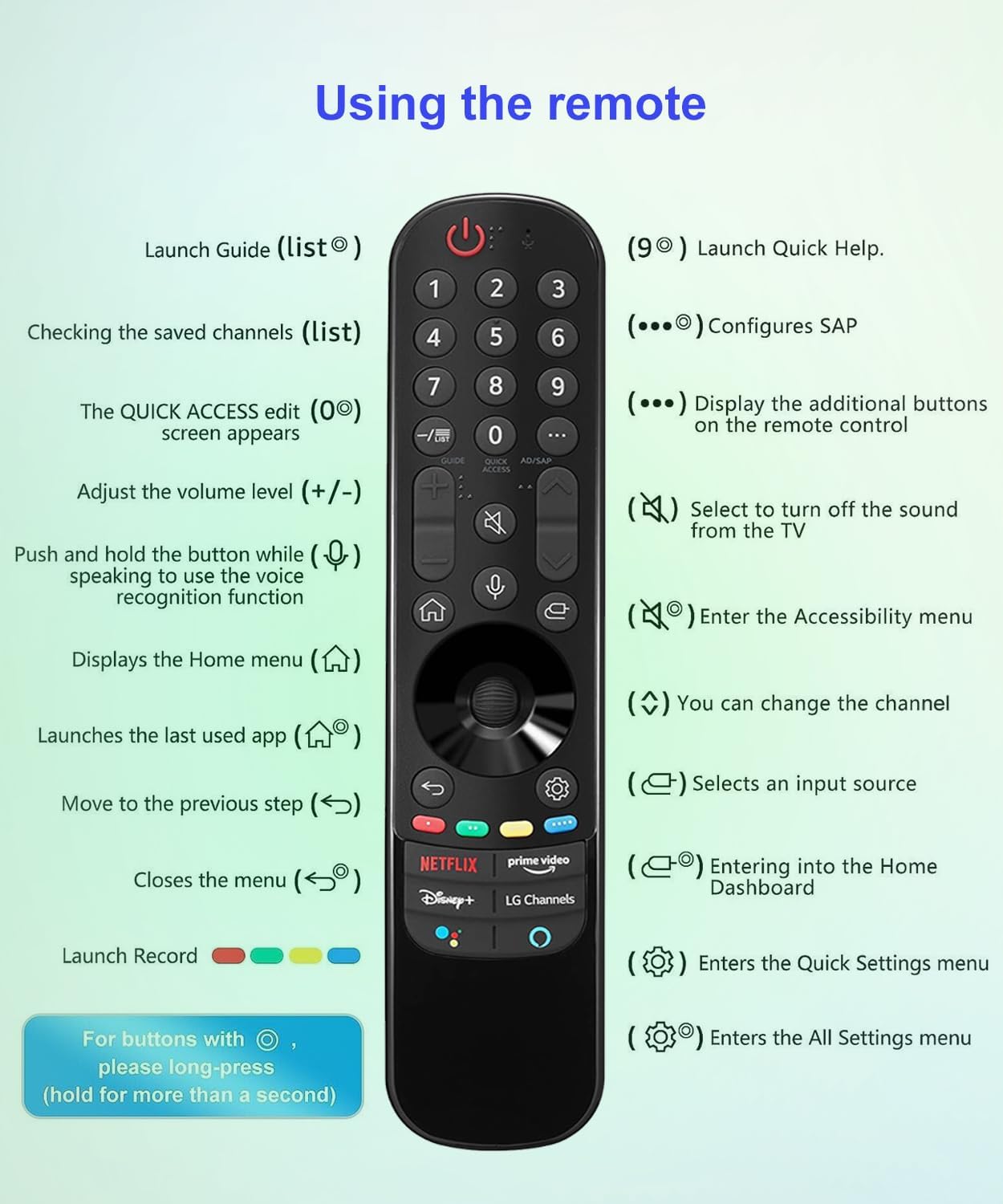
Image 6.1: A detailed diagram illustrating the functions of each button on the remote control.
6.1 Button Functions
- Power Button (Red Circle with Line): Turns the TV on or off.
- Number Buttons (0-9): Directly launch Guide (list button), check saved channels (list button), or configure SAP (9 button).
- Quick Access Edit (0 button): Edits quick access settings.
- AD/SAP Button: Displays additional buttons on the remote control.
- Volume Up/Down (+/-): Adjusts the volume level.
- Mute Button (Speaker with X): Selects to turn off the sound from the TV.
- Channel Up/Down: Changes the channel.
- Voice Recognition Button (Microphone): Push and hold while speaking to use the voice recognition function.
- Home Button (House): Displays the Home menu.
- Back Button (Curved Arrow): Moves to the previous step.
- Input Source Button (Rectangle with Arrow): Selects an input source.
- Settings Button (Gear Icon): Enters the Quick Settings menu. Long-press for All Settings menu.
- Navigation Wheel/Buttons: Used for pointing, scrolling, and selecting items on screen.
- Netflix, Disney+, Prime Video, LG Channels Buttons: Direct access to these streaming services. Note: These buttons may not function correctly if your TV does not have the corresponding app or button on its original remote.
6.2 Voice Command
To use the voice command feature, press and hold the Microphone button, then speak clearly into the remote. Release the button when finished speaking. This allows you to search for content, change settings, or control your TV using your voice.

Image 6.2: This image illustrates the voice command feature, showing the microphone icon and sound waves indicating voice input, which is then processed to control the TV or access streaming services like Netflix, Disney+, Prime Video, and LG Channels.
6.3 Magic Pointer Function
The remote's magic pointer allows you to navigate your TV screen by pointing the remote and moving a cursor, similar to a computer mouse. Use the navigation wheel to scroll through content.
7. Compatible Models
This replacement Voice Magic remote control is universal for a wide range of LG Smart TVs, including 4K OLED, 4K UHD, 8K UHD, 4K MiniLED, 8K MiniLED, and LED LCD Smart TV series models. It offers seamless compatibility with and replaces the following LG Magic Remote Control models:
- AN-MR21GA / MR21GA AKB76036202
- AN-MR20GA / MR20GA AKB75855501
- AN-MR22GA / MR22GA AKB76039901, AKB76039902, AKB76039904
- AN-MR22GN / MR22GN AKB76040002
- AN-MR23GA / MR23GA AKB76043102
- AN-MR23GN / MR23GN AKB76043202
Known compatible LG TV models include, but are not limited to: OLED77G1PUA, 55NANO90UPA, OLED77A1PUA, 65UP7560AUD, 75NANO75UPA, 50NANO75PUA, OLED83C1AUA, 75UP7770PUB, OLED55C3AUA, OLED83C3AUA, 65UP8000PUA, 65NANO99UPA, OLED65A1AUA, 86UP8770PUA, 50UP8000PUA, 43UP7560AUD, OLED55C1PUB, 43UP7700PUB, OLED65C1PUB, 55UP7700PUB, 43UP8000PUA, 43UP7100ZUF, OLED48C1PUB, 55UP7100ZUF, 70UP7070PUE, 65UP7700PUA, 55UP7560AUD, 75UP7070PUD, AKB76039904, 65UP7700PUB, 60UP7670PUB, 86QNED90UPA, 86NANO90UPA, OLED77B3AUA, 82UP8770PUA, 55UP7670PUC, 75QNED90UPA, 86NANO85APA, OLED65B3AUA, OLED55B3AUA.
8. Maintenance
8.1 Cleaning the Remote
To clean the remote control, gently wipe it with a soft, dry cloth. Do not use liquid cleaners, sprays, or abrasive materials, as these can damage the remote's surface or internal components.
8.2 Battery Replacement
Replace the batteries when the remote's response becomes sluggish or if it stops functioning. Always replace both AAA batteries at the same time with new ones, ensuring correct polarity.
9. Troubleshooting
- Remote not responding:
- Ensure batteries are inserted correctly with the correct polarity.
- Replace old batteries with new ones.
- Ensure there are no obstructions between the remote and the TV's IR receiver.
- Confirm the remote is compatible with your specific LG Smart TV model.
- Voice function not working:
- Ensure you are pressing and holding the Microphone button while speaking.
- Speak clearly and at a normal volume.
- Check your TV's settings to ensure voice recognition is enabled.
- Magic pointer not appearing or working:
- Ensure the remote has fresh batteries.
- Some older LG Smart TV models may not fully support the Magic Pointer function.
- Shortcut buttons (Netflix, Disney+, etc.) not working:
- These buttons may not function correctly if your TV does not have the corresponding app installed or if the original remote for your TV did not feature these specific buttons.
- Ensure your TV is connected to the internet.
10. Specifications
| Product Dimensions | 7.59 x 1.65 x 1.18 inches |
| Item Weight | 2.65 ounces |
| Batteries Required | 2 AAA batteries (not included) |
| Connectivity Technology | Infrared |
| Special Features | Ergonomic, No Programming Required, Pre-Programmed, Universal, Voice Search |
| Max Number of Supported Devices | 1 (Television) |
11. Warranty and Support
For any defective product or issues with this remote control, please contact the seller through Amazon's after-sales service. The seller aims to provide a suitable solution within 1 business day.
For further assistance or inquiries, please refer to your Amazon order details to contact the seller directly.