1. Introduction
The MT-VIKI 4K HDMI Multiviewer 4x1 is a versatile device designed to manage multiple HDMI input sources on a single UHD display. It supports real-time, seamless switching between up to four HDMI inputs, delivering crisp 4K@30Hz resolution. This manual provides detailed instructions for setup, operation, and troubleshooting to ensure optimal performance of your device.
2. Product Features
- Quad Multi Viewer: Supports 4 HDMI input sources to a UHD TV or display with real-time fast seamless switching up to 4K@30Hz.
- 4 Display Modes: Single Mode / Quad Mode / PBP Mode / Dual Mode. Audio output only works for single mode and PBP (1 big/3 small screen) Mode. Other modes are muted.
- 2 Ways for Switching: Press button & IR Remote. This 4x1 HDMI Quad Switcher supports resolution up to 4K@30Hz, and backward compatibility.
- Full Compatibility: Compatible with gaming consoles (PlayStation, Xbox one, Nintendo), Roku, DVD, Blu-ray players, Amazon Fire TV, cable TV, Chromecast, and many other HDMI devices.
- Package Contents: Includes 1x HDMI Multiviewer, 1x Power adapter, 1x IR remote, and 1x User Manual.
3. Package Contents
Upon opening the package, verify that all items are present and in good condition:
- 1 x MT-VIKI 4K HDMI Multiviewer (Model: MT-SW041C)
- 1 x Power Adapter
- 1 x IR Remote Control
- 1 x User Manual (this document)

Figure 3.1: Contents of the MT-VIKI 4K HDMI Multiviewer package.
4. Setup and Connection
Follow these steps to connect your MT-VIKI 4K HDMI Multiviewer:
- Connect HDMI Input Sources: Connect up to four HDMI source devices (e.g., PS4/PS5, security cameras, PCs, laptops, Blu-ray players) to the HDMI 1, HDMI 2, HDMI 3, and HDMI 4 input ports on the multiviewer using high-quality HDMI cables.
- Connect HDMI Output to Display: Connect the HDMI OUT port of the multiviewer to your UHD TV, monitor, or LED screen using an HDMI cable.
- Connect Power: Plug the included power adapter into the DC 12V port on the multiviewer, then plug the adapter into a power outlet.

Figure 4.1: Connection Diagram for the MT-VIKI 4K HDMI Multiviewer.
Video 4.1: This video demonstrates the physical connection process for the MT-VIKI 4K HDMI Multiviewer, showing how to connect HDMI input sources, the HDMI output to a monitor, and the power cable.
5. Operating Modes and Control
The MT-VIKI 4K HDMI Multiviewer offers various display modes and control options:
5.1 Display Modes
The device supports four primary display modes, allowing you to customize how your input sources are viewed on a single screen:
- Single Mode (Full Screen): Displays one selected HDMI input source in full screen. Audio output is available in this mode.
- Quad Mode (Same Size 4 Screens): Displays all four HDMI input sources simultaneously, each occupying an equal quadrant of the screen. Audio is muted in this mode.
- PBP Mode (1 Big/3 Small Screens): Displays one main HDMI input source in a larger window, with the other three input sources shown in smaller windows. Audio output is available for the main input source in this mode.
- Dual Mode (2 Screens): Displays two HDMI input sources side-by-side. Audio is muted in this mode.

Figure 5.1: Visual representation of the four display modes.

Figure 5.2: Detailed view of segmentation modes and remote control.
5.2 Control Options
You can control the multiviewer using two methods:
- Front Panel Buttons: The device features buttons on the front panel (CH1, CH2, CH3, CH4, MODE) for direct switching between inputs and display modes.
- IR Remote Control: Use the included IR remote control for convenient operation from a distance. The remote allows you to switch between inputs and cycle through display modes.
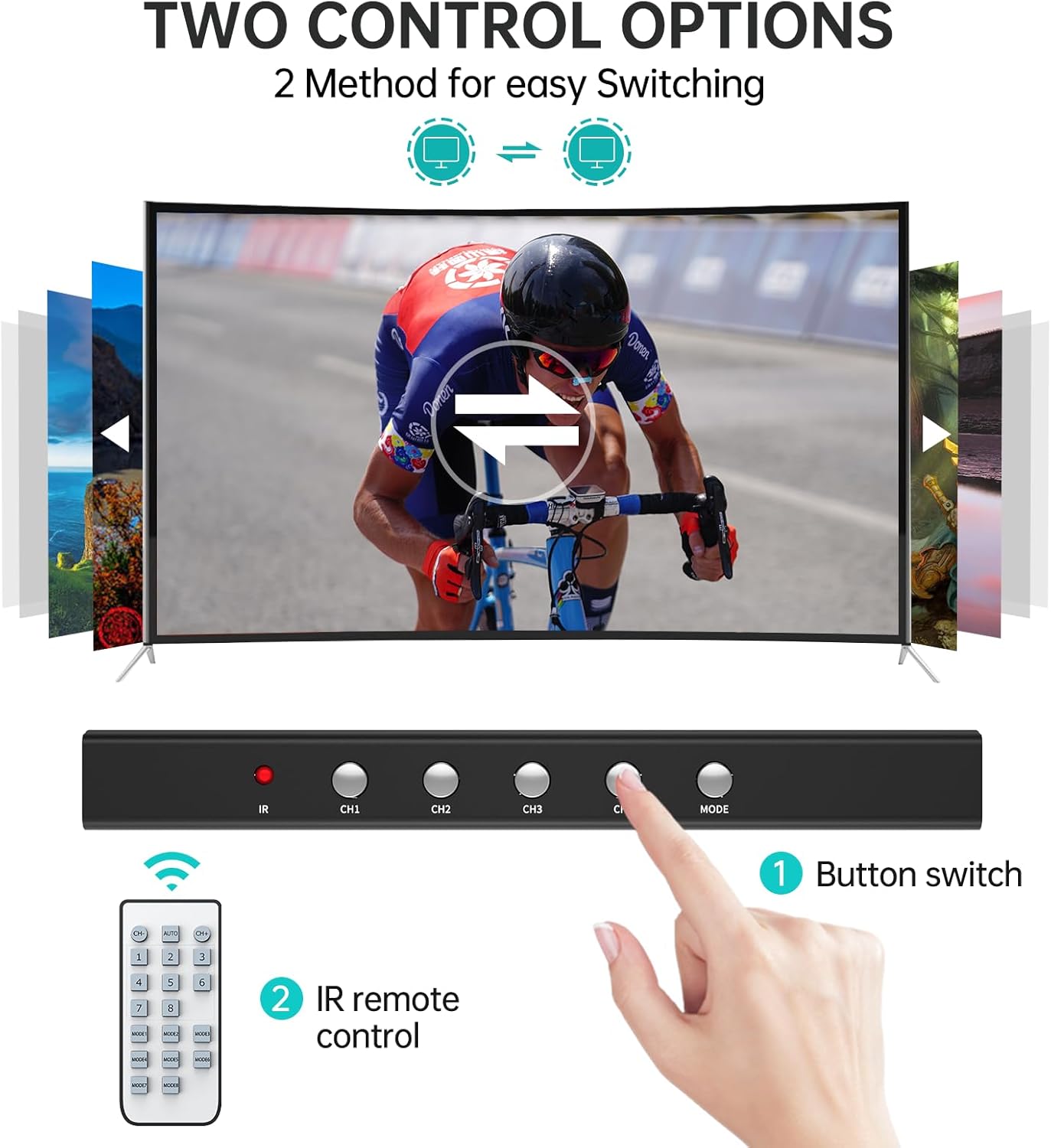
Figure 5.3: Control methods for the MT-VIKI 4K HDMI Multiviewer.
Video 5.1: This video demonstrates how audio output functions in different display modes (Single Display mode and 1 Big/3 Small Display mode) and how to control the device using the IR remote.
6. Technical Specifications
| Feature | Specification |
|---|---|
| Model Number | MT-SW041C |
| HDMI Version | HDMI 1.4 |
| Max Resolution | 4K@30Hz |
| Input Ports | 4 x HDMI |
| Output Ports | 1 x HDMI |
| Control Methods | Front Panel Buttons, IR Remote Control |
| Power Supply | DC 12V |
| Dimensions | 9 x 5 x 3.25 inches |
| Item Weight | 1.25 pounds |
| Color | Black |
| Compatible Devices | Gaming Console, Television, Personal Computer, DVD Player |
7. Troubleshooting
If you encounter issues with your MT-VIKI 4K HDMI Multiviewer, please refer to the following common troubleshooting steps:
- No Signal/Black Screen:
- Ensure all HDMI cables are securely connected to both the source devices, the multiviewer, and the display.
- Verify that the power adapter is correctly connected and the device is powered on.
- Try a different HDMI cable.
- Ensure your display supports the output resolution (4K@30Hz). If not, try a lower resolution source.
- No Audio Output:
- Audio is only supported in Single Mode and PBP (1 Big/3 Small Screens) Mode. Ensure you are in one of these modes for audio output.
- Check the audio settings on your source device and display.
- Ensure the HDMI cable supports audio transmission.
- Remote Control Not Working:
- Ensure there are no obstructions between the remote and the IR receiver on the multiviewer.
- Check and replace the batteries in the remote control.
- Ensure you are within the effective range of the IR remote.
- Picture Quality Issues (Fuzzy/Distorted):
- Ensure you are using high-quality HDMI cables, especially for 4K resolution.
- Check the resolution settings on your source devices.
- Some display modes (e.g., Quad Mode) may scale down the resolution, which can affect clarity.
8. Maintenance
To ensure the longevity and optimal performance of your MT-VIKI 4K HDMI Multiviewer:
- Keep the device in a cool, dry place, away from direct sunlight, heat sources, and excessive humidity.
- Avoid placing heavy objects on top of the device.
- Clean the device with a soft, dry cloth. Do not use liquid or aerosol cleaners.
- Ensure proper ventilation around the device to prevent overheating.
9. Warranty and Support
This product is backed by MT-VIKI. For specific warranty details and technical support, please refer to the official MT-VIKI website or contact their customer service. Amazon's return policy allows for returns within 30 days of purchase.
For additional information, you may refer to the official User Manual PDF: MT-VIKI 4K HDMI Multiviewer User Manual (PDF)


