
1. Introduction
This manual provides essential information for the safe and efficient operation of the Generic MRM-6600P-R / MRM-6600P 600W Server Power Supply. Please read this manual thoroughly before installation and use to ensure proper functionality and to prevent damage to the unit or connected equipment.
2. Safety Information
Always adhere to the following safety precautions:
- Power Disconnection: Always disconnect the power supply from the main power source before performing any installation, maintenance, or troubleshooting.
- Qualified Personnel: Installation and servicing should only be performed by qualified personnel.
- Ventilation: Ensure adequate ventilation around the power supply. Do not block ventilation openings.
- Environment: Operate the power supply in a dry, well-ventilated environment, free from excessive dust, moisture, and extreme temperatures.
- Grounding: Ensure the power supply is properly grounded to prevent electrical shock.
- Overload: Do not overload the power supply beyond its rated capacity.
3. Product Overview
The MRM-6600P-R / MRM-6600P is a 600W server power supply designed for reliable and stable power delivery to server systems. It features a robust design suitable for continuous operation.

Figure 1: Top view of the MRM-6600P-R 600W server power supply. This image displays the main body of the power supply, including the product label with specifications and various regulatory certifications. The silver casing and screw points are visible.

Figure 2: Angled view of the MRM-6600P-R 600W server power supply. This perspective highlights the front panel with the AC power inlet, a handle for easy insertion/removal, and two cooling fans. The robust metal casing is also visible.
4. Setup and Installation
- Preparation: Ensure the server chassis is powered off and disconnected from all power sources.
- Locate Bay: Identify the designated power supply bay in your server chassis.
- Insert PSU: Carefully slide the MRM-6600P-R / MRM-6600P power supply into the bay until it is fully seated. Ensure the connectors align properly.
- Secure PSU: Secure the power supply using the retaining screws or latches provided by your server chassis.
- Connect Cables: Connect the necessary power cables from the power supply to the server's motherboard, hard drives, and other components. Refer to your server's manual for specific cable routing.
- Power On: Once all connections are secure, reconnect the server to the main power source and power it on.
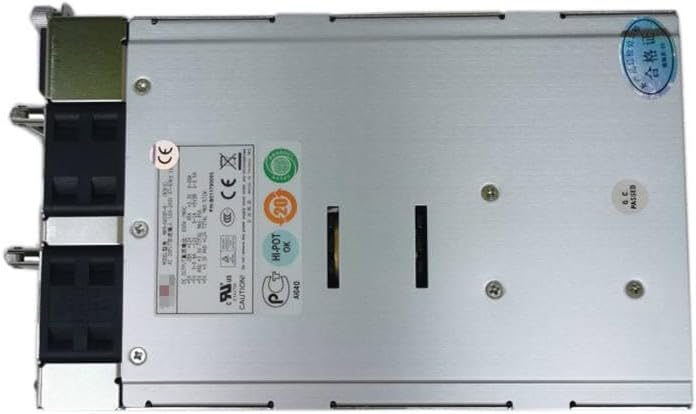
Figure 3: Rear view of the MRM-6600P-R 600W server power supply. This view shows the exhaust vents for the cooling fans, the main power switch, and the power input socket. This is the side that typically faces the rear of the server rack.
5. Operating Instructions
The MRM-6600P-R / MRM-6600P power supply operates automatically once installed and connected. It provides stable DC power to your server components.
- Power On/Off: Use the server's main power switch to turn the system on or off. The power supply will respond accordingly.
- Status Indicators: Some server chassis may have LED indicators for power supply status. Refer to your server's manual for details.
- Hot-Swap (if applicable): If your server supports hot-swappable power supplies, ensure proper procedures are followed as per your server's documentation when replacing a unit.
6. Maintenance
Regular maintenance helps ensure the longevity and optimal performance of your power supply.
- Dust Removal: Periodically clean dust from the power supply's fan vents and exterior using compressed air or a soft brush. Ensure the power supply is off and disconnected before cleaning.
- Cable Inspection: Regularly inspect all power cables for signs of wear, fraying, or damage. Replace damaged cables immediately.
- Environmental Check: Ensure the operating environment remains within recommended temperature and humidity ranges.
7. Troubleshooting
| Problem | Possible Cause | Solution |
|---|---|---|
| Power supply not turning on. | No power from wall outlet; loose power cable; faulty power supply. | Check wall outlet with another device; ensure power cable is securely connected; test with a known good power supply if possible. |
| System unstable or random shutdowns. | Insufficient power; overheating; faulty power supply. | Verify total power consumption does not exceed 600W; ensure proper ventilation; check for dust buildup; consider replacing power supply. |
| Loud fan noise. | Dust buildup in fans; failing fan bearing. | Clean fan blades and vents; if noise persists, the fan may need replacement (professional service recommended). |
8. Specifications
| Feature | Detail |
|---|---|
| Brand | Generic |
| Model | MRM-6600P-R, MRM-6600P |
| Output Wattage | 600 Watts |
| Compatible Devices | Server |
| ASIN | B0CSK33MXV |
| Date First Available | January 16, 2024 |
9. Warranty and Support
This product is covered by a standard manufacturer's warranty. For specific warranty terms and conditions, please refer to the documentation provided with your purchase or contact the seller directly. For technical support or inquiries, please reach out to the product vendor or your system integrator.


