
Introduction
This manual provides instructions for the setup, operation, and maintenance of your DollaTek Portable Phone Screen Automatic Clicker. This device is designed to automate screen tapping actions on mobile devices, offering adjustable clicking speeds for various applications.
Package Contents
- 1 x Automatic Screen Clicker Main Unit
- 2 x Clicker Heads with Cables
- 1 x USB Type-C Charging Cable
Note: Other products shown in promotional images are not included.
Product Features
- Adjustable Clicking Speed: Offers 199 speed levels, from 1 to 99 clicks per second, with infinite speed adjustment.
- Digital Display: Equipped with a digital display to clearly show the current clicking speed.
- Nano-Adhesive Clicker Heads: Clicker heads use a nano-adhesive film for strong, durable screen adhesion. The adhesive can be restored by washing with water if stickiness decreases.
- Built-in Rechargeable Battery: Features integrated polymer batteries and a Type-C charging interface, supporting continuous operation for up to 24 hours on a full charge, even while charging.
- Visual Indicator: Each clicker head includes a blue indicator light that flashes in sync with the clicking frequency, providing visual confirmation of operation.
- Non-Contact Technology: Employs non-contact spatial mapping click technology for silent operation, preventing screen damage, and ensuring sensitive and stable clicking performance.
Setup Instructions
- Charge the Device: Connect the automatic clicker main unit to a power source using the provided USB Type-C charging cable. The device can be used while charging.
- Attach Clicker Heads: Insert the cables of the clicker heads into the designated ports on the main unit. The device supports up to two clicker heads simultaneously.
- Position Clicker Heads: Remove the clear protective film from the nano-adhesive surface of each clicker head. Carefully place the clicker head onto the desired tapping location on your phone screen. Ensure firm contact for optimal performance.
- Power On: Press and hold the power button (usually marked with a power symbol) on the main unit to turn on the device. The digital display will illuminate.
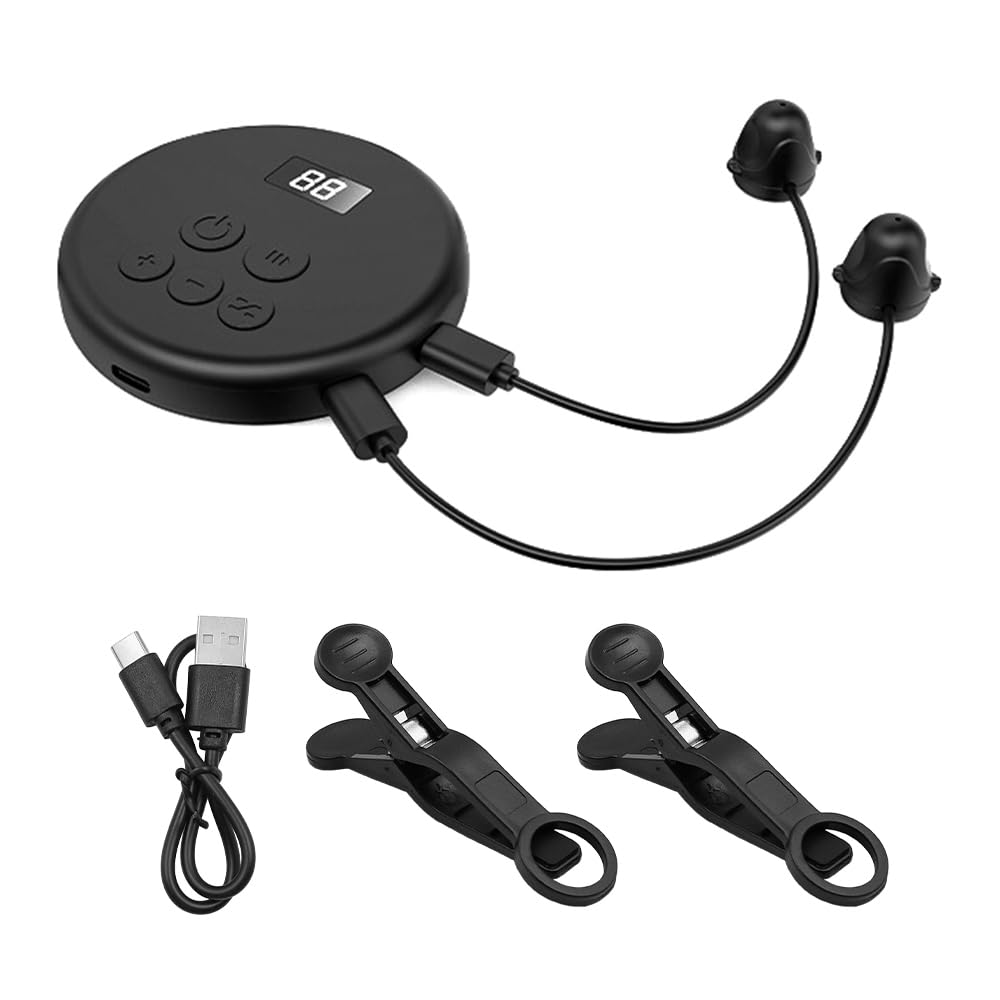
Image: The main unit of the DollaTek Automatic Clicker with two clicker heads attached, ready for use.

Image: The DollaTek Automatic Clicker main unit connected to three mobile phones, with clicker heads positioned on their screens, illustrating a multi-device setup.
Operating Instructions
- Adjust Clicking Speed: Use the '+' and '-' buttons on the main unit to increase or decrease the clicking speed. The digital display will show the current speed setting (e.g., '88' for 88 clicks per second).
- Start/Pause Clicking: Press the play/pause button (often marked with a triangle or similar symbol) to start or pause the automatic clicking action. The blue indicator lights on the clicker heads will flash when active.
- Cycle Mode (if applicable): Some models may feature a cycle button (often marked with a circular arrow). Press this button to activate or deactivate specific clicking patterns or modes, if available. Refer to the digital display for mode indicators.
- Power Off: Press and hold the power button to turn off the device when not in use.

Image: The automatic clicker in operation, connected to three phones, illustrating its application in scenarios such as quick order receiving, game cycles, and speed praise.
Maintenance
- Cleaning Clicker Heads: If the nano-adhesive on the clicker heads loses its stickiness, gently wash the adhesive surface with clean water. Allow it to air dry completely before re-applying to the screen. Do not use harsh chemicals or abrasive materials.
- Device Cleaning: Wipe the main unit with a soft, dry cloth. Avoid using liquid cleaners directly on the device.
- Storage: Store the device in a cool, dry place away from direct sunlight and extreme temperatures when not in use.
- Charging: Ensure the device is charged regularly, especially if stored for extended periods, to maintain battery health.
Troubleshooting
- Device Not Turning On:
- Ensure the device is sufficiently charged. Connect it to a power source using the Type-C cable.
- Press and hold the power button for a few seconds.
- Clicker Head Not Tapping:
- Check if the clicker head cable is securely connected to the main unit.
- Ensure the clicker head is firmly adhered to the screen. Clean the adhesive surface if it has lost stickiness (refer to Maintenance section).
- Verify that the device is powered on and the clicking function is activated (blue indicator light should be flashing).
- Inconsistent Clicking:
- Ensure the clicker head is placed on a clean, flat screen surface without air bubbles under the adhesive.
- Adjust the clicking speed to a stable rate.
- Digital Display Not Working:
- Recharge the device.
- If the issue persists, contact customer support.
Specifications
| Manufacturer | DollaTek |
| Model Number | CP030255 |
| Material | ABS |
| Package Dimensions | 22.3 x 14.4 x 5.8 cm |
| Weight | 200 grams |
| Battery Type | Built-in Polymer Battery |
| Charging Interface | USB Type-C |
| Country of Origin | China |

Image: Dimensions of the DollaTek Automatic Clicker main unit, showing a diameter of 70mm and a thickness of 7.6mm.
Warranty and Support
For warranty information or technical support, please refer to the retailer's return policy or contact DollaTek customer service directly. Keep your purchase receipt for any warranty claims.