
ESSISH ANENG MH12
MH12 Digital Megohmmeter User Manual
Model: ANENG MH12
1. Introduction
The ESSISH ANENG MH12 is a versatile digital megohmmeter designed for measuring insulation resistance, earth resistance, and high voltage. It functions as a precise voltmeter and cable tester, suitable for various industrial and electrical applications. This manual provides detailed instructions to ensure safe and effective operation of your device.
2. Safety Information
- Always read and understand this manual before operating the device.
- Observe all safety precautions and warnings marked on the device and in this manual.
- Do not use the device if it appears damaged or is not operating correctly.
- Ensure proper test lead connections before performing any measurements.
- Avoid contact with live circuits during testing.
- The device is designed for professional use; ensure you have adequate knowledge of electrical safety.
3. Package Contents
Upon opening your ANENG MH12 package, please verify that all the following items are included:
- 1 x MH12 Digital Megohmmeter
- 1 x Set of Test Leads
- 1 x User Manual
- 1 x Carrying Case
- 1 x Alligator Clip

Figure 3.1: MH12 Megohmmeter and its standard accessories.
4. Product Overview
The ANENG MH12 features a clear digital display and intuitive controls for various measurement functions. Its robust design ensures durability in demanding environments.

Figure 4.1: Front view of the MH12 Digital Megohmmeter.
5. Specifications
Detailed technical specifications for the ANENG MH12 Megohmmeter are provided below:
| Function | Measuring Range | Accuracy | Short Circuit Current |
|---|---|---|---|
| Insulation Resistance (50V/100V) | 0.1MΩ~200MΩ | ±(5%+10) | Less than 1.8mA |
| Insulation Resistance (250V) | 0.4MΩ~10GΩ | ±(5%+10) | Less than 1.8mA |
| Insulation Resistance (500V) | 1MΩ~10GΩ | ±(5%+10) | Less than 1.8mA |
| Insulation Resistance (1000V) | 2MΩ~10GΩ | ±(5%+10) | Less than 1.8mA |
| AC Voltage | 10-600V | ±(1%+5) | N/A |
| DC Voltage | 10-600V | ±(0.8%+5) | N/A |
General Specifications:
- Display: 2000 Counts, Backlight bright screen
- Data Storage: 100 groups
- Features: Autoranging, Low battery alert, Automatic discharge, Data retention, Automatic shut-down, Polarization Index (PI), Dielectric Absorption Ratio (DAR), Measurement time display
- Battery Model: 8 x AA batteries
- Test Lead Length: 110cm (43.3in)
- Product Material: Silicone/ABS
- Pen Material: PCV/Brass
- Net Weight: 621.9g (without battery)
- Product Dimensions: 17.2 x 14.0 x 6.2 cm (6.79 x 5.52 x 2.48 in)

Figure 5.1: Detailed function and specification table.
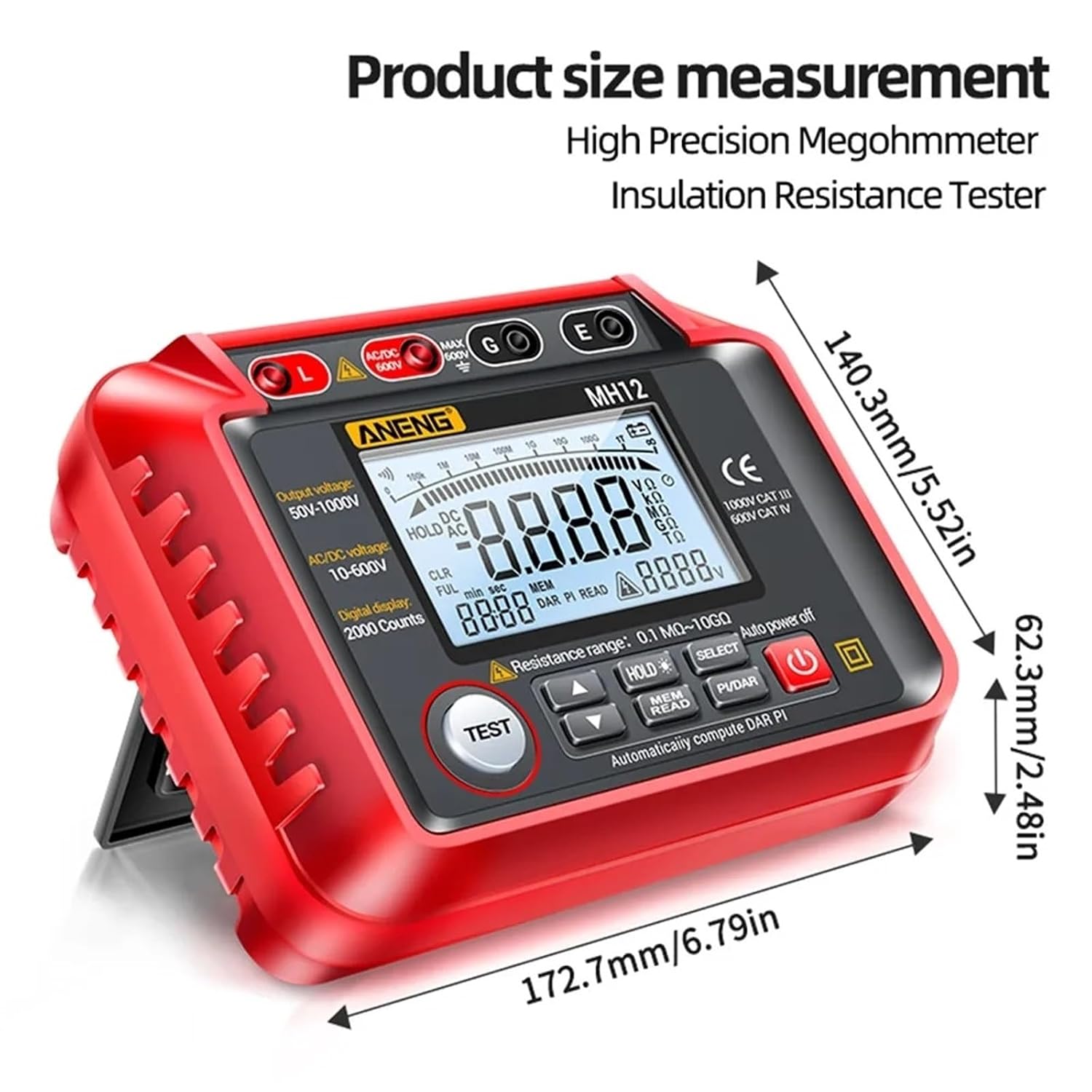
Figure 5.2: Product size measurement diagram.
6. Setup
6.1 Battery Installation
- Locate the battery compartment on the rear of the MH12 unit.
- Open the battery compartment cover.
- Insert 8 AA batteries, ensuring correct polarity as indicated inside the compartment.
- Close the battery compartment cover securely.
6.2 Connecting Test Leads
- Connect the red test lead to the 'L' (Live) terminal and the black test lead to the 'E' (Earth) terminal for insulation resistance measurements.
- For voltage measurements, connect the test leads to the appropriate AC/DC voltage input terminals as indicated on the device.
7. Operating Instructions
7.1 Power On/Off
Press the power button (⏻) to turn the device on or off. The device features an automatic shut-down function to conserve battery life.
7.2 Insulation Resistance Measurement
- Ensure the test leads are correctly connected for insulation resistance.
- Select the desired test voltage (50V, 100V, 250V, 500V, or 1000V) using the appropriate function button.
- Press the TEST button to initiate the measurement. The display will show the insulation resistance value.
- The device features automatic discharge after measurement.
7.3 AC/DC Voltage Measurement
- Connect the test leads to the AC/DC voltage input terminals.
- Select either AC or DC voltage mode.
- The device will display the measured voltage.
7.4 Data Storage and Recall
The MH12 can store up to 100 groups of measurement data.
- After a measurement, press the HOLD button to hold the current reading.
- To save the data, press the MEM READ button.
- To recall stored data, press the MEM READ button repeatedly to cycle through stored values.

Figure 7.1: Data storage feature in use.
7.5 Polarization Index (PI) and Dielectric Absorption Ratio (DAR) Measurement
The MH12 can automatically compute PI and DAR values, which are crucial for assessing insulation quality.
- Initiate an insulation resistance test.
- Press the PI/DAR button. The device will measure insulation resistance at 1 minute and 10 minutes (for PI) or 30 seconds and 60 seconds (for DAR) and calculate the ratio.
- The display will show the calculated PI or DAR value. Refer to the table below for interpretation.
| Insulation Quality | Danger | Warn | Good | Very Good |
|---|---|---|---|---|
| Index Value | <1.0 | 1.0~2.0 | 2.0~4.0 | >4.0 |

Figure 7.2: Polarization Index (PI) measurement process.
8. Maintenance
8.1 Cleaning
- Wipe the device with a dry, soft cloth. Do not use abrasive cleaners or solvents.
- Ensure the device is powered off and disconnected from any circuits before cleaning.
8.2 Storage
- Store the device in a cool, dry place, away from direct sunlight and extreme temperatures.
- If storing for an extended period, remove the batteries to prevent leakage.
8.3 Battery Replacement
When the low battery alert appears on the display, replace all 8 AA batteries promptly to ensure accurate measurements.
9. Troubleshooting
If you encounter issues with your MH12 Megohmmeter, refer to the following common problems and solutions:
- Device does not power on: Check battery installation and ensure batteries are not depleted. Replace if necessary.
- Inaccurate readings: Verify test lead connections are secure and clean. Ensure the correct measurement mode is selected. Check battery level.
- Display is dim or blank: Batteries may be low or depleted. Replace batteries.
- No response from buttons: Try powering the device off and on again. If the issue persists, contact customer support.
10. Warranty and Support
For warranty information or technical support regarding your ESSISH ANENG MH12 Digital Megohmmeter, please refer to the contact details provided with your purchase documentation or visit the official ESSISH website. Keep your proof of purchase for warranty claims.
Ask a question about this manual
Ask about setup, troubleshooting, compatibility, parts, safety, or missing instructions. Manuals+ will review the question and use this page’s manual context to help answer it.