
Samsung TQ55S93DAEXXC
Samsung TV OLED 4K 2024 55S93D Smart TV User Manual
Model: TQ55S93DAEXXC
Introduction
This manual provides essential information for the setup, operation, maintenance, and troubleshooting of your Samsung TV OLED 4K 2024 55S93D Smart TV. Please read this manual carefully to ensure proper use and to maximize your viewing experience.
Product Overview
The Samsung TV OLED 4K 2024 55S93D is a 55-inch Smart TV designed to deliver superior visual and audio performance. It features advanced OLED technology for enhanced brightness and contrast, cinematic sound with Q-Symphony, and a 144Hz Motion Xcelerator for smooth gaming.
Key Features
- Enhanced Brightness and Contrast: Utilizes HDR10+ Adaptive/Gaming, OLED brightness enhancer, and Quantum dot technology for vivid dark images and bright colors.
- Cinematic Sound: Features Dolby Atmos, Q-Symphony, and OTS Lite for a multi-dimensional audio experience.
- Smart TV Capabilities: Access to content, over 100 free channels via Samsung TV Plus, cloud gaming with Gaming Hub, and SmartThings connectivity.
- High Refresh Rate Gaming: Supports 4K at 144Hz with HDMI 2.1, Game Motion Plus, and Motion Estimation, Motion Compensation (MEMC) for fluid gameplay.
- Energy Efficiency: AI optimizes energy consumption based on environment and ambient light. The SolarCell Remote charges via solar energy.
What's in the Box
The product package includes the following components:
- Samsung 55S93D OLED TV
- SolarCell Remote Control
- User Manual (this document)
- E-Manual
- Power Cable

Image: Contents of the Samsung TV OLED 4K 2024 55S93D package, showing the TV, SolarCell Remote, power cable, and a diagram of the ports.
Setup
Unpacking and Placement
Carefully remove the TV and all components from the packaging. Place the TV on a stable, flat surface or mount it securely to a wall using a compatible VESA mount (sold separately). Ensure adequate ventilation around the TV.

Image: Front view of the Samsung 55S93D OLED TV, showcasing its slim design and vibrant display.
Connecting Peripherals
The TV is equipped with multiple ports for various connections:
- HDMI: 4 ports for connecting external devices such as gaming consoles, Blu-ray players, or soundbars.
- USB: 2 ports for connecting USB storage devices.
- LAN: 1 port for wired network connection.

Image: Detailed view of the connectivity ports on the back of the Samsung TV, including HDMI, USB, and LAN inputs.
Power Connection
Connect the power cable to the TV and then to a wall outlet. The TV will automatically enter standby mode.
Operating Instructions
Initial Setup Wizard
Upon first power-on, the TV will guide you through an initial setup process. This includes language selection, network connection (Wi-Fi or Ethernet), channel scanning, and Smart Hub configuration.
Using the SolarCell Remote
The included SolarCell Remote can be charged via indoor lighting or USB-C. It provides intuitive control over your TV's functions, including navigation, volume, channel selection, and voice commands.

Image: Front and back view of the Samsung SolarCell Remote, highlighting its solar charging panel.
Smart TV Features (Tizen OS)
Your Samsung Smart TV runs on the Tizen operating system, offering a wide range of applications and services.
- Smart Hub: Centralized access to streaming apps, live TV, and connected devices.
- Samsung TV Plus: Enjoy over 100 free channels and programs without subscriptions.
- Gaming Hub: Access cloud gaming platforms directly from your TV without a console.
- SmartThings: Control compatible smart home devices directly from your TV.

Image: Screenshot of the Samsung Smart TV interface (Tizen OS) displaying various streaming applications and content categories.
Picture and Sound Settings
Customize your viewing and listening experience through the TV's settings menu.
- Picture Mode: Select from various modes like Standard, Dynamic, Movie, or adjust settings manually for brightness, contrast, sharpness, and color.
- Sound Mode: Choose from modes such as Standard, Adaptive Sound, or amplify dialogue.
- Q-Symphony: When connected to a compatible Samsung soundbar (e.g., HW-S800D), Q-Symphony allows the TV speakers and soundbar to operate simultaneously for a richer audio experience.

Image: A Samsung OLED TV paired with a Samsung soundbar, demonstrating the Q-Symphony feature for integrated audio.
Maintenance
Cleaning the TV
To clean the screen, gently wipe it with a soft, dry microfiber cloth. For the frame and stand, use a soft, damp cloth. Avoid using harsh chemicals or abrasive materials.
Software Updates
Ensure your TV's software is up to date for optimal performance and security. You can check for updates via the TV's settings menu (Settings > Support > Software Update).
Troubleshooting
Common Issues and Solutions
| Problem | Possible Cause | Solution |
|---|---|---|
| No power | Power cable disconnected | Check power cable connection to TV and wall outlet. |
| No picture/sound | Incorrect input source, loose HDMI cable | Verify input source. Check HDMI cable connections. |
| Remote not working | Low battery, obstruction | Ensure remote is charged (SolarCell). Remove obstructions between remote and TV. |
| Poor Wi-Fi connection | Router distance, interference | Move router closer or use wired LAN connection. Reduce interference from other devices. |
For more detailed troubleshooting, refer to the e-manual accessible through your TV's settings or visit the Samsung support website.
Specifications
| Feature | Detail |
|---|---|
| Model Number | TQ55S93DAEXXC |
| Screen Size | 55 Inches / 140 cm |
| Display Technology | OLED |
| Resolution | 4K (3840 x 2160) |
| Refresh Rate | 100 Hz (Native), 144 Hz (Motion Xcelerator) |
| Dimensions (with stand) | 122.54 cm (W) x 77.36 cm (H) x 26.52 cm (D) |
| Weight | 15.9 kg |
| Connectivity | Bluetooth, Ethernet, HDMI (4 ports), USB (2 ports), Wi-Fi |
| Energy Efficiency Class | G |
| Power Consumption (SDR) | 81.0 W / 81 kWh/1000h |
| Power Consumption (HDR) | 123 W / 116 kWh/1000h |
For detailed energy information, refer to the EU Energy Label: https://eprel.ec.europa.eu/qr/1950611
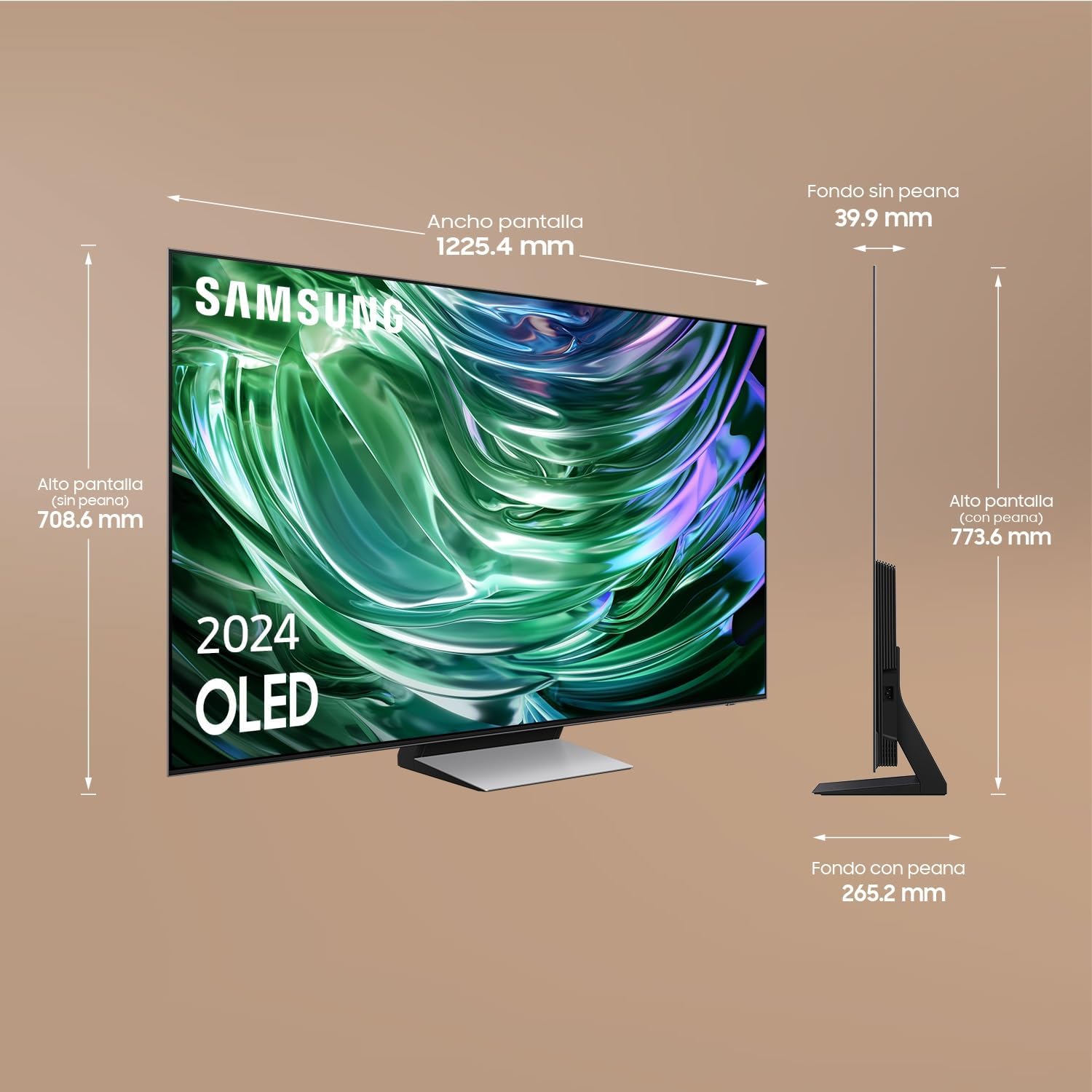
Image: EU Energy Label for the Samsung TQ55S93DAE TV, showing its energy efficiency class G and power consumption.
Warranty and Support
Samsung provides a manufacturer's warranty for this product. For specific warranty terms and conditions, please refer to the warranty card included in your product packaging or visit the official Samsung support website.
For technical assistance, product registration, or to find service centers, please contact Samsung Customer Service. Contact details can be found on the Samsung website or in the e-manual.
- Customer Service: Refer to your regional Samsung support website.
- Online Support: www.samsung.com/support
Ask a question about this manual
Ask about setup, troubleshooting, compatibility, parts, safety, or missing instructions. Manuals+ will review the question and use this page’s manual context to help answer it.