
1. Introduction
Thank you for choosing the AVID POWER 8V Cordless Rotary Tool. This versatile tool is designed for a wide range of applications including carving, engraving, sanding, polishing, cutting, and grinding. Its cordless design, variable speed settings, and integrated LED lights provide convenience and precision for various projects. Please read this manual thoroughly before operation to ensure safe and effective use of your tool.
2. Safety Information
Always follow basic safety precautions to reduce the risk of fire, electric shock, and personal injury.
- Work Area Safety: Keep your work area clean and well-lit. Cluttered or dark areas invite accidents. Do not operate power tools in explosive atmospheres, such as in the presence of flammable liquids, gases, or dust.
- Electrical Safety: Avoid body contact with earthed or grounded surfaces such as pipes, radiators, ranges, and refrigerators. There is an increased risk of electric shock if your body is earthed or grounded.
- Personal Safety: Always wear eye protection. Use a dust mask if operating in dusty conditions. Secure loose clothing, jewelry, and long hair. Do not overreach; maintain proper footing and balance at all times.
- Tool Use and Care: Do not force the tool. Use the correct tool for your application. Disconnect the plug from the power source and/or the battery pack from the tool before making any adjustments, changing accessories, or storing power tools.
- Battery Tool Use and Care: Recharge only with the charger specified by the manufacturer. Do not use battery packs other than those specifically designated for the tool.
3. Package Contents
Your AVID POWER 8V Cordless Rotary Tool package includes the following items:
- AVID POWER 8V Cordless Rotary Tool
- USB Charging Cable
- 60 Pcs Accessories Kit (including sanding bands, cut-off wheels, grinding stones, polishing wheels, mandrels, collets, drill bits, etc.)
- Accessory Storage Case
- Wrench for accessory changes
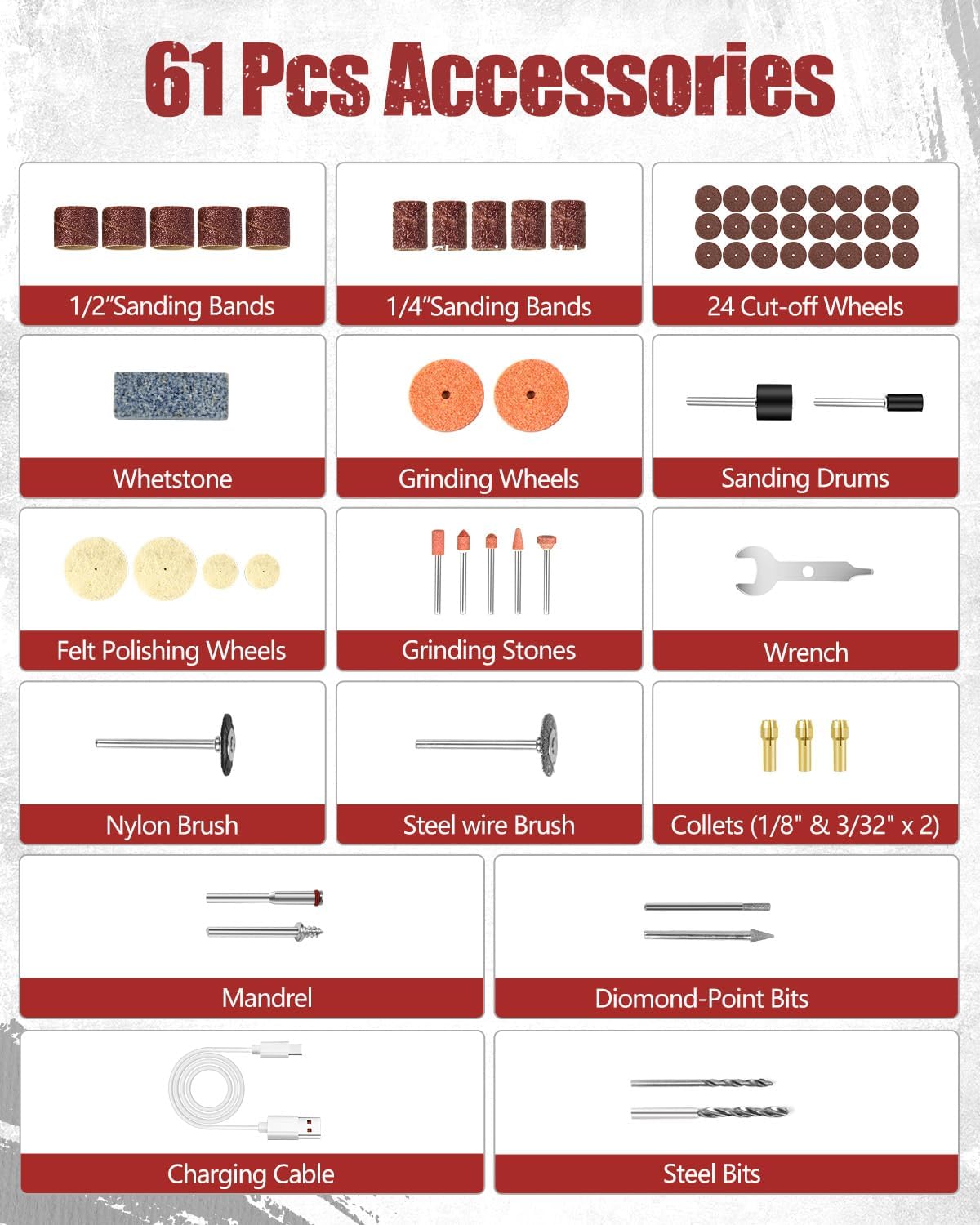
Image: The AVID POWER 8V Cordless Rotary Tool shown with its full set of 60 accessories, including various bits, sanding bands, polishing wheels, a charging cable, and a storage case.
4. Product Overview and Features
The AVID POWER 8V Cordless Rotary Tool is engineered for precision and ease of use. Key features include:
- Powerful 8V Motor: Delivers consistent power for various tasks.
- 5 Variable Speeds: Adjustable rotation speeds from 5,000 to 25,000 RPM for optimal control.
- Rechargeable Battery: Integrated 8V battery with 1-2 hour fast charging.
- 4 Front LED Lights: Illuminates the work area for improved visibility in low-light conditions.
- Low Noise Operation: Designed for quieter use, particularly beneficial for sensitive applications like pet nail grinding.
- Ergonomic Design: Anti-slip rubber-covered handle for comfortable grip and reduced fatigue.
- Spindle Lock: Facilitates quick and easy accessory changes.

Image: An exploded diagram illustrating the internal components and external features of the AVID POWER 8V Cordless Rotary Tool, including the motor, battery, LED lights, speed control, and spindle lock button.
5. Setup
5.1 Charging the Tool
Before first use, fully charge the rotary tool. Connect the provided USB charging cable to the tool's charging port and to a compatible USB power adapter (not included). The battery charging indicator lights will illuminate to show charging status and indicate when the tool is fully charged (typically 1-2 hours).
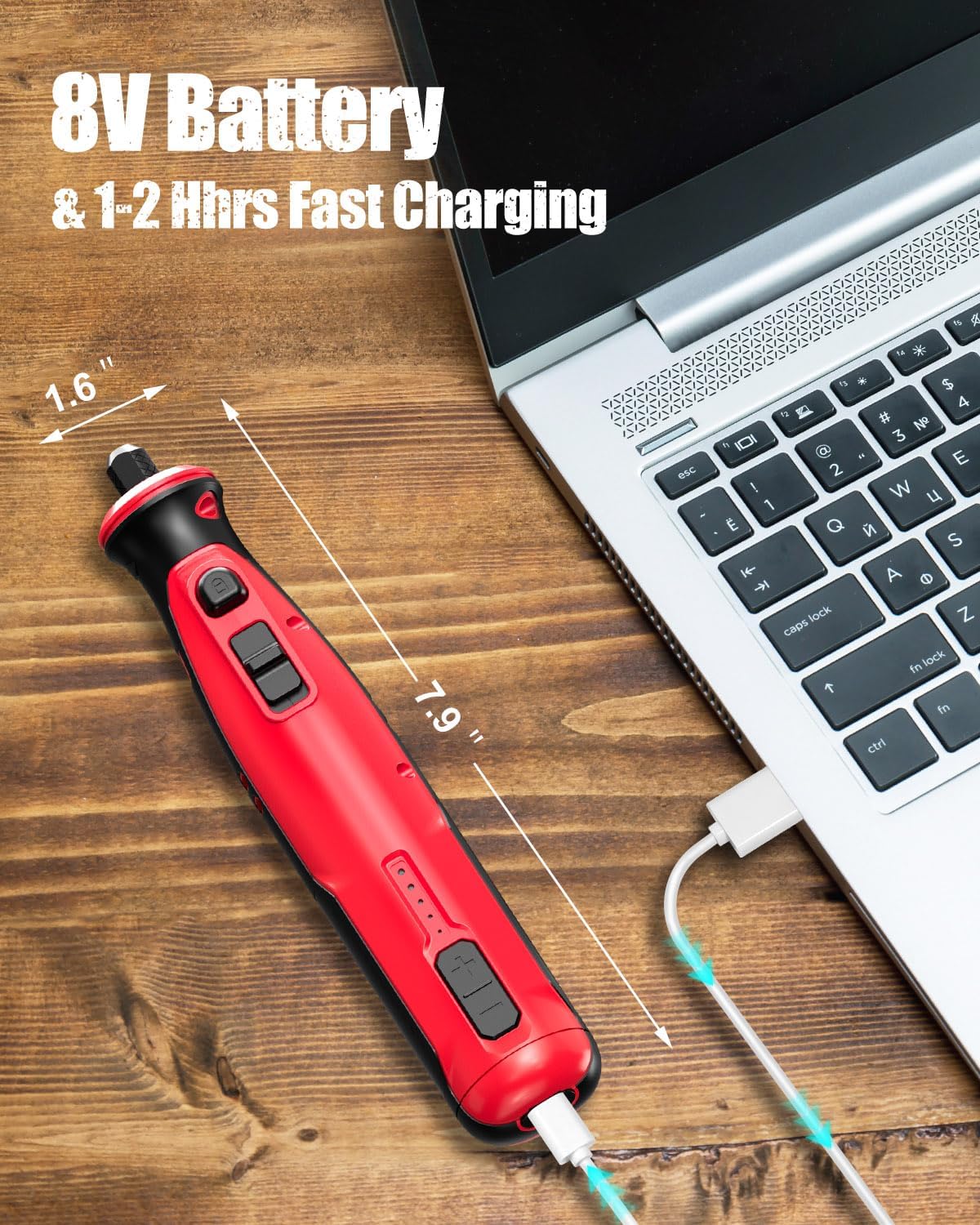
Image: The AVID POWER rotary tool connected to a laptop via its USB charging cable, demonstrating the charging process.
5.2 Attaching Accessories
Always ensure the tool is turned off before changing accessories.
- For Sanding Bands:
Align the sanding drum over the mandrel. Use the provided wrench to tighten the screw on the mandrel, securing the sanding drum in place. - For Cut-off Wheels:
Remove the mandrel screw and washer. Place the desired cut-off wheel over the mandrel shaft, ensuring the washer is positioned between the screw and the accessory. Tighten with the provided wrench. - For Felt Polishing Wheels:
Align the desired accessory hole with the mandrel screw head. Screw the accessory onto the mandrel by twisting clockwise until it is secure. - Changing Collets and Bits:
Press and hold the spindle lock button. Use the wrench to loosen the collet nut. Insert the desired bit into the collet, then tighten the collet nut with the wrench while still holding the spindle lock button.

Image: A visual guide demonstrating how to properly align a sanding drum onto a mandrel and secure it with a wrench for use with the rotary tool.

Image: A step-by-step illustration showing how to attach a cut-off wheel to the rotary tool's mandrel, including the placement of the washer and tightening with a wrench.

Image: A diagram illustrating the process of attaching a felt polishing wheel to the rotary tool's mandrel by screwing it clockwise until secure.

Image: A four-panel sequence showing how to change the collet and bit on the rotary tool by pressing the spindle lock, loosening the nut, inserting the bit, and retightening.
6. Operating Instructions
6.1 Powering On/Off and Speed Adjustment
To turn the tool on, slide the power switch to the 'On' position. To adjust the speed, use the speed control buttons (+/-) to select one of the five variable speed settings (5,000 to 25,000 RPM). To turn off the tool, slide the power switch to the 'Off' position.

Image: A close-up of the AVID POWER rotary tool highlighting the easy-push on/off power switch and speed adjustment buttons.
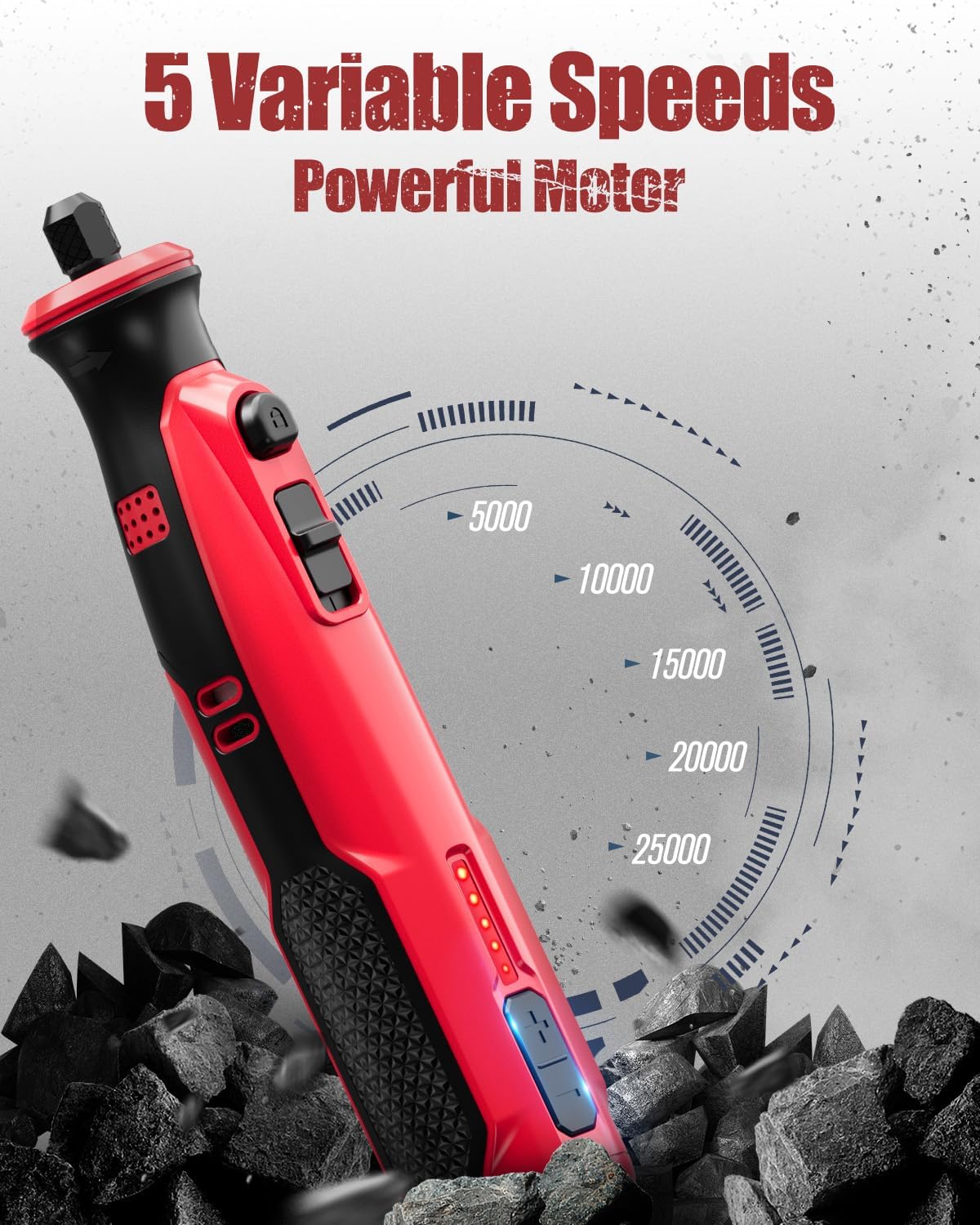
Image: The AVID POWER rotary tool illustrating its five variable speed settings, ranging from 5,000 to 25,000 RPM, indicating its powerful motor.
6.2 Using the LED Lights
The tool features 4 front LED lights that automatically illuminate when the tool is powered on. These lights provide enhanced visibility for your work, especially in dimly lit areas or for detailed tasks.

Image: A user operating the AVID POWER rotary tool, with its four front LED lights brightly illuminating the intricate carving work on a wooden surface.
6.3 Application-Specific Guidance
- Dog Nail Grinding: For dog nail grinding, use speed settings between 5,000 and 15,000 RPM. Avoid using higher speeds (20,000-25,000 RPM) for this application to prevent overheating and discomfort to the pet. The low noise feature is designed to minimize stress for animals.
- Sanding: Ideal for finishing wood, plastic, and metal surfaces. Use appropriate sanding bands for desired grit and material.
- Cutting: Use cut-off wheels for clean cuts on plastic and metal. Ensure proper safety precautions, including eye protection.
- Grinding/Sharpening: Effective for deburring metal, removing rust, and sharpening tools.
- Drilling: Suitable for drilling small holes in wood, plastic, and shells.
- Carving/Engraving: Use diamond-point bits for detailed carving and engraving on wood, glass, and plastic.
- Cleaning/Polishing: Utilize felt polishing wheels and appropriate compounds to clean and polish metal, stone, and shells.

Image: A woman gently grinding the nails of a Corgi dog using the AVID POWER rotary tool, demonstrating its suitability for pet grooming due to its soft noise and LED illumination.

Image: The AVID POWER rotary tool being used to sand a small wooden object, showcasing its application for surface finishing.

Image: The AVID POWER rotary tool equipped with a cut-off wheel, actively cutting a nail embedded in a piece of wood, demonstrating its cutting capability.

Image: The AVID POWER rotary tool with a grinding stone attachment, being used to grind a pair of metal pliers, illustrating its use for deburring and sharpening.

Image: The AVID POWER rotary tool with a drill bit, creating a small hole in a wooden plank, demonstrating its drilling functionality.

Image: The AVID POWER rotary tool being used for engraving text onto a clear plastic sheet, highlighting its precision for detailed work.

Image: Two examples of the AVID POWER rotary tool in use: one polishing a small stone with a felt wheel, and another cleaning rust from a metal surface, demonstrating its cleaning and polishing capabilities.
7. Maintenance
7.1 Cleaning
Regularly clean the tool to ensure optimal performance and longevity. Use a soft, dry cloth to wipe down the exterior. For stubborn dirt, a slightly damp cloth can be used, but ensure no moisture enters the tool's vents or charging port. Periodically clear dust and debris from the ventilation openings to prevent overheating.
7.2 Storage
Store the rotary tool and its accessories in a dry, clean, and secure location, out of reach of children. Use the provided accessory storage case to keep bits organized and protected. If storing for extended periods, ensure the battery is partially charged (around 50%) to prolong battery life.
8. Troubleshooting
- Tool Does Not Turn On:
- Check if the battery is charged. Recharge the tool if necessary.
- Ensure the power switch is fully in the 'On' position.
- Reduced Power or Speed:
- The battery may be low. Recharge the tool.
- The accessory might be dull or damaged. Replace with a new accessory.
- Ensure the correct speed setting is selected for the task.
- Excessive Vibration or Noise:
- Check if the accessory is properly installed and tightened.
- Ensure the accessory is not bent or damaged. Replace if necessary.
- Verify that the collet is clean and free of debris.
- Tool Overheats:
- Ensure ventilation openings are clear of dust and debris.
- Avoid continuous heavy-duty use. Allow the tool to cool down.
- Do not apply excessive pressure during operation.
9. Specifications
| Feature | Specification |
|---|---|
| Brand | AVID POWER |
| Model Number | ACRT338 |
| Voltage | 8 Volts |
| Power Source | Battery Powered |
| Minimum Rotational Speed | 5,000 RPM |
| Maximum Rotational Speed | 25,000 RPM |
| Number of Speeds | 5 |
| Special Feature | 4 LED lights |
| Included Components | 60 Pcs accessories, USB Charging Cable |
| Item Weight | 0.25 Kilograms (8.8 ounces) |
| Battery Cell Type | Lithium Ion |
10. Warranty and Support
For warranty information or technical support, please refer to the documentation included with your purchase or contact AVID POWER customer service directly. You can typically find contact details on the manufacturer's official website or through the retailer where the product was purchased.
As the seller is 'Avid Power', you may visit their official store for support: AVID POWER Store on Amazon.
11. Official Product Videos
No official product videos from the seller were found in the provided data.