
1. Introduction
This manual provides essential instructions for the safe and effective use of your PHIXTON PH2401 Rechargeable LED Flashlight. Please read this manual thoroughly before operating the device and retain it for future reference. The PHIXTON PH2401 is designed for various applications including camping, hiking, emergency situations, and general illumination, featuring high brightness, adjustable focus, and USB-C charging capabilities.
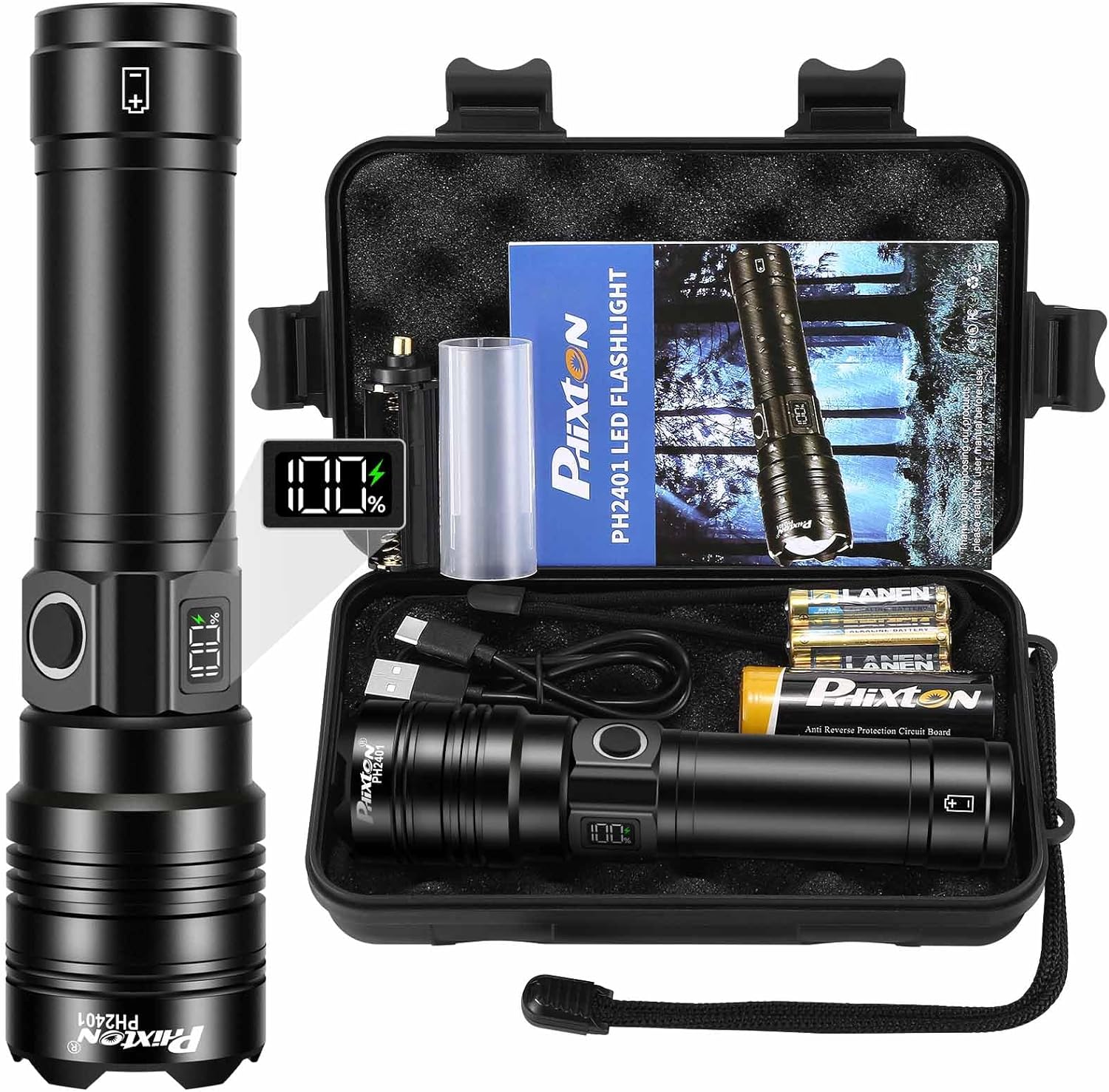
Image 1.1: PHIXTON PH2401 Flashlight and Included Accessories.
2. Safety Information
- Do not look directly into the LED light when it is active, as it can cause temporary vision impairment or eye damage.
- Keep the flashlight out of reach of children.
- Use only the specified rechargeable battery or AAA batteries with the provided adapter.
- Do not attempt to disassemble or modify the flashlight, as this may void the warranty and pose a safety risk.
- Avoid exposing the flashlight to extreme temperatures or direct sunlight for prolonged periods.
- Ensure the USB port cover is securely closed when not in use to maintain water resistance.
- Dispose of batteries according to local regulations.
3. Package Contents
Verify that all items are present in your package:
- 1x PHIXTON PH2401 Rechargeable LED Flashlight
- 1x 6000mAh Rechargeable Battery
- 3x AAA Alkaline Batteries
- 1x AAA Battery Holster
- 1x USB-C Charging Cable
- 1x Gift Box / Protective Case
- 1x Wrist Strap

Image 3.1: Package Contents.
4. Product Components
Familiarize yourself with the different parts of your PHIXTON PH2401 flashlight:

Image 4.1: Exploded View of Flashlight Components.
- LED: Light Emitting Diode, the primary light source.
- Glass Lens: Protects the LED and helps focus the beam.
- Zoomable Design: Allows adjustment between floodlight and spotlight.
- Hard Body: Durable aviation-grade aluminum alloy casing.
- Power Button: Controls power and light modes.
- LCD Power Indicator: Displays remaining battery percentage.
- USB-C Charging Interface: Input port for charging the flashlight.
- USB-A Discharging Interface: Output port for using the flashlight as a power bank.
- Battery Tube: Houses the rechargeable battery or AAA battery holster.
- AAA Battery Holster: Adapter for using AAA batteries.
- Rechargeable Battery: Primary power source (6000mAh).
- Tail Cover: Secures the battery compartment.
- Wrist Strap: For secure handling.
5. Setup
5.1 Battery Installation
- Unscrew the tail cover of the flashlight.
- For Rechargeable Battery: Insert the included 6000mAh rechargeable battery with the positive (+) end facing towards the flashlight head. Ensure any protective plastic film is removed from the battery before insertion.
- For AAA Batteries: Place three AAA alkaline batteries into the provided AAA battery holster, observing correct polarity. Insert the holster into the flashlight with the positive (+) end facing towards the flashlight head.
- Screw the tail cover back on securely.
5.2 Initial Charging
Before first use, it is recommended to fully charge the rechargeable battery.
- Locate the USB-C charging interface on the flashlight body.
- Open the protective rubber cover.
- Connect the included USB-C cable to the flashlight's USB-C port and the other end to a USB power source (e.g., wall adapter, computer, power bank).
- The LCD power indicator will show the charging progress. It typically takes 2-3 hours for a full charge.
- Once fully charged (100% displayed), disconnect the cable and close the protective rubber cover to maintain water resistance.
6. Operating Instructions
6.1 Power On/Off and Mode Selection

Image 6.1: Lighting Modes and Power Control.
- To Turn On: Press the power button once. The flashlight will turn on in High mode.
- To Change Modes: With the flashlight on, press the power button repeatedly to cycle through the 5 lighting modes: High → Middle → Low → Strobe → SOS.
- To Turn Off: Press and hold the power button for approximately 2 seconds from any mode.
6.2 Adjustable Focus
The flashlight features an adjustable focus mechanism to switch between a wide floodlight and a concentrated spotlight beam.

Image 6.2: Adjustable Focus (Floodlight vs. Spotlight).
- Gently push or pull the head of the flashlight forward or backward to adjust the beam.
- Pushing the head forward creates a narrow, concentrated spotlight beam for long-range illumination (up to 3280 feet).
- Pulling the head backward creates a wide floodlight beam for illuminating a larger area (up to 500 square meters).
6.3 LCD Power Indicator
The integrated LCD display shows the remaining battery percentage, allowing you to monitor power levels accurately.
- The display activates when the flashlight is turned on or when charging.
- A full charge is indicated by 100%.
- When the battery level is low, recharge the flashlight promptly to avoid unexpected power loss.
6.4 USB-C Charging Function (Input)
To recharge the flashlight's internal battery:
- Open the protective rubber cover over the USB ports.
- Insert the USB-C cable into the USB-C port (input).
- Connect the other end of the cable to a compatible USB power source.
- The LCD display will show charging status.
- Close the rubber cover after charging.
6.5 USB Discharging Function (Output)
The flashlight can function as a power bank to charge other devices.

Image 6.3: USB Charging and Discharging Interfaces.
- Open the protective rubber cover over the USB ports.
- Connect your device's charging cable to the USB-A port (output) on the flashlight.
- The flashlight will begin charging your device.
- Close the rubber cover after use.
7. Maintenance
7.1 Cleaning
- Wipe the flashlight body with a soft, damp cloth.
- Do not use abrasive cleaners or solvents.
- Clean the lens gently with a lens cloth to maintain optimal light output.
7.2 Battery Care
- Recharge the battery regularly, even if not in frequent use, to maintain battery health.
- The flashlight has built-in overcharging protection, but avoid leaving it connected to a charger indefinitely.
- If storing for an extended period, charge the battery to approximately 50-70% and recharge every 3-6 months.
7.3 Storage
- Store the flashlight in a cool, dry place away from direct sunlight and extreme temperatures.
- Ensure the USB port cover is sealed to prevent dust and moisture ingress.
- The included protective case is ideal for safe storage and transport.
7.4 Water Resistance
The PHIXTON PH2401 is designed with a high tenacity seal rubber waterproof ring, allowing it to be used in various weather conditions such as rain or snow. However, it is not intended for submersion in water.

Image 7.1: Water Resistance and Runtime Information.
8. Troubleshooting
| Problem | Possible Cause | Solution |
|---|---|---|
| Flashlight does not turn on. | Battery is depleted or incorrectly installed. Protective film on battery not removed. | Charge the battery. Ensure battery is inserted with correct polarity and protective film is removed. |
| Light is dim or flickers. | Low battery level. Loose connections. | Recharge the battery. Ensure tail cap is tightened. |
| Flashlight not charging. | USB cable or power source faulty. USB-C port obstructed. | Try a different USB cable or power source. Check USB-C port for debris. |
| USB discharging (power bank) not working. | Flashlight battery too low. Device cable faulty. | Ensure flashlight battery is sufficiently charged. Try a different charging cable for your device. |
9. Specifications
| Feature | Detail |
|---|---|
| Model Number | PH2401 |
| Light Source Type | LED (PH-L330 30W LED) |
| Brightness | Up to 10000 Lumens |
| Long Range | Up to 3280 feet (1000 meters) |
| Lighting Modes | High, Middle, Low, Strobe, SOS |
| Power Source | Rechargeable Battery (6000mAh) or 3x AAA Alkaline Batteries |
| Charging Interface | USB-C Input |
| Discharging Interface | USB-A Output (Power Bank Function) |
| Material | Aviation-grade Aluminum Alloy |
| Water Resistance Level | Water Resistant (not submersible) |
| Product Dimensions | 1.69"D x 1.69"W x 6.57"H (43mm x 43mm x 167mm) |
| Item Weight | 15.8 ounces (approx. 448g) |
10. Warranty and Support
10.1 Warranty Information
The PHIXTON PH2401 Rechargeable LED Flashlight comes with a limited warranty. Please refer to the product packaging or contact customer service for specific warranty terms and conditions.
10.2 Customer Support
If you have any questions, concerns, or require assistance with your PHIXTON PH2401 flashlight, please do not hesitate to contact our customer service team. We aim to respond to all inquiries within 24 hours and provide a satisfactory solution.
For support, please message us through the platform where you purchased the product or visit the official PHIXTON store page.