
1. Introduction
Thank you for choosing the WASTDE 26800 mAh Solar Power Bank, Model PN-W23. This device is designed to provide reliable portable power for your electronic devices, featuring a high-capacity battery, integrated charging cables, wireless charging, and a solar panel for emergency recharging. It is built to be durable for outdoor use, offering shockproof, waterproof, and dustproof protection. Please read this manual carefully to ensure proper use and maintenance of your power bank.

Image 1.1: Front and back view of the WASTDE Solar Power Bank, showcasing the solar panel and wireless charging area.
2. Safety Information
To prevent injury or damage to your device, please observe the following safety precautions:
- Do not expose the power bank to extreme temperatures (above 60°C/140°F or below -10°C/14°F).
- Avoid dropping, disassembling, or attempting to repair the device yourself.
- Keep the power bank away from water, moisture, and flammable materials. While it is water-resistant, it is not designed for submersion.
- Do not use the power bank if it is damaged, swollen, or leaking.
- Keep out of reach of children.
- Dispose of the power bank according to local regulations for lithium-polymer batteries.
3. Package Contents
Verify that all items are present in your package:
- WASTDE 26800 mAh Solar Power Bank (PN-W23)
- USB Charging Cable (for charging the power bank)
- Carabiner
- User Manual
- Storage Pouch

Image 3.1: Contents of the WASTDE Solar Power Bank package, including the power bank, built-in cables, carabiner, storage pouch, and user manual.
4. Product Overview
Familiarize yourself with the components and features of your WASTDE Solar Power Bank.
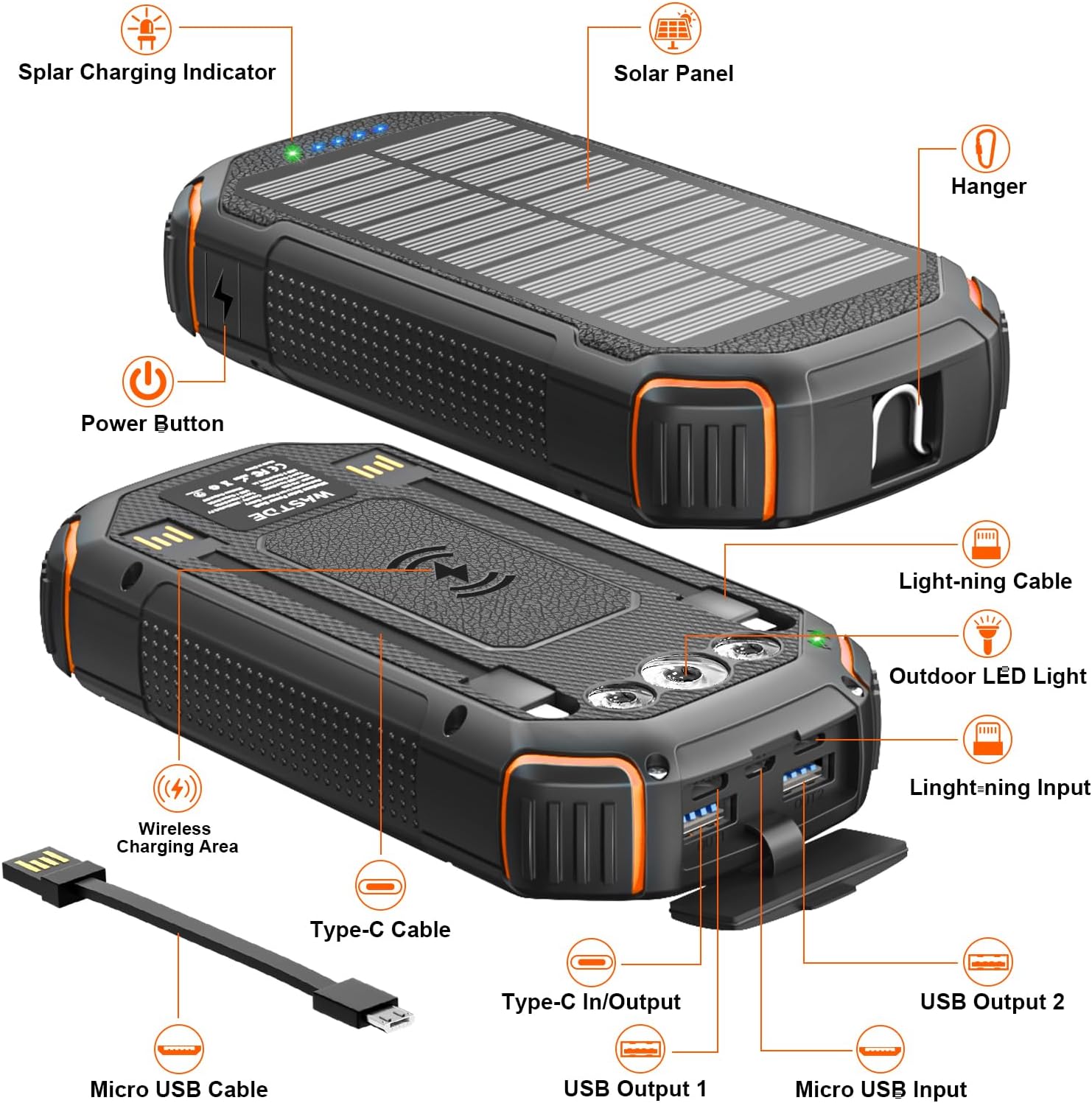
Image 4.1: Detailed diagram illustrating the various ports, buttons, and features of the power bank, including the solar panel, power button, LED indicator, built-in cables, USB output ports, and wireless charging area.
Key Features:
- 26800 mAh High Capacity: Provides multiple charges for smartphones and other devices.
- Built-in Charging Cables: Includes Micro USB, USB-C, and Lightning cables for convenience.
- Wireless Charging: Compatible with Qi-enabled devices.
- Solar Panel: For emergency recharging when conventional power sources are unavailable.
- LED Flashlight: Features three modes for various lighting needs.
- Durable Design: Shockproof, waterproof, and dustproof for outdoor environments.
5. Setup and Initial Charging
Before first use, it is recommended to fully charge the power bank via a wall adapter.
5.1 Charging the Power Bank via Wall Outlet
- Connect a USB-C cable (or the built-in USB-C cable) to the power bank's USB-C input/output port.
- Connect the other end of the cable to a compatible USB wall adapter (not included).
- Plug the wall adapter into a power outlet.
- The LED indicators on the power bank will illuminate to show the charging status. A full charge is indicated when all LEDs are solid.
Note: Initial charging via wall outlet typically takes several hours due to the large battery capacity.
5.2 Charging the Power Bank via Solar Panel
The solar panel is designed for emergency charging and maintaining battery life, not as a primary charging method due to its inherent limitations in speed and efficiency.
- Place the power bank in direct sunlight with the solar panel facing upwards.
- A green LED indicator will light up to confirm that solar charging is active.
- For optimal solar charging, ensure there is no obstruction to the sunlight.
Important: Solar charging is significantly slower than wall charging. It can take several days of direct sunlight to fully charge the 26800 mAh battery. Use solar charging primarily for emergencies or to extend battery life when away from power outlets.

Image 5.1: Illustration of the power bank's capacity and estimated charges for various devices, highlighting its large capacity.
6. Operating Instructions
6.1 Checking Battery Level
Press the power button once to view the current battery level indicated by the blue LED lights. Each light typically represents 25% of the battery capacity.

Image 6.1: Diagram showing the LED indicators for battery capacity (0-25%, 26-50%, 51-75%, 76-100%).
6.2 Charging Your Devices
The power bank supports charging multiple devices simultaneously through its various output options.

Image 6.2: The power bank simultaneously charging a smartphone, tablet, and wireless earbuds, demonstrating its multi-device charging capability.
Using Built-in Cables:
The power bank includes integrated Micro USB, USB-C, and Lightning cables for direct connection to most smartphones and small electronic devices.
- Pull out the appropriate built-in cable for your device.
- Connect the cable to your device's charging port.
- The power bank will automatically begin charging. If not, press the power button once.

Image 6.3: The WASTDE Solar Power Bank featuring its convenient built-in charging cables (USB-C, Micro USB, and Lightning) for various devices.
Using USB Output Ports:
For devices requiring standard USB-A cables, use the two USB output ports.
- Connect your device's USB charging cable to one of the USB output ports (USB Output 1 or USB Output 2).
- Connect the other end of the cable to your device.
- The power bank will automatically begin charging. If not, press the power button once.
Using Wireless Charging:
The power bank supports Qi wireless charging for compatible devices.
- Place your Qi-enabled device directly onto the wireless charging area on the power bank.
- Ensure the device is centered on the charging pad for optimal connection.
- The power bank will automatically begin wireless charging. If not, press the power button once.

Image 6.4: A smartphone being wirelessly charged by the WASTDE Solar Power Bank, demonstrating the Qi wireless charging feature.

Image 6.5: Visual guide on how to activate wireless charging by placing a device on the charging area and pressing the power button.
6.3 Using the LED Flashlight
The integrated LED flashlight has three modes: standard, SOS, and strobe.
- To turn on/off: Press and hold the power button for approximately 3 seconds.
- To cycle modes: Once the flashlight is on, press the power button briefly to switch between standard, SOS, and strobe modes.

Image 6.6: The power bank's bright LED flashlight illuminating a camping scene, highlighting its utility for outdoor enthusiasts and emergencies.

Image 6.7: A person using the power bank's flashlight to illuminate their path while climbing, demonstrating its practical application in low-light conditions.
7. Maintenance and Care
Proper care will extend the life of your power bank.
- Cleaning: Use a soft, dry cloth to clean the power bank. Do not use harsh chemicals or abrasive materials.
- Storage: Store the power bank in a cool, dry place away from direct sunlight and extreme temperatures. For long-term storage, it is recommended to keep the battery charged to about 50-75%.
- Water Resistance: While designed to be water-resistant, avoid prolonged exposure to heavy rain or submersion in water. Ensure all port covers are securely closed when exposed to moisture.
- Dust and Shock Protection: The rugged design provides protection against dust and minor impacts. However, avoid intentional drops or exposure to excessive dust.

Image 7.1: Visual representation of the power bank's shockproof, waterproof, and dustproof capabilities, suitable for outdoor adventures.
8. Troubleshooting
If you encounter issues with your power bank, refer to the following common problems and solutions:
| Problem | Possible Cause | Solution |
|---|---|---|
| Power bank not charging | Cable not connected properly; faulty cable/adapter; power bank fully charged. | Ensure cables are securely connected. Try a different cable or wall adapter. Check LED indicators; if all are solid, the power bank is fully charged. |
| Device not charging from power bank | Power bank battery low; device cable not connected; power bank not activated; device incompatible with wireless charging. | Charge the power bank. Ensure device cable is securely connected. Press the power button once to activate output. For wireless charging, ensure your device is Qi-compatible and correctly positioned. |
| Solar charging is slow | Insufficient sunlight; solar panel partially obstructed; inherent limitation of solar charging. | Place the power bank in direct, unobstructed sunlight. Understand that solar charging is a supplementary feature and slower than wall charging. |
| Flashlight not working | Power button not held long enough; power bank battery low. | Press and hold the power button for 3 seconds to activate. Charge the power bank if the battery is low. |

Image 8.1: Internal diagram illustrating the multiple protection mechanisms built into the power bank, including high-temperature, short-circuit, over-discharge, overcharge, overcurrent, and overvoltage protection.
9. Specifications
| Feature | Detail |
|---|---|
| Brand | WASTDE |
| Model | PN-W23 |
| Battery Capacity | 26800 Milliampere-hour (mAh) |
| Battery Composition | Lithium-polymer |
| Input (USB-C) | 5V/3A (15W Fast Charge) |
| Output (USB-A x2) | 5V/3A |
| Output (Built-in Cables) | Micro USB, USB-C, Lightning |
| Wireless Charging | Qi-compatible |
| Special Features | 4 built-in charging cables, 15W fast charging, wireless charging, 3-mode flashlight, shockproof, waterproof, dustproof |
| Voltage | 5 Volts |
| Item Weight | 600 Grams |
| Color | Orange |
10. Warranty and Support
The WASTDE 26800 mAh Solar Power Bank is covered by a three-year warranty from the date of purchase. This warranty covers manufacturing defects and ensures the product meets its stated specifications under normal use.
For warranty claims, technical support, or any questions regarding your product, please contact WASTDE customer service through the retailer where you purchased the product or visit the official WASTDE website for contact information.
Please retain your proof of purchase for warranty validation.


