
Supdex ZY021-825PRO
Supdex 1:18 Alloy Metal US M60 RC Tank Instruction Manual
Model: ZY021-825PRO
Introduction
Thank you for choosing the Supdex 1:18 Alloy Metal US M60 RC Tank. This remote-controlled model tank is designed for realistic operation, featuring a durable alloy metal construction, 2.4Ghz control, simulated smoke, authentic sound effects, functional lights, and the ability to shoot airsoft BBs. This manual provides essential information for safe operation, setup, maintenance, and troubleshooting to ensure an optimal experience with your RC tank.

Image: The Supdex 1:18 Alloy Metal US M60 RC Tank and its remote control.
Important Safety Information
- Adult Supervision: This product is recommended for ages 14 and up. Adult supervision is advised, especially when operating the BB shooting function.
- BB Shooting Safety: The tank shoots airsoft BBs with significant force. NEVER aim or shoot at people, animals, or fragile objects. Always wear protective eyewear when operating the tank, particularly when using the shooting function. Ensure the firing switch is OFF when not actively shooting.
- Battery Safety: Use only the specified Lithium Polymer batteries. Do not overcharge, short-circuit, or expose batteries to extreme temperatures. Dispose of batteries responsibly.
- Water Exposure: The tank is not waterproof. Avoid operating in wet conditions or submerging it in water.
- Moving Parts: Keep fingers, hair, and loose clothing away from moving tracks and wheels during operation.
- Choking Hazard: Small parts and BBs can be a choking hazard. Keep away from small children.
Package Contents
Please verify that all items listed below are included in your package:
- Supdex 1:18 US M60 RC Tank (1)
- 2.4Ghz Remote Controller (1)
- Rechargeable Lithium Polymer Batteries (2)
- USB Charging Cable (1)
- Airsoft BBs (approx. 100)
- Water Bottle for Smoke Fluid (1)
- Detachable Machine Guns (2, for replacement)
- Tank Commander Figure (1)
- Instruction Manual (1)
Components Overview
Familiarize yourself with the main components of your RC tank and remote control.
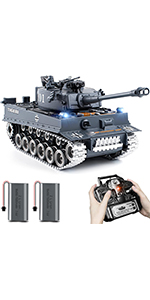
Image: Detailed diagram of the tank and remote control components.
Tank Components:
- Muzzle: Where BBs are fired.
- Firing Indicator: Lights up before shooting.
- Bullet Hatch: Access point for loading BBs.
- Shooting Switch: Safety switch for BB firing.
- Water Hole: For adding smoke fluid.
- Main Switch: Power on/off for the tank.
- Caterpillar Tracks: Metal tracks for movement.
- Road Wheels, Idler Wheel, Sprocket Wheel: Components of the track system.
Remote Controller Components:
- Power Switch: On/off for the remote.
- Control Sticks: For tank movement and turret control.
- Fire Button: Activates BB shooting.
- Sound Button: Toggles sound effects.
- Smoke Button: Toggles smoke function.
- Volume Switch: Adjusts sound volume.
Setup Guide
1. Battery Installation and Charging
- Tank Battery: Locate the battery compartment on the underside of the tank. Open it, connect the rechargeable Lithium Polymer battery, and secure it. Close the compartment.
- Remote Controller Batteries: Open the battery compartment on the back of the remote control. Insert 2 AA batteries (not included), ensuring correct polarity. Close the compartment.
- Charging: Use the provided USB charging cable to charge the tank's Lithium Polymer batteries. Connect the battery to the USB cable, then plug the USB cable into a suitable USB power source (e.g., computer USB port, USB wall adapter). The indicator light on the charger will show charging status (typically red for charging, off or green for fully charged). Do not overcharge.
2. Pairing the Remote Control
The tank and remote use a 2.4Ghz frequency for stable connection.
- Ensure both the tank and remote control are powered off.
- Turn on the tank's main power switch.
- Turn on the remote control's power switch. The remote's indicator light should flash.
- Move the left control stick on the remote fully forward, then fully backward. The remote's indicator light should become solid, indicating successful pairing.
3. Filling Smoke Fluid
For realistic smoke effects, fill the smoke generator with the provided fluid.

Image: Demonstrating how to add smoke fluid to the tank.
- Locate the small water hole/smoke fluid port on the tank's deck.
- Carefully use the provided water bottle to add a few drops of smoke fluid into the port. Do not overfill.
4. Loading Airsoft BBs
Prepare the tank for shooting by loading the airsoft BBs.

Image: Instructions for loading airsoft BBs into the tank's bullet hatch.
- Locate the bullet hatch on the tank's turret. Open it.
- Carefully pour the provided airsoft BBs into the hatch. Do not force or overfill.
- Close the bullet hatch securely.
Operating Instructions
1. Tank Movement
- Forward/Backward: Push both control sticks on the remote forward or backward simultaneously.
- Turn Left/Right: Push one stick forward and the other backward, or push one stick further than the other.
- 360-Degree Rotation: Push one stick forward and the other backward to rotate the tank in place.
2. Turret Control

Image: Visual representation of the tank's turret and barrel movement capabilities.
- Turret Rotation: Use the designated controls on the remote to rotate the turret up to 330 degrees.
- Barrel Elevation: Use the designated controls to move the barrel up and down, with a tilt angle of up to 30 degrees.
3. BB Shooting Function
- Activate Firing: Ensure the physical shooting switch on the tank's turret is in the 'ON' position.
- Fire BBs: Press the 'Fire' button on the remote control. The firing indicator light will illuminate, the muzzle will telescope, and a recoil action with sound effects will occur as the BB is fired.
- Safety: Always turn the shooting switch to 'OFF' when not actively firing or when handling the tank. Refer to the safety information section.
4. Smoke, Sound, and Lights

Image: The RC tank demonstrating its light and sound features.
- Smoke Function: Press the 'Smoke' button on the remote to toggle the realistic exhaust smoke effect on or off.
- Sound Effects: The tank features engine sounds and other realistic audio. Press the 'Sound' button on the remote to toggle sound effects on or off. Use the 'Volume Switch' to adjust the sound level.
- Lights: The tank's lights activate automatically when the tank is powered on.
5. Terrain Capabilities
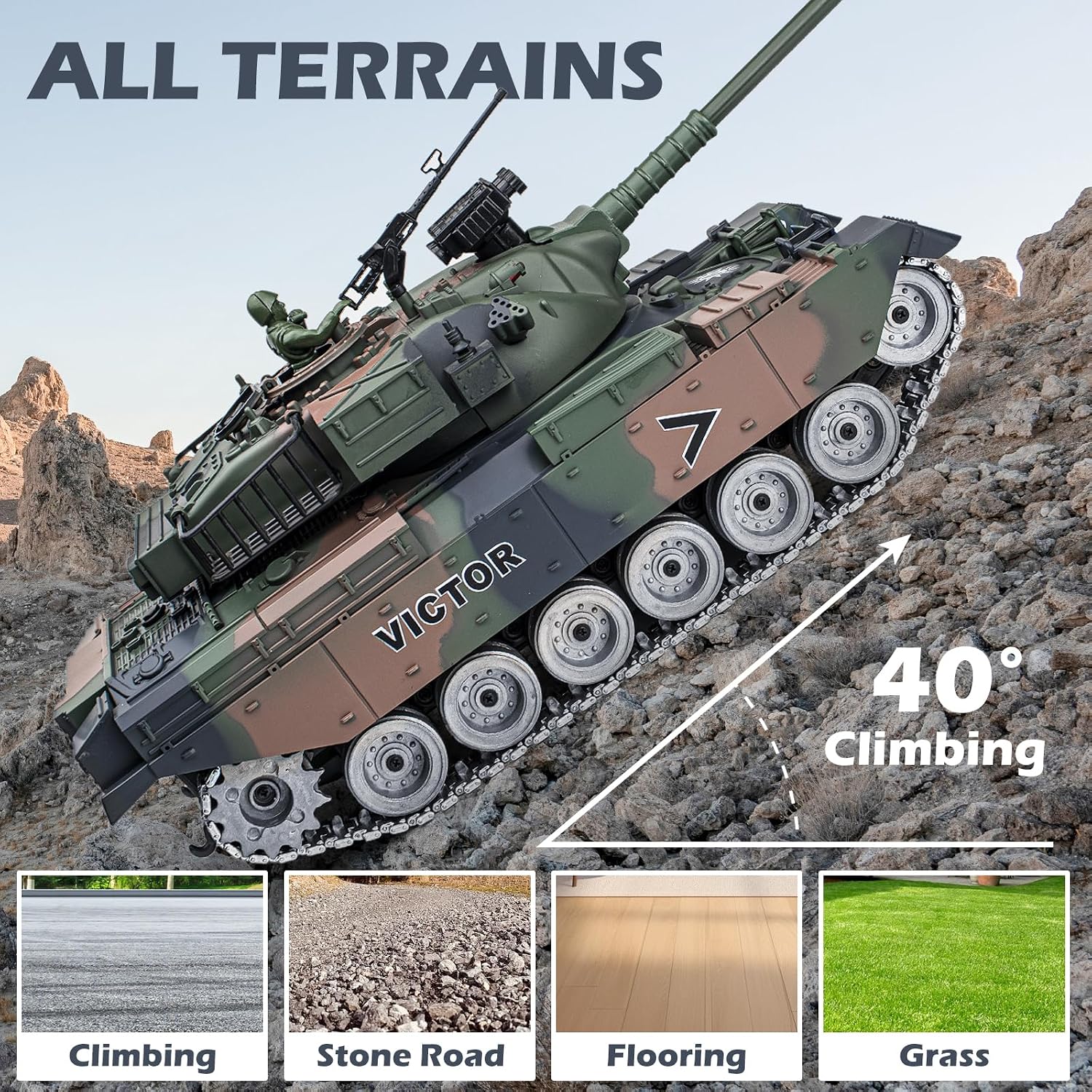
Image: The RC tank demonstrating its ability to traverse various terrains and climb inclines.
The Supdex M60 RC Tank is equipped with independent suspension and metal tracks, allowing it to conquer various terrains, including:
- Lawns and grass
- Most rugs and carpets
- Gravel and dirt paths
- Small rocks and obstacles
- Can climb slopes up to 40 degrees.
Maintenance
- Cleaning: After use, especially on dirty or dusty terrains, gently wipe the tank's exterior with a soft, dry cloth. Remove any debris from the tracks and wheels. Do not use water or harsh chemicals.
- Battery Care: Always disconnect and remove batteries from the tank and remote when not in use. Store batteries in a cool, dry place. Recharge batteries fully before long-term storage and periodically during storage to maintain their health.
- Smoke Fluid: If the smoke function is not used for an extended period, empty any remaining fluid to prevent residue buildup.
- Storage: Store the tank and remote in a dry, cool environment, away from direct sunlight and extreme temperatures.
Troubleshooting
| Problem | Possible Cause | Solution |
|---|---|---|
| Tank does not power on. | Tank battery not charged or connected; Main switch off. | Ensure battery is fully charged and correctly connected. Turn on the tank's main switch. |
| Remote control does not respond. | Remote batteries low/incorrectly installed; Not paired. | Replace remote batteries. Re-pair the remote with the tank (refer to Setup Guide). |
| BBs are not firing. | Shooting switch off; No BBs loaded; Jammed mechanism. | Ensure the shooting switch on the tank is ON. Load BBs. If jammed, clear the muzzle carefully (with power off). |
| No smoke effect. | No smoke fluid; Smoke function off. | Add smoke fluid (refer to Setup Guide). Press the 'Smoke' button on the remote. |
| Sound effects are not working or too low. | Sound function off; Volume too low. | Press the 'Sound' button on the remote. Adjust the 'Volume Switch'. |
Specifications
| Feature | Detail |
|---|---|
| Model Number | ZY021-825PRO |
| Scale | 1:18 |
| Product Dimensions | 15.5 x 7.4 x 5 inches |
| Item Weight | 3.74 pounds |
| Control Frequency | 2.4Ghz |
| Battery Type | Lithium Polymer (included) |
| Recommended Age | 14 years and up |
| Material | Alloy Metal (tracks and wheels), Plastic |
| Features | Forward/Backward, Left/Right Rotation, 360-degree Tank Rotation, 330-degree Turret Rotation, Barrel Up/Down (30-degree tilt), Authentic Recoil, Smoke Exhaust, Sound Effects, Lights, Airsoft BB Shooting, 40-degree Climbing Slope |
Warranty and Support
For warranty information, technical support, or inquiries regarding your Supdex RC Tank, please refer to the contact information provided with your purchase or visit the official Supdex brand store.
You can find more information and contact details at the Supdex Brand Store.
Ask a question about this manual
Ask about setup, troubleshooting, compatibility, parts, safety, or missing instructions. Manuals+ will review the question and use this page’s manual context to help answer it.