
Treligate G6
Treligate Mini G Lamp User Manual
Model: G6
Introduction
Thank you for choosing the Treligate Mini G Lamp. This versatile device seamlessly integrates an LED atmosphere lamp, 15W wireless charger, Bluetooth 5.3 speaker, sunrise alarm clock, and smart light sound machine. Designed for modern living, it enhances your bedroom, living room, office, or any space with its multi-functional capabilities and aesthetic design.

What's in the Box
Please check the package contents upon opening:
- Treligate G6 LED Table Lamp
- Type-C Cable
- Treligate Instruction Manual
Setup
1. Power Connection
Connect the provided Type-C cable to the lamp's power input port and plug the other end into a compatible power adapter (9V/2A or 5V/2A recommended, not included). The lamp requires a continuous power source for all functions.

2. Initial Power On
Once connected to power, the lamp will automatically power on and the digital clock display will activate.
Operating Instructions
Control Buttons Overview
The Treligate Mini G Lamp is controlled via a series of intuitive buttons located on the device. Refer to the diagram below for button functions:
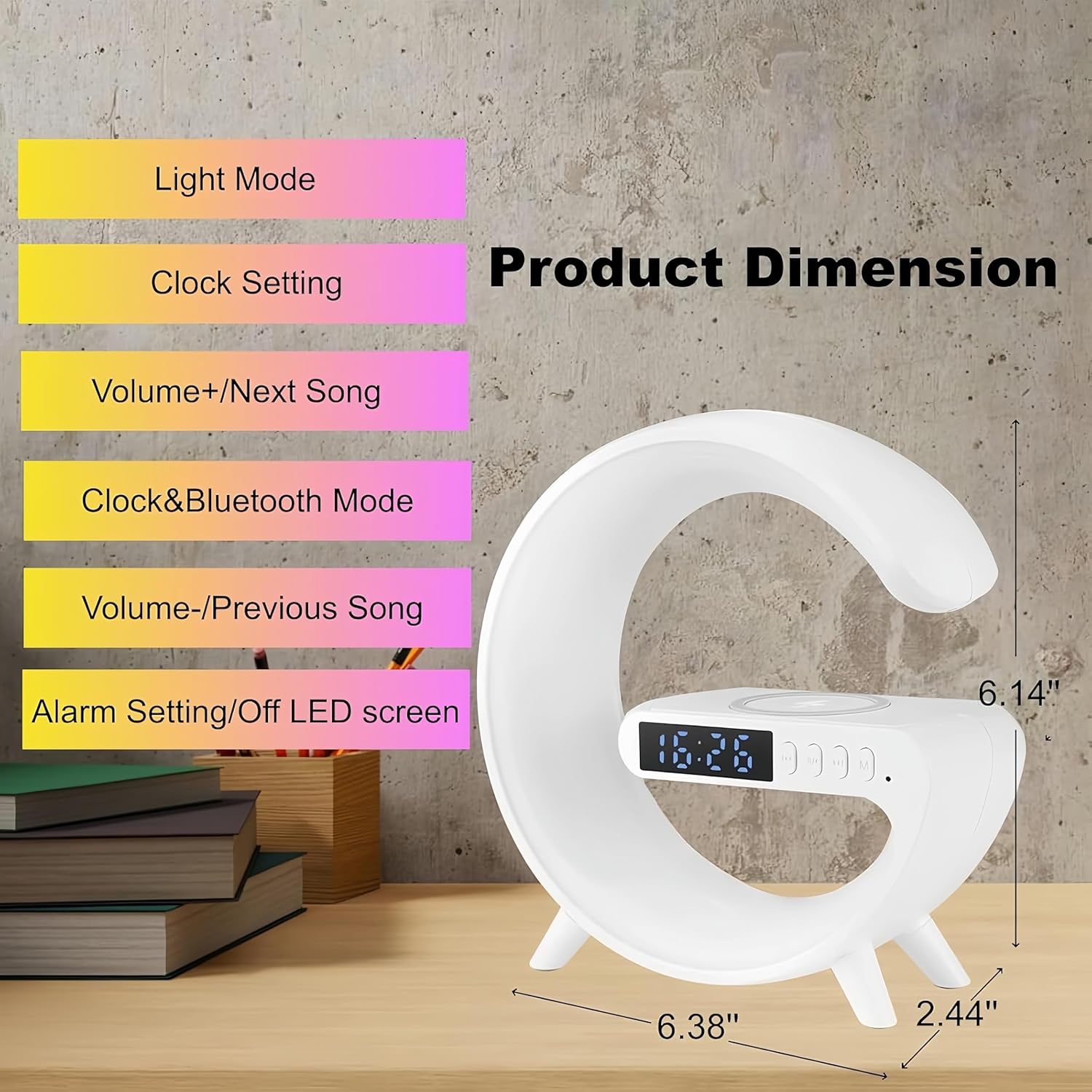
- Light Mode Button: Cycles through various light modes.
- Clock Setting Button: Used to set the time.
- Volume+/Next Song Button: Increases volume or skips to the next song in Bluetooth mode.
- Clock & Bluetooth Mode Button: Switches between clock display and Bluetooth pairing mode.
- Volume-/Previous Song Button: Decreases volume or goes to the previous song in Bluetooth mode.
- Alarm Setting/Off LED Screen Button: Sets the alarm or turns off the LED display.
1. Setting the Clock and Alarm
Use the Clock Setting Button to adjust the time. Refer to the detailed instructions in the included Treligate Instruction Manual for precise steps on setting the time and customizing the alarm clock. The sunrise simulation feature will gently illuminate 3 minutes before your set alarm time, gradually increasing light to help you wake up naturally.


2. Using the Bluetooth Speaker
To connect your device to the Treligate Mini G Lamp via Bluetooth 5.3:
- Press the Clock & Bluetooth Mode Button to enter Bluetooth pairing mode. The lamp will indicate it's ready to pair.
- On your smartphone, tablet, or computer, go to Bluetooth settings and search for "G6".
- Select "G6" to connect. Once connected, you will hear an audible confirmation.
- You can now play music through the lamp's speaker. Use the Volume+/Next Song and Volume-/Previous Song buttons on the lamp or your connected device to control playback and volume.


3. Wireless Charging
The Treligate Mini G Lamp features a 15W fast wireless charging pad. To use this function:
- Ensure your phone supports wireless charging.
- Place your phone directly on the charging induction area of the lamp.
- For optimal charging, it is recommended to remove your phone case, especially if it is thick.
- For larger phones, placing them vertically on the charging pad may improve contact and charging efficiency.

4. Adjusting Light Modes
The lamp offers 10 kinds of color modes to create various ambiances. Press the Light Mode Button to cycle through the available lighting effects.


Maintenance
- Cleaning: Use a soft, dry cloth to clean the surface of the lamp. Avoid using abrasive cleaners or solvents, as they may damage the finish.
- Storage: When not in use for extended periods, store the lamp in a cool, dry place away from direct sunlight and extreme temperatures.
- Handling: Handle the lamp with care to prevent damage to the electronic components or the G-shaped frame.
Troubleshooting
| Problem | Possible Cause | Solution |
|---|---|---|
| Lamp does not power on. | Not properly connected to power; faulty cable or adapter. | Ensure the Type-C cable is securely connected to both the lamp and a working power adapter/outlet. Try a different cable or adapter if available. |
| Wireless charging is slow or not working. | Phone not aligned correctly; thick phone case; non-compatible phone; insufficient power adapter. | Reposition the phone on the charging pad. Remove phone case. Verify your phone supports wireless charging. Use a 9V/2A or 5V/2A power adapter. |
| Bluetooth speaker not connecting. | Lamp not in pairing mode; "G6" not found; interference. | Press the Clock & Bluetooth Mode Button to enter pairing mode. Ensure Bluetooth is enabled on your device. Move closer to the lamp and away from other electronic devices. |
| Light modes are not changing. | Incorrect button pressed. | Ensure you are pressing the dedicated Light Mode Button. |
Specifications
| Feature | Detail |
|---|---|
| Model | G6 |
| Brand | Treligate |
| Product Dimensions | 2.44"D x 6.14"W x 6.38"H |
| Item Weight | 7.9 ounces (225 Grams) |
| Material | Plastic |
| Light Source Type | LED |
| Wireless Charging Output | 15W (Fast Charging) |
| Bluetooth Version | 5.3 |
| Light Modes | 10 Color Modes |
| Power Source | Corded Electric (Type-C) |
| Control Method | Touch / Push Button |
| Special Features | Wireless Charging, Bluetooth Speaker, Color Changing, Wake up Light, Alarm Clock, Night Light, Atmosphere Light, Music Sync |


Warranty and Support
Treligate is committed to ensuring your satisfaction. If you encounter any issues during the use of your Mini G Lamp, please do not hesitate to reach out to Treligate Customer Service. We will do our utmost to provide you with a satisfactory solution.
For support, please contact us through the seller contact option on the platform where you purchased the product, or visit the official Treligate store for more information.
Ask a question about this manual
Ask about setup, troubleshooting, compatibility, parts, safety, or missing instructions. Manuals+ will review the question and use this page’s manual context to help answer it.