1. Introduction
This manual provides instructions for the proper setup, operation, and maintenance of your Audio-Technica ATW-2110c Wireless Bodypack System. Please read this manual thoroughly before using the product to ensure optimal performance and longevity.
The Audio-Technica ATW-2110c is a robust 10-channel wireless audio system designed for various applications, including mobile rigs, small venues, and school auditoriums. It offers reliable wireless sound transmission with a range of approximately 300 feet.
2. System Components
The ATW-2110c system includes the following main components:
- ATW-R2100c Receiver: A compact half-rack receiver unit.
- ATW-T210c Bodypack Transmitter: A portable transmitter for use with a 4-pin cW-style microphone (microphone not included).
- Rackmount Kit: For integrating the receiver into a standard equipment rack.
- UHF Antennas: A pair of detachable UHF antennas for signal reception.
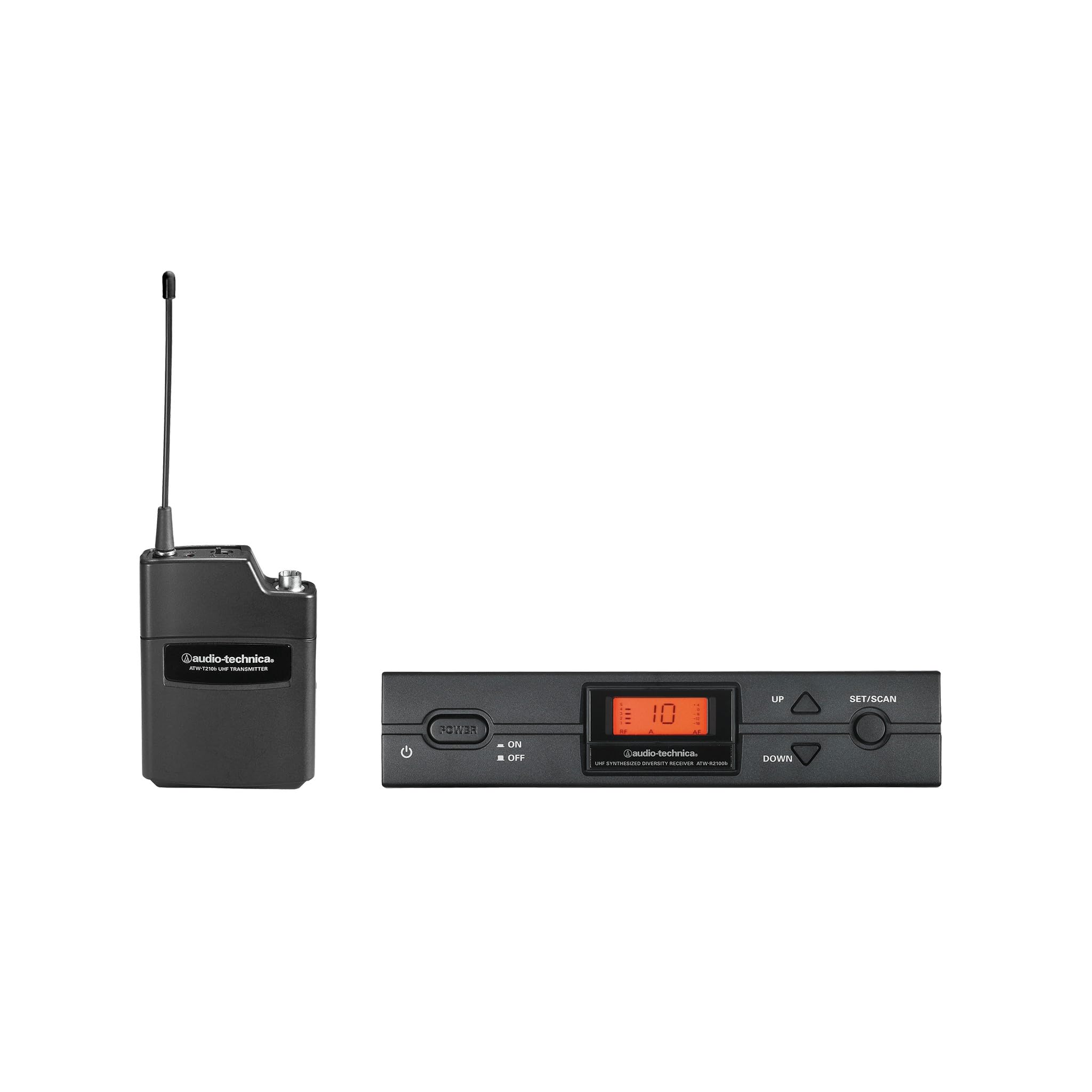
Figure 2.1: Overview of the Audio-Technica ATW-2110c Wireless Bodypack System components.
3. Setup Instructions
3.1 Receiver Placement and Antenna Connection
- Position the Receiver: Place the ATW-R2100c receiver in a location free from obstructions and away from potential sources of interference (e.g., computers, digital processors, large metal objects). For rack mounting, use the provided rackmount kit.
- Attach Antennas: Screw the two detachable UHF antennas onto the corresponding antenna connectors on the rear panel of the ATW-R2100c receiver. Ensure they are securely tightened. Position the antennas vertically for optimal reception.
- Power Connection: Connect the supplied AC adapter to the DC input jack on the receiver and then plug it into a standard AC power outlet.
3.2 Bodypack Transmitter Setup
- Install Batteries: Open the battery compartment of the ATW-T210c bodypack transmitter. Insert two fresh AA alkaline batteries, observing the correct polarity (+/-). Close the compartment securely.
- Connect Microphone: Plug your 4-pin cW-style microphone (e.g., lavalier, headworn) into the input jack on the bodypack transmitter. Ensure the connector clicks into place.
- Power On: Press and hold the power button on the bodypack transmitter until the indicator light illuminates.
3.3 Frequency Synchronization
Follow the receiver's display and controls to select an available channel and synchronize it with the bodypack transmitter. Refer to the receiver's specific instructions for detailed frequency scanning and pairing procedures.
4. Operating Instructions
4.1 Powering On/Off
- Receiver: The receiver powers on automatically when connected to power. Use the front panel power button if available, or disconnect the AC adapter to power off.
- Transmitter: Press and hold the power button on the bodypack transmitter to turn it on or off. The LED indicator will show power status.
4.2 Adjusting Audio Levels
Adjust the output level on the ATW-R2100c receiver to match the input requirements of your mixing console or amplifier. Start with a low level and gradually increase it to avoid distortion. The bodypack transmitter typically has a gain control for the microphone input; adjust this to prevent clipping at the source.
4.3 Monitoring Performance
Regularly check the RF and AF indicators on the receiver. A steady RF signal indicates good wireless connection. The AF indicator should fluctuate with audio input. If the RF signal is weak or intermittent, reposition the antennas or the transmitter.
5. Maintenance
- Cleaning: Use a soft, dry cloth to clean the exterior of the receiver and transmitter. Do not use harsh chemicals or abrasive cleaners.
- Battery Replacement: Replace batteries in the bodypack transmitter when the low battery indicator appears or when performance degrades. Always use fresh, high-quality AA alkaline batteries. Remove batteries if the unit will not be used for an extended period.
- Storage: Store the system in a cool, dry place away from direct sunlight and extreme temperatures.
6. Troubleshooting
| Problem | Possible Cause | Solution |
|---|---|---|
| No sound output |
|
|
| Intermittent signal or dropouts |
|
|
| Distorted audio |
|
|
7. Specifications
| Model Number | ATW-2110C |
| Brand | Audio-Technica |
| Item Weight | 6.61 pounds |
| Package Dimensions | 27 x 18 x 5 inches |
| Color | Black |
| Compatible Devices | Microphone |
| Connector Type | XLR (for receiver output) |
| Power Source | Battery Powered (Transmitter), AC Adapter (Receiver) |
| Wireless Range | Approximately 300 feet (line of sight) |
| Channels | Up to 10 usable channels |
8. Warranty Information
Audio-Technica products are designed and manufactured to strict quality standards. For specific warranty terms and conditions applicable to your ATW-2110c Wireless Bodypack System, please refer to the warranty card included with your product or visit the official Audio-Technica website. Keep your proof of purchase for warranty claims.
9. Customer Support
If you encounter any issues not covered in this manual or require further assistance, please contact Audio-Technica customer support. You can find contact information, FAQs, and additional resources on the official Audio-Technica website:
Please have your model number (ATW-2110C) and purchase date ready when contacting support.


