1. Product Overview
The AQUASTRONG 18in Sand Filter Pump (Model SFP450) is designed for inground and above-ground pools up to 20,000 gallons. It features a 1 HP motor, a maximum flow rate of 6100 GPH, and a 6-way valve for versatile filtration control. This system enhances water circulation and filtration, contributing to a clear pool environment.

Image: AQUASTRONG Sand Filter Pump system, illustrating the concept of creating a filtration plan.
Key Features:
- Customized Filtration: Offers 9 time settings (2 to 24 hours) for single or continuous cycles, ensuring efficient operation.
- High Flow Rate: A powerful 1 HP motor delivers a maximum flow of 6100 gallons per hour (101 GPM), suitable for pools up to 20,000 gallons.
- Enhanced Durability: Designed for long-lasting, efficient filtration with a 150 lb sand capacity, reducing frequent maintenance needs.
- 6-Way Valve: Provides multiple functions for comprehensive pool maintenance.
2. Safety Information
Read all instructions carefully before installation and operation.
- Always disconnect power before performing any service or maintenance.
- Ensure the pump is installed on a level, solid surface to prevent vibration and movement.
- Do not operate the pump if the power cord or plug is damaged.
- Keep children and pets away from the pump and filter system during operation.
- Consult a qualified electrician for electrical connections if you are unsure.
- Ensure proper ventilation around the pump to prevent overheating.
- Never operate the pump dry (without water).
3. Product Components
The AQUASTRONG SFP450 sand filter pump system includes the following main components:
- Sand Filter Tank (18-inch diameter)
- Pump Motor (1 HP)
- 6-Way Multiport Valve
- Pressure Gauge
- Base Plate
- Connecting Hoses/Pipes

Image: The AQUASTRONG sand filter pump assembly with key dimensions (18"L x 18"W x 18"H) indicated.
4. Installation Guide
Follow these steps for proper installation of your sand filter pump system:
- Positioning: Place the pump and filter on a firm, level surface, as close to the pool as possible. Ensure adequate drainage.
- Secure the Pump: Secure the pump onto the base plate.
- Add Filter Media: Fill the sand filter tank with the recommended amount of filter sand or filter balls (150 lbs sand capacity). Refer to the "Pool Selection Tips" in the Specifications section for guidance.
- Install Multiport Valve: Carefully install the 6-way multiport valve onto the top of the filter tank. Ensure all O-rings are properly seated and lubricated.
- Connect Plumbing: Connect the pump to the filter valve and the filter valve to the pool's return and skimmer lines.

Image: Illustration of the recommended 1-1/2 inch PVC hose connection method for the pump's inlet and outlet ports, showing the use of hose adapters and a glued area for secure fitting.
Note: The system is designed for 1-1/2 inch PVC hoses. Adapters may be required for different hose sizes. Ensure all connections are tight to prevent leaks.
- Electrical Connection: Connect the pump to a grounded electrical outlet. Ensure the power supply matches the pump's requirements.
- Prime the Pump: Before starting, ensure the pump is primed by filling the pump basket with water.
- Set Valve to 'FILTER': Before starting the pump, ensure the 6-way valve is set to the 'FILTER' position.

Image: A visual guide demonstrating the four key installation steps: securing the pump, adding filter media, installing the valve to 'FILTER', and setting the timer to start.
5. Operating Instructions
5.1. 6-Way Multiport Valve Functions
The 6-way valve allows you to control the water flow through the filter system. Always turn off the pump before changing valve positions.

Image: A detailed view of the 6-way multiport valve, illustrating each position and its function: FILTER, BACKWASH, RINSE, WASTE, CIRCULATE, and CLOSED.
- FILTER: Standard operating mode for daily filtration. Water passes through the sand media, cleaning the pool water.
- BACKWASH: Reverses water flow through the filter to clean the sand media. This flushes trapped debris out through the waste port.
- RINSE: Used after backwashing to flush out any remaining debris from the filter lines before returning to FILTER mode.
- WASTE: Bypasses the filter and sends water directly out the waste port. Useful for lowering pool water level or vacuuming heavy debris directly to waste.
- CIRCULATE: Bypasses the filter and circulates water directly back to the pool. Useful for mixing chemicals without filtering.
- CLOSED: Stops all water flow to and from the filter. Never use this setting while the pump is running.
5.2. Timer Settings
The integrated timer allows for automated filtration cycles. The pump offers 9 time settings from 2 to 24 hours, with options for single or continuous cycles.
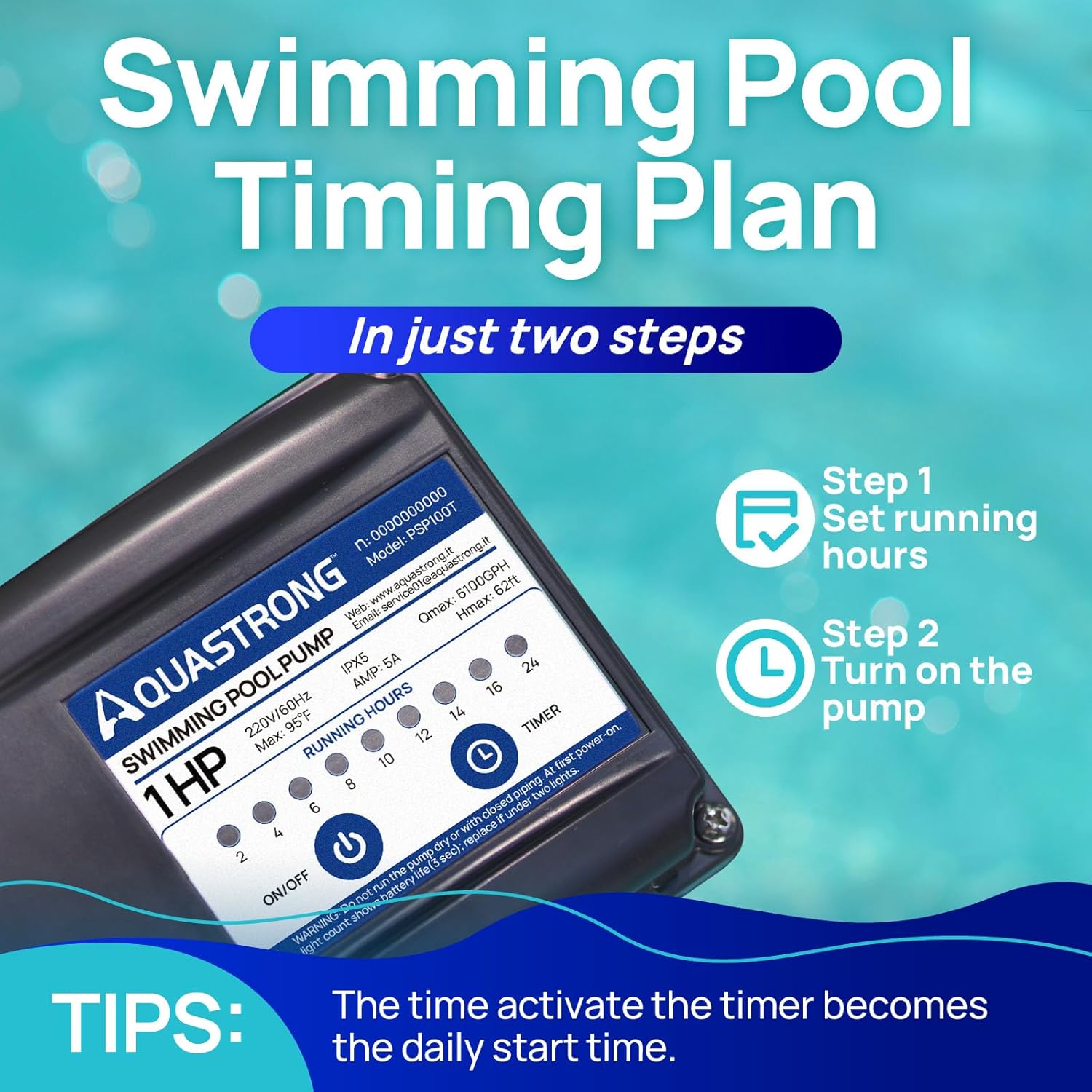
Image: The pump's control panel showing the timer settings (2, 4, 6, 8, 10, 12, 14, 16, 24 hours) and the ON/OFF switch. The time you activate the timer becomes the daily start time.
- Set Running Hours: Select the desired filtration duration using the timer dial.
- Activate Timer: Turn on the pump. The time of activation will become the daily start time for the selected cycle.
- Continuous Operation: For continuous operation, select the appropriate setting or bypass the timer function if available.
6. Maintenance
Regular maintenance ensures optimal performance and longevity of your AQUASTRONG sand filter pump.
- Backwashing: Backwash the filter when the pressure gauge reads 8-10 PSI above its clean operating pressure, or when water clarity decreases.
- Turn off the pump.
- Set the 6-way valve to 'BACKWASH'.
- Turn on the pump and backwash until the water in the sight glass (if present) runs clear (typically 2-3 minutes).
- Turn off the pump.
- Set the 6-way valve to 'RINSE'.
- Turn on the pump and rinse for 30-60 seconds.
- Turn off the pump.
- Set the 6-way valve to 'FILTER' and restart the pump for normal operation.
- Sand Replacement: Filter sand typically needs replacement every 3-5 years, depending on usage and water quality.
- Pump Basket Cleaning: Periodically check and clean the pump's strainer basket to remove large debris.
- Winterization: In colder climates, drain all water from the pump and filter system to prevent freezing damage. Store the pump in a dry, protected area.
7. Troubleshooting
This section addresses common issues you might encounter with your sand filter pump.
| Problem | Possible Cause | Solution |
|---|---|---|
| Pump not priming / Low flow |
|
|
| Sand returning to pool |
|
|
| Water not clearing |
|
|
| Pump making unusual noise |
|
|
8. Product Specifications
Detailed specifications for the AQUASTRONG SFP450 Sand Filter Pump:
| Feature | Detail |
|---|---|
| Brand | AQUASTRONG |
| Model Number | SFP450 |
| Filter Size | 18 inch |
| Horsepower (HP) | 1 HP |
| Maximum Flow Rate | 6100 GPH (101 Gallons Per Minute) |
| Maximum Lifting Height | 62 Feet |
| Recommended Pool Size | Up to 20,000 Gallons |
| Sand Capacity | 150 lbs |
| Valve Type | 6-Way Multiport Valve |
| Power Source | Corded Electric |
| Material | Plastic, Cast Iron |
| Product Dimensions (L x W x H) | 18" x 18" x 18" |
| Color | Gray |
Pool Selection Tips:

Image: A table providing guidance on selecting the appropriate filter size based on HP, maximum pool size, system flow rate, and sand capacity.
| Filter Size | HP | Recommended Max. Pool Size | System Flow Rate | Sand Capacity |
|---|---|---|---|---|
| 16in | 3/4HP | 16000 | 2860 | 100 lbs |
| 18in | 1HP | 20000 | 4490 | 150 lbs |
| 18in | 1.5HP | 28000 | 5265 | 150 lbs |
| 20in | 1.5HP | 32000 | 6060 | 200 lbs |
| 20in | 2HP | 38000 | 6800 | 200 lbs |
9. Warranty and Customer Support
The AQUASTRONG SFP450 Sand Filter Pump is backed by a two-year warranty from the date of purchase. This warranty covers manufacturing defects and ensures peace of mind regarding product quality.
For technical assistance, troubleshooting not covered in this manual, or warranty claims, please contact AQUASTRONG customer support. Refer to your purchase documentation for specific contact details or visit the official AQUASTRONG website.

Image: A close-up of the pump system highlighting its easy installation and durable design, accompanied by a "2 Year Warranty" badge.