
Introduction
Thank you for choosing the RORIOS Military Men's Dual Display Digital Quartz Watch. This timepiece combines analog and digital displays with multiple functions, designed for durability and practicality. This manual provides essential information for setting up, operating, and maintaining your watch.
Product Overview
The RORIOS AA-AEW001 watch features a robust design with a Japanese quartz movement for precise timekeeping. It includes a durable acrylic mirror and a comfortable TPU strap. Key features include:
- Dual time display (analog and digital)
- Luminous display for low-light conditions
- Stopwatch function
- Week calendar display (Day, Date, Month)
- 50-meter water resistance
- Shock and drop resistant construction
- 12/24 hour time format switching
- Alarm mode
- Countdown timer

Figure 1: Watch Face and Button Layout. This image shows the watch face with labels indicating the 'Light Button', 'Mode Switching', 'Month/Date', 'Function Switch Key', 'Setting Up The Keys', and 'Time Display'.

Figure 2: Watch Buttons. This image highlights the four main control buttons: LIGHT (top left), MODE (bottom left), START (top right), and RESET (bottom right).
Operation Guide
Button Functions:
- LIGHT Button (Top Left): Activates the backlight for the digital display.
- MODE Button (Bottom Left): Cycles through different modes: Time Display, Alarm Setting, Stopwatch, Countdown Timer.
- START Button (Top Right): Used to start/stop functions in Stopwatch mode, adjust values during setting, or confirm selections.
- RESET Button (Bottom Right): Used to reset functions in Stopwatch mode, or switch between 12/24 hour format.
- Crown (Center Right): Used to set the analog time.
Setting the Analog Time:
- Pull out the crown (center right button) to the first position.
- Rotate the crown to adjust the hour and minute hands to the desired time.
- Push the crown back in to secure the analog time setting.
Setting the Digital Time and Date:
- From the normal time display mode, press the MODE button three times to enter the time setting mode. The seconds will flash.
- Press the RESET button to cycle through the setting items: Seconds → Hour → Minute → Month → Date → Day of Week.
- Use the START button to adjust the flashing value.
- Once all settings are complete, press the MODE button to return to the normal time display.
12/24 Hour Format Switching:
- In the normal time display mode, press the RESET button to toggle between 12-hour and 24-hour formats.
Using the Alarm:
- From the normal time display mode, press the MODE button once to enter the Alarm mode.
- Press the RESET button to select the hour or minute to set.
- Use the START button to adjust the flashing value.
- Press the MODE button to exit alarm setting.
- To turn the alarm ON/OFF, press the START button while in Alarm mode. An alarm icon will appear/disappear.
Using the Stopwatch:
- From the normal time display mode, press the MODE button twice to enter Stopwatch mode.
- Press the START button to begin timing.
- Press the START button again to pause timing.
- Press the RESET button to clear the stopwatch to zero.
- Press the MODE button to exit Stopwatch mode.
Using the Backlight:
- Press the LIGHT button (top left) to illuminate the digital display. The backlight will remain on for a few seconds.
Maintenance
Water Resistance:
This watch is rated for 50 meters (5 ATM) water resistance. This means it is suitable for daily use, hand washing, rain exposure, and short periods of immersion in water. Important: Do not operate any buttons while the watch is submerged in water, as this can compromise the water seal and cause damage. Avoid hot water, steam, or extreme temperature changes.

Figure 3: Water Resistance Feature. The watch is designed for daily life waterproof activities.
Cleaning:
To clean your watch, wipe it gently with a soft, dry cloth. For stubborn dirt, a slightly damp cloth can be used, followed by immediate drying. Avoid using chemical cleaners or abrasive materials.
Storage:
When not in use, store your watch in a cool, dry place away from direct sunlight, extreme temperatures, and strong magnetic fields.
Troubleshooting
- Digital Display Blank: Check if the battery needs replacement. If the issue persists after battery replacement, contact customer support.
- Analog Hands Not Moving: Ensure the crown is pushed in completely. If it is, the battery for the analog movement might need replacement.
- Inaccurate Time: Re-set both analog and digital times carefully following the instructions. If the watch consistently loses or gains time, the movement may require servicing.
- Water Inside Watch: If moisture appears inside the watch, stop using it immediately and seek professional repair to prevent further damage.
Specifications
| Model Number | AA-AEW001 |
| Brand | RORIOS |
| Movement Type | Japanese Quartz |
| Display Type | Analog-Digital |
| Case Material | Resin |
| Case Diameter | 58 mm |
| Case Thickness | 17 mm |
| Strap Material | Rubber (TPU) |
| Strap Width | 27 mm |
| Watch Circumference | 250 mm |
| Weight | 70 grams |
| Water Resistance | 50 meters (5 ATM / 5.00 Bars) |
| Special Features | Calendar, Date, Month, Chronograph, Alarm |
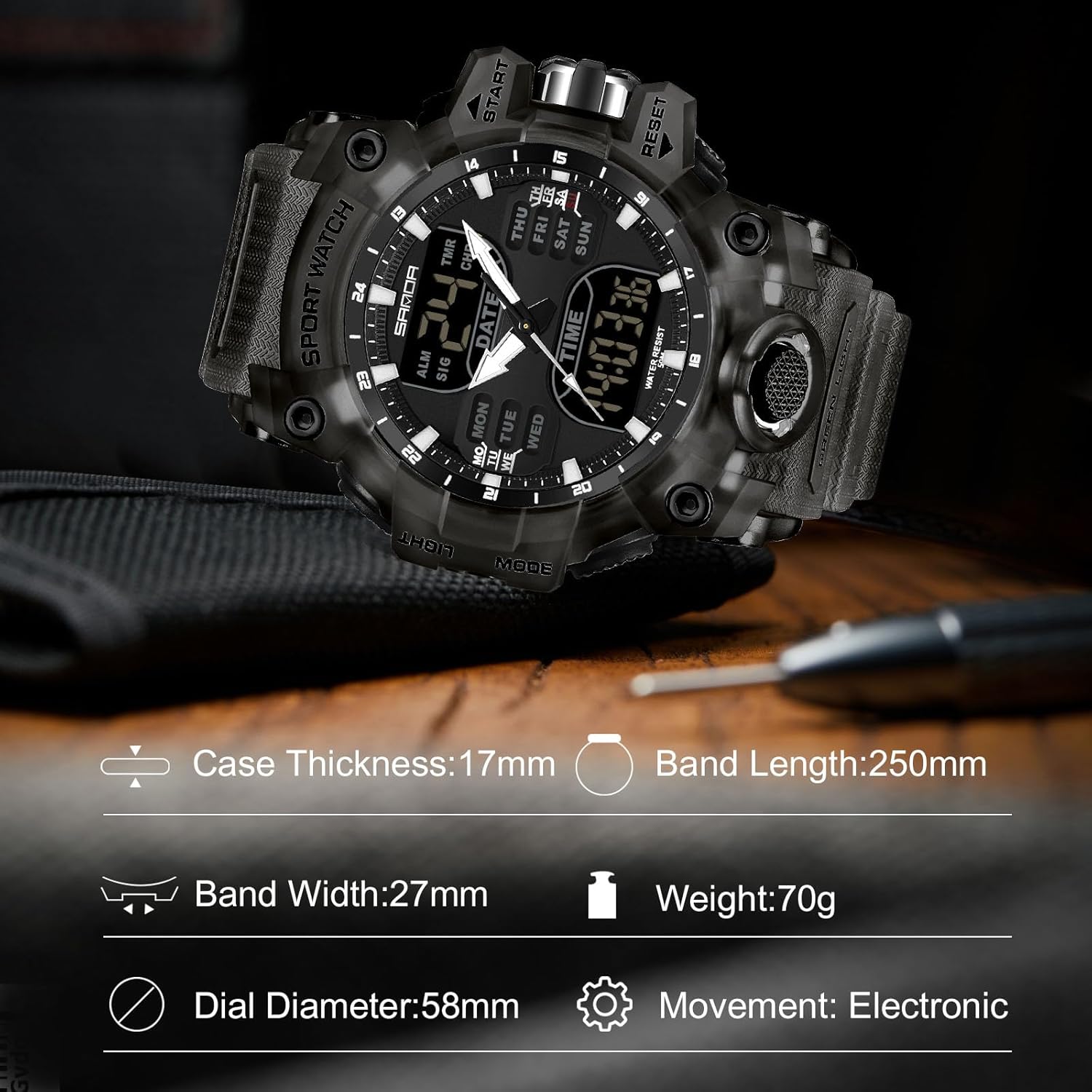
Figure 4: Watch Dimensions. This diagram provides key measurements of the watch.
Warranty and Support
Warranty Information:
For warranty details, please refer to the information provided by your point of purchase. If the product was sold by Amazon, consult the manufacturer's website for warranty information. If purchased from a third-party seller, please contact that seller directly for warranty specifics. Manufacturer warranty information may also be available on the RORIOS official website.
Customer Support:
Should you encounter any issues with your RORIOS watch, please contact our customer service team. We are committed to providing satisfactory solutions and support for our products.