
1. Introduction
Thank you for choosing the Kitchenwell Digital Precision Kitchen Scale. This manual provides essential information for the safe and efficient operation of your new kitchen scale. Please read it thoroughly before use and retain it for future reference.

Image 1: The Kitchenwell Digital Precision Kitchen Scale, showcasing its sleek black design and digital display.
2. Safety Information
- Do not immerse the scale in water or other liquids.
- Clean the scale with a damp cloth; do not use abrasive cleaners.
- Place the scale on a flat, stable surface for accurate measurements.
- Do not overload the scale beyond its maximum capacity of 15kg.
- Keep out of reach of children.
- Avoid extreme temperatures and direct sunlight.
3. Package Contents
- 1 x Kitchenwell Digital Precision Kitchen Scale
- 2 x CR2032 Batteries (pre-installed or included separately)
- 1 x User Manual
4. Setup
4.1 Battery Installation
The scale requires 2 CR2032 batteries. If not pre-installed, open the battery compartment on the underside of the scale and insert the batteries, ensuring correct polarity (+/-). Close the compartment securely.
4.2 Initial Placement
Place the scale on a hard, flat, and stable surface. Uneven surfaces can affect measurement accuracy.
5. Operating Instructions
5.1 Power On/Off
- To turn on: Press the "ON/TARE" button. The display will show "0g" when ready.
- To turn off: Press and hold the "ON/TARE" button for a few seconds, or wait for the automatic shut-off.
5.2 Weighing Items
- Ensure the scale is on and displays "0g".
- Place the item to be weighed directly onto the center of the weighing platform.
- The weight will be displayed on the LCD screen.

Image 2: The Kitchenwell scale displaying the weight of various fruits, demonstrating its use for food preparation.
5.3 Tare Function
The Tare function allows you to weigh multiple ingredients in the same container or to subtract the weight of a container.
- Place an empty container on the scale. The display will show its weight.
- Press the "ON/TARE" button. The display will reset to "0g".
- Add the ingredient to be weighed into the container. The display will show only the weight of the ingredient.
- Repeat the Tare function for additional ingredients.
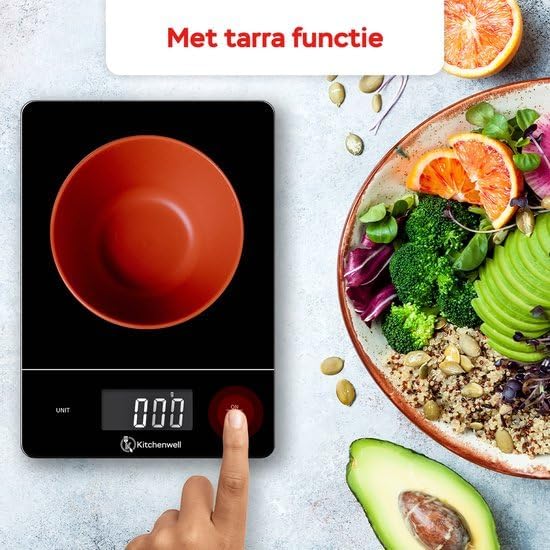
Image 3: A hand pressing the ON/TARE button on the Kitchenwell scale with an empty bowl, illustrating the tare function.
5.4 Unit Conversion
The scale supports multiple weighing units. To change the unit:
- Press the "UNIT" button to cycle through available units: grams (g), kilograms (kg), milliliters (ml), pounds (lb), and ounces (oz).
- Select the desired unit for your measurement.

Image 4: The Kitchenwell scale displaying various unit options (ml, g, oz, lb, lb'oz), highlighting its versatility.
5.5 Automatic Shut-off
To conserve battery life, the scale will automatically turn off after approximately 1 minute of inactivity.
6. Maintenance
6.1 Cleaning
Wipe the scale surface with a soft, slightly damp cloth. Do not use chemical cleaning agents or immerse the scale in water. The glass weighing platform is water-resistant for easy cleaning of spills.

Image 5: A hand wiping the surface of the Kitchenwell scale with a cloth, demonstrating its easy-to-clean, water-resistant design.
6.2 Storage
Store the scale in a cool, dry place. Its slim design allows for easy storage in kitchen drawers.
7. Troubleshooting
| Problem | Possible Cause | Solution |
|---|---|---|
| Scale does not turn on. | Batteries are dead or incorrectly installed. | Check battery polarity or replace batteries. |
| Inaccurate readings. | Scale is on an uneven surface, overloaded, or needs recalibration. | Place on a flat surface. Ensure weight is within 15kg limit. Turn off and on again. |
| "Lo" displayed. | Low battery indicator. | Replace batteries. |
| "O-Ld" displayed. | Overload indicator. | Remove item immediately to prevent damage. Do not exceed 15kg. |
8. Specifications
- Brand: Kitchenwell
- Model Number: KN352
- Weight Limit: 15 Kilograms
- Minimum Measurement: 1 Gram
- Display Type: LED
- Special Features: Automatic Shut-off, Tare Function
- Material: Glass, Plastic
- Item Weight: 588 Grams
- Batteries: 2 CR2032 batteries (included)
- First Available Date: January 14, 2024

Image 6: An infographic highlighting key specifications of the Kitchenwell scale: 1g to 15kg capacity, digital display, auto-off, and tare function.
9. Warranty and Support
Kitchenwell products are designed for reliability and performance. For warranty information or technical support, please refer to the contact details provided with your purchase or visit the official Kitchenwell website. Please have your model number (KN352) and purchase date ready when contacting support.