
1. Introduction
This manual provides essential information for the installation, operation, and maintenance of your Waaiyawa LV-LP18 / 9268A001AA Projector Lamp Assembly. This lamp assembly is designed for use with Canon LV-7215 and LV-7215E projectors, featuring a genuine original OEM bulb for optimal performance and longevity.
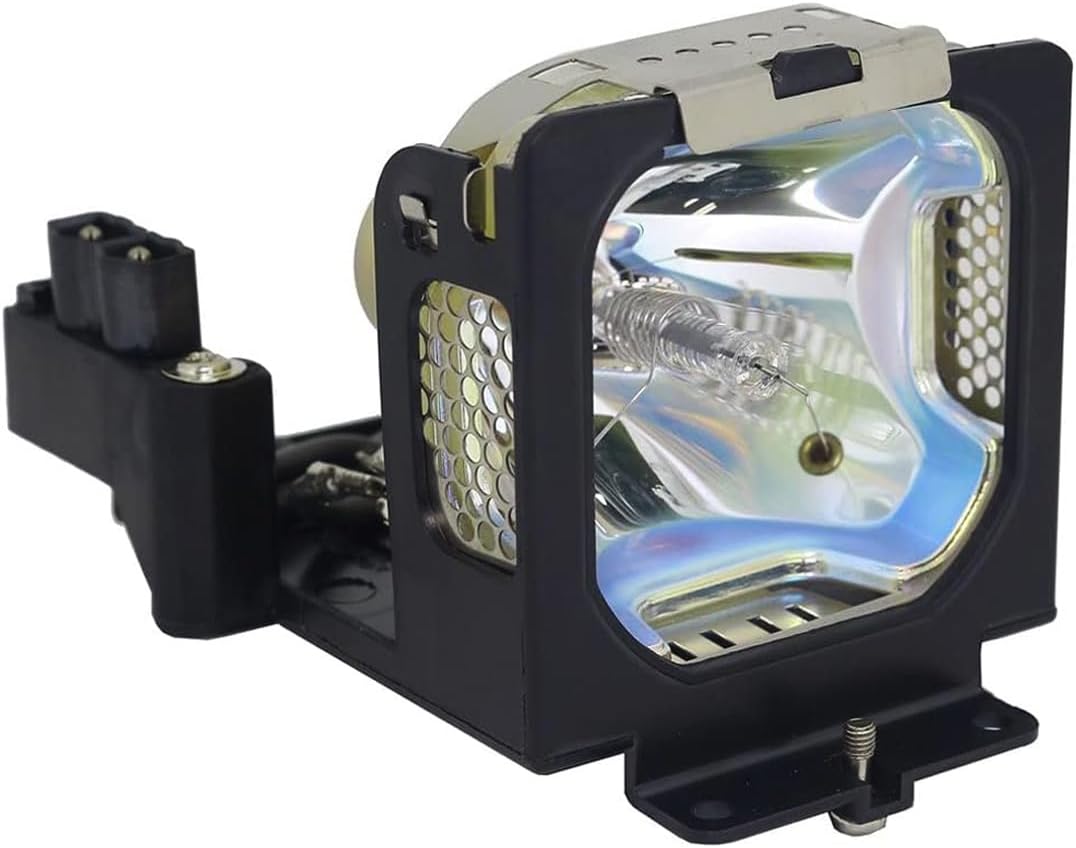
Figure 1: Front view of the Waaiyawa LV-LP18 / 9268A001AA Projector Lamp Assembly.

Figure 2: Side view of the lamp assembly, highlighting the internal bulb structure.
2. Specifications
| Feature | Detail |
|---|---|
| Brand | Waaiyawa |
| Model Name | LV-LP18 / 9268A001AA |
| Compatible Projectors | Canon LV-7215, LV-7215E |
| Bulb Type | Genuine Original OEM Bulb (UHP, P-VIP, NSH, SHP, HS, UHE, UHM) |
| Light Source Type | Mercury vapor |
| Material | Glass, Metal, Plastic |
| Item Weight | 9.6 ounces (approx. 0.6 lbs) |
| Product Dimensions | 6 x 4 x 5 inches |
| Included Components | Original OEM Bulb included |
3. Installation Instructions
Follow these steps carefully to replace the projector lamp. Ensure the projector is powered off and cooled down before beginning the installation process.
- Power Off and Cool Down: Make sure the projector is powered off and unplugged. Allow sufficient time for the projector and the old lamp to cool completely before handling.
- Locate Lamp Cover: Identify the lamp cover on your projector. Refer to your projector's specific user manual for the exact location.
- Remove Lamp Cover: Loosen the screw(s) securing the lamp cover and carefully slide it off.
- Remove Old Lamp: Loosen the screws securing the old lamp to the projector. These screws may not come all the way out. Gently pull the handle on the old lamp to remove it from the projector.
- Insert New Lamp: Carefully insert the new Waaiyawa LV-LP18 / 9268A001AA lamp into the projector along the guide rail. Ensure it is facing the correct way and fits without force. If it does not fit easily, recheck its orientation. Press the handle down to secure it.
- Secure New Lamp: Tighten the screws to secure the new lamp in place.
- Replace Lamp Cover: Replace the lamp cover and tighten the screw(s) to secure it.
- Reset Lamp Timer: After installation, consult your projector's manual to reset the lamp timer. This ensures accurate tracking of the new lamp's usage.

Figure 3: Visual guide for lamp replacement steps.
Warning: Projector bulbs are consumables and need to be replaced regularly. Operating a bulb beyond its recommended lifespan can lead to decreased performance or potential failure.
4. Operation and Performance
The Waaiyawa LV-LP18 / 9268A001AA lamp assembly utilizes genuine OEM bulbs, designed to provide stable light output and superior brightness for 3000-5000 hours under normal operating conditions. This ensures consistent image quality throughout its lifespan.

Figure 4: Brightness stability comparison, illustrating consistent light output of the Waaiyawa bulb.

Figure 5: Visual comparison demonstrating the clarity and brightness provided by the Waaiyawa lamp.
5. Maintenance and Care
To maximize the lifespan and performance of your projector lamp, consider the following:
- Proper Cooling: Ensure your projector has adequate ventilation. Blocked vents can lead to overheating and reduce lamp life.
- Avoid Frequent On/Off Cycles: Turning the projector on and off frequently can stress the lamp. Allow it to run for a reasonable period once started.
- Clean Air Filter: Regularly clean or replace your projector's air filter to prevent dust buildup, which can hinder cooling.
- Handle with Care: When replacing the lamp, avoid touching the bulb glass directly with bare hands, as oils can cause hot spots and premature failure.
6. Troubleshooting
If you encounter issues after installing your new lamp, consider these common troubleshooting steps:
- No Image/Dim Image:
- Ensure the lamp is fully seated and secured in its housing.
- Verify the lamp cover is correctly installed and secured.
- Check if the lamp timer has been reset.
- Confirm the projector is receiving power and input signal.
- Lamp Warning Light:
- This often indicates the lamp timer needs to be reset after a new lamp installation.
- If the light persists after resetting the timer, recheck the lamp installation.
- Projector Shuts Down:
- This can be an overheating issue. Ensure proper ventilation and clean air filters.
- Confirm the lamp is correctly installed and not loose.
For persistent issues, refer to your Canon projector's user manual or contact customer support.
7. Warranty and Support
The Waaiyawa LV-LP18 / 9268A001AA Projector Lamp Assembly comes with a 1-Year Warranty. Additionally, a 30-day money-back guarantee is provided. For any questions, technical assistance, or warranty claims, please contact Waaiyawa customer service. They aim to respond within 12 hours.
Manufacturer: Waaiyawa
Contact: Refer to your purchase documentation or the seller's contact information for support details.