
BIFANS HK1 Remote
Replacement Remote Control User Manual
Brand: BIFANS | Model: HK1 Remote
1. Introduction
This manual provides instructions for the BIFANS Replacement Remote Control with Learning Function. This remote is designed as a direct replacement for various Android TV Boxes and features an infrared (IR) learning capability to control basic functions of other devices, such as your television.
Please read this manual carefully before using the remote control to ensure proper operation and to utilize all its features.
2. Package Contents
- 1 x BIFANS Replacement Remote Control
Note: 2 x AAA batteries are required and are not included in the package.
3. Setup
3.1 Battery Installation
To power the remote control, you will need two (2) AAA batteries. Follow these steps to install them:
- Locate the battery compartment cover on the back of the remote control.
- Slide the cover downwards or press the latch (if present) to open the compartment.
- Insert two AAA batteries, ensuring the positive (+) and negative (-) terminals align correctly with the markings inside the compartment.
- Replace the battery compartment cover by sliding it back into place until it clicks securely.
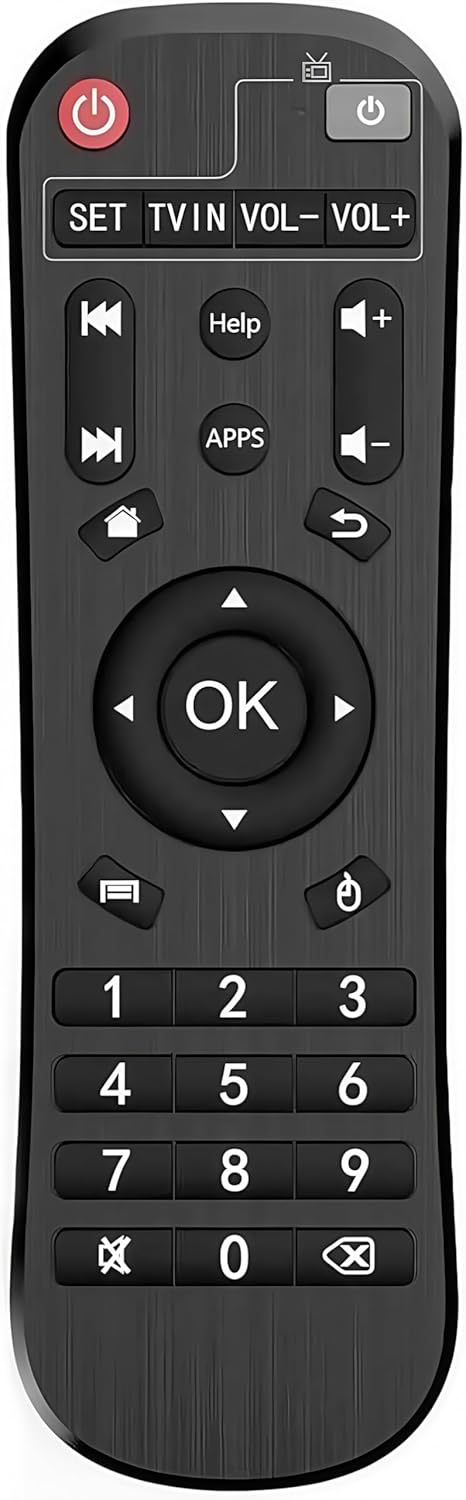
Image: Front view of the BIFANS Replacement Remote Control, showing its button layout including power, navigation, volume, and number pad.
3.2 Initial Use
The BIFANS Replacement Remote Control is designed for immediate use with compatible Android TV Boxes without requiring any programming or pairing. Simply insert the batteries, and it should function directly with your device.
4. Operating Instructions
4.1 Basic Functions
The remote control provides standard functions for navigating and controlling your Android TV Box. Common buttons include:
- Power Button: Turns the Android TV Box on or off.
- Navigation Pad (Up, Down, Left, Right, OK): Used for menu navigation and selection.
- Volume Buttons (VOL-, VOL+): Adjusts the volume.
- Back/Return Button: Returns to the previous screen or menu.
- Home Button: Returns to the main home screen of the Android TV Box.
- Number Pad (0-9): For direct input or channel selection.
- Media Control Buttons (Play/Pause, Fast Forward, Rewind): For controlling media playback.

Image: A hand holding the BIFANS remote control, demonstrating its use with an Android TV Box connected to a television.
4.2 Learning Function (for TV Control)
The remote control features a learning function, allowing you to program certain buttons (Power, TV IN, VOL-, VOL+) to control your television or other IR-controlled devices. This reduces the need for multiple remotes.
Follow these steps to program the learning function:
- Press and hold the Black Power key (usually located at the top right) for 5 seconds until the red LED indicator stays on. This indicates the remote is in learning mode.
- Press a study button (one of the gray buttons in the learning area: Power, TV IN, VOL-, VOL+) on the BIFANS remote. The red LED indicator will blink slowly, indicating it's ready to receive a signal.
- Place your original TV remote control and the BIFANS remote control head-to-head, approximately 2-3 cm apart.
- Press the corresponding key on your original TV remote control that you wish to program (e.g., TV Power button). The red LED indicator on the BIFANS remote will blink 3 times quickly and then stay on, indicating successful learning.
- Repeat steps 2-4 for any other buttons you wish to program (TV IN, VOL-, VOL+).
- Once all desired buttons are programmed, press any key outside the TV zone (e.g., a number button or navigation button) on the BIFANS remote to exit the study status. The red LED indicator will turn off.
If the learning process fails (LED blinks 5 times), return and repeat the steps from the beginning.

Image: Back view of the BIFANS remote control, highlighting the battery compartment and providing a visual guide to the learning function steps.
5. Compatibility
This replacement remote control is specifically designed to be compatible with the following Android TV Box models:
- MXQ
- MXQ Pro
- hk1 Box
- hk1 Max
- hk1 Rbox
- x96mini
- X96
- x96max
- x96max+
- T95M
- T95N
- T95Q
- T9
- T95X
- H96
- H96 pro+
- H96max
Important Note:
This remote control is NOT compatible with Amazon Fire Stick, Amazon Box, or other non-listed devices.
6. Specifications
| Material | ABS Shell + Silicone Button |
| Color | Black |
| Remote Control Distance | Up to 33 feet (10 meters) |
| Battery Type | 2 x AAA Batteries (not included) |
| Product Dimensions | 5.5 x 1.5 x 0.6 inches (approx. 14 x 3.8 x 1.5 cm) |
| Item Weight | 1.44 ounces (approx. 40.8 grams) |
7. Troubleshooting
If you encounter issues with your remote control, please refer to the following common solutions:
- Remote not responding:
- Ensure batteries are inserted correctly with the correct polarity (+/-).
- Replace old or depleted batteries with new AAA batteries.
- Ensure there is a clear line of sight between the remote control and the Android TV Box's IR receiver. Obstructions can block the signal.
- Learning function not working:
- Ensure the BIFANS remote is in learning mode (red LED solid on).
- Verify that the original remote control is functioning correctly and has sufficient battery power.
- Ensure the distance between the two remotes is 2-3 cm during the learning process.
- Repeat the learning steps carefully, ensuring each step is completed before moving to the next.
- Some original remotes may use RF (Radio Frequency) instead of IR (Infrared). The learning function only works with IR signals.
8. Safety Information
- Do not expose the remote control to direct sunlight, high temperatures, or humidity.
- Avoid dropping or subjecting the remote control to strong impacts.
- Do not mix old and new batteries, or different types of batteries.
- Remove batteries if the remote control will not be used for an extended period to prevent leakage.
- Dispose of used batteries according to local regulations.
- Keep the remote control out of reach of small children.
9. Warranty and Support
For any questions, technical support, or warranty inquiries regarding your BIFANS Replacement Remote Control, please contact BIFANS customer service through the retailer where the product was purchased or visit the official BIFANS store page on Amazon.
Link to BIFANS Store: BIFANS Store on Amazon