1. Introduction
Thank you for purchasing the BOOM BASS L-22 Bluetooth Speaker. This manual provides essential information for the safe and efficient operation of your new speaker. Please read this manual thoroughly before use and retain it for future reference.
2. Product Overview
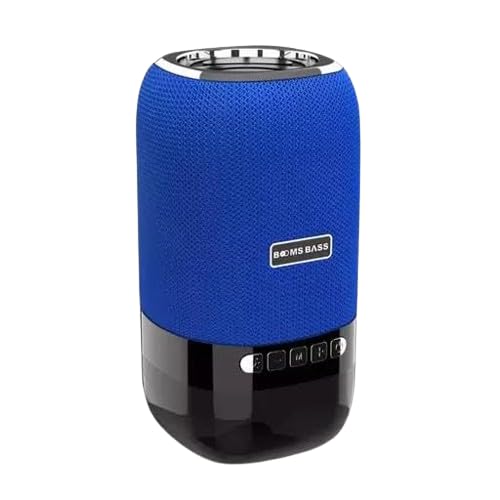
Image: The BOOM BASS L-22 Bluetooth Speaker, featuring a cylindrical design with a blue fabric mesh upper section and a black glossy base. The speaker has control buttons on the front of the black base and a silver ring at the top.
The BOOM BASS L-22 is a portable 5W Bluetooth speaker designed for wireless audio playback. It features a distinctive blue color and integrated LED lighting, enhancing your audio experience with visual effects. Its compact design makes it suitable for various environments.
3. Features
- Bluetooth Connectivity: Seamless wireless audio streaming from compatible devices.
- 5W Audio Output: Delivers clear and powerful sound.
- Blue Color Design: Stylish and vibrant blue finish.
- Integrated LED Lighting: Features different LED light modes for an enhanced ambiance.
- Portable Design: Compact dimensions (10D x 10W x 10H Centimeters) for easy transport.
- Waterproof: Designed to be resistant to water.
4. What's in the Box
Upon unboxing, please ensure all items listed below are present:
- 1 x BOOM BASS L-22 Bluetooth Speaker
- 1 x Charging Cable (Note: Specific cable type not provided in product details, typically USB)
- 1 x User Manual (This document)
5. Setup
5.1 Charging the Speaker
- Locate the charging port on the speaker.
- Connect the provided charging cable to the speaker's charging port.
- Connect the other end of the charging cable to a compatible USB power adapter (not included) or a computer's USB port.
- The LED indicator will typically show charging status (e.g., solid red while charging, off when fully charged).
- Allow the speaker to fully charge before first use for optimal battery life.
5.2 Bluetooth Pairing
- Power On: Press and hold the Power button on the speaker until you hear an audible prompt or see the LED indicator light up.
- Enter Pairing Mode: The speaker should automatically enter Bluetooth pairing mode, indicated by a flashing LED light (e.g., blue). If not, press the Bluetooth pairing button (if available).
- Enable Bluetooth on Your Device: On your smartphone, tablet, or other Bluetooth-enabled device, go to the Bluetooth settings and turn Bluetooth ON.
- Select Speaker: In the list of available devices, look for "BOOM BASS L-22" or a similar name. Tap on it to connect.
- Confirmation: Once successfully paired, the speaker will usually provide an audible confirmation, and the LED indicator will stop flashing and remain solid.
Note: If prompted for a password, enter "0000" (four zeros).
6. Operating Instructions
6.1 Basic Controls
- Power On/Off: Press and hold the Power button.
- Play/Pause: Press the Play/Pause button to start or pause audio playback.
- Volume Up: Press the Volume + button to increase volume.
- Volume Down: Press the Volume - button to decrease volume.
- Next Track: Press and hold or double-press the Volume + button (functionality may vary by model).
- Previous Track: Press and hold or double-press the Volume - button (functionality may vary by model).
- Mode Button (M): Press to switch between available modes (e.g., Bluetooth, AUX, TF Card, USB - if supported by the speaker).
- LED Light Control: Some models may have a dedicated button or a long press on another button to change LED light patterns or turn them off.
6.2 Audio Playback
Once paired, audio from your connected device will automatically play through the speaker. Control playback (play, pause, skip) either from your device or using the speaker's control buttons.
7. Maintenance
7.1 Cleaning
- Ensure the speaker is powered off and disconnected from any power source before cleaning.
- Wipe the exterior with a soft, dry, lint-free cloth.
- For stubborn marks, lightly dampen the cloth with water. Do not use harsh chemicals, cleaning solvents, or strong detergents.
- Avoid getting moisture into any openings or ports.
7.2 Storage
- Store the speaker in a cool, dry place away from direct sunlight and extreme temperatures.
- If storing for an extended period, charge the battery to approximately 50% every few months to preserve battery health.
8. Troubleshooting
| Problem | Possible Cause | Solution |
|---|---|---|
| Speaker does not turn on. | Battery is depleted. | Charge the speaker fully. |
| Cannot pair with Bluetooth device. | Bluetooth is off on device; speaker not in pairing mode; device too far. | Ensure Bluetooth is enabled on your device. Put speaker in pairing mode. Move device closer to speaker (within 10 meters). Forget speaker from device's Bluetooth list and re-pair. |
| No sound or low volume. | Volume too low on speaker or device; speaker not connected. | Increase volume on both speaker and connected device. Ensure speaker is successfully paired and connected. |
| Sound distortion. | Volume too high; interference; low battery. | Reduce volume. Move speaker away from other electronic devices. Charge the speaker. |
9. Specifications
| Feature | Detail |
|---|---|
| Brand | Generic |
| Model Name | L-22 (Speaker) |
| Connectivity Technology | Bluetooth |
| Speaker Type | Subwoofer |
| Output Power | 5W |
| Colour | Blue |
| Product Dimensions | 10D x 10W x 10H Centimeters |
| Waterproof | Yes |
| Recommended Uses | Tablets, Smartphones |
10. Warranty and Support
For warranty information and customer support, please refer to the documentation provided at the time of purchase or contact the retailer/manufacturer directly. Keep your purchase receipt as proof of purchase for warranty claims.
Manufacturer: Giga Traders


