
Introduction
This manual provides instructions for the assembly, operation, and maintenance of your Yuly CIY GAS67 Hot Swap Mechanical Keyboard Kit. The GAS67 is a 65% layout keyboard kit featuring a gasket structure, hot-swappable switch sockets compatible with 3-pin and 5-pin MX switches, and a Type-C connection. It is designed for users who wish to customize their mechanical keyboard experience.
Package Contents
Before proceeding with assembly, please verify that all components are present. The kit typically includes:
- Keyboard Case (ABS integrated shell)
- PCB (Printed Circuit Board) with hot-swappable sockets
- Metal Positioning Plate
- Soundproof Silicone Pad
- Bottom Sound-Absorbing Cotton
- Keycap Stabilizers
- USB Type-C Cable
- Switch Puller
- Keycap Puller
- Screwdriver
- Additional Gaskets/Foam (may vary)
- Screws and standoffs

Image: Overview of the Yuly CIY GAS67 keyboard kit components, showing the green case, PCB, metal plate, various foam layers, stabilizers, a USB-C cable, and assembly tools like a switch puller and screwdriver.

Image: Overview of the Yuly CIY GAS67 keyboard kit components, showing the white case, PCB, metal plate, various foam layers, stabilizers, a USB-C cable, and assembly tools like a switch puller and screwdriver.
Setup and Assembly
The Yuly CIY GAS67 is a barebones kit, requiring the user to install switches and keycaps. Follow these steps for proper assembly:
- Prepare the PCB and Plate:
Place the soundproof silicone pad and bottom sound-absorbing cotton onto the keyboard case. Ensure the PCB is aligned correctly with the metal positioning plate. Install the included keycap stabilizers onto the PCB if they are not pre-installed.

Image: Top and bottom view of the GAS67 kit with a blue transparent case, illustrating the PCB and metal plate assembly within the case.
- Install Switches:
Align the pins of your chosen 3-pin or 5-pin MX-style mechanical switches with the hot-swappable sockets on the PCB. Gently press each switch into place until it clicks securely. Ensure the pins are straight to avoid bending.
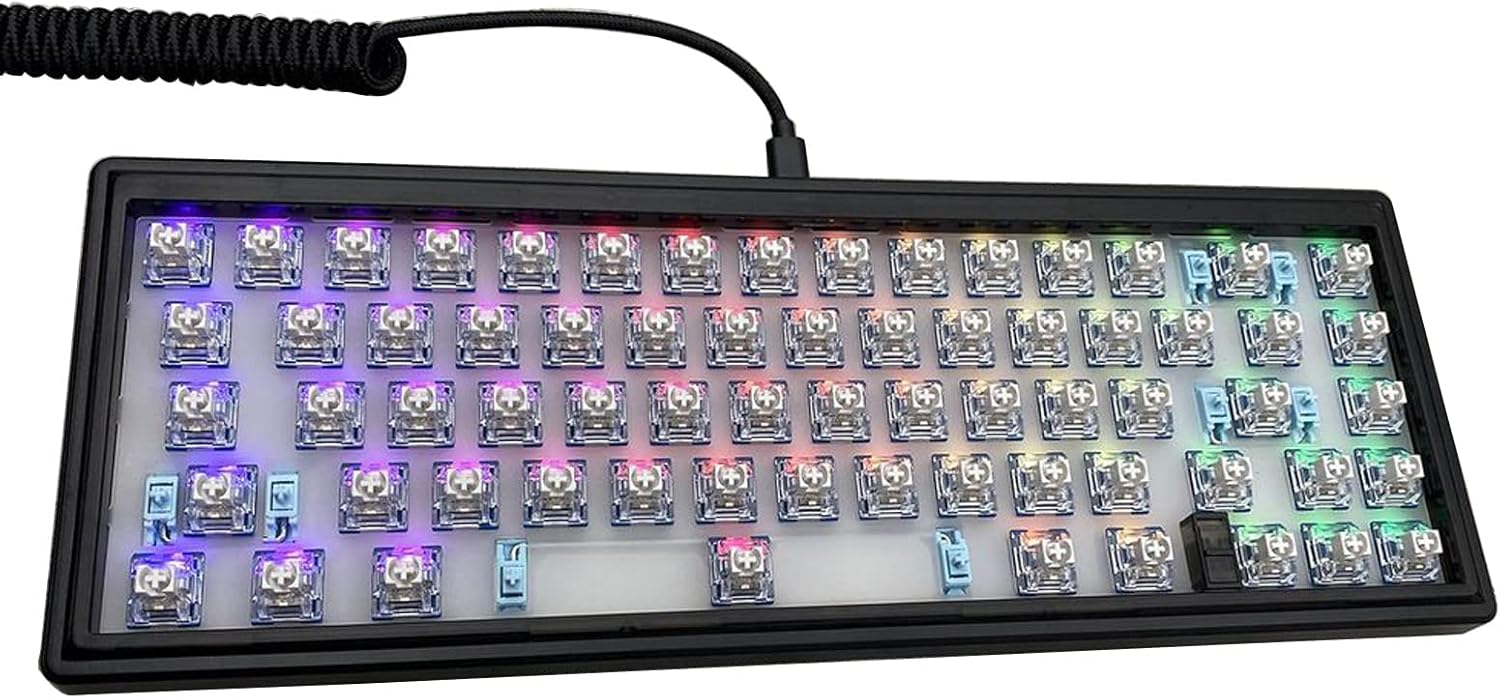
Image: A close-up view of the GAS67 keyboard with mechanical switches installed, demonstrating the hot-swap functionality and potential RGB lighting.
- Install Keycaps:
Once all switches are installed, carefully place your keycaps onto the switches. Ensure they are pressed down firmly and evenly. The GAS67 supports a 65% layout, so ensure your keycap set is compatible.
- Connect the Keyboard:
Connect the provided USB Type-C cable to the port on the keyboard and to an available USB port on your computer. The keyboard should be recognized automatically by your operating system.
Operating Instructions
The Yuly CIY GAS67 functions as a standard USB keyboard. No special drivers are typically required for basic operation.
- Basic Functionality: Once connected, the keyboard will function immediately for typing and standard input.
- Customization: The kit is designed for customization. Users can change switches and keycaps to alter typing feel and aesthetics.
- Software (if applicable): Refer to the manufacturer's website or community resources for any available software for key remapping or RGB lighting control, if supported by the PCB.
Maintenance
Proper maintenance ensures the longevity and performance of your mechanical keyboard kit.
- Cleaning Keycaps: Remove keycaps using a keycap puller. Clean them with a mild soap solution and a soft cloth, then dry thoroughly before reattaching.
- Cleaning Switches: Use compressed air to remove dust and debris from around the switches. For deeper cleaning, switches can be carefully removed using a switch puller.
- Case Cleaning: Wipe the ABS case with a soft, damp cloth. Avoid harsh chemicals that may damage the finish.
- Cable Care: Avoid sharp bends or excessive pulling on the USB-C cable to prevent damage.
Troubleshooting
If you encounter issues with your Yuly CIY GAS67 keyboard kit, refer to the following common solutions:
- Keyboard Not Responding:
- Ensure the USB-C cable is securely connected to both the keyboard and the computer.
- Try a different USB port on your computer.
- Test with a different USB-C cable if available.
- Restart your computer.
- Specific Keys Not Working:
- Carefully remove the keycap and then the switch for the non-functional key using the provided tools.
- Inspect the switch pins for bends or damage. Straighten bent pins gently with tweezers if possible.
- Reinsert the switch firmly into the hot-swap socket. Ensure it is fully seated.
- Try swapping the problematic switch with a known working switch from another key to determine if the issue is with the switch or the PCB socket.
- Intermittent Connectivity:
- Check the USB-C cable for damage.
- Ensure the USB port on the keyboard is clean and free of debris.
- Avoid placing the keyboard near strong electromagnetic interference sources.
Specifications
| Model | GAS67 |
| Keyboard Layout | 65% (67 keys) |
| Switch Compatibility | MX-style 3-pin / 5-pin hot-swappable |
| Connectivity | USB Type-C |
| Shell Material | ABS (Acrylonitrile Butadiene Styrene) |
| Positioning Plate Material | Metal |
| Product Dimensions (L x W x H) | 326 x 120 x 26 mm (12.83 x 4.72 x 1.02 inches) |
| Special Features | Gasket Structure, Hot-Swappable Sockets, Soundproof Silicone Pad, Bottom Sound-Absorbing Cotton, Keycap Stabilizers |

Image: Dimensional diagram of the GAS67 keyboard kit, indicating a length of 326mm (12.83 inches) and a width of 120mm (4.72 inches).
Warranty and Support
For warranty information and technical support, please refer to the retailer where the product was purchased or visit the official Yuly website. Keep your proof of purchase for warranty claims.