
1. Introduction
This manual provides essential information for the safe and efficient operation of your NOVOPAL 5000 Watt Pure Sine Wave Power Inverter. This device converts 24V DC battery power into 110V/120V AC household electricity, suitable for powering a wide range of appliances and sensitive electronic equipment. It features a continuous power output of 5000 watts and a peak power of 10000 watts, an LCD display for monitoring, and a remote control for convenient operation.
2. Safety Information
Please read and understand all safety instructions before installing or operating the inverter. Failure to follow these instructions may result in electric shock, fire, or serious injury.
- Proper Ventilation: Ensure the inverter is installed in a well-ventilated area to prevent overheating.
- Correct Voltage: Connect the inverter only to a 24V DC power source. Connecting to a 12V DC source will not function, and connecting to a higher voltage may cause damage.
- Grounding: The inverter must be properly grounded.
- Avoid Moisture: Do not expose the inverter to rain, water, or excessive moisture.
- Load Capacity: Do not exceed the inverter's continuous power rating of 5000 watts.
- Polarity: Always connect battery cables with correct polarity (positive to positive, negative to negative). Reverse polarity will damage the inverter.
- Built-in Fuse: The inverter has a built-in fuse. Do not attempt to install additional fuses internally.
The NOVOPAL inverter includes comprehensive safety features:
- Overheat Protection
- Short Circuit Protection
- Undervoltage Protection
- Overvoltage Protection
- Overload Protection
- Reverse Connection Protection

Image: Visual representation of the inverter's multiple protection features, including over temperature, overvoltage, undervoltage, reverse polarity, overload, and short circuit protection.
3. Package Contents
Verify that all items are present in your package:
- 1 x NOVOPAL 5000W 24V Pure Sine Wave Inverter
- 1 x Wired Remote Control (16 ft cable length)
- 1 x Set of Battery Cables (Red and Black)
- 1 x Set of Protective Terminal Covers
- 1 x Ground Wire
- 1 x User Manual (this document)
- 1 x Set of Spare Fuses
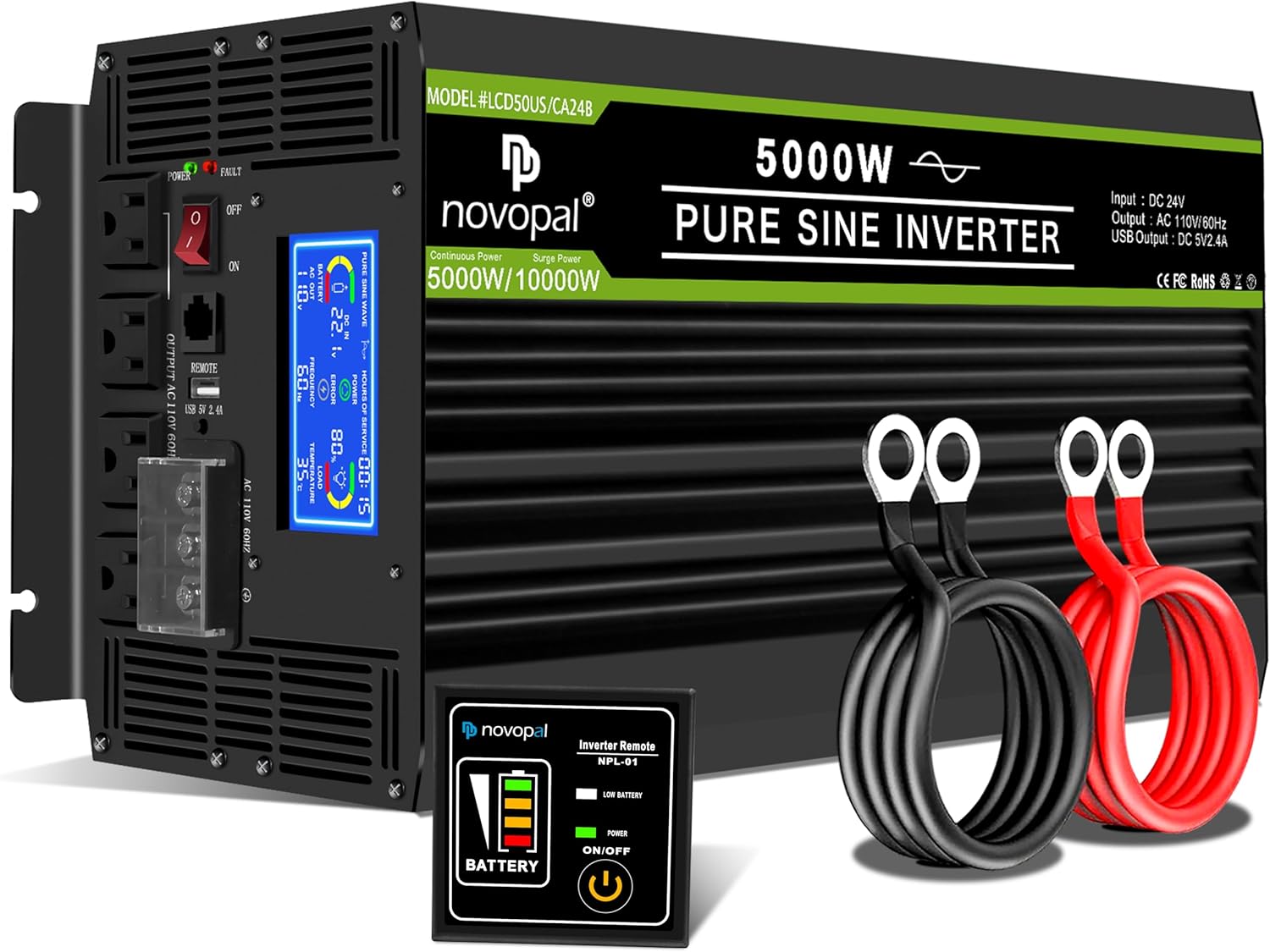
Image: The NOVOPAL 5000W Pure Sine Wave Power Inverter shown with its included accessories: battery cables (red and black), remote control, and protective terminal covers.
4. Product Overview
4.1. Physical Components
Familiarize yourself with the various parts of your inverter:

Image: A detailed view of the NOVOPAL inverter highlighting key components such as the Negative DC Terminal, Cooling Fan, Positive DC Terminal, LCD Display, High Power Terminal, Indicator Light, ON/OFF Switch, Remote Control port, USB Port 2.1A, and AC Sockets.
4.2. LCD Display
The integrated LCD display provides real-time operational status and diagnostic information:
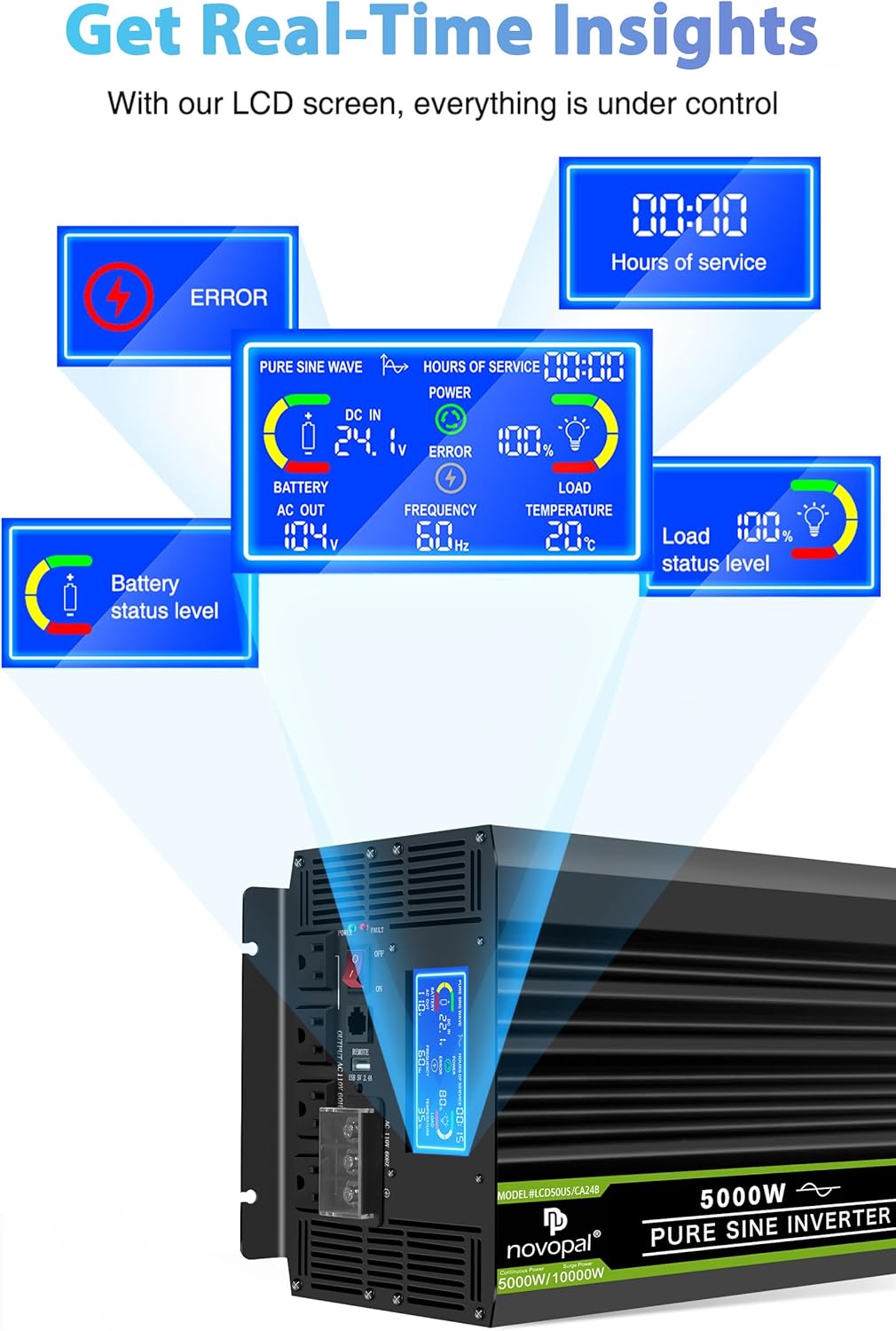
Image: Close-up of the inverter's LCD screen showing various indicators including ERROR, HOURS OF SERVICE, DC IN voltage, BATTERY level, AC OUT voltage, FREQUENCY, LOAD percentage, and TEMPERATURE.
5. Setup Instructions
5.1. Mounting the Inverter
Choose a dry, cool, and well-ventilated location for mounting the inverter. Ensure there is sufficient space around the unit for airflow, especially around the cooling fans. The inverter can be mounted horizontally or vertically using the integrated mounting brackets.

Image: The NOVOPAL inverter with its dimensions (20.87 inches length, 9.21 inches width, 6.50 inches height) indicated, illustrating its physical size for mounting considerations.
5.2. Battery Connection (DC 24V)
- Ensure the inverter's power switch is in the OFF position.
- Connect the red positive (+) battery cable to the positive (+) terminal of your 24V battery bank.
- Connect the other end of the red positive (+) cable to the positive (+) DC input terminal on the inverter.
- Connect the black negative (-) battery cable to the negative (-) terminal of your 24V battery bank.
- Connect the other end of the black negative (-) cable to the negative (-) DC input terminal on the inverter.
- Tighten all connections securely to prevent loose contacts, which can cause overheating and damage.
5.3. Grounding the Inverter
For safety, the inverter must be properly grounded. Connect the provided ground wire from the inverter's ground terminal to a suitable earth ground point (e.g., vehicle chassis, ground rod, or electrical panel ground bus).
5.4. Remote Control Connection
The remote control allows for convenient power management, especially when the inverter is installed in a less accessible location. Plug the remote control cable into the designated REMOTE port on the inverter. The remote control features an ON/OFF button and a battery level indicator.

Image: The NOVOPAL wired remote control, showing its ON/OFF button and battery level indicator, with a 16-foot cable for flexible placement.
6. Operating Instructions
6.1. Powering On/Off
- After all connections are secure, switch the inverter's main power switch to the ON position. The LCD display will illuminate.
- Alternatively, use the ON/OFF button on the remote control to power the inverter on or off.
- To power off, switch the main power switch to OFF or press the remote control's ON/OFF button.
6.2. Connecting AC Loads
- Plug your AC appliances into the 110V/120V AC outlets on the inverter.
- Ensure the total continuous wattage of all connected appliances does not exceed 5000 watts.
- For appliances with high startup (surge) power requirements, ensure the inverter's 10000-watt peak capacity is not exceeded.
6.3. USB Port Usage
The inverter includes a 2.1A USB port for charging compatible USB-powered devices such as smartphones and tablets.
6.4. Interpreting the LCD Display
The LCD display provides critical information for monitoring the inverter's performance:
- Input Voltage (DC IN): Shows the current DC voltage from your battery bank.
- Battery Capacity: Indicates the estimated remaining battery charge level.
- Power Percentage: Displays the percentage of the inverter's capacity currently being used.
- Time of Use: Shows the duration the inverter has been operating.
- Power Indicator Light: Illuminates when the inverter is active.
- Fault Indicator (ERROR): Displays error codes or warnings if a protection feature is triggered.
- Output Power: Shows the current AC power output in watts.
- Output Frequency (FREQUENCY): Displays the AC output frequency (60Hz).
- Operating Temperature (TEMPERATURE): Shows the internal temperature of the inverter.
7. Maintenance
- Cleaning: Periodically clean the exterior of the inverter with a dry cloth. Ensure ventilation openings and cooling fans are free from dust and debris.
- Connections: Regularly check all DC and AC connections to ensure they are tight and free from corrosion.
- Ventilation: Confirm that the inverter's ventilation remains unobstructed during operation.
8. Troubleshooting
If the inverter is not functioning correctly, consult the LCD display for error messages and refer to the following common issues:
| Problem | Possible Cause | Solution |
|---|---|---|
| No AC Output / Inverter Off | Low battery voltage, Overload, Overheat, Loose connections, Inverter switch off | Check battery voltage, Reduce load, Allow inverter to cool, Secure all cables, Turn inverter on |
| LCD shows "ERROR" | Specific fault detected (e.g., overvoltage, undervoltage, overload, short circuit, overheat, reverse polarity) | Identify the specific error code on the display. Address the underlying issue (e.g., charge battery, reduce load, check wiring). The inverter may require a power cycle (disconnect and reconnect battery) after a fault. |
| Weak or Intermittent Power | Insufficient battery charge, Undersized battery cables, Loose connections | Charge battery, Use appropriate gauge cables, Tighten connections |
| Fans constantly running | High internal temperature due to heavy load or poor ventilation | Ensure adequate ventilation, Reduce load if possible. This is normal operation under heavy load. |
9. Specifications
| Feature | Specification |
|---|---|
| Model Name | LCD50US24B |
| Continuous Power | 5000 Watts |
| Peak Power | 10000 Watts |
| Input Voltage | DC 24V |
| Output Voltage | AC 110V / 120V |
| Output Waveform | Pure Sine Wave |
| Output Frequency | 60Hz |
| USB Output | DC 5V, 2.1A |
| Product Dimensions | 18.34 x 4.92 x 6.49 inches |
| Item Weight | 23.4 pounds |
| Recommended Uses | Travel, Camping, Business trip, Car, Boat |
| Power Source | Solar and Battery Powered |
10. Warranty and Support
The NOVOPAL 5000W Pure Sine Wave Power Inverter comes with a 1-year warranty covering materials and workmanship. For any issues encountered during use, please contact NOVOPAL customer support via email for assistance.