
1. Introduction
This manual provides essential information for the installation, operation, and maintenance of the SPABOY FX3U-14MT Programmable Logic Controller (PLC). The FX3U-14MT is an industrial control board featuring 14 digital inputs, 10 digital outputs, 6 analog inputs, 2 analog outputs, and RS232/RS485 communication interfaces. It is designed for various industrial automation applications.
Please read this manual thoroughly before using the product to ensure correct and safe operation.
2. Safety Information
Observe the following safety precautions to prevent personal injury and damage to the equipment:
- Ensure power is disconnected before performing any wiring or maintenance.
- Only qualified personnel should install and service this device.
- Do not operate the PLC in environments exceeding its specified temperature, humidity, or vibration limits.
- Avoid exposing the device to direct sunlight, corrosive gases, or excessive dust.
- Proper grounding is essential for safe operation and to prevent electrical noise.
3. Product Overview
The SPABOY FX3U-14MT PLC is a compact and versatile industrial control solution. Below is an image illustrating the main components and connection points.

Figure 3.1: Top-down view of the FX3U-14MT PLC. This image shows the main circuit board, input/output terminal blocks, and the RS232 communication port.

Figure 3.2: Angled view of the FX3U-14MT PLC, highlighting the side-mounted terminal blocks for various connections.
4. Setup and Installation
4.1. Physical Installation
The PLC should be mounted in a stable, well-ventilated enclosure, away from sources of heat, vibration, and electromagnetic interference. Use appropriate mounting hardware to secure the board.
4.2. Power Supply Connection
Connect a stable DC power supply (typically 24V DC, check specifications for exact voltage range) to the designated power terminals. Ensure correct polarity. Improper power connection can damage the device.
4.3. Wiring Digital Inputs (DI)
The FX3U-14MT features 14 digital inputs. Connect sensors, switches, and other input devices to the DI terminals. Refer to the wiring diagram for specific terminal assignments. Inputs are typically sink/source type, requiring careful consideration of external wiring.
4.4. Wiring Digital Outputs (DO)
The PLC provides 10 digital outputs. Connect actuators, relays, indicator lights, or other output devices to the DO terminals. Ensure the load current does not exceed the maximum rating per output. The FX3U-14MT variant uses transistor outputs.
4.5. Wiring Analog Inputs (AI)
The 6 analog inputs support standard industrial signals (e.g., 0-10V, 4-20mA). Connect analog sensors to these terminals. Proper shielding and grounding of analog signal cables are crucial to minimize noise interference.
4.6. Wiring Analog Outputs (AO)
The 2 analog outputs provide control signals for devices like variable frequency drives or proportional valves. Connect these devices to the AO terminals, ensuring compatibility with the output signal range.
4.7. Communication Ports (RS232/RS485)
Connect the PLC to a programming device or other communication equipment using the RS232 or RS485 ports. Use appropriate cables and ensure correct pin assignments for reliable data exchange.
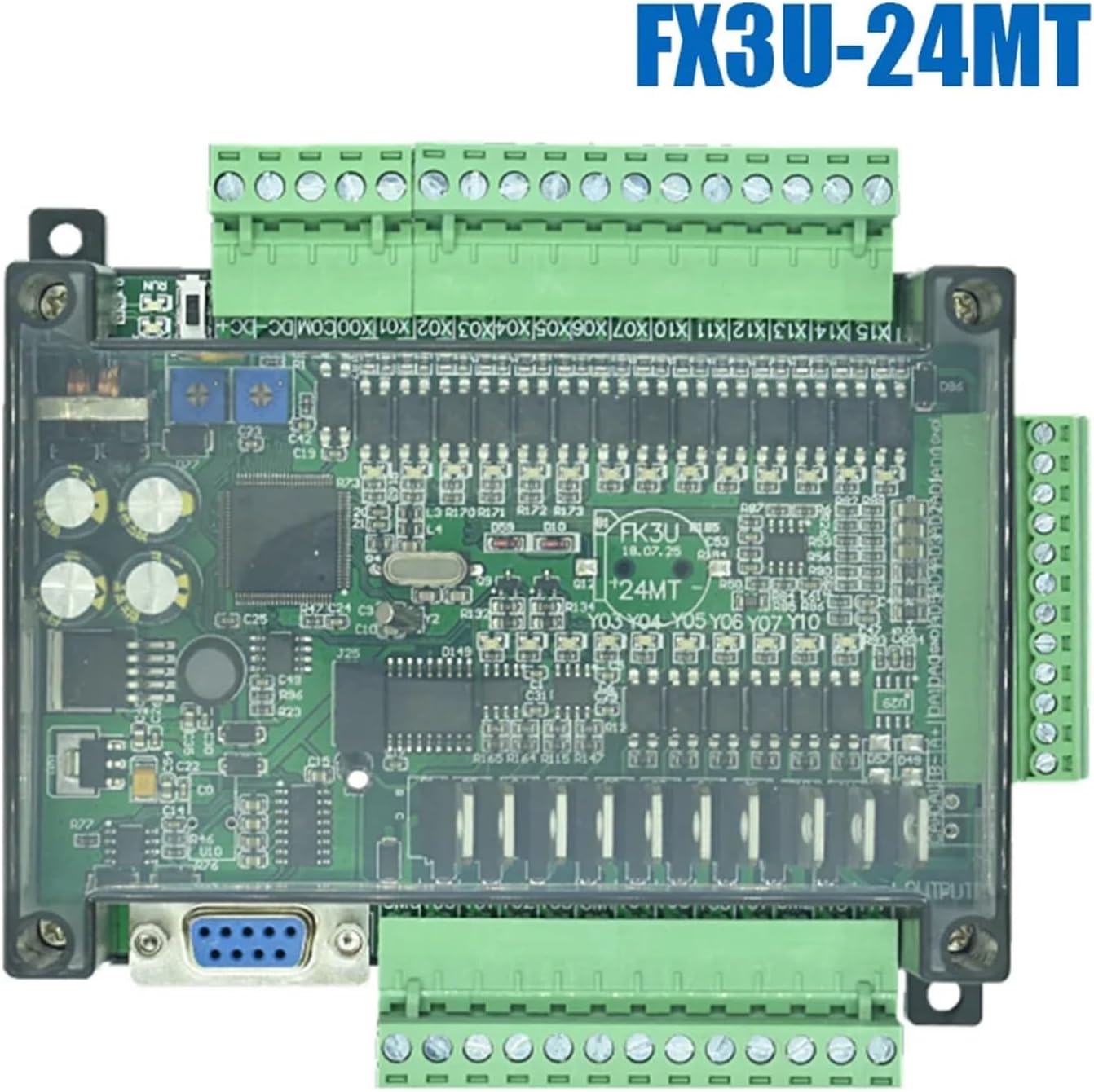
Figure 4.1: Side view of the FX3U-14MT PLC, detailing the RS232 communication port and input/output wiring terminals.
5. Operating Instructions
5.1. Software Installation and Connection
Install the appropriate PLC programming software (e.g., GX Works2/3 or compatible software) on your computer. Connect the computer to the PLC via the RS232 port using a suitable programming cable.
5.2. Programming the PLC
Develop your control logic using ladder diagram, instruction list, or other supported programming languages within the software. The FX3U series typically supports a rich instruction set for various control tasks.
5.3. Uploading and Downloading Programs
Once the program is complete, download it to the PLC's memory. Ensure the PLC is in STOP mode before downloading. After downloading, switch the PLC to RUN mode to execute the program. You can also upload existing programs from the PLC for backup or modification.
5.4. Monitoring and Debugging
Use the programming software to monitor the status of inputs, outputs, internal relays, and data registers in real-time. This feature is essential for debugging and verifying program logic.
6. Maintenance
Regular maintenance ensures the longevity and reliable operation of your PLC.
- Cleaning: Periodically clean the PLC and its enclosure to prevent dust accumulation, which can lead to overheating or short circuits. Use a soft, dry cloth or compressed air.
- Connection Checks: Regularly inspect all wiring connections for tightness and signs of corrosion. Loose connections can cause intermittent operation or failures.
- Environmental Monitoring: Ensure the operating environment remains within the specified temperature and humidity ranges.
- Backup Programs: Periodically back up your PLC programs to an external storage device to prevent data loss.
7. Troubleshooting
This section provides solutions to common issues encountered during PLC operation.
| Problem | Possible Cause | Solution |
|---|---|---|
| PLC does not power on. | No power supply, incorrect voltage, reversed polarity, faulty power supply. | Check power connections, verify voltage and polarity, test power supply. |
| Inputs not responding. | Incorrect wiring, faulty sensor, program logic error, input type mismatch. | Verify wiring, test sensor, check program logic, ensure input type (sink/source) matches. |
| Outputs not activating. | Incorrect wiring, faulty actuator, program logic error, overloaded output. | Verify wiring, test actuator, check program logic, ensure load is within output rating. |
| Communication errors. | Incorrect cable, wrong port settings (baud rate, data bits), driver issues. | Check cable integrity, verify communication settings in software and PLC, reinstall drivers. |
8. Specifications
Detailed technical specifications for the SPABOY FX3U-14MT PLC.
| Feature | Specification |
|---|---|
| Model | FX3U-14MT |
| Digital Inputs (DI) | 14 points |
| Digital Outputs (DO) | 10 points (Transistor Type) |
| Analog Inputs (AI) | 6 points |
| Analog Outputs (AO) | 2 points |
| Communication Ports | RS232, RS485 |
| Manufacturer | SPABOY |
| Item Weight | 50 Grams (1.76 ounces) |
| Package Dimensions | 1.18 x 0.79 x 0.39 inches |
9. Warranty and Support
For warranty information and technical support, please refer to the official SPABOY website or contact your local distributor. Keep your purchase receipt for warranty claims.