
Introduction
This manual provides detailed instructions for the assembly, operation, and maintenance of your Giantex L Shaped Computer Desk, Model GX10583-CB. This versatile desk features a convertible design, allowing it to be configured as an L-shaped or straight desk, and includes a built-in charging station, storage shelves, and drawers. Please read these instructions carefully before assembly and use to ensure safe and proper operation.
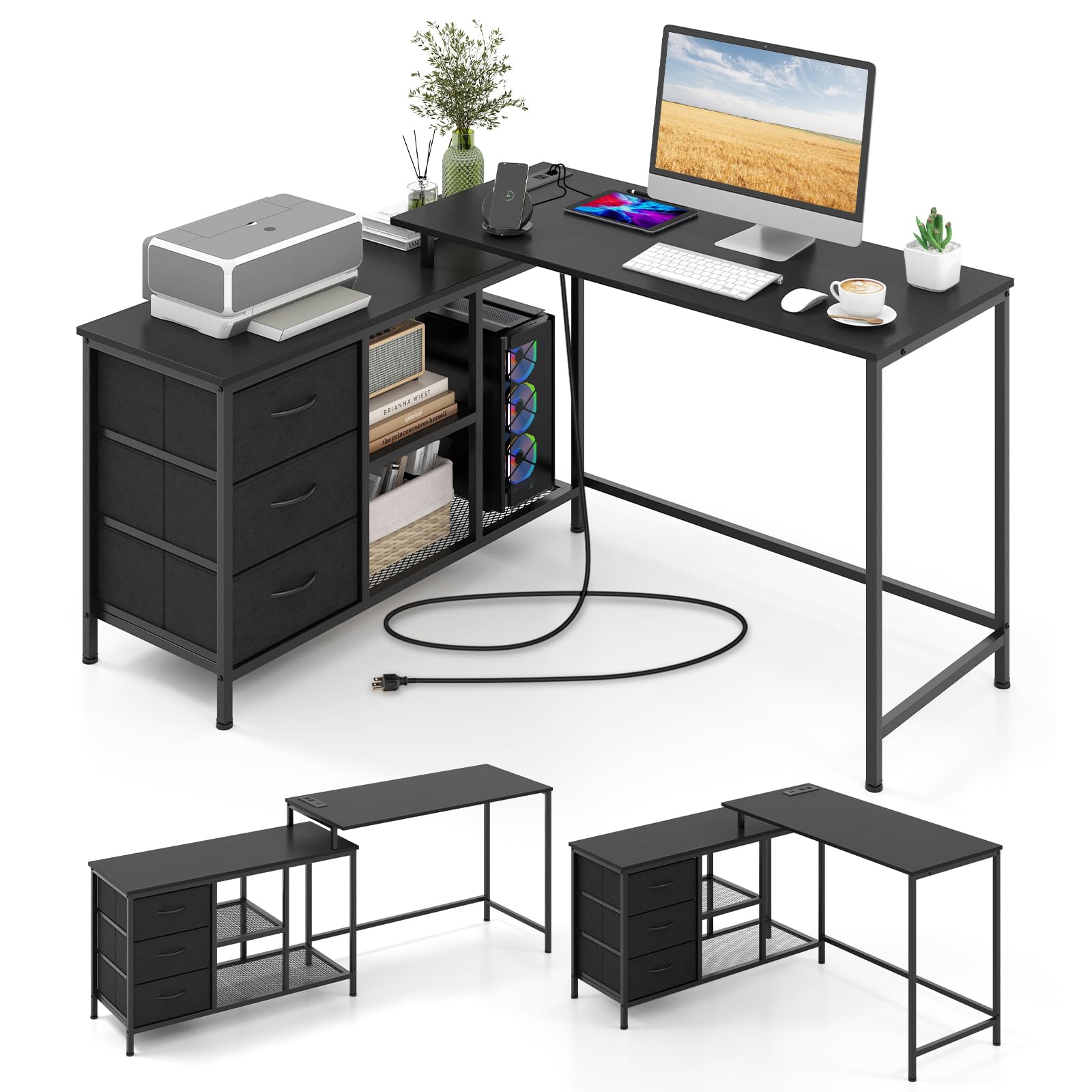
Image: The Giantex L Shaped Computer Desk in its L-shaped configuration, showcasing its design and storage capabilities.
Video: A brief overview of the Giantex L Shaped Computer Desk, highlighting its features and versatility.
Important Safety Information
- Always assemble the desk on a flat, stable surface.
- Use the adjustable foot pads to level the desk if necessary, ensuring stability.
- Be cautious when handling the tall, detachable tabletop to avoid injury or damage during configuration changes.
- Do not overload the desk with excessive weight, as it may compromise stability and tip over. The maximum weight recommendation for the tall table is 200 lbs, side cabinet top is 110 lbs, middle shelf is 25 lbs, bottom shelf is 35 lbs, and each drawer is 15 lbs.
- Always follow the instructions provided for safe assembly and use.
- Ensure all screws and fasteners are securely tightened before use. Periodically check and re-tighten as needed.
- Keep children and pets away from the assembly area.
- Do not use power tools for assembly unless explicitly instructed, as overtightening can damage components.

Image: Key stability features including screw hole covers, reinforced metal tubes, and adjustable foot pads.
Package Contents
Before beginning assembly, verify that all parts listed below are present and undamaged. If any parts are missing or damaged, please contact customer support.
Components:
- 1 x Computer Desk (main structure)
- 1 x Instruction Manual
- 3 x Removable Fabric Drawers
- Metal Frame Components (various labeled parts like A, B, C, D, E, F, G, H, I, J, K, L, M)
- 1 x Charging Station (with 2 AC outlets and 2 USB ports)
Hardware:
- Screws (various sizes, e.g., M6*12, M4*16, M6*20, M6*30)
- Adjustable Foot Pads
- Screw Hole Covers
- Drawer Handles
- Hex Wrench
- Screwdriver

Image: A visual representation of all desk components and hardware included in the package.
Assembly Instructions
Follow these steps carefully to assemble your L Shaped Computer Desk. It is recommended to have two people for assembly.
- Step 1: Assemble the Side Cabinet Frame Base. Attach the adjustable foot pads to the bottom of the metal frame parts C, E, and K.
- Step 2: Connect Side Cabinet Frame Sections. Securely attach frame part C to part I using the provided screws. Then, attach frame part E to part I.
- Step 3: Install Crossbars for Side Cabinet. Attach the G crossbars to the side cabinet frame using screws.
- Step 4: Insert Middle Shelf. Place the mesh shelf H into the designated slots within the side cabinet frame and secure it with screws.
- Step 5: Attach Top Crossbars for Side Cabinet. Secure the F crossbars to the top of the side cabinet frame using screws.
- Step 6: Attach Side Cabinet Top Panel. Place the main tabletop panel A onto the assembled side cabinet frame and secure it with screws.
- Step 7: Assemble Fabric Drawers. Unfold the fabric drawers (N), insert the bottom panel, and attach the handles using the small screws.
- Step 8: Insert Drawers into Side Cabinet. Slide the assembled fabric drawers into the designated slots in the side cabinet.
- Step 9: Assemble the Long Desk Frame. Attach the L crossbars to the underside of the long desk tabletop panel B. Then, attach the K and J frame parts to the long desk tabletop panel B using screws.
- Step 10: Connect Long Desk to Side Cabinet. Attach the M crossbar to the long desk frame. Connect the long desk assembly to the side cabinet assembly.
- Step 11: Install Charging Station. Insert the charging station into the pre-cut opening on the long desk tabletop and secure it with screws.
Video: Detailed assembly instructions for the Giantex L Shaped Computer Desk.
Convertible Design:
The desk can be configured in two main ways: an L-shaped corner desk or a long straight desk. The tall tabletop section is detachable, offering flexibility to create a smaller study writing desk if desired. To convert, carefully detach or reattach the tall tabletop section as needed, ensuring all connections are secure.

Image: Illustration of the desk's flexible combinations, showing how it can adapt to different spaces.

Image: The desk configured as an L-shaped corner desk, suitable for various office setups.

Image: The desk configured as a long straight desk, offering an extended workspace.
Operating Instructions
Charging Station:
The desk is equipped with a built-in charging station for your convenience. It includes:
- 2 AC Outlets (125V/12A)
- 2 USB Ports (5V/Max. 2.1A)
To use, simply plug the desk's power cord into a standard wall outlet. You can then connect your electronic devices to the AC outlets or USB ports for charging or power. Ensure devices are compatible with the provided power specifications.

Image: The integrated charging station with AC outlets and USB ports for convenient device power.
Storage Features:
The desk offers ample storage to keep your workspace organized:
- 3 Removable Fabric Drawers: Ideal for stationery, documents, and personal items.
- 2-Tier Open Shelf: Suitable for books, binders, or decorative items.
- Spacious Host Stand: Designed to accommodate a computer tower or other larger equipment.
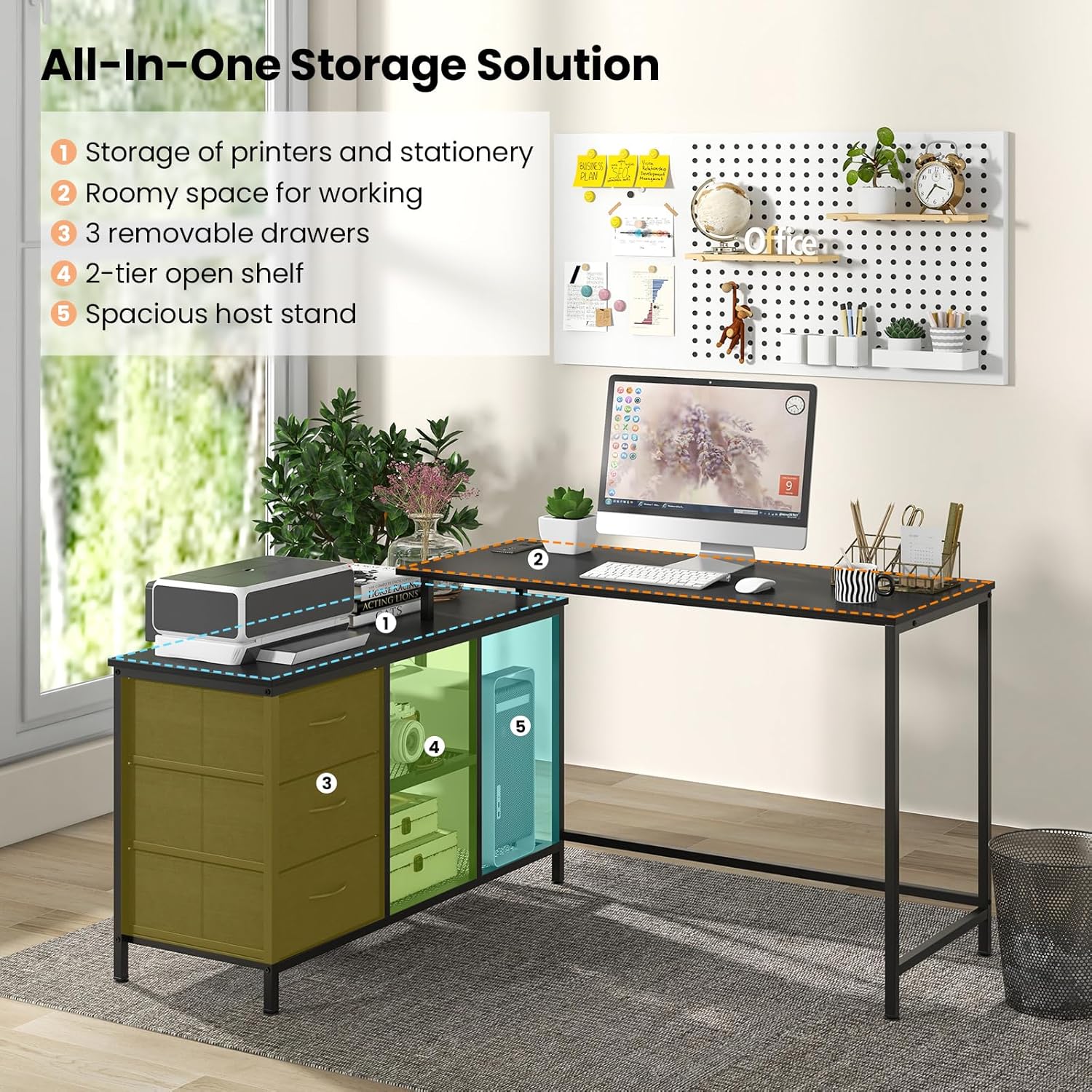
Image: An overview of the desk's storage solutions, including drawers, shelves, and a host stand.
Maintenance
- Cleaning: Wipe surfaces with a soft, damp cloth. Avoid harsh chemicals or abrasive cleaners that could damage the finish.
- Hardware Check: Periodically inspect all screws and fasteners to ensure they remain tight. Re-tighten as necessary to maintain stability.
- Drawer Care: The fabric drawers can be spot cleaned with a mild detergent. Ensure they are completely dry before returning them to the desk.
- Power Unit: Keep the charging station free from dust and spills. Do not attempt to disassemble or repair the power unit yourself.
Troubleshooting
- Desk Wobbles: Ensure all assembly screws are tightened. Use the adjustable foot pads at the bottom of the desk legs to level the desk on uneven floors.
- Charging Station Not Working: Verify that the desk's power cord is securely plugged into a functional wall outlet. Check if the devices you are trying to charge are properly connected and compatible with the charging station's specifications.
- Drawers Not Sliding Smoothly: Ensure the fabric drawers are correctly assembled and inserted. Check for any obstructions in the drawer slots.
- Parts Missing/Damaged: If you discover any missing or damaged parts during assembly, please refer to the "Warranty and Support" section for contact information.
Specifications
| Brand | Giantex |
| Model Number | GX10583-CB |
| Color | Black |
| Material | Engineered Wood, Metal, Non-Woven Fabric |
| Overall Dimension (L Desk) | 55" x 41.5" x 29.5" (L x W x H) |
| Overall Dimension (Long Desk) | 81" x 19" x 29.5" (L x W x H) |
| Item Weight | 45.5 lbs |
| Max Load Capacity (Tall Table) | 200 lbs |
| Max Load Capacity (Side Cabinet Top) | 110 lbs |
| Max Load Capacity (Middle Shelf) | 25 lbs |
| Max Load Capacity (Bottom Shelf) | 35 lbs |
| Max Load Capacity (Each Drawer) | 15 lbs |
| AC Outlet | 125V/12A |
| USB Port | 5V/Max. 2.1A |
| Power Cord Length | 4.9 ft |
| Required Assembly | Yes |
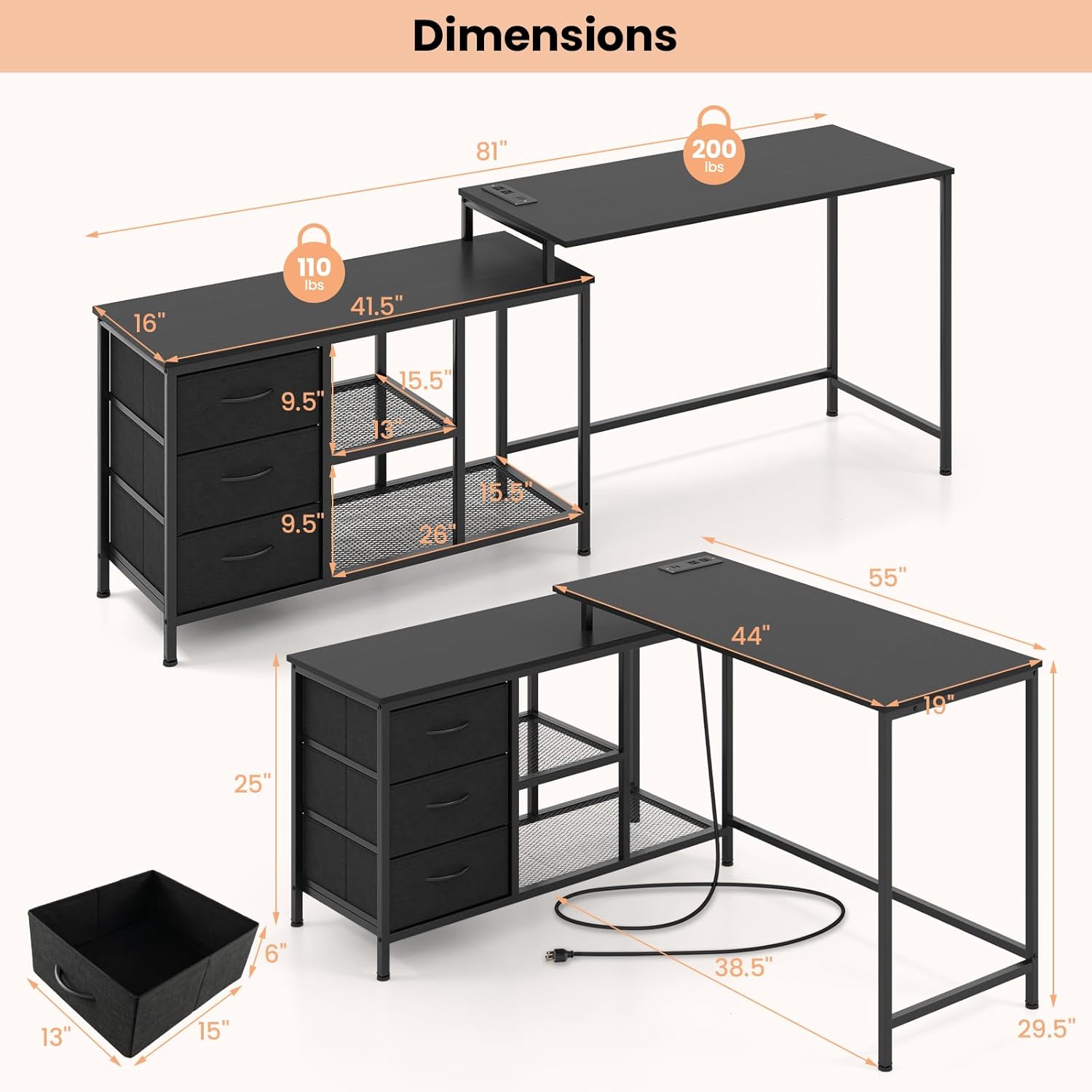
Image: Dimensional drawing and load capacities for the desk components.
Warranty and Support
This Giantex L Shaped Computer Desk comes with a limited warranty. For specific warranty details, please refer to the documentation included with your purchase or contact Giantex customer support.
Returns: The product is eligible for 30-day easy returns. Please check the retailer's return policy for full details.
Customer Support: For assistance with assembly, missing parts, or any other inquiries, please visit the Giantex Store on Amazon or contact their customer service directly.