
1. Safety Precautions
Failure to follow these instructions may result in death, severe injury, or property loss.
- Always ensure the power supply is disconnected before performing any wiring or maintenance.
- Do not connect the U, V, W output terminals directly to the AC power supply; this will damage the inverter.
- Never install the inverter on flammable materials to prevent explosion risks.
- The ground terminal of the inverter must be properly grounded.
- Avoid using the inverter in environments with explosive gases.
- Only qualified personnel should perform wiring and maintenance due to high internal voltages.
2. Product Overview
The Vvikizy AT1-4000X is a 220V single-phase input to three-phase output Variable Frequency Drive (VFD) designed for precise speed control of 3-phase 4kW AC motors. It employs a unique PWM control method to deliver high torque, high accuracy, and a wide speed regulation range.
Key features include:
- Unique Control Method: Enables high torque, high accuracy, and a wide speed regulating range for efficient motor performance.
- Anti-trip Performance: Designed to operate reliably in challenging power conditions, temperature variations, humidity, and dusty environments.
- Low Noise and Electromagnetic Interference: Optimized PWM control technology minimizes noise and electromagnetic interference, suitable for sensitive applications.
- Simple Operation: Features straightforward wiring and an intuitive control panel for ease of use.
- Fast Response: Provides quick start and stop response, along with significant torque at low speeds for smooth and efficient motor control.

Figure 2.1: Front view of the Vvikizy AT1-4000X Variable Frequency Drive.
3. Components and Control Panel
3.1 Control Panel Layout
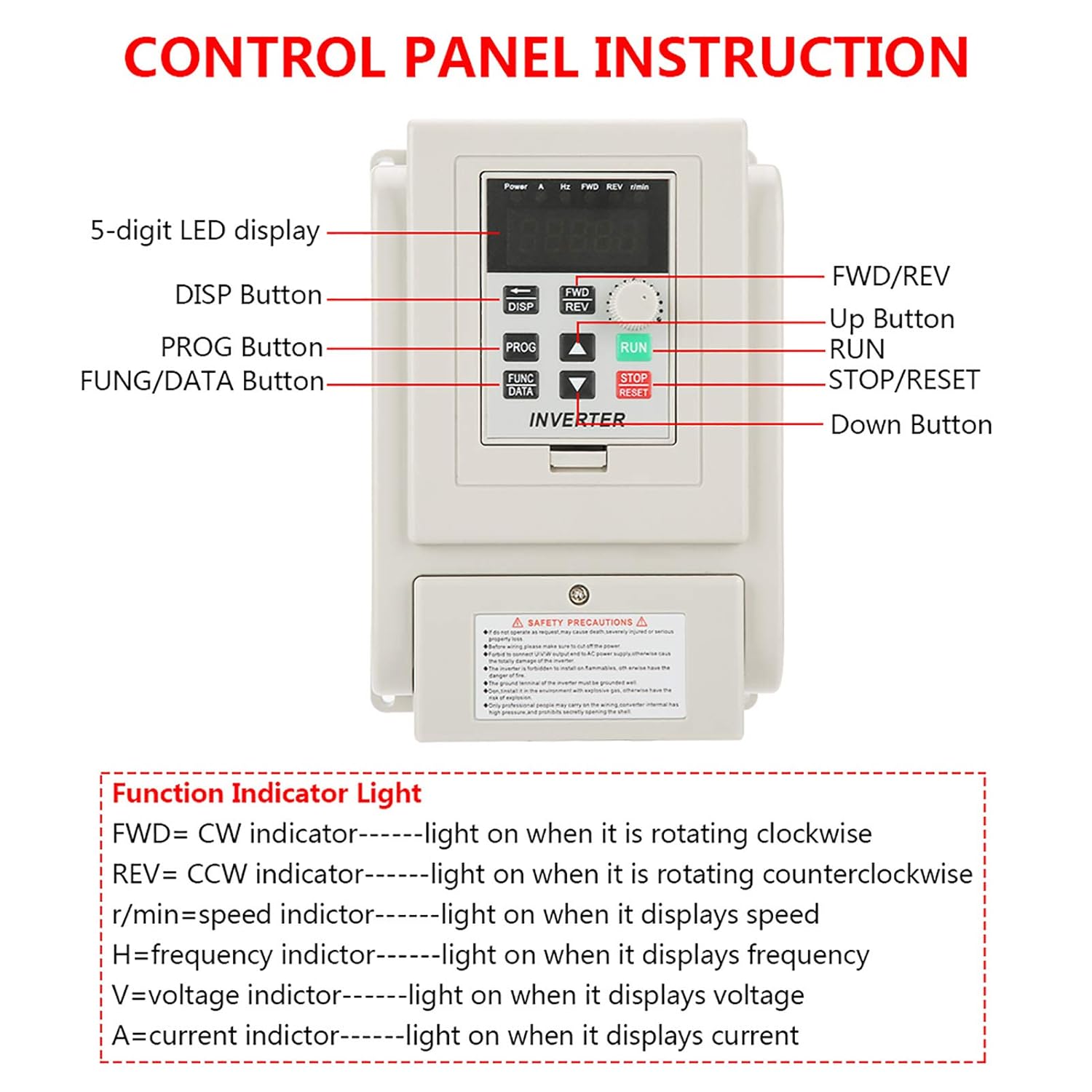
Figure 3.1: Detailed view of the VFD control panel with labeled buttons and display.
The control panel features a 5-digit LED display and several buttons for operation and programming:
- 5-digit LED display: Shows operational parameters such as frequency, speed, voltage, and current.
- DISP Button: Used to cycle through different display parameters.
- PROG Button: Enters or exits programming mode.
- FUNC/DATA Button: Used for function selection and data entry/confirmation in programming mode.
- FWD/REV Button: Toggles the motor's rotation direction (Forward/Reverse).
- Up Button (▲): Increases parameter values or navigates menus.
- Down Button (▼): Decreases parameter values or navigates menus.
- RUN Button (Green): Starts the motor.
- STOP/RESET Button (Red): Stops the motor or resets errors.
- Speed Knob: Adjusts the output frequency/speed.
3.2 Function Indicator Lights
The control panel includes indicator lights to show the current status:
- FWD: Illuminates when the motor is rotating clockwise.
- REV: Illuminates when the motor is rotating counter-clockwise.
- r/min: Illuminates when the display shows motor speed.
- H: Illuminates when the display shows frequency.
- V: Illuminates when the display shows voltage.
- A: Illuminates when the display shows current.
3.3 Internal Structure

Figure 3.2: Side view of the VFD, highlighting the internal heat sink and cooling fans for thermal management.
4. Setup and Wiring
The VFD is designed for simple and straightforward wiring. Always ensure power is disconnected before proceeding.
4.1 Terminal Functions

Figure 4.1: Close-up view of the VFD's input and output wiring terminals.
- L, N: Single phase AC 220V input terminals. Connect your 220V single-phase power supply here.
- U, V, W: Three-phase output terminals. Connect these directly to your 3-phase AC motor.
- GND: Ground terminal. Ensure this is properly connected to an earth ground.
4.2 Installation Steps
- Mount the VFD securely in a well-ventilated area, away from flammable materials and explosive gases.
- Ensure the main power supply is OFF.
- Remove the terminal cover screws.
- Connect the single-phase 220V AC input to the L and N terminals.
- Connect the three-phase AC motor to the U, V, and W output terminals.
- Connect the GND terminal to a reliable earth ground.
- Replace the terminal cover and secure the screws.
- Double-check all connections before applying power.
5. Operating Instructions
Once the VFD is correctly wired and powered on, you can begin operating your motor.
- Power On: Apply single-phase 220V AC power to the VFD. The LED display should illuminate.
- Adjust Speed: Use the Speed Knob to set the desired output frequency/motor speed. The display will show the current frequency (H) or speed (r/min) depending on the DISP setting.
- Start Motor: Press the green RUN button to start the motor. The FWD or REV indicator will light up.
- Change Direction: To change the motor's rotation direction, press the FWD/REV button while the motor is running or stopped.
- Stop Motor: Press the red STOP/RESET button to stop the motor.
- Display Parameters: Use the DISP button to cycle through various display parameters such as frequency (H), speed (r/min), voltage (V), and current (A).
- Programming: For advanced settings and parameter adjustments, press the PROG button to enter programming mode. Refer to the detailed programming guide (if available separately) for specific parameter settings.
6. Maintenance
Regular maintenance helps ensure the longevity and reliable operation of your VFD.
- Keep the VFD clean and free from dust and debris. Use a soft, dry cloth for cleaning.
- Ensure adequate ventilation around the unit to prevent overheating. Regularly check that cooling fans (if present) are operating correctly and not obstructed.
- Periodically inspect all wiring connections for tightness and signs of wear or damage.
- Avoid exposing the VFD to excessive moisture or corrosive environments.
7. Troubleshooting
This section addresses common issues you might encounter with the Vvikizy AT1-4000X VFD.
- Motor Not Starting:
- Check power supply connections (L, N).
- Verify motor wiring (U, V, W).
- Ensure the STOP/RESET button is not engaged.
- Check for any error codes on the LED display and consult the programming guide for their meaning.
- Motor Running Erratically or at Incorrect Speed:
- Confirm the Speed Knob setting.
- Check for proper motor parameters set in programming mode (if applicable).
- Ensure the motor is suitable for the VFD's output capacity (4kW).
- Overheating:
- Ensure sufficient ventilation around the VFD.
- Clean any dust or obstructions from the cooling fins and fans.
- Verify the ambient temperature is within the operating limits.
For persistent issues or error codes not listed, please contact Vvikizy customer support.
8. Specifications
| Feature | Detail |
|---|---|
| Model Number | AT1-4000X (Vvikizy5qp6zgyo9c) |
| Input Voltage | Single Phase AC 220V |
| Output Voltage | 3 Phase AC (variable) |
| Compatible Motor Power | Up to 4kW |
| Control Method | PWM Control |
| Dimensions (approx.) | 21.6 x 19.6 x 16.5 cm |
| Weight (approx.) | 1.48 kg |
| Manufacturer | Vvikizy |
| Country of Origin | China |
9. Warranty and Support
Information regarding product warranty and customer support details is not available in the provided product data. Please refer to the product packaging or contact the seller directly for warranty terms and support inquiries.