
1. Introduction
Thank you for purchasing the Bonrcea Power Recliner Chair. This manual provides essential information for the safe assembly, operation, and maintenance of your new recliner. Please read these instructions thoroughly before use and retain them for future reference.
The Bonrcea Power Recliner Chair is designed for comfort and convenience, featuring an adjustable reclining mechanism, a footrest, and integrated USB charging functionality.
2. Safety Information
- Maximum Weight Capacity: The chair has a maximum weight capacity of 300 pounds (136 kg). Do not exceed this limit.
- Stable Surface: Always ensure the chair is placed on a stable, level surface to prevent tipping.
- Children and Pets: Keep children and pets away from the moving parts of the recliner, especially during operation, to prevent injury.
- Power Cord: Ensure the power cord is not pinched or damaged. Keep it away from heat sources and wet areas.
- Clearance: Maintain adequate clearance around the recliner when operating the reclining mechanism to avoid obstructions or damage.
- Cleaning: Refer to the "Maintenance" section for proper cleaning instructions. Do not use harsh chemicals.
3. Package Contents
Before assembly, verify that all components are present and undamaged. If any parts are missing or damaged, please contact customer support.
- Backrest
- Chair Base
- Power Cord
- Instruction Manual (this document)
4. Assembly Instructions
Assembly of the Bonrcea Power Recliner Chair is designed to be straightforward and typically takes 5-10 minutes.
- Unpack Components: Carefully remove all parts from the packaging and lay them out on a soft, clean surface to prevent scratches.
- Attach Backrest: Align the metal brackets on the backrest with the corresponding slots on the chair base. Slide the backrest down firmly until it clicks securely into place. Ensure both sides are fully engaged.
- Connect Power Cord: Locate the power cord connection point at the rear or underside of the chair base. Plug the power cord into the chair, then into a standard electrical outlet.
- Test Functionality: Once assembled, test the reclining mechanism and USB charging port to ensure proper operation.

Figure 4.1: Fully assembled Bonrcea Power Recliner Chair.
5. Operating Instructions
5.1 Reclining Function
The Bonrcea Power Recliner Chair features an adjustable reclining mechanism with a range of 110-160 degrees. The position lock is infinite, allowing you to stop at any desired angle.
- To Recline: Locate the control buttons on the side of the chair. Press and hold the button to extend the footrest and recline the backrest. Release the button when the desired position is reached.
- To Return Upright: Press and hold the other button to retract the footrest and bring the backrest to an upright position. Release the button when the desired position is reached.
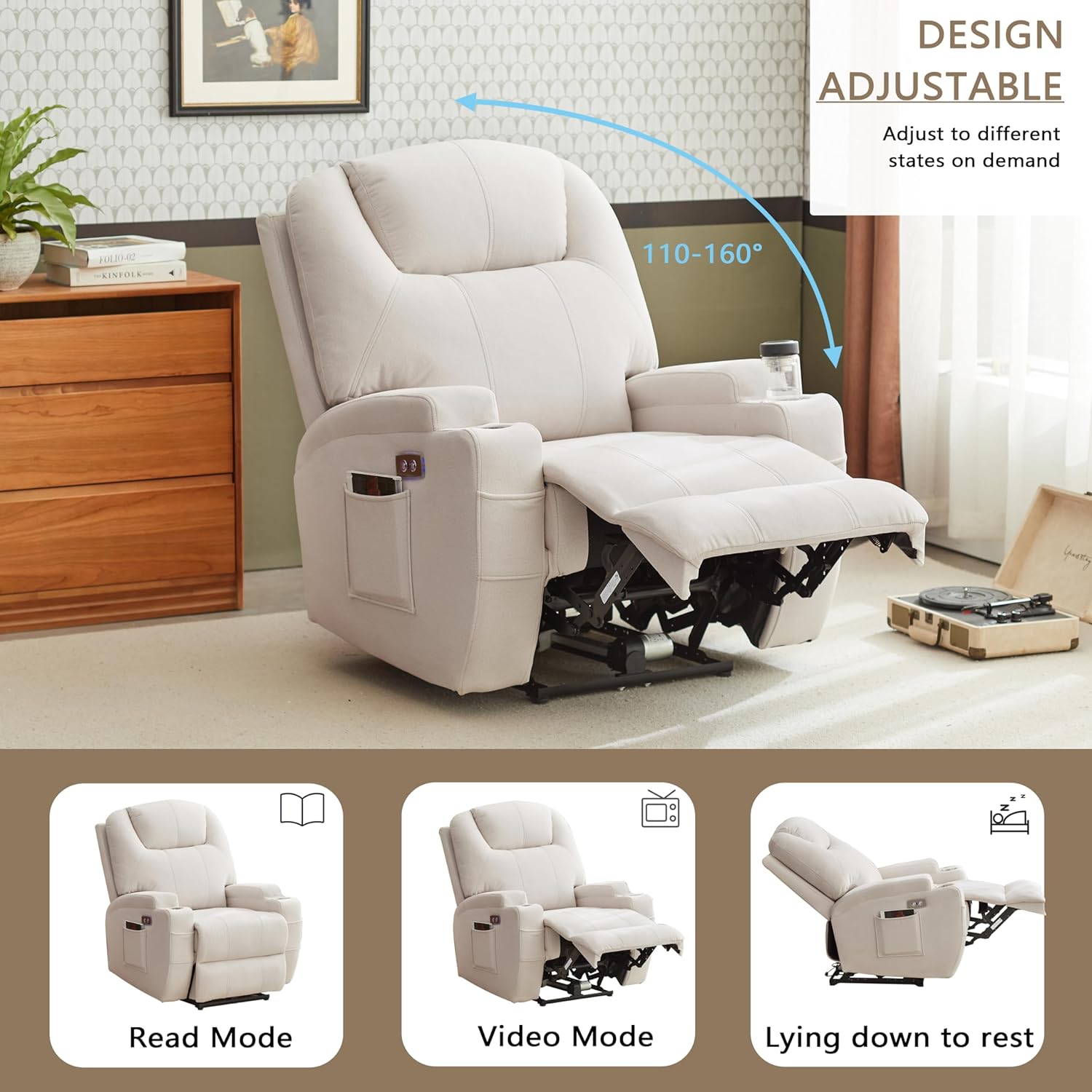
Figure 5.1: Reclining positions from 110° to 160°.
Video 5.1: Demonstration of the recliner's adjustable positions and USB charging port.
5.2 USB Charging Function
The recliner includes a USB charging port for your convenience.
- Locate the USB port next to the reclining control buttons.
- Plug your device's USB charging cable into the port to charge.
5.3 Storage Pockets
The chair is equipped with four organizer pockets on the sides, suitable for storing data cables, remotes, books, and other small items.

Figure 5.2: Overview of recliner features including storage pockets and control panel.
6. Maintenance
Proper care will extend the life and appearance of your recliner.
- Cleaning: Wipe clean with a soft, damp cloth. Avoid abrasive cleaners or harsh chemicals, as these can damage the fabric.
- Spills: Blot spills immediately with a clean, dry cloth. Do not rub.
- Inspection: Periodically check all connections and moving parts to ensure they are secure and functioning correctly.
- Sunlight: Avoid prolonged exposure to direct sunlight to prevent fading of the fabric.
7. Troubleshooting
If you encounter any issues with your recliner, please refer to the following common problems and solutions:
| Problem | Possible Cause | Solution |
|---|---|---|
| Recliner does not operate. | Power cord not connected or loose. No power to outlet. | Ensure power cord is securely plugged into the chair and a working electrical outlet. Check circuit breaker. |
| Footrest or backrest moves slowly or unevenly. | Obstruction in mechanism. Low power. | Check for any objects obstructing the mechanism. Ensure the power supply is stable. |
| USB port not charging. | Power not connected. Device cable faulty. | Verify the chair is powered on. Try a different USB cable or device. |
| Chair feels unstable. | Not on a level surface. Loose assembly. | Move the chair to a level surface. Recheck assembly connections for tightness. |
If the problem persists after attempting these solutions, please contact customer support.
8. Specifications
| Feature | Detail |
|---|---|
| Brand | Bonrcea |
| Model Number | L-G-1202 |
| Color | Beige |
| Product Dimensions (D x W x H) | 29.5"D x 37.4"W x 42.9"H |
| Seat Height | 19.7 Inches |
| Seat Depth | 21 inches |
| Arm Height | 25 Inches |
| Maximum Weight Recommendation | 300 Pounds |
| Reclining Angle | 110-160 degrees |
| Material | High-density padded sponge, Hardwood + Iron frame |
| Special Features | Adjustable Reclining, Footrest, USB Charging Port, Organizer Pockets |
| Product Care Instructions | Wipe Clean |

Figure 8.1: Product dimensions diagram.
9. Warranty and Support
Bonrcea offers a limited warranty for this product. Free exchange is available for installation problems, damaged, or missing parts.
For any purchase problems, questions, or to claim warranty service, please contact Bonrcea customer support directly. Refer to your purchase documentation for specific contact details or visit the official Bonrcea website.