1. Introduction
This manual provides detailed instructions for the installation and use of the METEESER JBL Harness Adapter. This adapter is designed to integrate aftermarket car stereos with existing JBL amplifier systems and steering wheel controls in compatible Toyota vehicles. It features a 16-pin power socket and Canbus support for seamless integration.

Image 1.1: Overview of the METEESER JBL Harness Adapter, showing various connectors and the Canbus module.
2. Compatibility
The METEESER JBL Harness Adapter is compatible with a wide range of Toyota models equipped with JBL amplifier systems. It also supports original steering wheel controls. Please verify your vehicle's compatibility before installation.
2.1 Important Compatibility Notes:
- This harness is specifically designed to support JBL amplifiers.
- It does not fit all JBL systems. Contact support for exact product compatibility if unsure.
- This wiring harness is only suitable when the back of your car CD has both 16-pin and 28-pin interfaces.
- It is designed for aftermarket Android car stereos with 16-PIN power outlets.
- Does not apply to Pioneer, Sony, or Kenwood radios.
- Cannot be supported on lower configuration models of listed vehicles.
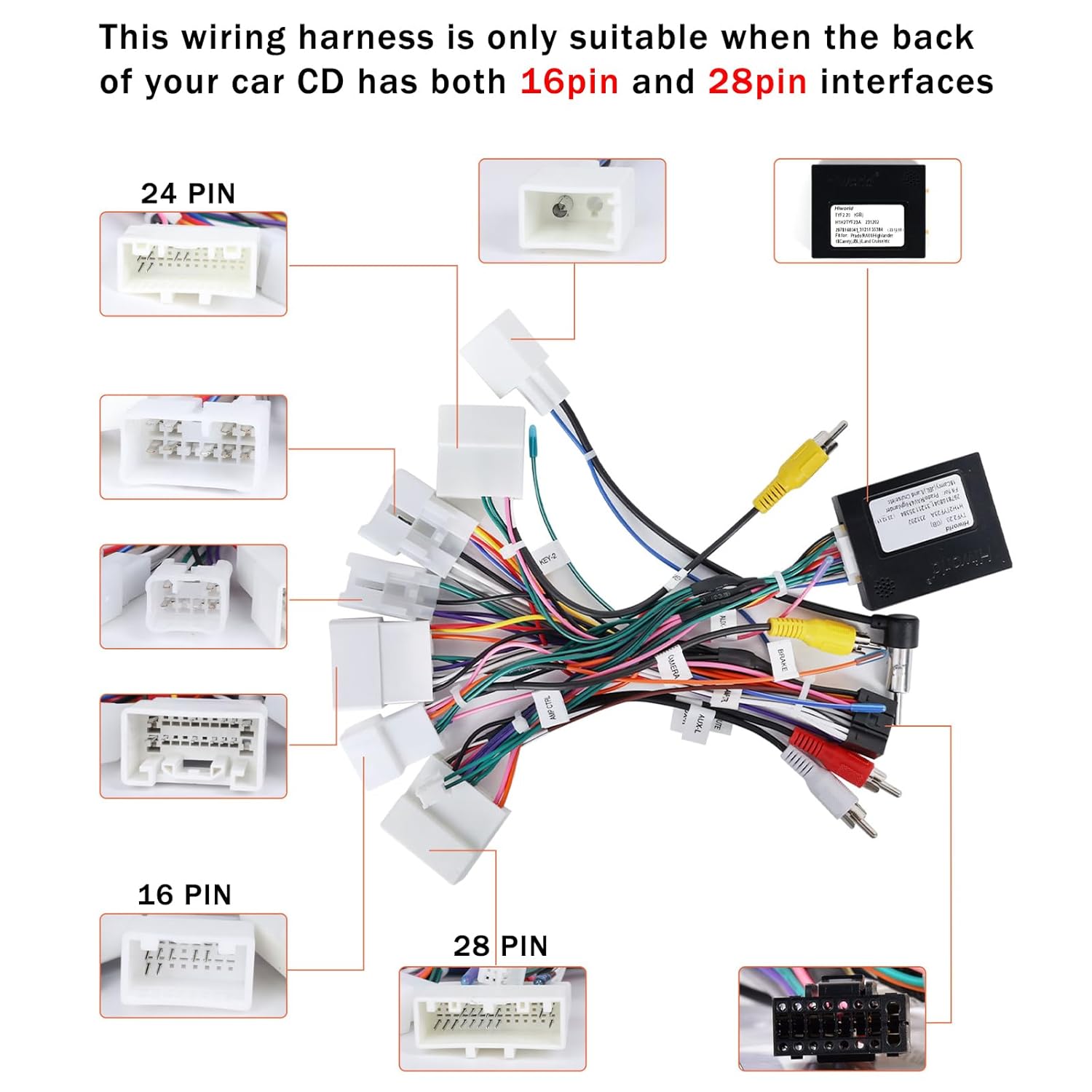
Image 2.1: Illustration showing the requirement for both 16-pin and 28-pin interfaces on the car's CD unit for proper harness compatibility.

Image 2.2: Example of an aftermarket Android radio's backside, highlighting the 16-PIN power outlet required for this harness.
2.2 Compatible Toyota Vehicle Models:

Image 2.3: Visual list of compatible Toyota vehicle models and their respective year ranges.
- Toyota Camry 2012-2014, 2015-2017
- Toyota Corolla 2014-2016, 2019-2020
- Toyota Corolla Levin 2017-2018
- Toyota RAV4 2013-2018, 2019-2020
- Toyota Prado 2014-2017, 2018
- Toyota Fortuner 2016-2019
- Toyota Highlander 2015-2021
- Toyota Tundra 2012-2013
- Toyota Vios 2012-2015
- Toyota Yaris 2012-2017
- Toyota Sienna 2016-2018
- Toyota Hilux 2015-2018, 2012-2014
- Toyota Land Cruiser 2016-2020
- Toyota REIZ 2011-2023
- Toyota CHR 2018
- Toyota 86 2012-2016
- Toyota Tacoma 2012-2013, 2016-2020
- Toyota Venza 2012-2013
- Toyota AVENSIS 2012-2015
- Toyota Prius 2013-2015
- Toyota 4Runner 2012-2022
- Toyota Innova 2015
- Toyota Noah 2014-2017
- Toyota Alphard 2015
3. Setup and Installation
The METEESER JBL Harness Adapter features a plug-and-play design for straightforward installation. No cutting of original vehicle wires is required.
3.1 Pre-Installation Check:
- Ensure your car's CD unit has both 16-pin and 28-pin interfaces at the back. Refer to Image 2.1.
- Confirm your aftermarket Android car stereo has a 16-PIN power outlet. Refer to Image 2.2.
- If you are unsure about compatibility, provide a picture of your car radio's backside slots to METEESER support for verification.
3.2 Installation Steps:
- Turn off your vehicle and disconnect the car battery to prevent electrical issues.
- Carefully remove your existing car stereo unit from the dashboard.
- Locate the existing wiring harnesses connected to your car stereo.
- Connect the METEESER JBL Harness Adapter to the corresponding 16-pin and 28-pin ports on your car's CD unit.
- Connect the other end of the METEESER harness to your aftermarket Android car stereo's 16-PIN power outlet.
- Ensure all connections are secure and properly seated.
- Reconnect the car battery.
- Test the functionality of your new car stereo, including audio output, steering wheel controls, and any other integrated features.
- Carefully re-install the car stereo unit into the dashboard.

Image 3.1: Reference image showing the backside wiring of an original car audio unit, useful for verifying harness fitment.
4. Wiring Diagram
This section provides a detailed wiring diagram for the 16-pin connector, outlining the function of each pin. This information is crucial for understanding the harness connections.

Image 4.1: Detailed diagram illustrating the pinout for the 16-pin connector, including signal names and their corresponding functions.
4.1 16-Pin Connector Pinout:
| Pin | Function | Pin | Function |
|---|---|---|---|
| A1 | FL+ | A7 | ACC |
| A2 | FL- | A8 | GND |
| A3 | FR+ | A9 | B+ |
| A4 | FR- | A10 | ILL |
| A5 | KEY-1 | A11 | KEY-2 |
| A6 | BACK | A12 | ANT.POWER |
| A13 | RL- | A14 | RL+ |
| A15 | RR+ | A16 | RR- |
5. Operating Instructions
Once the METEESER JBL Harness Adapter is correctly installed, your aftermarket Android stereo should function with the vehicle's JBL amplifier and original steering wheel controls.
5.1 Steering Wheel Control Configuration:
The harness provides Canbus support for original steering wheel controls. After installation, you may need to configure the steering wheel controls through your aftermarket Android stereo's settings menu. Refer to your stereo's user manual for specific instructions on mapping steering wheel buttons.
5.2 JBL Amplifier Integration:
The harness is designed to activate and utilize the factory JBL amplifier. Ensure your aftermarket stereo's audio settings are configured to output signals compatible with an external amplifier, if applicable. No additional steps are typically required for basic amplifier function beyond proper wiring.
6. Troubleshooting
If you encounter issues after installing the harness, review the following common troubleshooting steps:
- No Power to Stereo:
- Check all harness connections to ensure they are fully seated.
- Verify the car battery is properly reconnected and charged.
- Inspect vehicle fuses related to the car stereo system.
- No Sound Output:
- Confirm the JBL amplifier is receiving power and is active.
- Check audio settings on your aftermarket stereo to ensure correct output channels are selected.
- Verify speaker wire connections from the harness to the stereo.
- Steering Wheel Controls Not Working:
- Ensure the Canbus module is correctly connected.
- Access your aftermarket stereo's settings to configure or re-map the steering wheel buttons. Some stereos require manual learning of these controls.
- Note: Some users have reported Canbus features not activating on certain vehicle models (e.g., 2014 Scion Xb). If issues persist after configuration, contact support.
- USB Port Not Functioning:
- While the harness provides general connectivity, specific USB functionality may depend on the aftermarket stereo and vehicle's original wiring. Some users have noted USB ports not working with this adapter.
If troubleshooting steps do not resolve the issue, please contact METEESER customer support for further assistance.
7. Specifications
| Feature | Detail |
|---|---|
| Brand | METEESER |
| Model | 16-Pin JBL Harness Adapter (Q3582) |
| Connector Type | Toyota 16-pin, with additional 28-pin interface support |
| Material | Acrylonitrile Butadiene Styrene (ABS) |
| Weight | 0.15 Kilograms (150 g) |
| Parcel Dimensions | 23.29 x 16.51 x 5 cm |
| Compatibility | Toyota vehicles with JBL amplifier and specific 16-pin/28-pin CD unit interfaces (refer to Section 2) |
| Features | Canbus support, steering wheel control integration, plug-and-play design |
8. Warranty and Support
METEESER is committed to providing high-quality products and customer satisfaction.
8.1 Warranty Information:
This product comes with a 2-Year Warranty from the date of purchase. Please retain your proof of purchase for warranty claims.
8.2 Technical Support:
For technical assistance, installation questions, or troubleshooting that cannot be resolved using this manual, please contact METEESER customer support. Our team provides 24-hour technical support.
How to Reach Us:
- Click on the "METEESER" brand name on the product page.
- Click "Ask question" or navigate to the "Contact Seller" option.
- Provide details of your technical or installation questions, including pictures or videos if helpful.
We aim to reply within 24 hours.

Image 8.1: Visual guide on how to contact METEESER technical support through the online platform.