
GOXAWEE G5225-US
GOXAWEE Mini Cordless Rotary Tool Kit User Manual
Model: G5225-US | Brand: GOXAWEE
1. Introduction
Thank you for choosing the GOXAWEE Mini Cordless Rotary Tool Kit. This versatile and portable tool is designed to assist you with a wide range of art, craft, and DIY projects, offering precision and convenience. This manual provides essential information for the safe and effective operation, maintenance, and troubleshooting of your new rotary tool. Please read it thoroughly before first use and keep it for future reference.
2. Safety Information
Always prioritize safety when operating any power tool. Failure to follow these instructions may result in electric shock, fire, and/or serious injury.
- Eye Protection: Always wear safety goggles or safety glasses with side shields when operating the tool.
- Work Area: Keep your work area clean and well-lit. Cluttered or dark areas invite accidents.
- Electrical Safety: Do not expose the tool to rain or wet conditions. Water entering a power tool will increase the risk of electric shock.
- Personal Safety: Stay alert, watch what you are doing, and use common sense when operating a power tool. Do not use the tool while tired or under the influence of drugs, alcohol, or medication.
- Tool Use and Care: Do not force the power tool. Use the correct power tool for your application. The correct power tool will do the job better and safer at the rate for which it was designed.
- Accessory Compatibility: Only use accessories specifically designed for this rotary tool. Ensure accessories are properly installed and secured before operation.
- Battery Care: Charge the battery only with the specified charger. Do not disassemble, open, or shred battery pack or cells.
3. Package Contents
Your GOXAWEE Mini Cordless Rotary Tool Kit includes the following items:
- 1 x GOXAWEE Mini Cordless Rotary Tool (Yellow)
- 1 x USB Charging Cable
- 1 x Accessory Storage Box
- 105 x Various Accessories (including sanding drums, sanding paper discs, felt wheels, felt wheel pointed, mandrels, mini HSS cutting discs, resin cutting discs, abrasive stones, HSS twist drills, diamond burr bits, collets)

Figure 3.1: Complete GOXAWEE Mini Cordless Rotary Tool Kit with 105 accessories and USB charging cable.
4. Product Overview
Familiarize yourself with the components and features of your rotary tool:
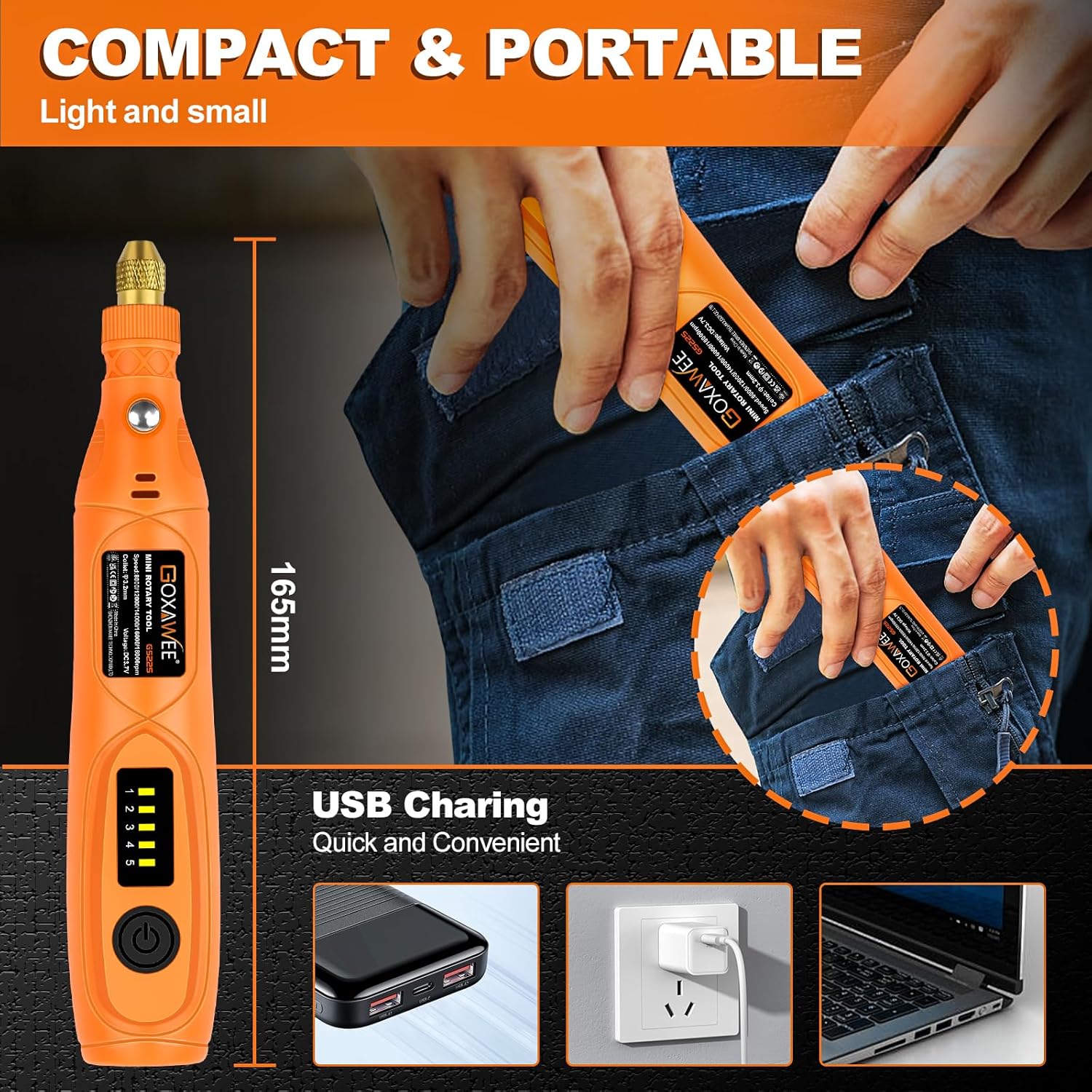
Figure 4.1: Key features of the GOXAWEE Mini Cordless Rotary Tool, including the chuck, spindle lock button, heat dissipation holes, speed control button, and Type-C charging port.
- Chuck (Range 2.35mm-3.2mm): Securely holds various accessories.
- Spindle Lock Button: Used to lock the spindle for easy accessory changes. Do not press when the tool is operating.
- Heat Dissipation Holes: Designed to dissipate heat generated during motor operation, preventing damage.
- Speed Control Button: Adjusts the rotational speed of the tool.
- Speed Indicator (1-5): Displays the current speed setting (5000-18000 RPM).
- Type-C Charging Port: For convenient USB charging.
5. Setup
5.1 Charging the Tool
The GOXAWEE Mini Cordless Rotary Tool is powered by a 3.7V Li-ion battery and can be charged via USB.
- Locate the Type-C charging port on the tool.
- Connect the provided USB charging cable to the tool and to a compatible USB power source (e.g., computer, wall adapter, power bank).
- The speed indicator lights will illuminate during charging and turn off when fully charged.

Figure 5.1: The rotary tool connected to a laptop for USB charging, illustrating the convenience of its Type-C port.
5.2 Attaching/Changing Accessories
To ensure safe and effective operation, always properly install accessories.
- Ensure the tool is turned off.
- Press and hold the Spindle Lock Button to prevent the spindle from rotating.
- Unscrew the chuck collar counter-clockwise until it is loose enough to insert or remove an accessory.
- Insert the shaft of the desired accessory fully into the chuck.
- While still holding the Spindle Lock Button, tighten the chuck collar clockwise until the accessory is securely fastened. Do not overtighten.
- Release the Spindle Lock Button.
Video 5.1: A user demonstrating the rotary tool's engraving capabilities on wood and a metal cup, showcasing its versatility for personalized projects.
6. Operating Instructions
6.1 Powering On/Off and Speed Adjustment
- To turn on the tool, press the Speed Control Button once. The tool will start at the lowest speed setting (Level 1).
- To increase the speed, press the Speed Control Button repeatedly. Each press will cycle through the 5 speed levels (5000 RPM to 18000 RPM).
- To turn off the tool, continue pressing the Speed Control Button until all speed indicator lights are off.

Figure 6.1: Illustration of the 5-speed settings on the GOXAWEE Mini Cordless Rotary Tool, ranging from 5000 RPM to 18000 RPM.
6.2 Usage Examples
The GOXAWEE Mini Cordless Rotary Tool is suitable for a variety of tasks. Always select the appropriate accessory and speed for your material and application.
- Engraving: Use diamond burr bits for intricate designs on wood, plastic, glass, or soft metals.
- Sanding: Attach sanding drums or discs for smoothing rough edges or preparing surfaces.
- Cutting: Utilize cutting discs for precise cuts on various materials.
- Polishing: Use felt wheels with polishing compound to bring a shine to surfaces.
- Drilling: Employ HSS twist drills for small holes in wood, plastic, or soft metals.
- Grinding: Use abrasive stones for shaping or deburring.
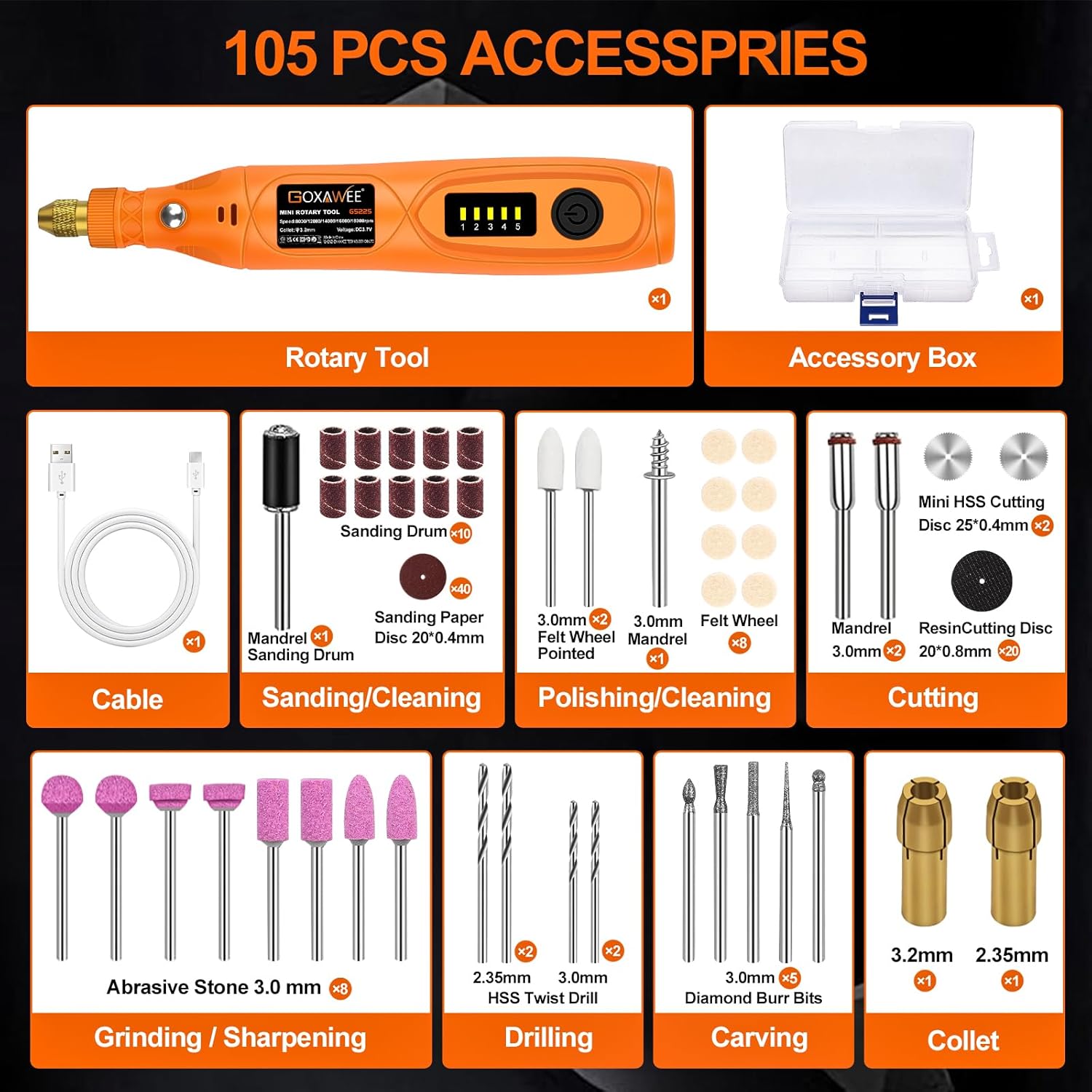
Figure 6.2: Examples of the rotary tool in action: grinding, cutting, sanding, and polishing, demonstrating its multi-purpose capabilities.
7. Maintenance
Proper maintenance ensures the longevity and optimal performance of your rotary tool.
- Cleaning: After each use, wipe down the tool with a clean, dry cloth to remove dust and debris. Use a small brush to clean the chuck and ventilation openings.
- Accessory Storage: Store all accessories in the provided accessory box to keep them organized and protected.
- Tool Storage: Store the rotary tool in a dry, safe place away from direct sunlight and extreme temperatures.
- Battery Care: For long-term storage, ensure the battery is partially charged (around 50%). Recharge periodically if not used for extended periods to maintain battery health.
8. Troubleshooting
| Problem | Possible Cause | Solution |
|---|---|---|
| Tool does not turn on. | Battery is depleted. | Charge the tool using the USB charging cable. |
| Accessory is loose or falls out. | Chuck not tightened properly. | Ensure the spindle lock button is pressed, then tighten the chuck collar securely. |
| Tool stops during operation. | Overload protection activated. | Reduce pressure on the tool or use a lower speed setting. Allow the tool to cool down. |
| Reduced performance. | Battery low or accessory worn. | Recharge the battery. Replace worn-out accessories. |
9. Specifications
- Brand: GOXAWEE
- Model: G5225-US
- Voltage: 3.7 Volts
- Power Source: Battery Powered (1 x 12V Li-ion battery included)
- Maximum Rotational Speed: 18000 RPM
- Minimum Speed: 5000 RPM
- Speed Control: 5-Speed Variable
- Chuck Range: 2.35mm-3.2mm
- Item Weight: 10.8 ounces
- Product Dimensions: 7.79 x 5.16 x 1.26 inches
- Material: ABS, Metal
- Special Features: Lightweight, Lock Button, Variable Speed, Cordless, Multi Use
- UPC: 860011020721
10. Warranty and Support
For warranty information, technical support, or any questions regarding your GOXAWEE Mini Cordless Rotary Tool Kit, please contact GOXAWEE customer service through the retailer's platform or visit the official GOXAWEE website. Please retain your proof of purchase for warranty claims.
Ask a question about this manual
Ask about setup, troubleshooting, compatibility, parts, safety, or missing instructions. Manuals+ will review the question and use this page’s manual context to help answer it.