1. Introduction
The MECHANIC MASTER C34Pro is a compact desktop PC case designed for high-performance computing in a small form factor. It features a modular design to accommodate a wide range of components and configurations.
- Modular Flexibility: Supports ATX/E-ATX motherboards, with MATX expansion possible via PCIe slot adjustments.
- Superior Compatibility: Designed to fit 360mm radiators, 165mm tower coolers, GPUs up to 420mm in length, and ATX PSUs up to 220mm, allowing for flagship components.
- Efficient Thermal Design: Features multi-zone fan mounts (top/bottom/front) with integrated dust filters and optimized airflow paths to ensure stable cooling under heavy loads.
- Robust Build & Details: Constructed with a 2mm aluminum shell and a 1mm steel frame, offering durability. Includes 18mm of space for cable management and a magnetic screwdriver kit for convenient assembly.
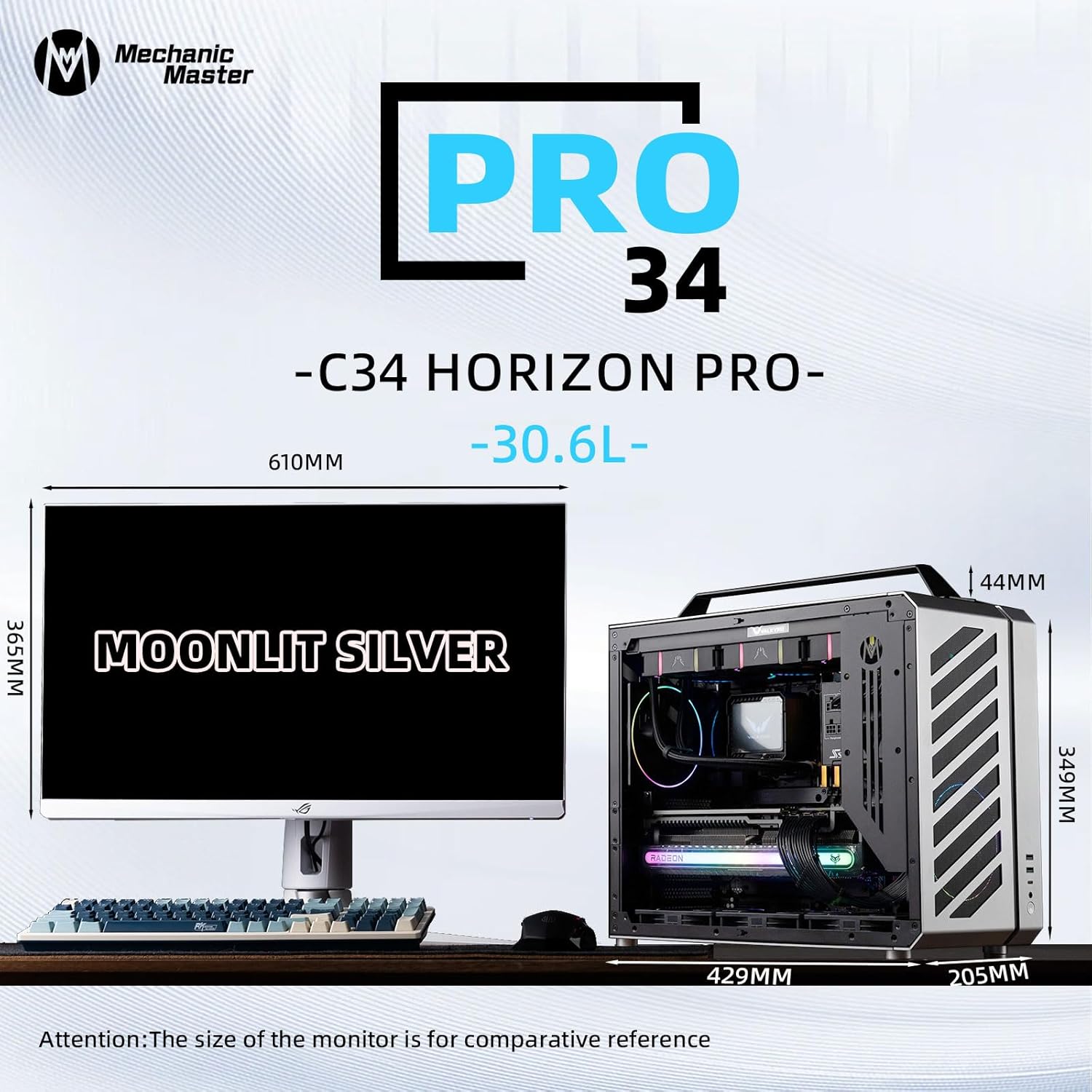
Figure 1: Overall dimensions of the C34Pro case, shown next to a monitor for size comparison.
2. Setup and Installation
2.1 Modular Motherboard Support (ATX/M-ATX)
The C34Pro offers flexible support for ATX and M-ATX motherboards. To switch between ATX and M-ATX modes, specific modules need to be adjusted:
- In ATX mode, remove the 2-slot PCI bracket.
- Move the motherboard I/O module downwards.
- Replace the dust baffle.
- Move the motherboard rectangular iron bar downwards to adapt to the M-ATX fixed position.

Figure 2: Detailed steps for adjusting the motherboard I/O module and brackets for ATX to M-ATX conversion.
2.2 Component Compatibility and Configurations
The C34Pro supports various component layouts, allowing for powerful builds within its compact frame. Consider the following common configurations:
- Configuration 1: 360mm AIO, 335mm GPU, Lower PSU (Memory height within 50mm).
- Configuration 2: 360mm AIO, 420mm GPU, Horizontal PSU (Memory height within 50mm).
- Configuration 3: Air Cooler, 420mm GPU, Upper PSU.
- Configuration 4: 280mm AIO, 420mm GPU, Upper PSU (Requires switching to five slots PCI mode).


Figure 3: Various internal configurations demonstrating component compatibility and placement options.
2.3 Cable Management
The case provides 18mm of dedicated space for cable management behind the motherboard tray. Utilize this space and the included Velcro straps to ensure a clean and organized build, which is crucial for optimal airflow.
2.4 Included Tools
A magnetic screwdriver kit is included to assist with assembly and disassembly of the case components.
Video 1: An official product video demonstrating the C34Pro in a 5-slot configuration, highlighting its features and internal layout.
Video 2: An official product video showcasing the C34Pro, providing a detailed look at its design and capabilities.
Video 3: An official product video displaying the C34Pro, offering various views of the case and its features.
Video 4: An official product video presenting the Mechanic Master Cool Cube Series C34Pro, highlighting its compact design and features.
3. Operating Instructions
The C34Pro case provides convenient front I/O ports for easy access to peripherals and power control:
- Power Button: Located on the front panel for system power control.
- USB 3.0 Ports: Two ports for high-speed data transfer.
- USB Type-C (USB 3.1) Port: One port for modern connectivity and faster transfer speeds.
- 2-in-1 Audio Jack: A single port for connecting headphones or a headset.
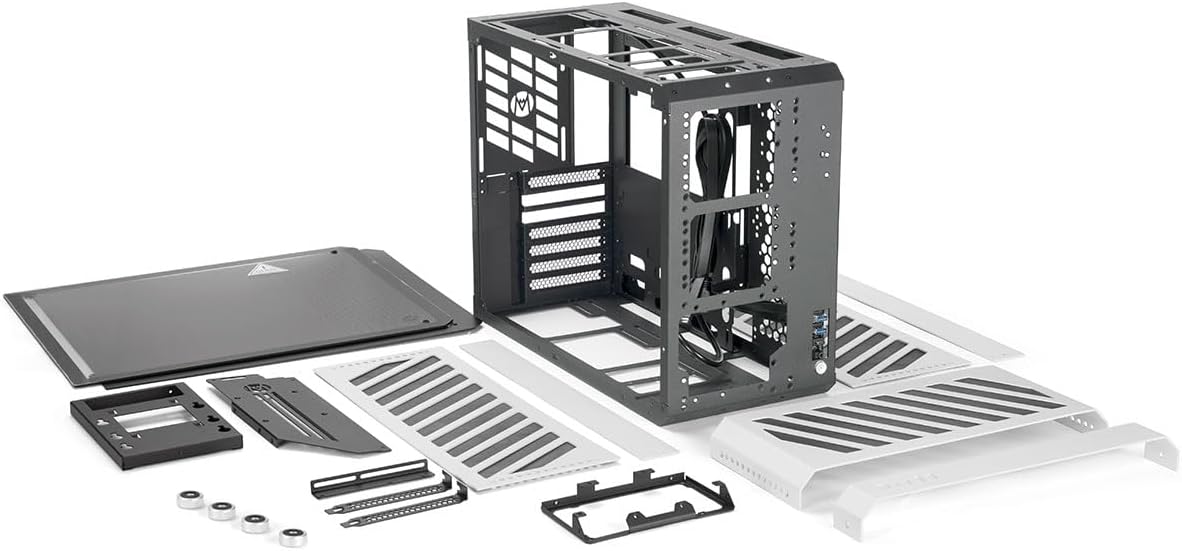
Figure 4: Front I/O panel with USB ports, audio jack, and power button.
4. Maintenance
To ensure optimal performance and longevity of your PC components, regular maintenance of the C34Pro case is recommended:
- Dust Filters: The case is equipped with multi-zone fan mounts that include dust filters. Regularly clean these filters to prevent dust buildup and maintain efficient airflow.
- Cleaning: Use a soft, dry cloth to clean the exterior surfaces. For internal cleaning, use compressed air to remove dust from fans and components.

Figure 5: Airflow diagram highlighting the multi-zone fan mounts and dust filters for optimal thermal performance.
5. Troubleshooting
Encountering issues during assembly or operation is not uncommon. Here are some common points to consider:
- Assembly Difficulty: The modular design involves many screws. Patience is key during assembly. Ensure all screws are properly aligned and tightened to avoid stripping or damaging components.
- Cable Management: With larger components or stiff PSU cables, cable management can be challenging. Plan your cable routing carefully and utilize the 18mm space behind the motherboard tray. Consider using a shorter PSU or more flexible cables if space is extremely tight.
- Component Fit: Double-check component dimensions against the case specifications, especially for GPUs, CPU coolers, and PSUs, to ensure compatibility before installation.
- Physical Damage: If any factory defects or damage are observed upon unboxing, contact the seller's customer service immediately for assistance.
6. Specifications
| Feature | Detail |
|---|---|
| Case Name | C34Pro |
| Case Size (L*W*H) | 429 x 205 x 349mm |
| Material | Outer shell: 2mm aluminium alloy, Inner shell: 1mm steel |
| Motherboard Compatibility | ITX, MATX, ATX, EEB (within 305x330 L*W, 275mm without EEB holder) |
| GPU Size | Length: 420mm (within 338mm), Height: 150mm |
| Power Supply Unit | ATX (Suggests 150mm), SFX/SFX-L |
| CPU Cooler | 165mm tower cooler, 360/280/240 AIO |
| Pre-I/O | Metal switch, 1*USB3.0, 1*Type-C 10G, 1*2-in-1 Audio, Built-in LED switch |
| Item Weight | 13.86 pounds (6.3 Kilograms) |
| Product Dimensions | 16.9 x 8 x 15.8 inches |

Figure 6: Detailed product parameters including case size, material, and component compatibility.
7. Warranty and Support
The product comes with a 30-day refund/replacement policy. Additionally, protection plans are available for extended coverage:
- 3-Year Protection Plan
- 4-Year Protection Plan
- Complete Protect: One plan covers all eligible past and future purchases.
For further support or inquiries, please contact the Mechanic Master Office Store.