
1. Important Safety Information
Read all instructions carefully before operating the E-MOTOR 4 Wheel Mobility Scooter. Failure to follow safety guidelines may result in injury or damage to the scooter.
- Weight Capacity: Do not exceed the maximum weight capacity of 265 pounds (120 kg).
- Speed: The maximum speed is 3.7 mph (6 km/h). Operate at a safe speed appropriate for your surroundings.
- Anti-Roll Wheels: The scooter is equipped with anti-roll wheels for enhanced stability.
- Braking: The electromagnetic braking system engages automatically when the control lever is released, bringing the scooter to a stop.
- Visibility: Utilize the LED front light for improved visibility in low-light conditions.
- Reversing: The scooter emits an audible warning tone when reversing. Ensure the path is clear before backing up.

Figure 1.1: Safety features including anti-roll wheels, LED front light, and reversing whistle.
Legal Disclaimer:
Statements regarding this product are for informational purposes only and are not intended to diagnose, treat, cure, or prevent any disease or health condition. Consult with a healthcare professional for medical advice.
2. Setup and Assembly
The E-MOTOR Mobility Scooter is designed for easy assembly and disassembly for transport. Follow these steps to set up your scooter.
2.1 Initial Assembly
- Adjust the Tiller Angle: Adjust the angle of the tiller (handlebar column) to your preferred position.
- Install the Battery: Carefully install the battery pack. Ensure it is seated correctly and makes proper contact. Note: Some users have found it helpful to install the battery rear side first to ensure good contact.
- Install the Seat: Place the seat onto the seat post and secure it.
- Install the Basket: Attach the front basket to the tiller column.

Figure 2.1: Four steps for initial scooter assembly.
2.2 Disassembly for Transport
The scooter can be quickly disassembled into five separate parts for convenient storage and transport in a standard vehicle trunk.

Figure 2.2: Scooter components and an example of storage in a car trunk.
3. Operating Instructions
Familiarize yourself with the control panel and operating modes before driving the scooter.
3.1 Control Panel Overview

Figure 3.1: Labeled components of the E-MOTOR Mobility Scooter.

Figure 3.2: Detailed view of the control panel.
- Key Hole: Insert the key to turn the scooter on or off.
- Power Display: A color-coded indicator shows the current battery status.
- Speed Control Dial: Adjust the maximum speed of the scooter.
- Forward/Reverse Levers: Use these levers to engage forward or reverse motion.
- Headlight Switch: Activates the front LED light.
- Horn Button: Sounds a warning tone.
3.2 Driving Modes
The scooter features two operating modes:
- Mode N (Neutral): In this mode, the scooter can only be moved manually by pushing. It will not move automatically.
- Mode D (Drive): In this mode, the scooter operates automatically via the controls and cannot be pushed manually.
Figure 3.3: Explanation of Mode N and Mode D.
3.3 Seat Adjustments
The seat components are adjustable for user comfort and support.
- Seat Height: Adjust the seat height using the lever located beneath the seat.
- Swivel Seat: The seat can swivel, facilitating easier entry and exit.
- Armrest Width: The width of the armrests can be adjusted.
- Armrest Angle: The angle of the armrests can be adjusted.
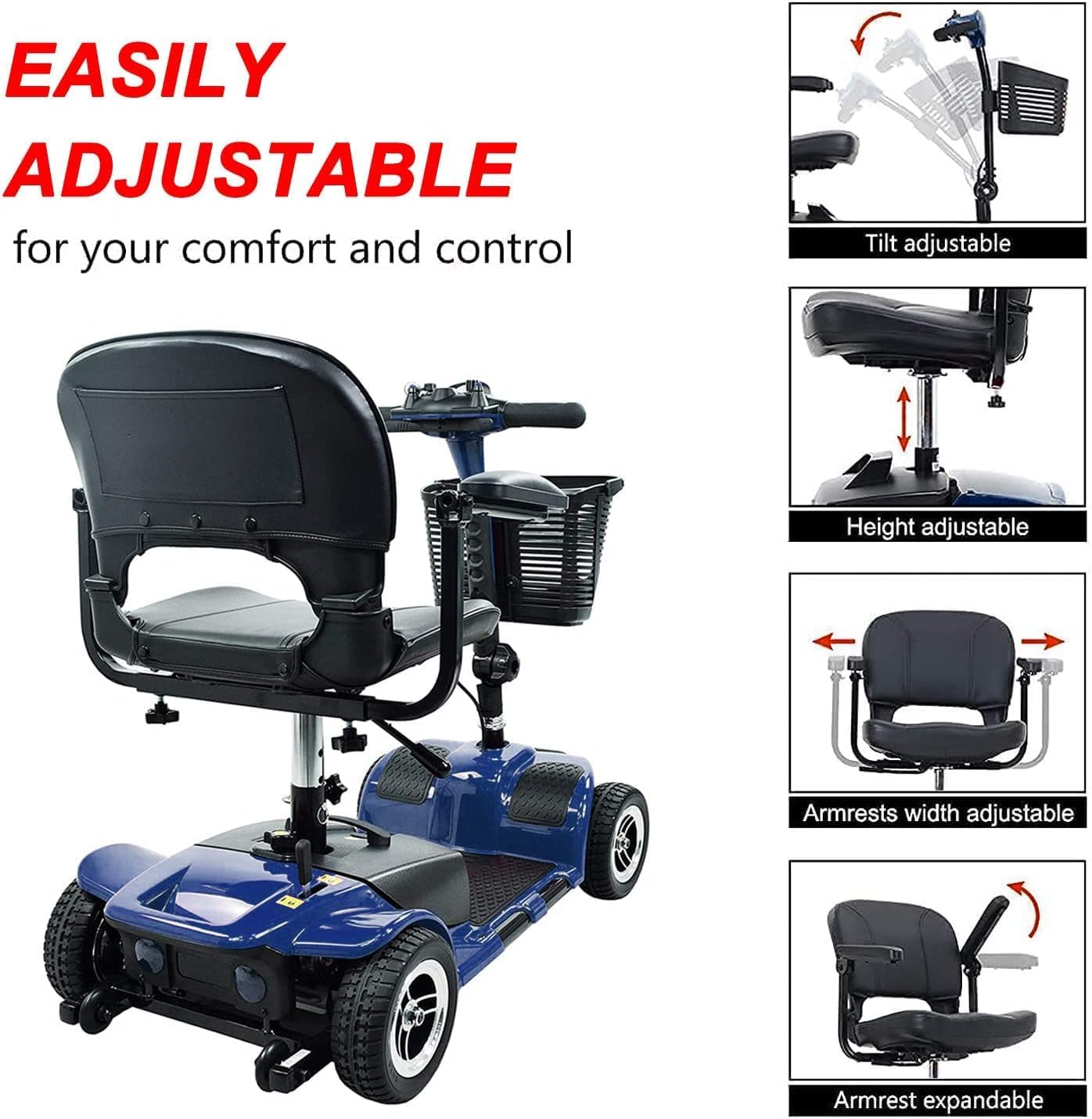
Figure 3.4: Adjustable seat components for personalized comfort.
4. Maintenance
Regular maintenance ensures the longevity and safe operation of your E-MOTOR Mobility Scooter.
- Cleaning: Wipe down the scooter regularly with a damp cloth. Avoid using harsh chemicals or abrasive cleaners.
- Battery Care: Charge the battery fully after each use. Do not allow the battery to fully discharge for extended periods. Refer to the battery manufacturer's guidelines for specific charging instructions.
- Tire Inspection: Periodically check the tires for wear and tear. The scooter is equipped with durable flat-free tires.
- Fasteners: Ensure all bolts and fasteners are secure. Do not overtighten.
5. Troubleshooting
This section addresses common issues you might encounter with your mobility scooter.
- Scooter Not Turning On:
- Ensure the key is fully inserted and turned to the 'ON' position.
- Check the battery connection and ensure the battery is charged.
- Loss of Power During Operation:
- Check the battery power display. If low, recharge the battery.
- Ensure the scooter is in 'Mode D' (Drive) and not 'Mode N' (Neutral).
- Unusual Noises:
- Stop the scooter immediately and inspect for any loose parts or obstructions.
- If the noise persists, contact customer service.
6. Specifications
Key technical specifications for the E-MOTOR 4 Wheel Mobility Scooter.
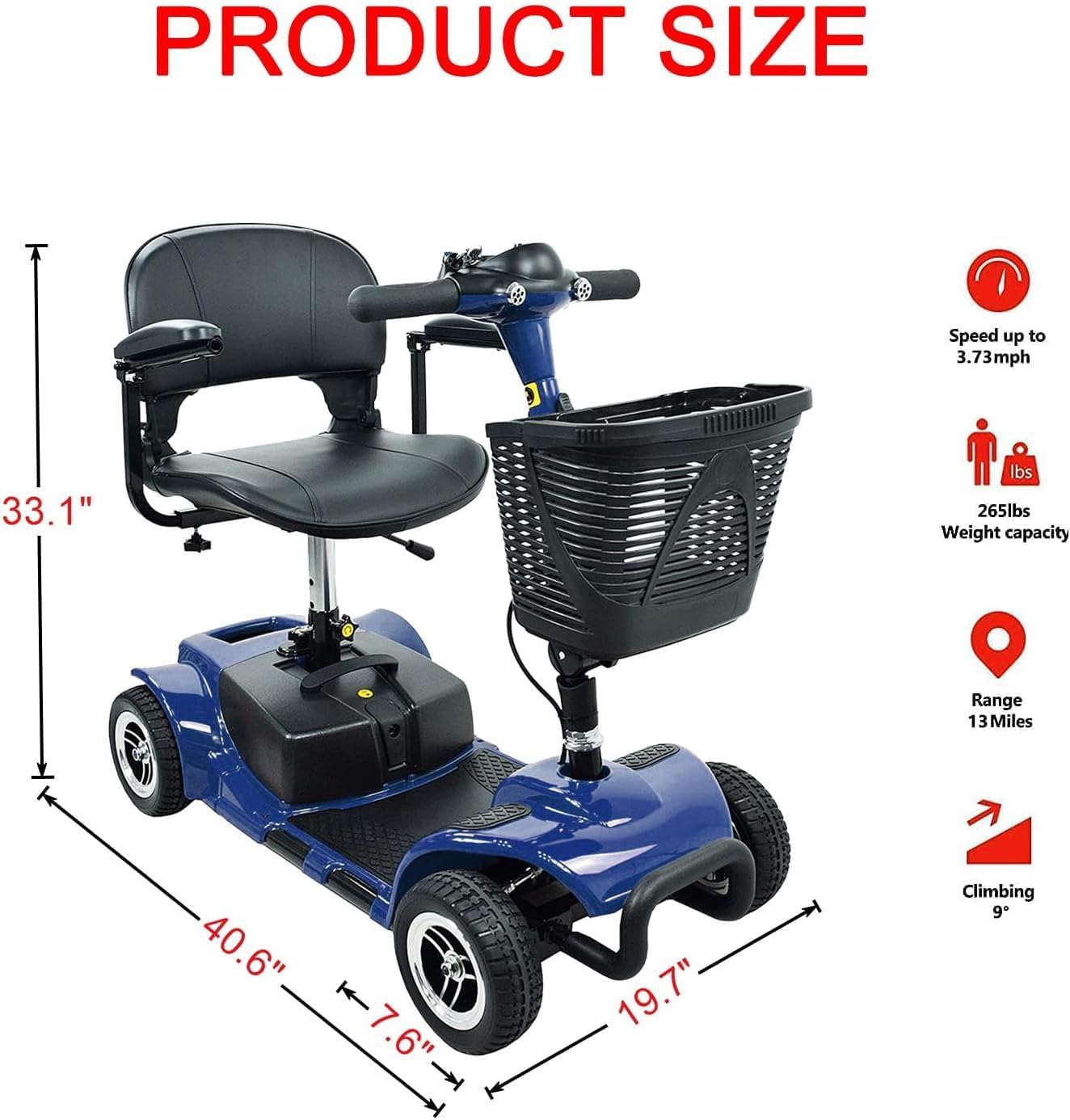
Figure 6.1: Product dimensions and performance specifications.
| Feature | Specification |
|---|---|
| Model | 4 Wheel Mobility Scooter |
| Item Weight | 93 Pounds (42.18 kg) |
| Product Dimensions (D x W x H) | 40.55" x 19.68" x 33.07" (103cm x 50cm x 84cm) |
| Maximum Weight Capacity | 265 Pounds (120 kg) |
| Top Speed | 3.7 mph (6 km/h) |
| Driving Range | Up to 13 miles (21 km) per charge |
| Braking System | Electromagnetic |
| Tires | Durable Flat-Free |
| Motor Type | Brushless Motor |
| Color | Blue |
7. Warranty and Support
7.1 Warranty Information
The E-MOTOR 4 Wheel Mobility Scooter comes with a 1-year warranty provided by a USA-based company. Please retain your proof of purchase for warranty claims.
7.2 Customer Support
For any questions, technical assistance, or warranty claims, please contact our USA-based customer service team. Our friendly and helpful representatives are dedicated to ensuring your satisfaction.
Contact information can typically be found on the product packaging or the E-MOTOR official website.