
1. Introduction
The HomBreez Smart Wi-Fi Air Purifier and Humidifier Combo (Model WG-03-S) is a versatile device designed to improve indoor air quality and comfort. This unit combines the functions of an air purifier, humidifier, and aromatherapy diffuser, featuring a 7-color ambient light and smart Wi-Fi control for enhanced user experience. It is suitable for various small to medium-sized rooms, including bedrooms, offices, and dorms.
Key Features:
- High Efficiency Purification: Equipped with an H13 True HEPA Filter and a high-efficiency 4-stage filter system, designed to capture dust, large particles, animal hair, fine particles, pollen, mites, formaldehyde, odors, VOCs, and other harmful gases. The 360° design ensures comprehensive air purification.
- Multi-Functional Combination: Integrates air purification, humidification, and aromatherapy diffusion into one compact unit.
- 7-Color Ambient Lighting: Features customizable ambient lighting to create a soothing atmosphere.
- 3 Timer Settings: Offers 1-hour, 3-hour, and 6-hour timer options for convenient operation.
- Sleep Mode: Operates at a low speed with minimal noise to ensure undisturbed sleep or work.
- Large Capacity Water Tank: A 500ml water tank provides up to 16 hours of continuous mist release (30ml/h), with an automatic shut-off function when water levels are low.
- Automatic Air Quality Detection: In automatic mode, the unit adjusts fan speed based on real-time air quality changes.
- Wi-Fi Smart App Control: For the Wi-Fi version, control and monitor air quality via a mobile smart application.
2. Product Overview
Components:

Figure 1: Key components of the HomBreez Air Purifier. This image displays the bottom cover, Type-C power connector, induction port, and air vent locations on the device.

Figure 2: Detailed diagram of the HomBreez Air Purifier's control panel and features. Labels indicate the ambient light, aromatherapy mist outlet, intelligent display, air purifier switch, aroma switch, ambient light switch, cartridge replacement reminder, PM2.5 display, Wi-Fi indicator, UVC indicator, air purification modes (manual 1-2-3 gears, automatic gear), air purification sleep mode, and aromatherapy timer (1-3-6 hours).
3. Setup
Unboxing and Initial Placement:
Carefully remove the HomBreez unit from its packaging. Place the unit on a stable, flat surface. Ensure the Type-C power connector is accessible for power connection.

Figure 3: The HomBreez Air Purifier as it appears when first removed from its packaging.
Filling the Water Tank and Adding Essential Oils:
- Remove the top cover of the unit.
- Carefully add water to the tank. Do not exceed the maximum water level line indicated inside the tank.
- If desired, drop an appropriate amount of essential oil into the water tank for aromatherapy.
- Place the lid back on correctly, ensuring it is securely seated.
- Plug in the power cable to operate the unit.
- Important: Do not place the unit in a tilted position. It must be placed smoothly on a desktop or other flat surface to function correctly and prevent spills.
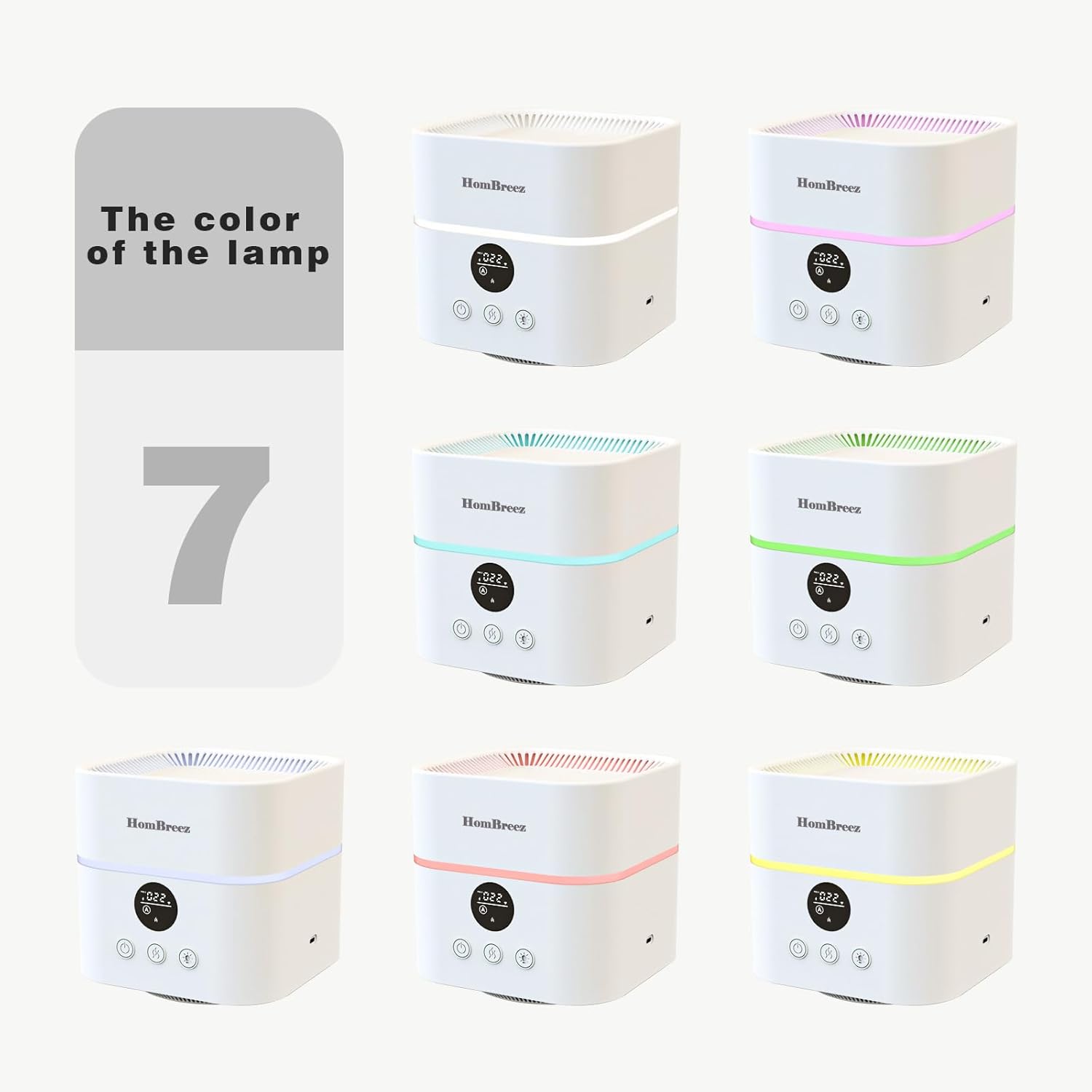
Figure 4: Visual instructions for preparing the HomBreez unit for operation, including filling the water tank and adding essential oils.
4. Operating Instructions
Power On/Off:
Press and hold the power button (usually the leftmost button) to turn the unit on or off. The intelligent display will activate upon power-on.
Air Purification Modes:
- Automatic Mode: The unit will automatically detect air quality (PM2.5 levels) and adjust the fan speed accordingly to optimize purification.
- Manual Mode: Cycle through different fan speeds (1, 2, 3 gears) by pressing the air purification mode button.
- Sleep Mode: Activates a low-noise, low-speed operation for quiet purification during rest periods.
Humidifier and Aromatherapy:
Press the dedicated button for humidification/aromatherapy to activate the mist function. Ensure the water tank is filled as per setup instructions. The unit can function as a humidifier and air purifier independently.
Timer Settings:
The unit offers timer settings for 1 hour, 3 hours, and 6 hours. Press the timer button to select the desired operating duration. The unit will automatically shut off after the set time.

Figure 5: The timer function allows users to set the device to operate for 1, 3, or 6 hours, suitable for various activities like sleeping or reading.
Ambient Lighting:
Press the ambient light button to cycle through the 7 available colors or to turn the light off. This feature can be used independently of the purification and humidification functions.
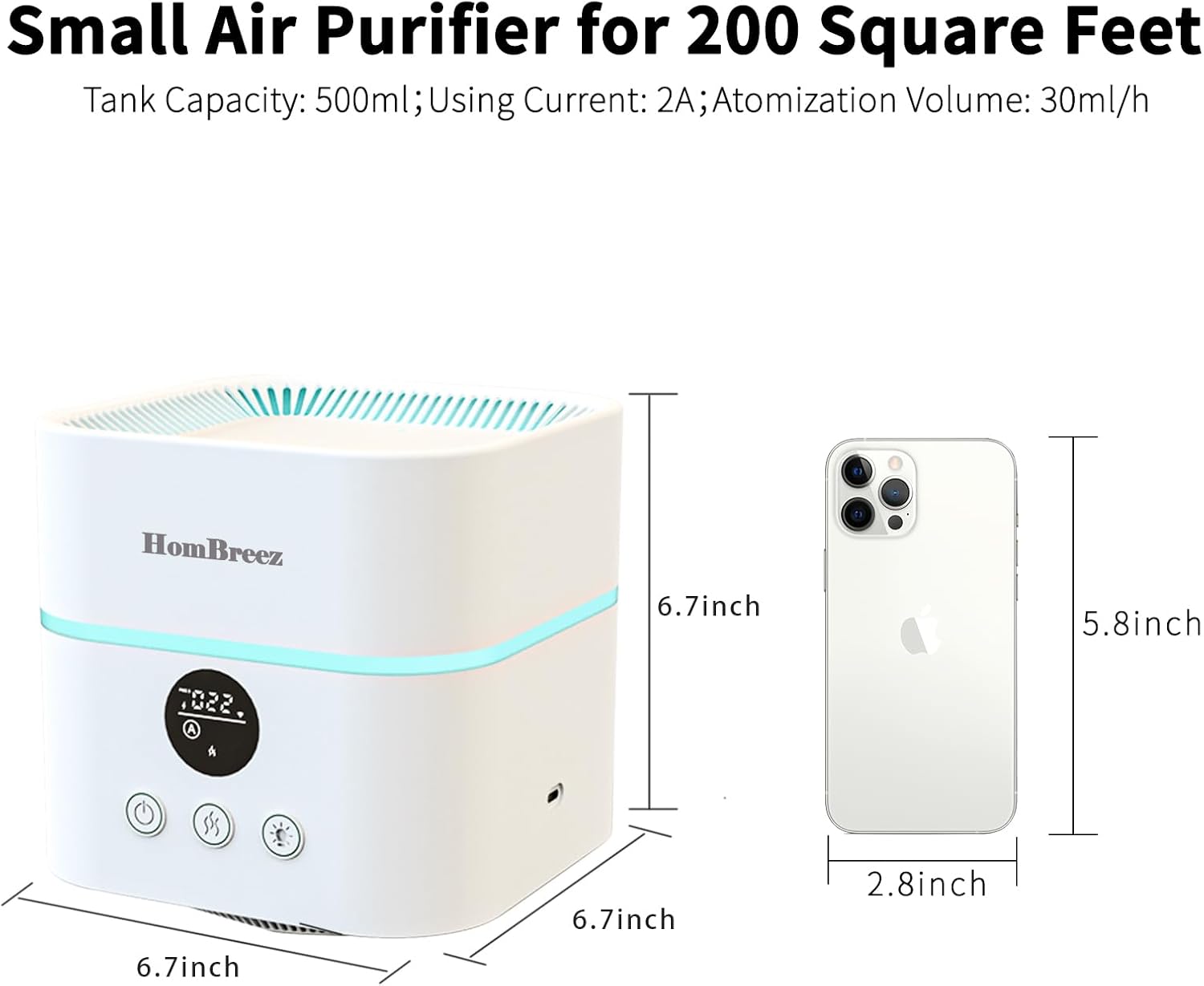
Figure 6: The HomBreez Air Purifier offers 7 different ambient light colors to enhance the room's atmosphere.
Wi-Fi Smart App Control (for Wi-Fi version):
For the Wi-Fi enabled version, download the dedicated smart app to control the unit remotely, monitor air quality, and adjust settings from your mobile device. Refer to the app's instructions for pairing and usage.
Video 1: This short video demonstrates the HomBreez Small Room Air Purifier in operation, showcasing its compact size and mist output.
5. Maintenance
Filter Replacement:
The HomBreez Air Purifier uses an H13 True HEPA 4-stage composite filter. The intelligent display will provide a cartridge replacement reminder when the filter needs to be changed. To replace the filter:
- Unplug the unit from the power source.
- Turn the unit upside down and twist the bottom cover to unlock and remove it.
- Remove the old filter.
- Insert a new H13 True HEPA filter.
- Replace the bottom cover and twist to lock it securely.

Figure 7: An exploded view of the HEPA 4-Stage Composite Filter, showing its layers for filtering various airborne particles and gases.
Cleaning:
- Exterior: Wipe the exterior of the unit with a soft, dry cloth. Do not use abrasive cleaners or solvents.
- Water Tank: Regularly clean the water tank to prevent mineral buildup and bacterial growth. Unplug the unit, remove the top cover, empty any remaining water, and wipe the inside with a soft cloth. For stubborn deposits, use a mild descaling solution as recommended by the manufacturer. Rinse thoroughly before refilling.
6. Troubleshooting
If you encounter any issues with your HomBreez Air Purifier and Humidifier Combo, please refer to the following common troubleshooting steps:
- Unit does not power on: Ensure the power cable is securely plugged into both the unit and a working electrical outlet.
- No mist is being produced: Check if the water tank is filled above the minimum level. Ensure the humidification function is activated.
- Inaccurate air quality readings: Verify that the induction port (refer to Figure 1) is not obstructed by dust or debris.
- Unusual noise during operation: Check for any foreign objects inside the unit or around the fan. Ensure the unit is placed on a stable, flat surface.
If these steps do not resolve the issue, please contact HomBreez customer support for further assistance.
7. Specifications
| Feature | Specification |
|---|---|
| Product Dimensions | 6.7"D x 6.7"W x 6.7"H (170 x 170 x 170 mm) |
| Item Model Number | WG-03-S |
| Power Source | DC |
| Item Weight | 2.47 Pounds |
| Water Tank Capacity | 500ml |
| Atomization Volume | 30ml/h |
| Filter Type | H13 True HEPA 4-Stage Composite Filter |
8. Warranty and Support
For detailed warranty information, please refer to the product packaging or the official HomBreez website. Keep your purchase receipt for warranty claims.
If you require technical support, have questions about your product, or need to make a warranty claim, please contact HomBreez customer service through the contact information provided on the product packaging or their official website.