
JQKJCAM JQSP09A sewer camera
JQKJCAM Sewer Camera Instruction Manual
Model: JQSP09A Sewer Camera (30M/100FT DVR)
Introduction
This manual provides comprehensive instructions for the safe and effective operation, maintenance, and troubleshooting of your JQKJCAM Sewer Camera. Designed for professional and home use, this system offers high-definition visual inspection of various pipelines, ducts, and drainage systems.

Figure 1: JQKJCAM Sewer Camera System with monitor, cable reel, and accessories.
Safety Information
- Always ensure the camera and cable are clean before and after use to prevent contamination.
- Do not expose the monitor unit to excessive moisture or extreme temperatures.
- Handle the camera head and cable with care to avoid damage.
- Ensure all connections are secure before powering on the device.
- Keep out of reach of children.
Package Contents
Verify that all items listed below are included in your package:
- 9-inch Ultra HD DVR Monitor
- 23mm/0.9-inch 1080P HD Camera Head with 12 LED lights
- 100ft (30M) Fiberglass Cable with Meter Counter
- Control Box with 4500mAh Rechargeable Battery
- 16GB SD Card (pre-installed in DVR models)
- Protective Cover for Camera Head
- Roller Guide Wheel (2 pieces)
- Power Adapter/Charger
- Screwdriver
- User Manual (this document)
Setup Instructions
Follow these steps to set up your JQKJCAM Sewer Camera for operation:
- Unpack Components: Open the durable engineering case and carefully remove all accessories.
- Connect Camera Head: Attach the 23mm camera head to the end of the yellow fiberglass cable. Ensure it is securely tightened to prevent water ingress.
- Connect Monitor and Signal Cables: Connect the screen cable (yellow connector) from the monitor to the corresponding port on the control box. Then, connect the main signal cable from the cable reel to the control box.
- Power On: After all connections are secure, power on the unit. The 9-inch Ultra HD monitor should display the camera's live feed.
- Insert SD Card (DVR models): For DVR models, ensure the 16GB SD card is properly inserted into the designated slot on the monitor unit for recording videos and photos.
- Attach Protective Cover/Guide Wheel (Optional): For larger pipes or to protect the camera, attach the protective cover or roller guide wheel to the camera head using the provided screwdriver. This helps reduce friction and maintain a stable trajectory.
Video 1: Step-by-step guide on setting up the JQKJCAM Sewer Camera, including connecting components and preparing for inspection.
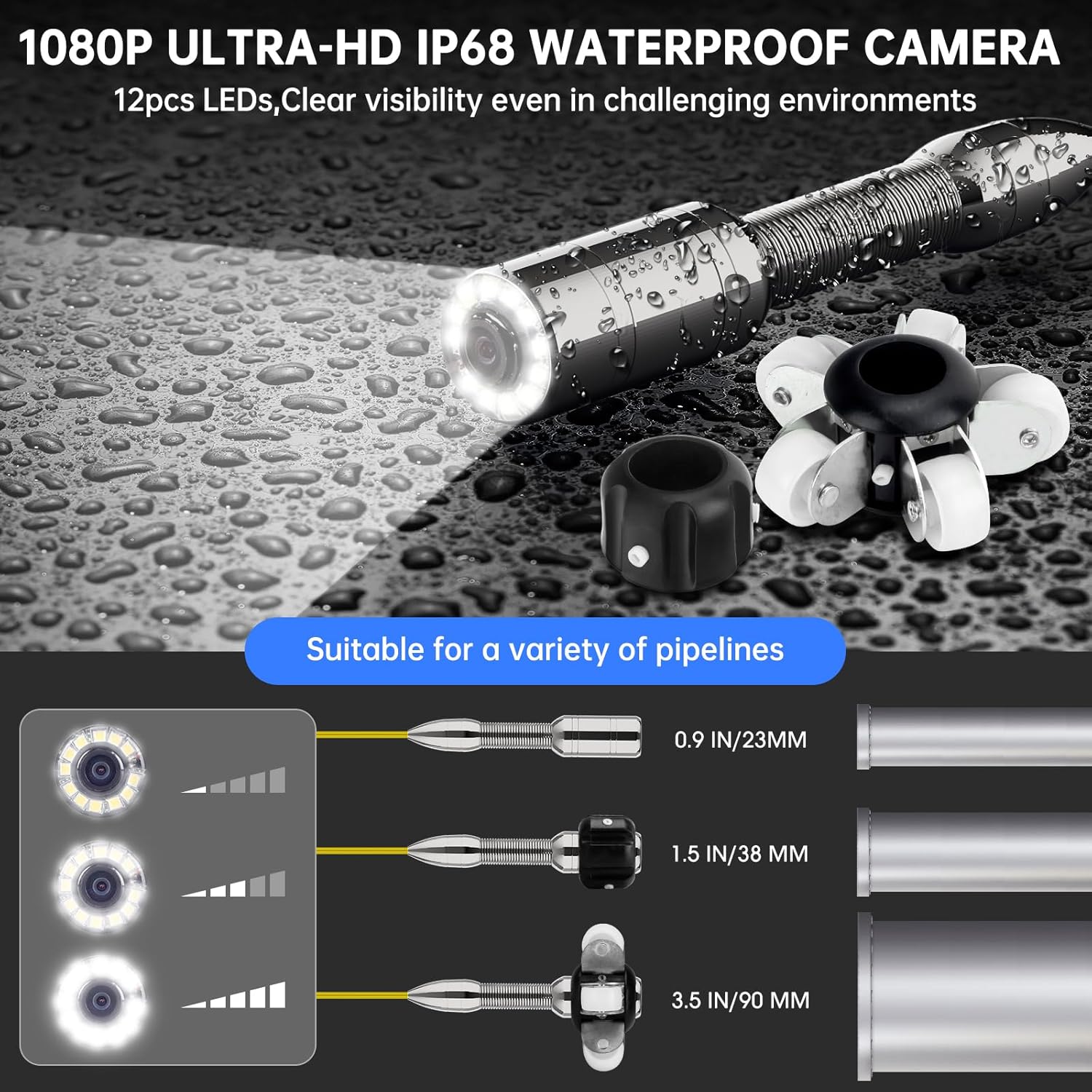
Figure 2: Close-up of the 1080P HD camera head with 12 adjustable LED lights, suitable for various pipeline environments.

Figure 3: The wheel guide attachment for the camera head, designed to reduce friction and improve maneuverability in pipes.
Operating Instructions
- Adjust LED Brightness: Use the knob on the control box to adjust the brightness of the 12 LED lights on the camera head. This ensures clear visibility in varying light conditions within the pipeline.
- Navigate the Camera: Slowly feed the fiberglass cable into the pipe. The semi-rigid cable allows for navigation through bends greater than 90 degrees. The meter counter on the cable indicates the distance the camera has traveled into the pipe.
- Monitor Live Feed: Observe the 9-inch Ultra HD monitor for real-time footage of the inspection area. The monitor supports 8X zoom for detailed viewing.
- Record Video: Press the "REC" button on the monitor to start recording. Press it again to stop recording. Recorded videos are saved to the 16GB SD card.
- Take Snapshots: During live viewing or video playback, press the "SNAPSHOT" button to capture still images. Images are saved to the SD card.
- Review Media: Use the "PLAY" or "MENU" buttons to navigate and review recorded videos and photos stored on the SD card.

Figure 4: The 9-inch Ultra HD monitor displaying the live camera feed, with controls for recording, snapshots, and zoom.

Figure 5: Close-up of the meter counter markings on the yellow fiberglass cable, providing precise distance measurement during inspection.
Maintenance
- Cleaning: After each use, clean the camera head and cable thoroughly with water and a mild detergent. Ensure no debris remains on the lens or LED lights. Dry completely before storage.
- Battery Care: The 4500mAh rechargeable Lithium Ion battery provides 5-6 hours of operation. Charge the battery fully after each use and before long-term storage. Do not overcharge.
- Storage: Store the entire system in its original tough engineering case in a cool, dry place, away from direct sunlight and extreme temperatures.
- SD Card Management: Regularly back up important recordings from the 16GB SD card to another device. Format the SD card periodically to maintain optimal performance.

Figure 6: The rechargeable 4500mAh battery, providing extended operational time for inspections.
Troubleshooting
| Problem | Possible Cause | Solution |
|---|---|---|
| No image on screen. | Loose cable connection, low battery, power off. | Check all cable connections. Charge the battery. Ensure the unit is powered on. |
| Image is dark or unclear. | LED lights off or too dim, dirty camera lens. | Adjust LED brightness using the knob. Clean the camera lens. |
| Cannot record video/take photos. | SD card full or not inserted, SD card error. | Ensure SD card is inserted correctly. Check available space. Format or replace SD card if necessary. |
| Camera stuck in pipe. | Obstruction, sharp bend. | Gently retract the cable. Do not force it. Consider using the guide wheel for smoother navigation. |
Specifications
- Camera Diameter: 23mm (0.9 inches)
- Video Capture Resolution: 1080p
- Monitor Size: 9-inch Ultra HD DVR Screen
- Cable Length: 30M (100 ft)
- Cable Material: Fiberglass (semi-rigid)
- Lighting: 12 high-brightness LED lights (adjustable)
- Waterproof Rating: IP68
- Battery: 4500mAh Lithium Ion (rechargeable)
- Storage: 16GB SD Card (included with DVR models)
- Product Dimensions: 11.42 x 11.02 x 9.84 inches
- Item Weight: 12.1 pounds
- Model Number: JQSP09A sewer camera
- Manufacturer: ShenzhenJiejing
Warranty and Support
For warranty information, technical support, or service inquiries, please refer to the contact details provided by the seller, JJKJ Cam, or visit the official JQKJCAM store on Amazon.
Protection plans are available for extended coverage:
- 2-Year Protection Plan: $47.99
- 3-Year Protection Plan: $60.99
- Complete Protect: $16.99/month (covers all eligible past and future purchases)
For further assistance, you may contact the seller directly through the Amazon platform.
Ask a question about this manual
Ask about setup, troubleshooting, compatibility, parts, safety, or missing instructions. Manuals+ will review the question and use this page’s manual context to help answer it.