Introduction
The LVYUAN 1200W Portable Power Station is a versatile and powerful energy solution designed to charge and operate a wide range of devices. With a substantial 1008Wh capacity and advanced LifePO4 batteries, it provides reliable power for smartphones, laptops, small appliances, and camping equipment. This power station features multiple output options, including AC (220V~240V), USB, Type-C, DC, and cigarette lighter ports, catering to diverse energy needs. It ensures uninterrupted power for essential devices during outages or emergencies, delivering a pure sine wave output for stable current and voltage.
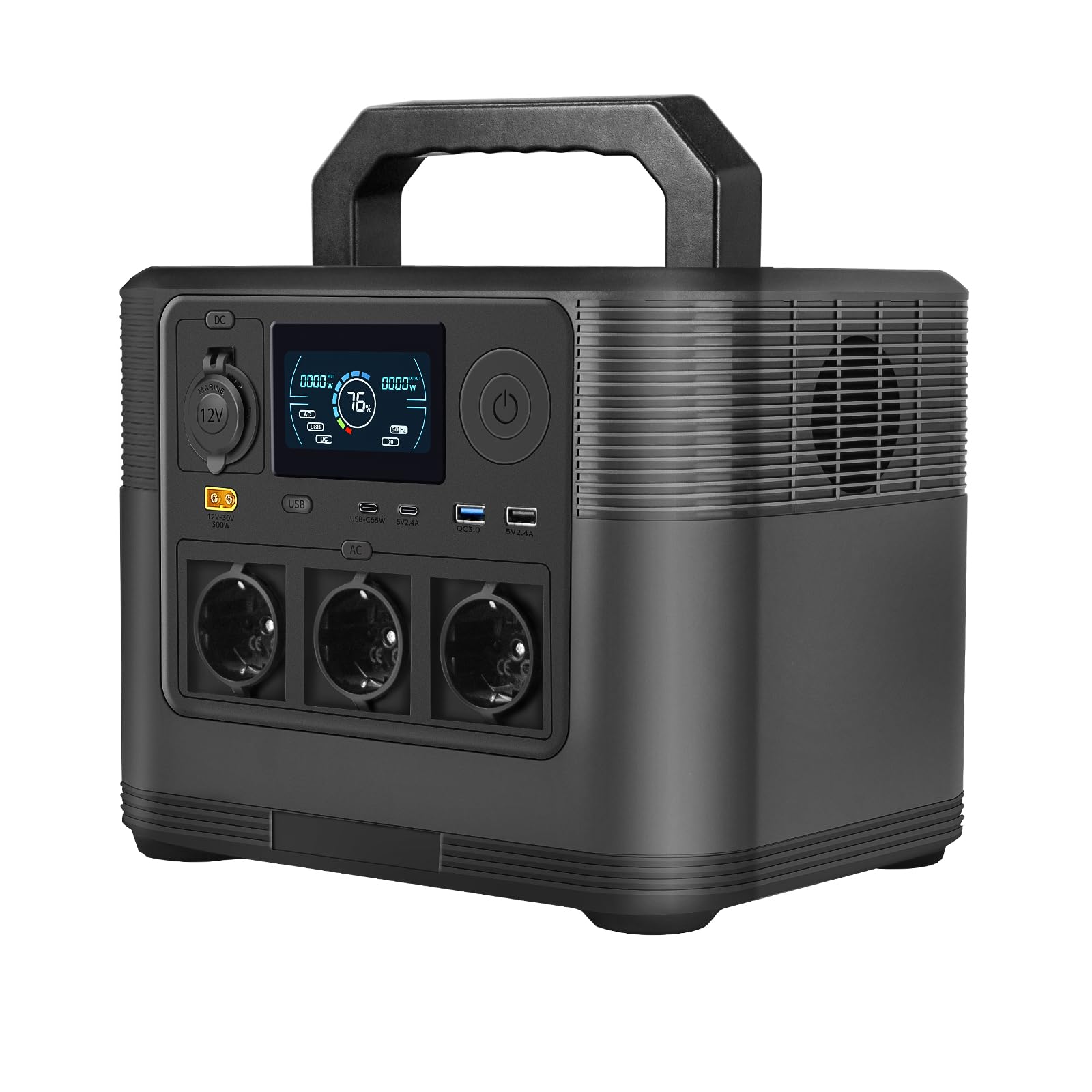
Image: The LVYUAN Portable Power Station 1200W, a compact and robust power solution.
Product Overview
Package Contents
Upon unpacking, please verify that all the following items are included:
- LVYUAN Portable Power Station 1200W x 1
- AC Charging Cable (EU standard) x 1
- User Manual x 1
Note: A solar panel is not included with this offer and must be purchased separately if desired.

Image: The power station shown with its included accessories: user manual, car charge cable, charging wire, and AC power adapter.
Component Identification
Familiarize yourself with the various ports and controls on your power station.

Image: This diagram illustrates the various components and controls on the operation panel of your power station. Key elements include the LED LCD panel, USB-Type A and Type-C ports, DC output button, AC output button, power button, DC12V output (Cigar socket), and the charging input port (XT60).

Image: The LCD display provides real-time information about the power station's status. It shows input power (W) during charging, heat dissipation status (cooling fan), remaining battery level (%), error indicators, output power (W), and activation marks for AC, USB, and DC outputs. It also includes a charge meter and frequency display (50Hz/60Hz).
Setup
Initial Charging
Before first use, it is recommended to fully charge your LVYUAN Portable Power Station. Use the provided AC charging cable to connect the power station to a standard wall outlet.
Alternative Charging Methods
Your power station supports multiple charging methods:
- Standard AC Charging: Connect the AC adapter to a wall outlet. This method typically charges the unit in approximately 5 hours.
- Solar Charging: Connect compatible solar panels (sold separately) to the XT60 input port. The power station supports PV charging with MPPT control and can accept DC 12V-30V input. Charging time is approximately 5 hours with 200W output solar panels, but varies based on sunlight conditions.
- In-Vehicle Charging: Use the car charging cable to connect the power station to your vehicle's 12V cigarette lighter socket. This method allows for charging while on the road or traveling, typically taking 6-8 hours.

Image: This diagram summarizes the various charging methods: Standard AC charging (approx. 5 hours), Solar charging with 200W output products (approx. 5 hours), and In-vehicle charging using a 12V cigar socket (approx. 6-8 hours). Actual charging times may vary based on environmental conditions and power source.

Image: The power station can be charged using compatible solar panels (sold separately). Connect the solar panel to the XT60 input port on the power station. Charging time varies based on sunlight conditions.

Image: This diagram illustrates the faster charging capabilities, showing that the power station can be fully charged in approximately 4 hours with a 300W solar panel or 6 hours with an adapter.
Operating Instructions
Powering On/Off
To turn the power station on or off, press and hold the main power button located on the control panel. The LCD display will illuminate upon activation.
Using DC Outputs
To activate the DC output ports (including the 12V cigarette lighter socket), press the dedicated DC output switch. The 'DC' indicator on the LCD display will light up, confirming activation. Connect your DC-powered devices to the appropriate ports.
Using USB Outputs
To use the USB-A and USB-C ports, press the USB output switch. The 'USB' indicator on the LCD display will activate. Connect your USB-powered devices for charging.
Using AC Outputs
To activate the AC outlets, press the AC output switch. The 'AC' indicator on the LCD display will light up. You can switch between 50Hz and 60Hz frequency by pressing and holding the AC output button and the power button simultaneously. Connect your standard AC appliances to the outlets.
Connecting Devices
Once the desired output function (DC, USB, or AC) is activated, connect your devices to the corresponding ports. The LCD display will show the real-time output wattage, allowing you to monitor power consumption. The power station is designed to charge and power multiple devices simultaneously, provided the total power draw does not exceed its rated output.
Maintenance
Storage
Store the power station in a cool, dry place away from direct sunlight, moisture, and extreme temperatures. Ensure the unit is fully charged before long-term storage. For optimal battery health, recharge the power station every 3-6 months, even if not in use.
Cleaning
Use a soft, dry cloth to clean the exterior surfaces of the power station. Do not use liquid cleaners, abrasive materials, or immerse the device in water. Keep the ventilation vents clear of dust and debris to ensure proper airflow.
Battery Care
The power station utilizes LifePO4 batteries, known for their durability and long cycle life. To maximize battery lifespan, avoid completely draining the battery frequently. Optimal performance and longevity are achieved by maintaining the battery charge between 20% and 80% whenever possible.
Troubleshooting
Device Not Charging/Powering On
- Ensure the power station is turned on and has sufficient battery charge.
- Verify that the specific output (DC, USB, or AC) you intend to use is activated by pressing its respective switch.
- Check if the device you are trying to charge or power is properly connected and functioning correctly.
- If using AC output, ensure the device's power consumption does not exceed the power station's rated continuous output (1200W) or peak output (1800W).
Error Indicator On Display
- An error mark on the display indicates that a protection function has been activated or an internal error has occurred. This may be due to conditions such as overload, over-temperature, short circuit, or critically low battery.
- Disconnect all connected devices and turn off the power station. Wait a few minutes, then restart it. If the error persists, please contact customer support.
Overheating
- If the heat dissipation mark is active, it indicates that the internal cooling fan is operating. This is normal during heavy use, high power output, or charging.
- Ensure that the ventilation vents on the power station are not blocked. Operate the power station in a well-ventilated area to allow for proper heat dissipation.
- If the device feels excessively hot and an error occurs, immediately disconnect all devices and allow the unit to cool down completely before attempting to use it again.
Specifications
| Feature | Value |
|---|---|
| Brand | LVYUAN |
| Model Number | LVYUAN1200S |
| Battery Type | LifePO4 (Lithium Iron Phosphate) |
| Battery Capacity | 1008Wh (45Ah/22.4V) |
| Cell Capacity | 315000mAh/3.2V |
| AC Output (Continuous) | 1200W |
| AC Output (Peak) | 1800W |
| AC Output Voltage/Frequency | 220V/5.5A 50Hz (Switchable to 60Hz) |
| Total AC Outlets | 3 |
| DC Input | 12V-30V=10A Max |
| DC Output | 12V=8.3A |
| USB 1 Output | 5V-12V=1.5A/18W |
| USB 2 Output | 5V=2.4A |
| Type C1 Output | 5V-20V 3.25A/65W |
| Type C2 Output | 5V=2.4A |
| Power Source | Battery, Solar |
| Recommended Uses | Residential, Camping, Commercial |
| Operating Temperature | 10~40°C |
| Charging Temperature | 0~40°C |
| Special Feature | Remote Start |
| Ignition System Type | Electronic |
| Manufacturer | LVYUAN |
| ASIN | B0CS5C698G |
Warranty and Support
Your LVYUAN Portable Power Station comes with a standard manufacturer's warranty. Please refer to the warranty card included in your package for specific terms and conditions, including the warranty period and coverage details. For technical support, troubleshooting assistance, or to initiate a warranty claim, please contact LVYUAN customer service through their official website or the retailer where the product was purchased. It is recommended to keep your purchase receipt as proof of purchase for warranty purposes.