1. Introduction
Thank you for choosing the Naicon Diloc Dune 9000 BTU Inverter Monosplit Air Conditioner. This manual provides essential information for the safe and efficient installation, operation, and maintenance of your new air conditioning system. Please read this manual thoroughly before using the appliance and retain it for future reference.
This system features inverter technology, R32 refrigerant, integrated Wi-Fi, and offers cooling, heating (heat pump), and dehumidification functions with an A++/A+ energy rating. The kit includes an indoor unit (D.DUNE09), an outdoor unit (D.DUNE109+), and a Wi-Fi module (D.WIFI).

Image 1.1: Naicon Diloc Dune 9000 BTU Inverter Monosplit Air Conditioner, showing both indoor and outdoor units.
2. Safety Information
Please observe the following safety precautions to prevent injury or damage to the appliance:
- Professional Installation: Installation, maintenance, and repair must be performed by qualified personnel. Improper installation can lead to electric shock, fire, or water leakage.
- Power Supply: Ensure the power supply matches the specifications of the unit. Do not use damaged power cords or plugs.
- Refrigerant: This unit uses R32 refrigerant. Handle with care and ensure proper ventilation during installation and servicing. R32 is a mildly flammable refrigerant.
- Children and Vulnerable Persons: This appliance can be used by children aged 8 years and above and persons with reduced physical, sensory or mental capabilities or lack of experience and knowledge if they have been given supervision or instruction concerning use of the appliance in a safe way and understand the hazards involved. Children shall not play with the appliance. Cleaning and user maintenance shall not be made by children without supervision.
- Ventilation: Do not block the air inlet or outlet of the indoor or outdoor unit.
- Cleaning: Always disconnect the power supply before cleaning the unit. Use a soft, dry cloth for cleaning. Do not use water or chemical solvents directly on the unit.
3. Product Overview
The Naicon Diloc Dune air conditioner system consists of two main components:
3.1. Indoor Unit (Model: D.DUNE09)
The indoor unit is responsible for circulating conditioned air within your room. It houses the evaporator coil, fan, and control electronics.

Image 3.1: The indoor unit of the Naicon Diloc Dune air conditioner.
3.2. Outdoor Unit (Model: D.DUNE109+)
The outdoor unit contains the compressor, condenser coil, and expansion valve. It dissipates or absorbs heat from the outside air.

Image 3.2: The outdoor unit of the Naicon Diloc Dune air conditioner.
3.3. Wi-Fi Module (Model: D.WIFI)
The integrated Wi-Fi module allows for remote control and monitoring of your air conditioner via a smartphone application.
4. Setup
4.1. Installation
The installation of this monosplit air conditioning system requires specialized knowledge and tools. It is strongly recommended that you engage a certified HVAC professional for the installation process to ensure proper functioning, safety, and compliance with local regulations.
Key installation considerations include:
- Selecting appropriate locations for both indoor and outdoor units.
- Ensuring proper drainage for condensate.
- Connecting refrigerant lines and electrical wiring correctly.
- Vacuuming the refrigerant lines and checking for leaks.
4.2. Wi-Fi Setup
Your Diloc Dune air conditioner comes with integrated Wi-Fi for smart control. To set up the Wi-Fi functionality:
- Download the compatible smartphone application (e.g., Tuya Smart or Smart Life, as indicated by product features) from your device's app store (Apple App Store or Google Play Store).
- Ensure your air conditioner is powered on.
- Follow the in-app instructions to add your device. This typically involves putting the air conditioner into pairing mode (refer to the specific instructions provided with the Wi-Fi module or in the app for details on how to activate pairing mode on the indoor unit).
- Connect the air conditioner to your home Wi-Fi network.

Image 4.1: Overview of Naicon Diloc Dune features, including Wi-Fi integration and compatibility with smart home platforms.
5. Operating Instructions
Your Diloc Dune air conditioner can be operated using the supplied remote control or via the smartphone application once Wi-Fi is configured.
5.1. Basic Functions
- Cooling Mode: Reduces room temperature. Select the snowflake symbol on the remote.
- Heating Mode: Increases room temperature (heat pump function). Select the sun symbol on the remote.
- Dehumidifier Mode: Reduces humidity in the air without significant temperature change. Select the water drop symbol.
- Fan Mode: Circulates air without cooling or heating. Select the fan symbol.
5.2. Special Functions
- Inverter Technology: The inverter compressor adjusts its speed to maintain a stable temperature, leading to energy efficiency and quieter operation.
- TURBO Function: Provides rapid cooling or heating to reach the desired temperature quickly.
- Auto Function: The unit automatically selects the operating mode (cooling, heating, or fan) based on the current room temperature and the set temperature.
- Wi-Fi Control: Use the smartphone app to control the unit remotely, set schedules, and monitor status.
5.3. Remote Control Usage
Point the remote control directly at the indoor unit's receiver. Ensure there are no obstructions between the remote and the unit. The remote control typically allows you to:
- Turn the unit On/Off.
- Select operating mode.
- Adjust temperature settings.
- Control fan speed.
- Set timer functions.
- Activate special functions like TURBO or SLEEP mode.
6. Maintenance
Regular maintenance ensures optimal performance and longevity of your air conditioner. Always disconnect the power supply before performing any maintenance.
6.1. Automatic Maintenance
The Diloc Dune air conditioner features an automatic maintenance function. This function helps to keep the internal components clean and reduce the growth of mold and bacteria. Refer to your specific model's detailed instructions for how this function operates and if it requires manual activation.
6.2. Filter Cleaning
The air filters in the indoor unit should be cleaned regularly (typically every 2-4 weeks, depending on usage and air quality) to maintain air quality and unit efficiency.
- Open the front panel of the indoor unit.
- Remove the air filters.
- Clean the filters using a vacuum cleaner or wash them with lukewarm water and a mild detergent.
- Allow the filters to dry completely in a shaded area before reinstalling them.
- Close the front panel.
6.3. Seasonal Checks
- Outdoor Unit: Ensure the outdoor unit is free from obstructions (leaves, debris) and that the coils are clean.
- Drainage: Check that the condensate drain line is clear and not blocked.
- Professional Service: Consider an annual professional service check-up to ensure all components are functioning correctly and to check refrigerant levels.
7. Troubleshooting
Before contacting customer support, please check the following common issues:
- Unit does not turn on: Check power supply, circuit breaker, and ensure the remote control batteries are not depleted.
- Insufficient cooling/heating: Ensure filters are clean, doors/windows are closed, and the set temperature is appropriate. Check for obstructions around indoor/outdoor units.
- Unusual noises: Minor noises during operation are normal. If loud or unusual noises occur, power off the unit and contact a professional.
- Water leakage from indoor unit: Check if the drain hose is blocked or kinked. Ensure the unit is installed level.
- Wi-Fi connection issues: Ensure your router is working, the Wi-Fi signal is strong, and the app is updated. Try re-pairing the device.
For persistent issues, contact a qualified service technician.
8. Specifications
8.1. General Specifications
- Brand: Naicon
- Model Number (Indoor Unit): D.DUNE09
- Cooling Capacity: 9000 BTU
- Refrigerant: R32
- Energy Class: A++/A+
- SEER (Seasonal Energy Efficiency Ratio): 6.8
- Special Feature: Wi-Fi Enabled
- Color: White
- Voltage: 230V AC
- Filter Type: Modern filter
- Country of Origin: Italy
8.2. Dimensions
- Indoor Unit (D.DUNE09) Product Dimensions: 31P x 76.5L x 48.1H cm
8.3. Key Features
- Wi-Fi Included
- Inverter Technology
- Dehumidifier Function
- TURBO Function
- Auto Function
- Automatic Maintenance
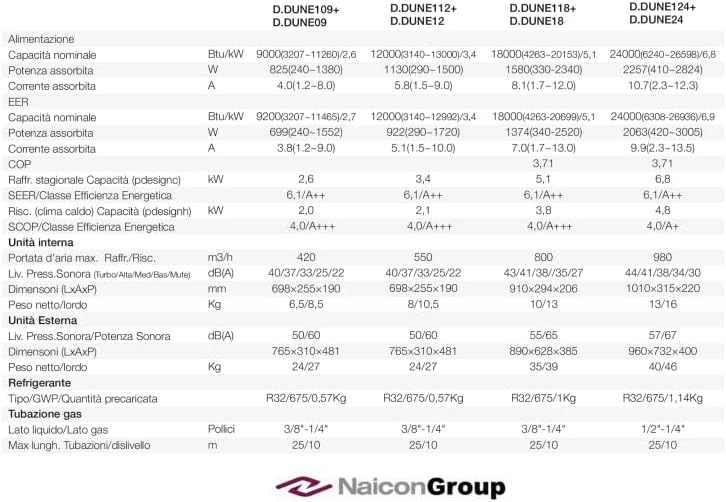
Image 8.1: Technical specifications table for Diloc Dune series, including D.DUNE09.
9. Warranty and Support
For warranty information and customer support, please refer to the documentation provided at the time of purchase or contact your retailer. General return policies for products purchased online may vary, typically allowing returns within a specific period if you change your mind or if the product is defective or damaged upon receipt. Always consult the specific terms and conditions of your purchase platform or retailer for detailed warranty and support procedures.


