
1. Introduction
Thank you for choosing the Antarctic Star Nugget Ice Maker. This appliance is designed to provide chewable, pebble ice quickly and efficiently, perfect for various beverages and occasions. With its compact design and user-friendly features, including a self-cleaning function, it's an ideal addition to your home, office, or for outdoor events.
Please read this manual thoroughly before operating the ice maker to ensure safe and optimal performance. Keep this manual for future reference.

The Antarctic Star Nugget Ice Maker, showcasing its compact design and the type of ice it produces, alongside a refreshing beverage.
2. Safety Instructions
To reduce the risk of fire, electric shock, or injury when using your ice maker, follow these basic precautions:
- Read all instructions before use.
- Do not touch the evaporator or ice blades when the unit is operating.
- Do not immerse the appliance, power cord, or plug in water or other liquids.
- Supervise children closely when the appliance is in use.
- Unplug the ice maker from the outlet when not in use or before cleaning.
- Do not operate any appliance with a damaged cord or plug, or after the appliance malfunctions or has been damaged in any manner.
- Use only potable water for ice production.
- Ensure proper ventilation around the unit. Maintain at least 6 inches of space from walls and other objects.
3. Product Components
Your Antarctic Star Nugget Ice Maker comes with the following components:
- Ice Maker Unit
- Ice Scoop
- Removable Ice Basket
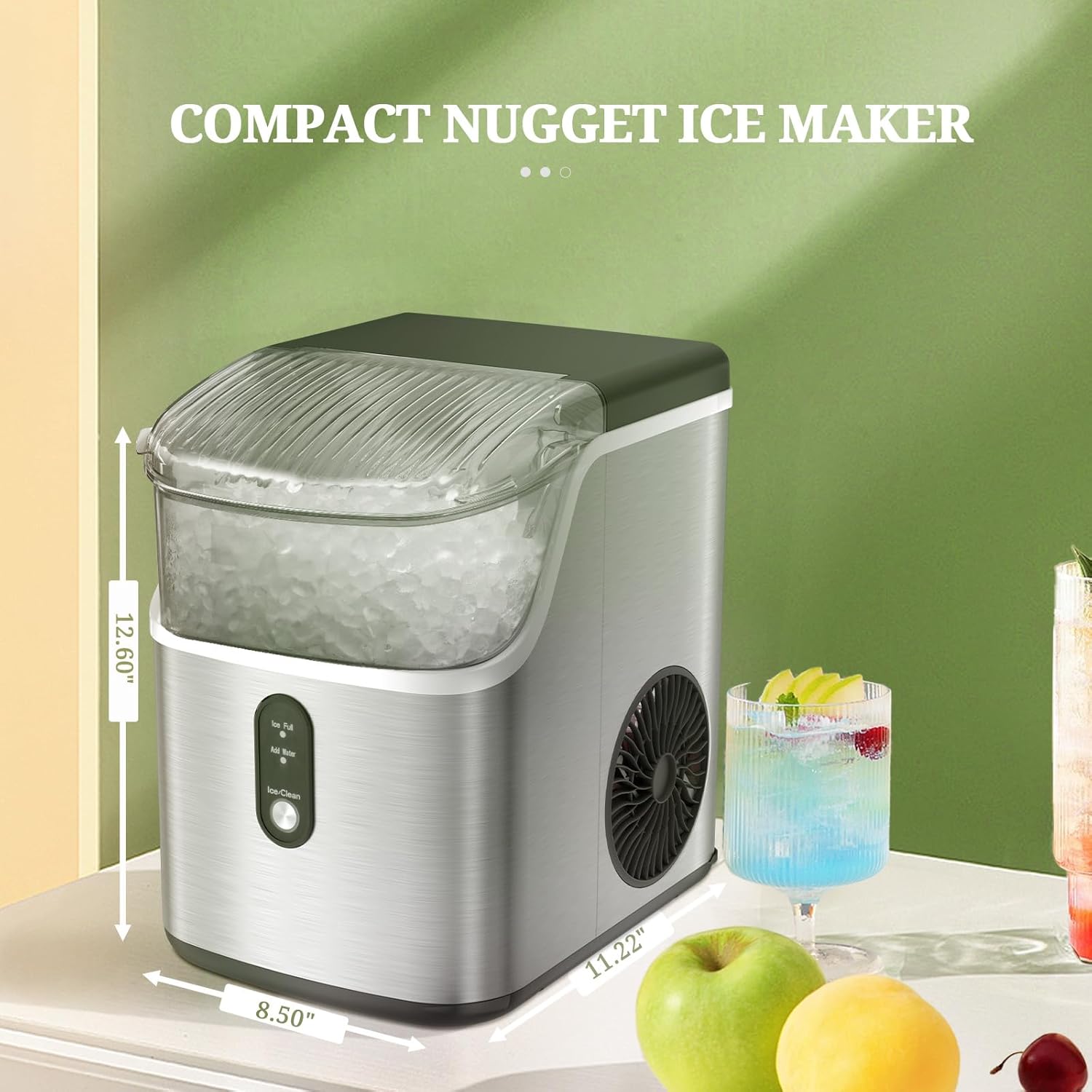
Front view of the ice maker highlighting its compact dimensions: approximately 12.60 inches high, 8.50 inches wide, and 11.22 inches deep.

Detail of the convenient ice scoop holder integrated into the ice maker's design.
4. Setup and First Use
4.1 Unpacking
Carefully remove your ice maker from its packaging. Remove all packing materials, including any tape or protective film. Inspect the unit for any damage during transit.
4.2 Placement
Place the ice maker on a flat, stable surface away from direct sunlight and heat sources (e.g., stoves, furnaces, radiators). Ensure there is at least 6 inches (15 cm) of clear space around the unit for proper ventilation. This compact unit is designed to fit on most countertops.
4.3 Initial Cleaning
Before first use, it is recommended to clean the ice maker. Follow these steps:
- Remove the ice basket.
- Clean the interior with a soft cloth and warm water with a mild detergent.
- Rinse thoroughly and drain any remaining water.
- Wipe the exterior with a damp cloth.
4.4 Filling the Water Tank
Open the lid and fill the water tank with potable water up to the MAX fill line. The water tank capacity is 1.1 liters.

A top-down view illustrating the water tank and its maximum fill line.
5. Operating Instructions
5.1 Making Ice
The Antarctic Star Nugget Ice Maker features a simple one-button operation:
- Ensure the unit is plugged into a grounded electrical outlet.
- Fill the water tank as described in Section 4.4.
- Press the ICE/CLEAN button once to start the ice making cycle. The indicator light will illuminate.
- The ice maker will begin producing nugget ice. The first batch may take slightly longer.
- The unit can produce up to 35 lbs of ice in 24 hours.

A visual guide to the three simple steps for making ice: filling water, pressing the power button, and enjoying your fresh ice.

A close-up view of the control panel, demonstrating the ease of one-click operation by pressing the Ice/Clean button.
5.2 Indicator Lights
The control panel features indicator lights to inform you of the unit's status:
- Ice Full: This light illuminates when the ice basket is full. The ice making process will pause automatically. Once ice is removed, the process will resume.
- Add Water: This light illuminates when the water tank is low on water. The ice making process will pause. Refill the water tank to resume operation.

The control panel displaying the 'Ice Full' and 'Add Water' indicators, along with the 'Ice/Clean' button for operation and maintenance.
6. Maintenance
6.1 Self-Cleaning Function
The ice maker is equipped with a convenient self-cleaning function:
- Ensure the water tank is filled with clean water.
- Press and hold the ICE/CLEAN button for 5 seconds. The ring indicator light will flash white, indicating the cleaning cycle has started.
- The cleaning procedure will run for approximately 15 minutes and then automatically exit.
- To exit the cleaning procedure manually, press the ICE/CLEAN button again.

The ice maker in self-cleaning mode, showing the internal water circulation for thorough cleaning.

A visual representation of the self-cleaning function, emphasizing its ease of use and effectiveness in maintaining a clean ice maker.
6.2 Regular Cleaning and Storage
For optimal performance and hygiene, regular cleaning is recommended:
- Always unplug the unit before cleaning.
- Remove the ice basket and clean it with warm, soapy water. Rinse and dry thoroughly.
- Drain any remaining water from the reservoir.
- Clean the interior and exterior surfaces with a soft cloth and mild detergent.
- For long-term storage, ensure the unit is completely dry before storing it in a cool, dry place.
7. Troubleshooting
If you encounter issues with your ice maker, please refer to the following table:
| Problem | Possible Cause | Solution |
|---|---|---|
| Ice maker not working | No power; Water tank empty. | Check power connection; Fill water tank. |
| "Add Water" indicator on | Water level is low. | Add water to the reservoir. |
| "Ice Full" indicator on | Ice basket is full. | Remove ice from the basket. |
| Ice production is slow or no ice | Poor ventilation; Water temperature too high; Unit needs cleaning. | Ensure adequate space around the unit; Use cold water; Perform self-cleaning. |
| Loud noise during operation | Unit not level; Internal component issue. | Ensure unit is on a flat, stable surface; If noise persists, contact customer support. |
8. Specifications
| Feature | Specification |
|---|---|
| Brand | Antarctic Star |
| Model Name | HZB-15NB |
| Product Dimensions (D x W x H) | 11.3" x 8.66" x 12.68" |
| Capacity | 35 Pounds (ice production per 24h) |
| Water Tank Capacity | 1.1 Liters |
| Wattage | 160 kWh |
| Voltage | 200 Volts |
| Refrigerant | R600a |
| Material | Plastic |
| Item Weight | 22.3 pounds |
| Installation Type | Countertop |
9. Warranty and Support
For detailed warranty information and customer support, please refer to the warranty card included with your product or visit the official Antarctic Star website. If you experience any issues not covered in the troubleshooting section, please contact Antarctic Star customer service for assistance.
Thank you for choosing Antarctic Star.