
Introduction
Thank you for choosing the SURNICE Wireless Remote Control Outlet. This device allows you to control your electrical appliances remotely, offering convenience and energy efficiency. With its programmable features and a wireless range of up to 40 meters, it simplifies managing your home electronics. Please read this manual carefully before use to ensure proper operation and safety.
Safety Information
- Maximum Load: Do not exceed the maximum load of 1000W (4.35A at 230V) for any connected appliance. Overloading can cause damage to the device and pose a fire hazard.
- Indoor Use Only: This product is designed for indoor, domestic use. Do not expose it to water, moisture, or extreme temperatures.
- Child Safety: The outlet features a child safety lock. Keep the remote control out of reach of children.
- CE Certified: The product is CE certified, ensuring it meets European safety, health, and environmental protection requirements.
- Material: Constructed from Acrylonitrile Butadiene Styrene (ABS) for durability and safety.
- Power Source: Ensure the wall outlet provides 230V.
Package Contents
Please verify that all components are present in your package. Typically, the package includes:
- SURNICE Wireless Remote Control Outlet(s)
- Remote Control Transmitter
- User Manual (this document)
If any items are missing or damaged, please contact customer support.
Setup and Pairing
Follow these steps to set up and pair your SURNICE Wireless Remote Control Outlet with the remote control.
1. Initial Pairing
- Plug the SURNICE Wireless Remote Control Outlet into a standard 230V wall socket.
- Press and hold the power button on the side of the outlet until its indicator light begins to flash slowly. Release the button.
- On the remote control, press the 'ON' button for the desired channel (e.g., 'A ON'). The indicator light on the outlet will stop flashing and remain steadily lit, confirming successful pairing.

Image: SURNICE Wireless Remote Control Outlet plugged into a power strip with a lamp, illustrating the pairing process. The remote control is shown in hand, ready to pair.
Video: How to Pair the SURNICE Wireless Remote Control Outlet
Video: This short video demonstrates the simple steps to pair the SURNICE Wireless Remote Control Outlet with its remote control, showing the indicator light behavior during the process.
2. Pairing Multiple Outlets or Remote Controls
The remote control has 3 channels (A, B, C) and an 'ALL' button. Each channel can control one or more outlets, and one outlet can be controlled by multiple remote controls.
- To pair another outlet to a different channel (e.g., 'B'), repeat steps 1-3, but press 'B ON' on the remote control.
- To pair multiple outlets to a single channel, repeat steps 1-3 for each outlet, using the same channel button (e.g., 'A ON').
- To pair an outlet to multiple remote controls, simply repeat the pairing process (steps 1-3) with each additional remote control.
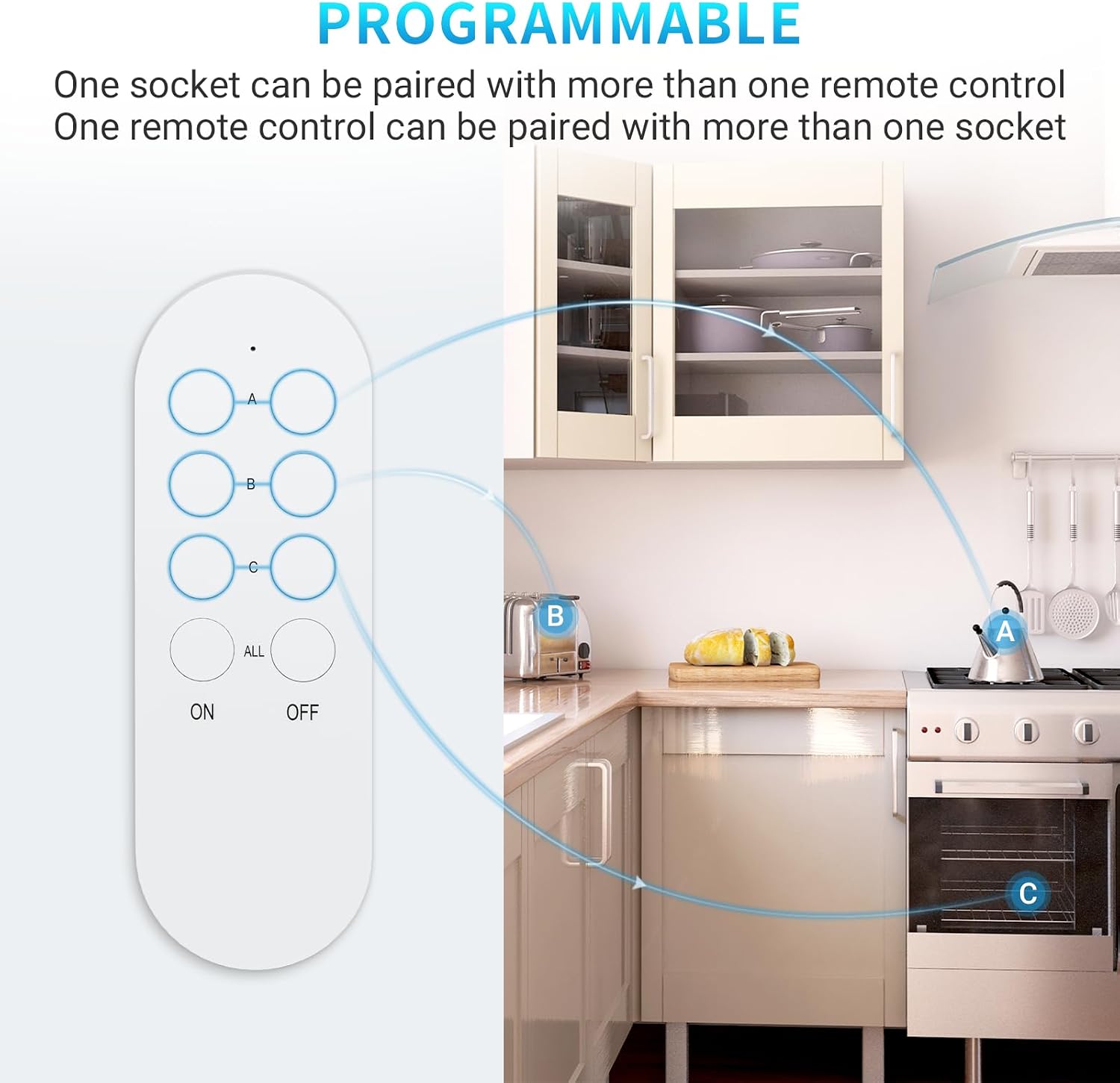
Image: A diagram showing the SURNICE remote control and its ability to programmatically control multiple kitchen appliances (kettle, toaster, oven) via channels A, B, and C.
Operating Instructions
Using the Remote Control
- Individual Control: Press the 'ON' or 'OFF' button corresponding to the channel (A, B, or C) to control the paired outlet(s) for that specific channel.
- All On/Off: Press the 'ALL ON' button to turn on all paired outlets simultaneously. Press the 'ALL OFF' button to turn off all paired outlets simultaneously.

Image: A detailed view of the SURNICE remote control and outlet, highlighting the LED indicator, ON/OFF button, pairing function, and the 'ALL ON/OFF' feature on the remote.
Wireless Range
The SURNICE Wireless Remote Control Outlet offers a maximum transmission range of up to 40 meters in open areas. This allows you to control devices from different rooms or even from your garden, provided there are no significant obstructions.

Image: A hand holding the SURNICE remote control, with a modern house in the background showing various appliances (kettle, coffee machine, air conditioner, washing machine) that can be controlled wirelessly up to 40 meters.
Energy Saving
The remote control outlets help reduce energy consumption by allowing you to easily turn off appliances when not in use. The standby power consumption is less than 0.5W, contributing to lower electricity bills.
Maintenance
To ensure the longevity and optimal performance of your SURNICE Wireless Remote Control Outlet, follow these simple maintenance guidelines:
- Cleaning: Wipe the device with a soft, dry cloth. Do not use liquid cleaners or abrasive materials.
- Storage: When not in use for extended periods, store the device in a cool, dry place away from direct sunlight.
- Avoid Impact: Protect the device from drops or strong impacts.
Troubleshooting
If you encounter any issues with your SURNICE Wireless Remote Control Outlet, refer to the following common problems and solutions:
Outlet Not Responding to Remote
- Check Power: Ensure the outlet is properly plugged into the wall socket and receiving power.
- Re-pair: The pairing might have been lost. Follow the "Setup and Pairing" instructions to re-pair the outlet with the remote control.
- Battery: Check the battery in the remote control. Replace if necessary.
- Obstructions: Large metal objects or thick walls can interfere with the wireless signal. Try moving closer to the outlet or removing obstructions.
How to Unpair an Outlet
To unpair an outlet from the remote control, follow these steps:
- Ensure the outlet is powered on and currently paired with the remote control.
- Press and hold the power button on the side of the outlet for approximately 20 seconds. The indicator light will first flash slowly, then quickly, and finally turn off.
- Release the button. The outlet is now unpaired. You can test this by pressing the corresponding 'ON' button on the remote; the outlet should not respond.
Video: How to Unpair the SURNICE Wireless Remote Control Outlet
Video: This short video demonstrates how to successfully unpair the SURNICE Wireless Remote Control Outlet from its remote control, showing the indicator light sequence.
Specifications
| Feature | Specification |
|---|---|
| Brand | SURNICE |
| Model | B0CRYXC52D |
| Color | White |
| Total Outlets | 3 |
| Voltage | 230V |
| Maximum Current | 4.35 A |
| Maximum Power | 1000 W |
| Special Features | Remote Control, Programmable Functions, Child Safety Lock |
| Recommended Use | Indoor, Domestic Use |
| Material | Acrylonitrile Butadiene Styrene (ABS) |
| Plug Type | Type E – 2 pins (France) |
| Wireless Frequency | 433.92 MHz |
| Wireless Range | Up to 40 m (open field) |
| Smart Home Compatibility | Not Smart Home Compatible |
| Smart Energy Saving | Yes |
| Country of Origin | China |
Warranty and Support
SURNICE products are designed for reliability and performance. For warranty information or technical support, please refer to the contact details provided with your purchase or visit the official SURNICE website. Keep your proof of purchase for warranty claims.
