
OSWIN HJ819
OSWIN HJ819 Remote Control Boat User Manual
Model: HJ819
Brand: OSWIN
1. Important Safety Precautions
Please read and understand all safety instructions before operating the OSWIN HJ819 Remote Control Boat. Failure to follow these instructions may result in injury or damage to the product.
- Adult Supervision: This product is recommended for users aged 8 and above. Adult supervision is required for children operating the boat.
- Water Environment: Operate the boat only in calm, clear freshwater environments such as pools or lakes. Avoid operating in strong currents, saltwater, or areas with dense aquatic vegetation or debris.
- Propeller Safety: Keep fingers, hair, and loose clothing away from the propeller when the boat is powered on. The propeller can cause injury.
- Battery Safety:
- Use only the provided charger and batteries.
- Do not overcharge batteries.
- Do not expose batteries to extreme temperatures or direct sunlight.
- If batteries swell or show signs of damage, discontinue use immediately.
- Dispose of batteries according to local regulations.
- Water-Off Sensor: The boat is equipped with a water-off sensor. The motor will only activate when the boat is in water, enhancing safety. Do not attempt to force the propeller to spin out of water.
- Avoid Obstacles: Do not operate the boat near swimmers, animals, or solid objects to prevent collisions and damage.
- Remote Control Range: Be aware of the remote control's maximum range (up to 250 ft). Operating beyond this range may result in loss of control.
2. Package Contents
Carefully unpack the box and ensure all items are present and in good condition:
- 1 x OSWIN HJ819 RC Boat
- 1 x 2.4GHz Remote Control
- 2 x Rechargeable Lithium Batteries (for boat)
- 1 x USB Charging Cable
- 1 x AAA Battery (for remote control, typically included)
- 1 x Wrench
- 2 x Spare Propeller Blades
- 2 x Spare Nuts
- 1 x User Manual

Image: All components included in the OSWIN HJ819 RC Boat package.
3. Setup
3.1 Charging the Boat Battery
- Connect the rechargeable lithium battery to the USB charging cable.
- Plug the USB charging cable into a standard USB power adapter (e.g., phone charger, computer USB port).
- The indicator light on the USB charger will show the charging status (refer to charger instructions for specific light indications).
- Charging typically takes 2-3 hours. Disconnect once fully charged.
3.2 Installing Batteries
Boat Battery Installation:
- Locate the battery compartment on the top of the boat.
- Open the waterproof cover. The boat features a fully sealed design with an EVA sealing ring for protection.
- Connect the charged lithium battery to the boat's power connector.
- Carefully place the battery inside the compartment and ensure all wires are tucked away.
- Securely close the waterproof cover, ensuring a tight seal to prevent water ingress.

Image: The boat's fully sealed design, highlighting the battery compartment area.
Remote Control Battery Installation:
- Open the battery cover on the back of the remote control.
- Insert 1 AAA battery, observing the correct polarity (+/-).
- Close the battery cover securely.
3.3 Pairing the Remote Control with the Boat
- Ensure both the boat and the remote control have fresh or fully charged batteries.
- Place the boat in water. The water-off sensor will activate the boat's power.
- Turn on the remote control.
- The remote control and boat should automatically pair. A successful pairing is usually indicated by a solid light on the remote or boat.
- If pairing fails, turn off both devices, wait a few seconds, and repeat the process.
4. Operating Instructions
4.1 Basic Controls
- Forward/Backward: Push the throttle stick (left stick) forward or backward.
- Turn Left/Right: Turn the steering wheel (right wheel) left or right.
4.2 Speed Adjustment
The remote control allows for speed adjustment:
- Locate the speed adjustment button on the remote control.
- Press the button once for 10+ MPH speed.
- Double-click the button for 15+ MPH speed.
4.3 LED Light Control
The boat features integrated LED lights for enhanced visibility and fun, especially in low light conditions:
- Press the light control button once to turn the lights on.
- Press the button twice to make the lights flash.
- Press the button three times to turn the lights off.
4.4 Capsized Boat Reset (Self-Righting)
If the boat capsizes during operation, use the one-button capsized reset feature:
- Long press the function button on the remote control.
- The boat will automatically flip itself back over to the correct orientation.

Image: Remote control functions for speed, lights, and self-righting.
4.5 Water-Off Sensor
The boat is equipped with a safety sensor that prevents the propeller from spinning when out of water. The motor will only energize when the boat is placed in water.
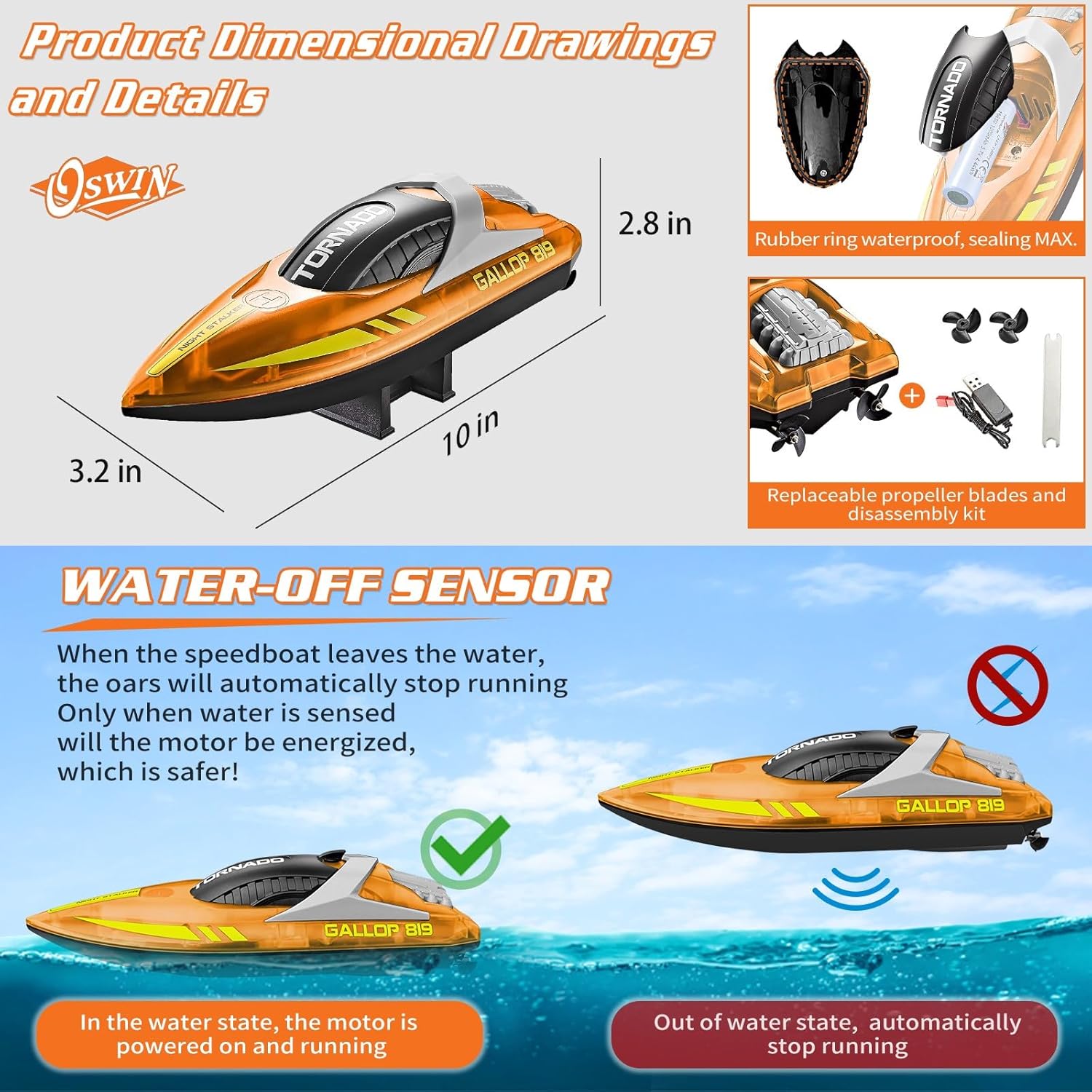
Image: Explanation of the water-off sensor for safe operation.
4.6 Operating Range and Low Power Warning
The 2.4GHz remote control provides a control distance of up to 250 feet. If the boat goes out of range or the remote control battery is low, a red light will flash on the remote control as a warning.

Image: Remote control range and low power warning indicator.
4.7 Product Demonstration Videos
Video: OSWIN RC Boat - HJ819 15+ MPH Fast Remote Control Boat. This video demonstrates the boat's speed, maneuverability, and LED lights in action.
Video: OSWIN RC Boat - HJ819 Remote Control Boat for Pool. This video showcases the boat's performance in a pool environment, highlighting its suitability for various water bodies.
5. Maintenance
Proper maintenance will extend the life and performance of your RC boat.
- After Each Use:
- Remove the boat from the water immediately after use.
- Wipe down the boat with a soft, dry cloth to remove any water or debris.
- Open the battery compartment and dry any moisture inside. Ensure the compartment is completely dry before closing.
- Remove the boat battery and store it separately.
- Propeller Maintenance: Regularly check the propeller for any debris (e.g., weeds, fishing line) that may be tangled around it. Clean as necessary. If the propeller is damaged, use the provided wrench to replace it with a spare.
- Seals: Periodically inspect the waterproof seals around the battery compartment and other openings to ensure they are intact and free of cracks or damage. A fully sealed design helps protect internal components from rust.
- Storage: Store the boat and remote control in a cool, dry place away from direct sunlight and extreme temperatures.
Image: Replaceable propeller blades and tools for maintenance.
6. Troubleshooting
If you encounter issues with your OSWIN HJ819 RC Boat, refer to the following common problems and solutions:
| Problem | Possible Cause | Solution |
|---|---|---|
| Boat does not respond to remote control. | Low battery in boat or remote; Not paired; Out of range. | Charge boat battery; Replace remote battery; Re-pair boat and remote; Bring boat closer to remote. |
| Propeller not spinning in water. | Water-off sensor not activated; Debris tangled in propeller. | Ensure boat is fully in water; Remove any debris from propeller. |
| Boat capsizes frequently. | Rough water conditions; High speed turns. | Operate in calmer water; Reduce speed during turns; Use self-righting feature. |
| LED lights not working. | Lights turned off; Low boat battery. | Press light control button to cycle through modes; Charge boat battery. |
| Remote control red light flashing. | Low remote control battery; Boat out of range. | Replace remote battery; Bring boat closer to remote. |
7. Specifications
- Model: HJ819
- Dimensions: 9.84 x 3.15 x 2.75 inches
- Weight: 6.4 ounces
- Speed: 10+ MPH / 15+ MPH (adjustable)
- Control Frequency: 2.4GHz
- Control Range: Up to 250 feet
- Boat Battery: Rechargeable Lithium (2 x 1100mAh recommended for 40+ minutes playtime)
- Remote Control Battery: 1 x AAA (included)
- Features: LED Lights, Water-Off Sensor, Self-Righting Function, Fully Sealed Design
- Manufacturer: OSWIN

Image: Boat features including speed and battery capacity.
8. Warranty and Support
OSWIN is committed to providing high-quality products. If you encounter any issues or have questions regarding your OSWIN HJ819 Remote Control Boat, please contact our customer support team. While specific warranty details are not provided in this manual, we encourage you to reach out for assistance with any product concerns.
For further information or support, please visit the official OSWIN Store on Amazon: OSWIN Store
Ask a question about this manual
Ask about setup, troubleshooting, compatibility, parts, safety, or missing instructions. Manuals+ will review the question and use this page’s manual context to help answer it.