
1. Introduction
This manual provides comprehensive instructions for the installation, operation, and maintenance of your HOCENWAY HGX-LITE Extruder. The HGX-LITE Extruder is designed to enhance 3D printing performance through its lightweight construction, large hardened steel reduction gears, and increased extrusion force. It is compatible with various 3D printers, including Voron, Ender 5 Series, Ender 3 V2/Pro, CR10, and CR10S.

Figure 1: HOCENWAY HGX-LITE Extruder. This image displays the complete extruder assembly, highlighting its compact design and visible gear mechanism.
2. Safety Information
Please read and understand all safety warnings before installing or operating the extruder. Failure to follow these instructions may result in damage to the product or injury.
- Do not overtighten screws: When no filament is installed, avoid tightening the screws to their maximum extent, as this can cause the aluminum parts to become stuck.
- Regular lubrication: For optimal performance and longevity, it is recommended to add grease to the gear basket bearing regularly during daily printing operations.
- Motor compatibility: This extruder is designed for use with a Nema14 36mm Stepper motor. Ensure your motor is compatible before installation. The motor is not included with this product.
- Moving parts: Keep hands and loose clothing clear of moving parts during operation to prevent injury.
3. Product Features
The HGX-LITE Extruder incorporates several design and material enhancements for superior 3D printing performance:
- Enhanced Grip and Torque: Utilizes larger extrusion wheels and a high-ratio transmission system to increase grip on filament, reduce slippage, and boost torque for consistent extrusion.
- Durable Gear Set: Features high-quality hardened steel, nickel-plated gears that are wear-resistant and possess high hardness (HRC 60+). This allows for printing with a wide range of consumables, including PLA, ABS, PETG, TPU, PP, PC, nylon, PEEK, and PEI, with an expected lifespan of 1000 hours for common filaments.
- Lightweight and Compact Design: The extruder's reduced weight and smaller volume contribute to improved printer dynamics and allow for higher transmission ratios and torque.
- Robust Construction: The outer shell is crafted from aluminum alloy with an oxidation treatment, ensuring durability. The reduction gear is CNC machined from POM (Polyoxymethylene), known for its wear resistance and extended lifespan.
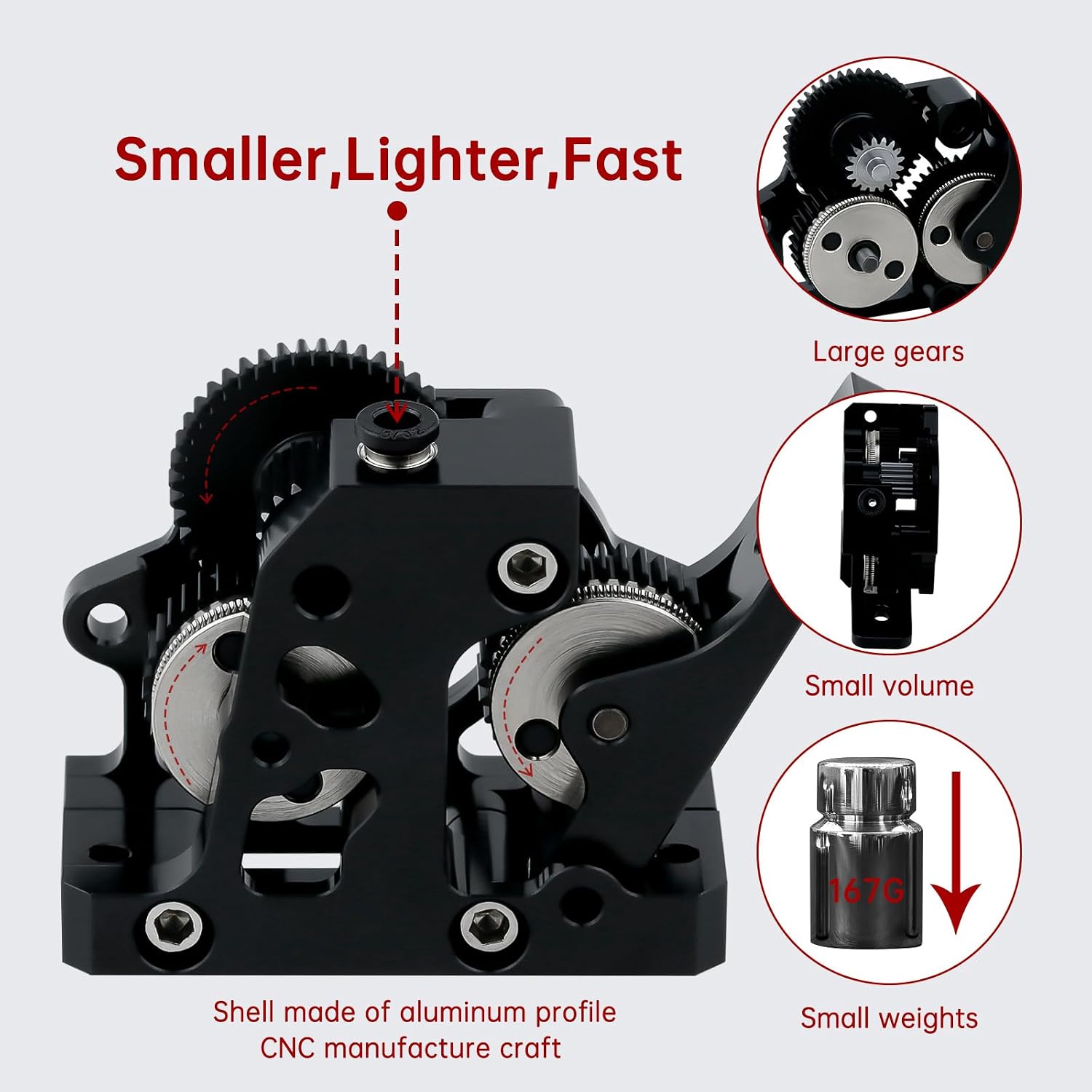
Figure 2: Design advantages of the HGX-LITE Extruder, emphasizing its compact size, reduced weight, and large gears for improved performance.

Figure 3: Close-up of the integrated quenched nickel-plated big gears and dual drive big gears, illustrating the larger drive wheels for increased filament grip and ultra-high hardness (HV3300) of the hardened steel components.
4. Setup and Installation
Follow these steps to properly install your HGX-LITE Extruder onto your 3D printer. Refer to your 3D printer's specific documentation for mounting points and motor connections.

Figure 4: Exploded diagram showing the components of the HGX-LITE Extruder and a reference image for mounting it onto a 3D printer toolhead. Note the locations for installation screws.
- Prepare the Motor: Ensure you have a compatible Nema14 36mm Stepper motor ready for attachment.
- Mount the Extruder: Align the HGX-LITE Extruder with the mounting points on your 3D printer's toolhead or frame. Use appropriate screws to secure it. Refer to Figure 4 for screw locations.
- Attach Stepper Motor: Connect the Nema14 36mm Stepper motor to the extruder. Ensure the motor shaft engages correctly with the extruder's drive mechanism.
- Connect Wiring: Connect the stepper motor's wiring to your printer's control board according to your printer's manual.
- Initial Calibration: After physical installation, it is crucial to calibrate the extruder's rotation distance (E-steps) in your printer's firmware (e.g., Klipper, Marlin). The gear ratio for the HGX-LITE is 9.5:1. An approximate starting rotation distance value might be around 53 for Klipper, but precise calibration is required for accuracy.
5. Operation
Once installed and calibrated, the HGX-LITE Extruder operates similarly to other direct drive or Bowden extruders, depending on your printer's configuration. Its enhanced grip and torque are designed to provide more consistent filament feeding.

Figure 5: Various views of the HGX-LITE Extruder demonstrating the filament path and the engagement of the nickel-plated gears. The driving force is rated at 15 KG.
- Loading Filament: Gently feed the filament into the extruder's input port until it engages with the drive gears. Ensure the filament passes smoothly through the entire path to the hotend.
- Adjusting Tension: The extruder features an adjustable tension mechanism (typically a spring-loaded screw). Adjust this to provide sufficient grip on the filament without deforming it. Too little tension can cause slipping; too much can crush the filament.
- Printing: Initiate your print job as usual. The HGX-LITE Extruder's robust design and high torque will contribute to reliable filament delivery.
6. Maintenance
Regular maintenance ensures the longevity and consistent performance of your HGX-LITE Extruder.
- Lubrication: As noted in the safety section, regularly apply a small amount of appropriate grease to the gear basket bearings. This reduces friction and wear.
- Cleaning: Periodically inspect the drive gears for filament dust or debris buildup. Use a small brush or compressed air to clean them. Ensure no foreign particles interfere with gear meshing.
- Check for Wear: Inspect the hardened steel gears for any signs of excessive wear or damage. While designed for durability, extreme conditions or abrasive filaments can accelerate wear.
- Tightness Check: Occasionally check all screws for proper tightness. Vibration during printing can sometimes loosen fasteners.
7. Troubleshooting
This section addresses common issues you might encounter with your extruder.
| Problem | Possible Cause | Solution |
|---|---|---|
| Filament not extruding or slipping | Insufficient tension on filament; clogged nozzle; incorrect E-steps; motor issue. | Adjust tension screw; clear nozzle; recalibrate E-steps; check motor connection. |
| Grinding sound from gears | Lack of lubrication; debris in gears; misaligned gears. | Apply grease to bearings; clean gears; check for proper assembly. |
| Extruder motor not moving | Loose wiring; faulty motor; driver issue on control board. | Check all wiring connections; test motor if possible; consult printer manual for driver diagnostics. |
| Inconsistent extrusion | Partial nozzle clog; inconsistent filament diameter; E-steps calibration off; temperature issues. | Clean nozzle; use quality filament; recalibrate E-steps; verify hotend temperature. |
| Aluminum parts stuck (if screws overtightened without filament) | Screws overtightened as per warning. | Carefully loosen screws. Avoid overtightening in the future when no filament is present. |
8. Specifications
Key technical specifications for the HOCENWAY HGX-LITE Extruder:
| Feature | Specification |
|---|---|
| Model Number | HGX Extruder |
| Brand | HOCENWAY |
| Material | Metal, Plastic (Aluminum alloy shell, POM reduction gear) |
| Item Weight | 77 Grams (2.72 ounces) |
| Gear Material | Hardened Steel, Nickel Plated |
| Gear Hardness | HRC 60+ (Mohls hardness up to 60 degrees) |
| Compatible Motor | Nema14 36mm Stepper motor (not included) |
| Package Dimensions | 4.61 x 2.99 x 1.81 inches |

Figure 6: Dimensional drawing of the HGX-LITE Extruder, showing key measurements in millimeters for integration and mounting.

Figure 7: Detailed dimensional drawing of the internal gears, including diameters and shaft sizes, useful for replacement or custom integration.
9. Warranty and Support
For warranty information and technical support, please contact HOCENWAY directly through their official channels or the retailer from whom you purchased the product. Keep your proof of purchase for any warranty claims.


