
1. Important Safety Instructions
Please read all instructions carefully before using your Arshia Premium Stand Mixer SM50-3073. Retain this manual for future reference. Incorrect operation may cause damage to the appliance or personal injury.
- Always ensure the power supply voltage matches the rating label on the appliance (220-240V, 50-60Hz).
- Do not immerse the motor unit, cord, or plug in water or any other liquid.
- Unplug the mixer from the outlet when not in use, before assembling or disassembling parts, and before cleaning.
- Keep hands, hair, clothing, as well as spatulas and other utensils away from moving beaters during operation to prevent injury and damage to the mixer.
- Never operate the appliance with a damaged cord or plug, or after the appliance malfunctions or has been damaged in any manner.
- This appliance is not intended for use by persons (including children) with reduced physical, sensory or mental capabilities, or lack of experience and knowledge, unless they have been given supervision or instruction concerning use of the appliance by a person responsible for their safety.
- Do not use outdoors.
- Do not let the cord hang over the edge of a table or counter, or touch hot surfaces.
- The mixer is equipped with electronic sensors to prevent motor damage in case of overload. If the mixer stops, turn it off, unplug, and reduce the load before restarting.
2. Product Overview
The Arshia Premium Stand Mixer SM50-3073 is a powerful kitchen appliance designed for efficient mixing, kneading, and whipping. It features a unique planetary mixing action where the beater rotates around its own axis while simultaneously orbiting the bowl, ensuring thorough mixing of all ingredients.
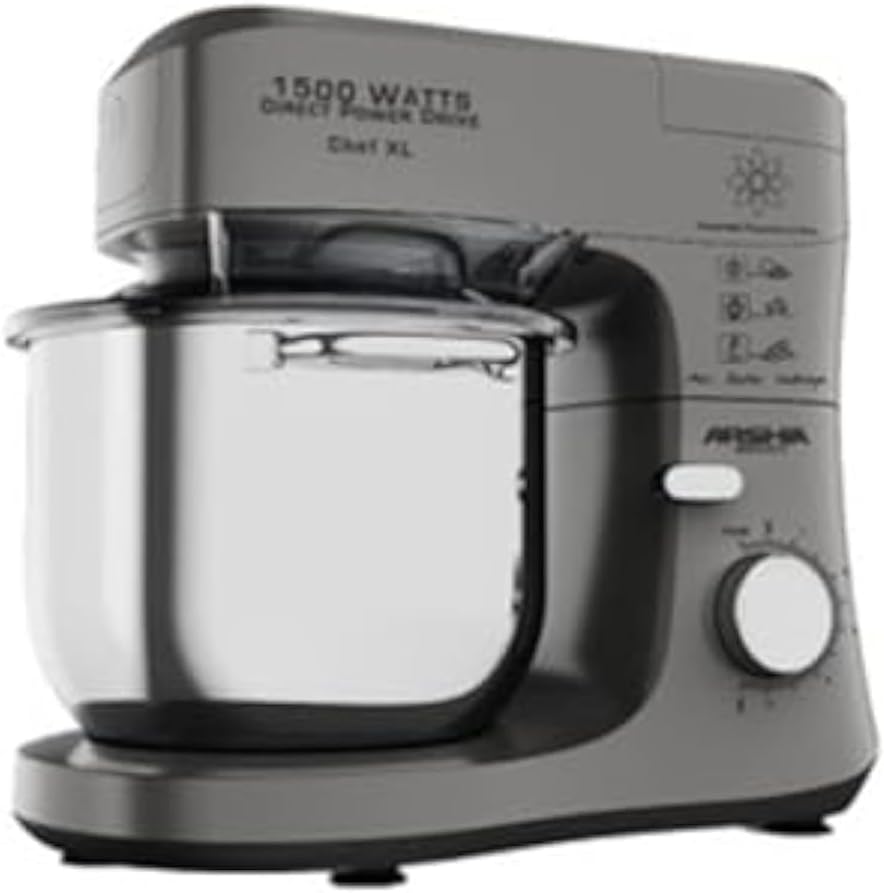
Image 1: The Arshia Premium Stand Mixer SM50-3073, showcasing its main unit, stainless steel bowl, and the attachment head. The mixer is grey with a sleek design.
Key Features:
- Powerful 1500W Motor: Ensures efficient mixing for various tasks.
- 7-Liter Stainless Steel Bowl: Large capacity suitable for both small and large quantities.
- 8-Step Variable Speed Control: Allows precise speed adjustment for optimal mixing performance.
- Planetary Mixing Action: Provides comprehensive coverage of the bowl for consistent results.
- Electronic Overload Sensors: Automatically shuts off the mixer to prevent motor damage.
- Durable Metal Gears: Designed for extended product lifespan.
Included Accessories:
- Stainless Steel Mixing Bowl (7L)
- Whisk Attachment
- Beater Attachment
- Dough Hook Attachment
- Splash Guard (if included, typically part of stand mixers)
3. Setup and First Use
- Unpacking: Carefully remove all packaging materials and check for any damage. Keep packaging for future storage or transport.
- Cleaning: Before first use, wash the mixing bowl, whisk, beater, and dough hook in warm soapy water. Rinse thoroughly and dry completely. Wipe the main motor unit with a damp cloth. Do not immerse the motor unit in water.
- Placement: Place the mixer on a stable, flat, and dry surface. Ensure there is adequate space around the mixer for ventilation and operation.
- Attaching the Bowl: Place the stainless steel mixing bowl onto the base of the mixer. Turn it clockwise until it locks securely into place.
- Attaching an Accessory: Lift the mixer head by pressing the release button. Select the desired attachment (whisk, beater, or dough hook). Insert the attachment into the shaft and turn it counter-clockwise until it clicks into place. Lower the mixer head until it locks.
- Power Connection: Plug the power cord into a grounded electrical outlet.
4. Operating Instructions
General Operation:
- Ensure the mixer head is locked down and an attachment is securely fitted.
- Add ingredients to the mixing bowl.
- Turn the speed control knob to the desired setting (1-8). Start with a low speed and gradually increase as needed to prevent splashing.
- Allow the mixer to operate for the required duration. The mixer supports mixing sessions up to 30 minutes.
- To stop the mixer, turn the speed control knob to the '0' (off) position.
- Unplug the mixer from the power outlet.
- Lift the mixer head and remove the attachment by turning it clockwise and pulling it down.
- Remove the mixing bowl by turning it counter-clockwise.
Attachment Usage Guidelines:
- Whisk: Ideal for whipping egg whites, cream, meringues, and light batters. Use higher speeds.
- Beater: Suitable for mixing cakes, cookies, frostings, mashed potatoes, and general batters. Use medium speeds.
- Dough Hook: Designed for kneading heavy doughs such as bread, pizza, and pasta. Use low speeds (1-3) to prevent overworking the motor.
Meat Grinder Attachment (if applicable):
The Arshia Premium Stand Mixer SM50-3073 may be compatible with a separate meat grinder attachment (check product packaging or manufacturer's website for availability and specific instructions). If you have this attachment, follow its specific assembly and usage instructions for grinding various types of meat. Always ensure the mixer is off and unplugged before attaching or detaching the meat grinder.
5. Cleaning and Maintenance
Regular cleaning and maintenance will ensure the longevity and optimal performance of your stand mixer.
- Always unplug the mixer before cleaning.
- Motor Unit: Wipe the exterior of the motor unit with a soft, damp cloth. Do not use abrasive cleaners or immerse the unit in water.
- Mixing Bowl and Attachments (Whisk, Beater, Dough Hook): These parts are generally dishwasher safe. Alternatively, wash them in warm soapy water, rinse thoroughly, and dry immediately to prevent water spots or corrosion.
- Splash Guard: Wash with warm soapy water, rinse, and dry.
- Storage: Ensure all parts are clean and dry before storing. Store the mixer and its accessories in a dry place, away from direct sunlight and moisture.
6. Troubleshooting
If you encounter issues with your Arshia Premium Stand Mixer, refer to the following common problems and solutions:
| Problem | Possible Cause | Solution |
|---|---|---|
| Mixer does not start | Not plugged in; Power outage; Speed control at '0' | Check power connection; Verify power supply; Turn speed control to a setting above '0'. |
| Mixer stops during operation | Overload protection activated; Mixer head not locked | Turn off, unplug, reduce ingredients, wait a few minutes, then restart; Ensure mixer head is fully locked. |
| Attachments not mixing thoroughly | Incorrect attachment for task; Too much or too little ingredient | Ensure correct attachment is used (e.g., dough hook for heavy dough); Adjust ingredient quantities to fit bowl capacity. |
| Unusual noise or vibration | Attachment not properly secured; Mixer head not locked; Mixer on uneven surface | Check and re-secure attachment; Ensure mixer head is locked; Place mixer on a stable, flat surface. |
If the problem persists after attempting these solutions, please contact customer support or a qualified service technician.
7. Specifications
Detailed technical specifications for the Arshia Premium Stand Mixer SM50-3073:
| Feature | Specification |
|---|---|
| Brand | Arshia |
| Model | SM50-3073 |
| Power / Wattage | 1500 Watts |
| Voltage | 220-240 Volts |
| Frequency | 50-60Hz |
| Capacity | 7 Liters |
| Number of Speeds | 8 |
| Material | Stainless Steel (Bowl), other parts as specified by manufacturer |
| Special Features | Removable Bowl, Electronic Overload Sensors, Planetary Mixing Action |
| Color | Grey |
8. Warranty and Support
This product is covered by a manufacturer's warranty. Please refer to the warranty card included with your purchase for specific terms, conditions, and duration. Keep your proof of purchase for warranty claims.
For technical support, service, or spare parts, please contact the retailer or the authorized Arshia service center in your region. Do not attempt to repair the appliance yourself, as this may void the warranty and pose safety risks.