
1. Introduction
Thank you for choosing the Kondras Motion Sensor Porch Light with GFCI Outlets. This manual provides essential information for the safe installation, operation, and maintenance of your new outdoor lighting fixture. Please read these instructions thoroughly before installation and retain them for future reference.

Image 1: Kondras Motion Sensor Porch Light with GFCI Outlets, showing the black fixture with a motion sensor at the top and two GFCI outlets on the side.
2. Important Safety Information
- Electrical Safety: Always turn off power at the circuit breaker before installing, servicing, or cleaning this fixture. Failure to do so may result in electric shock, injury, or death.
- Qualified Electrician: If you are unsure about electrical wiring, consult a qualified electrician.
- Grounding: This fixture must be properly grounded.
- GFCI Outlets: The integrated GFCI outlets are designed for outdoor use. Ensure the downward design keeps them dry. Test the GFCI outlets after installation by pressing the TEST button and then the RESET button.
- Bulb Type: Use only E26 base bulbs. For motion sensor modes, a dimmable E26 bulb is recommended to avoid flickering.
- Maximum Load: The GFCI outlets support a maximum of 15A / 1800W. Do not overload.
3. Package Contents
Verify that all components are present before beginning installation:
- Kondras Motion Sensor Porch Light (Model 0815-BK)
- Mounting Hardware
- User Manual (this document)
Note: Bulb is not included.
4. Product Specifications
| Brand | Kondras |
| Model Name | 0815-BK |
| Product Dimensions | 9.1"L x 6.1"W x 11.4"H |
| Material | Aluminum, Glass, Metal |
| Color | Black |
| Power Source | Corded Electric |
| Voltage | 120 Volts |
| Wattage | 100 watts (Max for bulb) |
| Bulb Base | E26 |
| GFCI Outlet Max Load | 15A / 1800W |
| Water Resistance Level | IP65 Waterproof |
| Motion Sensor Range | 40FT & 220° Wide Sensor Range |
| Operating Temperature | -41℃ to 40℃ |
5. Installation Instructions
- Prepare for Installation:
- Turn off power at the main circuit breaker before starting.
- Ensure you have all necessary tools (screwdriver, wire strippers, etc.) and the included mounting hardware.
- Mounting the Fixture:
- Attach the mounting plate to your existing junction box using the provided screws.
- Connect the electrical wires (live, neutral, ground) from the fixture to your household wiring according to local electrical codes. Ensure all connections are secure.
- Carefully align the fixture body with the mounting plate and secure it with the provided screws.

Image 2: Close-up view of the heat-resistant ceramic E26 bulb socket, highlighting its robust construction.
- Install the Bulb:
- Insert an E26 base bulb (not included) into the ceramic socket. For optimal performance with motion sensor modes, a dimmable E26 bulb is recommended to prevent flickering.
- Test GFCI Outlets:
- After installation and before restoring power, ensure the GFCI outlets are properly installed.
- Restore power at the circuit breaker.
- Press the TEST button on the GFCI outlet. The RESET button should pop out, and power to the outlets should be cut.
- Press the RESET button. Power should be restored. If the GFCI does not reset or trip, consult a qualified electrician.

Image 3: Detailed view of the two GFCI outlets, showing the TEST and RESET buttons and the downward design for weather protection.
6. Operating Instructions
The Kondras Motion Sensor Porch Light features three distinct operating modes, controlled by two dials located on the top of the fixture. The upper dial adjusts brightness (Off / 50%) in Auto Mode, and the lower dial selects the primary operating mode (Off, Pc, Auto).
6.1. Mode Selection

Image 4: Close-up of the motion sensor unit at the top of the fixture, showing the two control dials for mode and brightness adjustment.
- Dusk to Dawn Mode (Pc):
- Set the lower dial to "Pc".
- The light will automatically turn ON at 100% brightness at night and turn OFF during the day.
- Brightness cannot be adjusted in this mode.

Image 5: Visual representation of the Dusk to Dawn mode, showing the light off during the day and on at night.
- Auto Mode (Motion Activated, then Dim):
- Set the lower dial to "Auto".
- Set the upper dial to "50%" (or desired dim level).
- During the daytime, the light remains OFF.
- At night, the light will dim to the pre-set brightness (1%-50%) when no motion is detected.
- When motion is detected within 40 feet and a 220° range, the light will illuminate at 100% brightness for 120 seconds.
- After 120 seconds of no motion, it returns to the pre-set dim brightness.

Image 6: Diagram explaining Auto Mode: dim light at night, 100% brightness on motion, then back to dim after 2 minutes.
- Auto+ Mode (Motion Activated, then OFF):
- Set the lower dial to "Auto".
- Set the upper dial to "Off".
- During the daytime, the light remains OFF.
- At night, the light will remain OFF until motion is detected within 40 feet and a 220° range.
- Upon motion detection, the light illuminates at 100% brightness for 120 seconds.
- After 120 seconds of no motion, the light turns completely OFF.

Image 7: Diagram explaining Auto+ Mode: light off at night, 100% brightness on motion, then turns off completely after 2 minutes.
6.2. Using the GFCI Outlets
- The two integrated GFCI outlets can power outdoor devices such as lawn mowers, grills, cameras, or decorative string lights.
- Ensure the total power draw does not exceed 15A / 1800W.
- The downward design of the outlets helps protect them from rain.
- Always ensure the GFCI outlets are functioning correctly by performing the TEST/RESET procedure periodically.
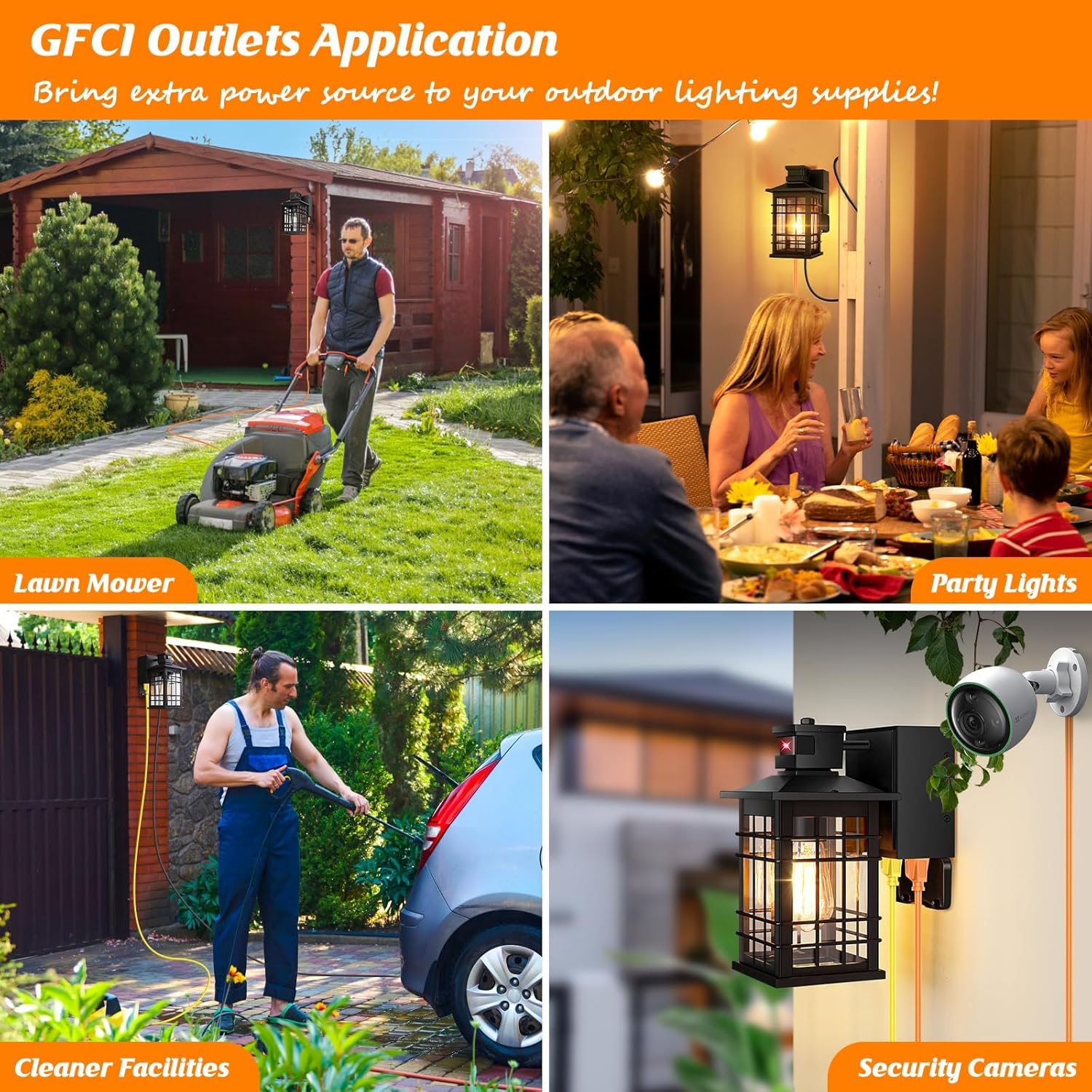
Image 8: Examples of how the GFCI outlets can be used for various outdoor devices like lawn mowers, BBQ grills, security cameras, and party lights.
7. Maintenance
- Cleaning: Turn off power before cleaning. Wipe the fixture with a soft, damp cloth. Do not use abrasive cleaners or solvents. The open bottom design simplifies bulb replacement and cleaning.
- Weather Resistance: The fixture is constructed with anti-corrosion aluminum and clear tempered glass, providing IP65 waterproof rating and resistance to various weather conditions (sun, snow, frost).
- Bulb Replacement: Ensure power is off. Unscrew the old bulb and screw in a new E26 base bulb.

Image 9: The Kondras porch light installed outdoors, illustrating its waterproof, sun-proof, snow-proof, and frost-proof features due to its 100% aluminum construction.
8. Troubleshooting
| Problem | Possible Cause | Solution |
|---|---|---|
| Light does not turn on. | No power, faulty bulb, incorrect wiring, sensor malfunction. | Check circuit breaker. Replace bulb. Verify wiring connections. Ensure sensor is not obstructed. |
| Motion sensor not working. | Incorrect mode setting, sensor obstruction, faulty sensor. | Ensure lower dial is set to "Auto" and upper dial is correctly positioned. Clear any obstructions from the sensor. Contact support if issues persist. |
| Light flickers in motion sensor mode. | Non-dimmable bulb used. | Replace with a dimmable E26 base bulb. |
| GFCI outlets have no power. | GFCI tripped, no power to fixture. | Press the RESET button on the GFCI outlet. Check circuit breaker. |
9. Warranty and Customer Support
This Kondras product comes with a 1-year warranty from the date of purchase, covering manufacturing defects.
For any questions, concerns, or troubleshooting assistance, please contact Kondras customer support. We are available 24 hours to assist you.
Please refer to your purchase documentation or the Kondras brand store on Amazon for specific contact details.
Kondras Brand Store: Visit Kondras Store