
Introduction
This instruction manual provides essential information for the proper use and maintenance of your GENGQIANSI Replacement Remote Control, model LAJ07. This remote is designed to be compatible with various Lasko Oscillating Tower Fan models, including S18961, S18635, U35115, 2033667, 2510, 2511, 2711, M18950, T38301, T32200, 2033667A, M16950, U35120, T36211, T37900, and T38305. No programming is required for operation; simply insert batteries and begin use.
Product Overview
The GENGQIANSI Replacement Remote Control offers a convenient way to operate your compatible Lasko tower fan. It features a user-friendly design with clearly labeled buttons for essential functions.
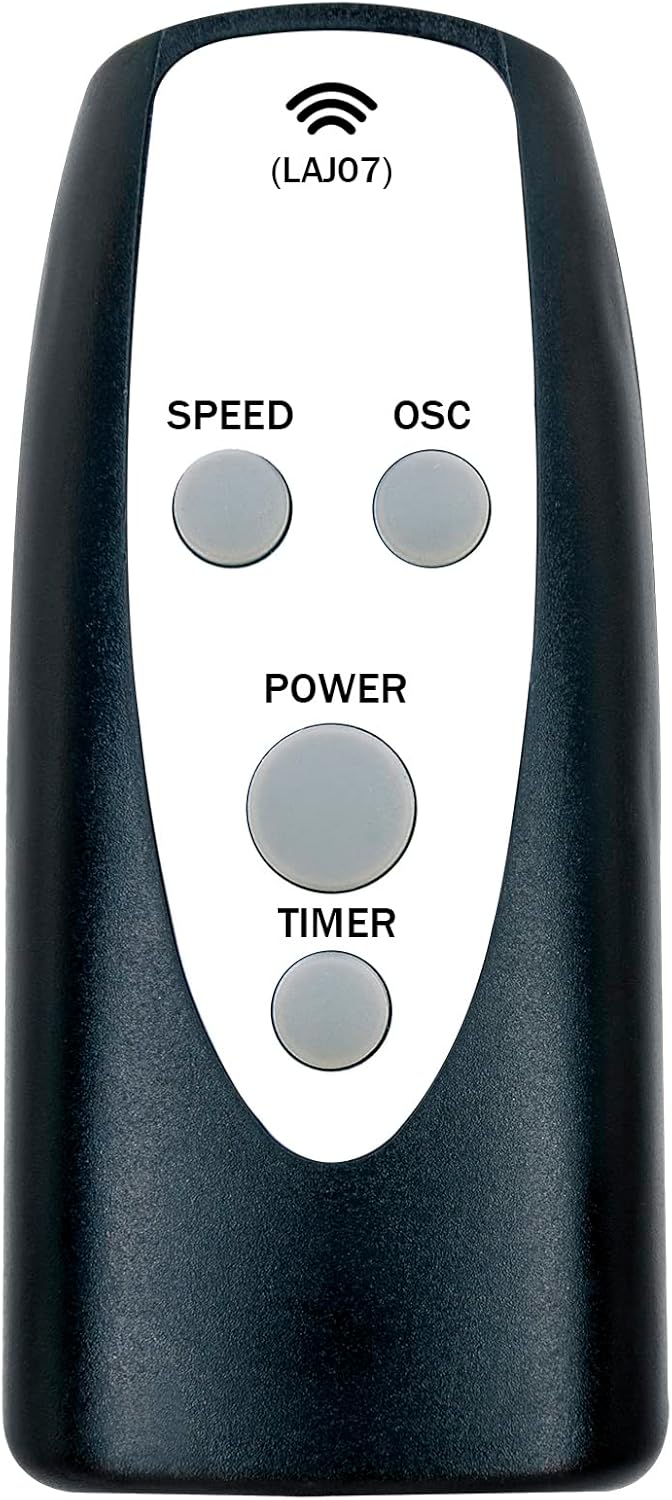
Figure 1: Front view of the GENGQIANSI Replacement Remote Control (LAJ07).
Key Features:
- No Programming Needed: Ready to use out of the box.
- Durable Design: Constructed for longevity and ease of use.
- Standard Battery Type: Uses readily available AAA 1.5V batteries.
- Wide Compatibility: Designed for various Lasko Oscillating Tower Fan models.
Setup
Battery Installation:
- Locate the battery compartment cover on the back of the remote control.
- Slide the cover downwards or press the latch to open the compartment.
- Insert two (2) AAA 1.5V batteries, ensuring the positive (+) and negative (-) terminals align correctly with the markings inside the compartment.
- Replace the battery compartment cover until it clicks securely into place.
Note: Batteries are not included with the remote control.

Figure 2: Battery compartment for AAA 1.5V batteries.
Operating Instructions
Point the remote control directly at the Lasko tower fan's receiver. Ensure there are no obstructions between the remote and the fan.

Figure 3: Remote control buttons and their functions.
Button Functions:
- POWER Button: Press to turn the fan ON or OFF.
- SPEED Button: Press to cycle through available fan speed settings (e.g., Low, Medium, High).
- OSC (Oscillation) Button: Press to turn the fan's oscillation function ON or OFF.
- TIMER Button: Press to set the fan's automatic shut-off timer (e.g., 1 hour, 2 hours, 4 hours).
Maintenance
Cleaning:
Wipe the remote control with a soft, dry cloth. Do not use abrasive cleaners or solvents, as these may damage the surface.
Battery Replacement:
Replace batteries when the remote's range decreases or if the fan does not respond consistently. Always replace both batteries at the same time with new AAA 1.5V batteries. Do not mix old and new batteries or different types of batteries.
Storage:
If the remote control will not be used for an extended period, remove the batteries to prevent leakage and potential damage.
Troubleshooting
- Remote not responding:
- Ensure batteries are inserted correctly with the correct polarity.
- Replace old batteries with new AAA 1.5V batteries.
- Check for any obstructions between the remote and the fan's receiver.
- Ensure the fan is plugged in and powered on.
- Buttons seem incorrectly labeled:
- While the remote is designed for specific Lasko models, some users have reported that button labels might not perfectly match the original remote's functions for all fan models. Test each button to determine its actual function for your specific fan model.
- Limited range:
- Replace batteries.
- Ensure a clear line of sight to the fan.
Specifications
| Brand | GENGQIANSI |
| Model Number | LAJ07 (Internal: A520240105B04(LAJ07)-01) |
| Compatible Devices | Lasko Oscillating Tower Fans (S18961, S18635, U35115, 2033667, 2510, 2511, 2711, M18950, T38301, T32200, 2033667A, M16950, U35120, T36211, T37900, T38305) |
| Battery Type | 2 x AAA 1.5V (not included) |
| Package Dimensions | 6.14 x 3.5 x 1.3 inches |
| Item Weight | 0.634 ounces |
Warranty and Support
Specific warranty information for this replacement remote control is not provided in the product details. For any warranty claims, technical support, or further assistance, please contact the seller directly through your purchase platform.