1. Introduction
The X MODAXE V519 OBD2 Diagnostic Scanner is a versatile and powerful tool designed for comprehensive vehicle maintenance and diagnostics. This device supports nine OBD II/EOBD standard protocols, ensuring broad compatibility with a wide range of vehicles. It offers quick fault diagnosis, real-time data streaming, and the ability to clear fault codes, empowering users to monitor and maintain their vehicle's health effectively.
The V519 scanner features a 2.8-inch color screen for clear display of information. Its user-friendly interface allows for seamless navigation using directional buttons. Key functions include reading and clearing engine fault codes, viewing live data streams, performing oxygen sensor tests, and checking I/M readiness. The device also supports software upgrades and printing diagnostic information. It offers multi-language support, including English, German, French, Spanish, Italian, Russian, Dutch, Chinese, Japanese, and Portuguese.

Figure 1: Front view of the X MODAXE V519 OBD2 Diagnostic Scanner, showing its compact design, color display, and control buttons. The OBD-II connector cable is visible on the left.
2. Product Overview
The V519 scanner is equipped with a clear 2.8-inch color screen and intuitive controls for easy operation. Below is an overview of its main components and functions.

Figure 2: Diagram illustrating the key components and controls of the V519 scanner, including the 2.8-inch color screen, 16-pin interface, and navigation buttons (up, down, left, right, OK, F1, F2, EXIT).
Key Features:
- Read Codes: Retrieve Diagnostic Trouble Codes (DTCs).
- Erase Codes: Clear DTCs from the vehicle's computer.
- I/M Readiness: Check emission system status.
- Data Stream: View real-time sensor data.
- Freeze Frame: View vehicle parameters at the moment a DTC was set.
- O2 Sensor Test: Monitor oxygen sensor performance.
- Vehicle Info: Display vehicle identification number (VIN) and calibration IDs.
- Mode 6/8: Advanced test results for specific monitoring systems.
- Fault Code Query: Look up DTC definitions.
- Playback Function: Review previously recorded data.
- Print/Upgrade Function: Connect to a computer for software updates and printing reports.
- Multi-language Support: Supports 10 languages including English, German, French, Spanish, Italian, Russian, Dutch, Chinese, Japanese, and Portuguese.

Figure 3: The V519 automotive diagnostic tool displaying a comprehensive list of its supported functions, including Read Codes, Erase Codes, View Freeze Frame, I/M Readiness, Vehicle Info, Data Stream, Battery Voltage Reading, Mode 6 Detection, Oxygen Sensor Test, Mode 8 Detection, Fault Code Query, Playback Function, Print/Upgrade Function, 35901 Fault Code Library, and 2.8-inch Color Screen.
3. Setup and Connection
Follow these steps to connect your V519 scanner to your vehicle:
- Locate the OBD-II Port: The OBD-II port is typically located under the dashboard on the driver's side of the vehicle. Refer to your vehicle's owner's manual if you cannot find it.
- Ensure Vehicle is Off: Make sure the vehicle's ignition is in the OFF position before connecting the scanner.
- Connect the Scanner: Plug the V519 scanner's 16-pin connector firmly into the vehicle's OBD-II port.
- Power On Vehicle: Turn the vehicle's ignition to the "ON" position (engine off). The scanner should power on automatically. If not, check the connection.
4. Operating Instructions
4.1. Navigation
The V519 scanner features a user-friendly interface with directional buttons and function keys:
- Up/Down Buttons: Scroll through menu options or data.
- Left/Right Buttons: Navigate between screens or adjust settings.
- OK Button: Confirm selections or enter sub-menus.
- F1/F2 Buttons: Perform specific functions as indicated on the screen.
- EXIT Button: Return to the previous menu or exit a function.
4.2. Diagnostic Functions

Figure 4: A comprehensive overview of the V519 scanner's capabilities, including reading and erasing codes, viewing freeze frames, I/M readiness, data stream, battery voltage reading, oxygen sensor test, fault code query, playback, print/upgrade, and a 35901 fault code library.
From the main menu, select "OBD/EOBD" to access the primary diagnostic functions:
- Read Codes: Select this option to retrieve current, pending, and permanent Diagnostic Trouble Codes (DTCs) stored in the vehicle's Engine Control Unit (ECU). The scanner will display the code and a brief description.
- Erase Codes: After addressing any vehicle issues, select this option to clear the DTCs and turn off the Malfunction Indicator Lamp (MIL). Confirm the action when prompted.
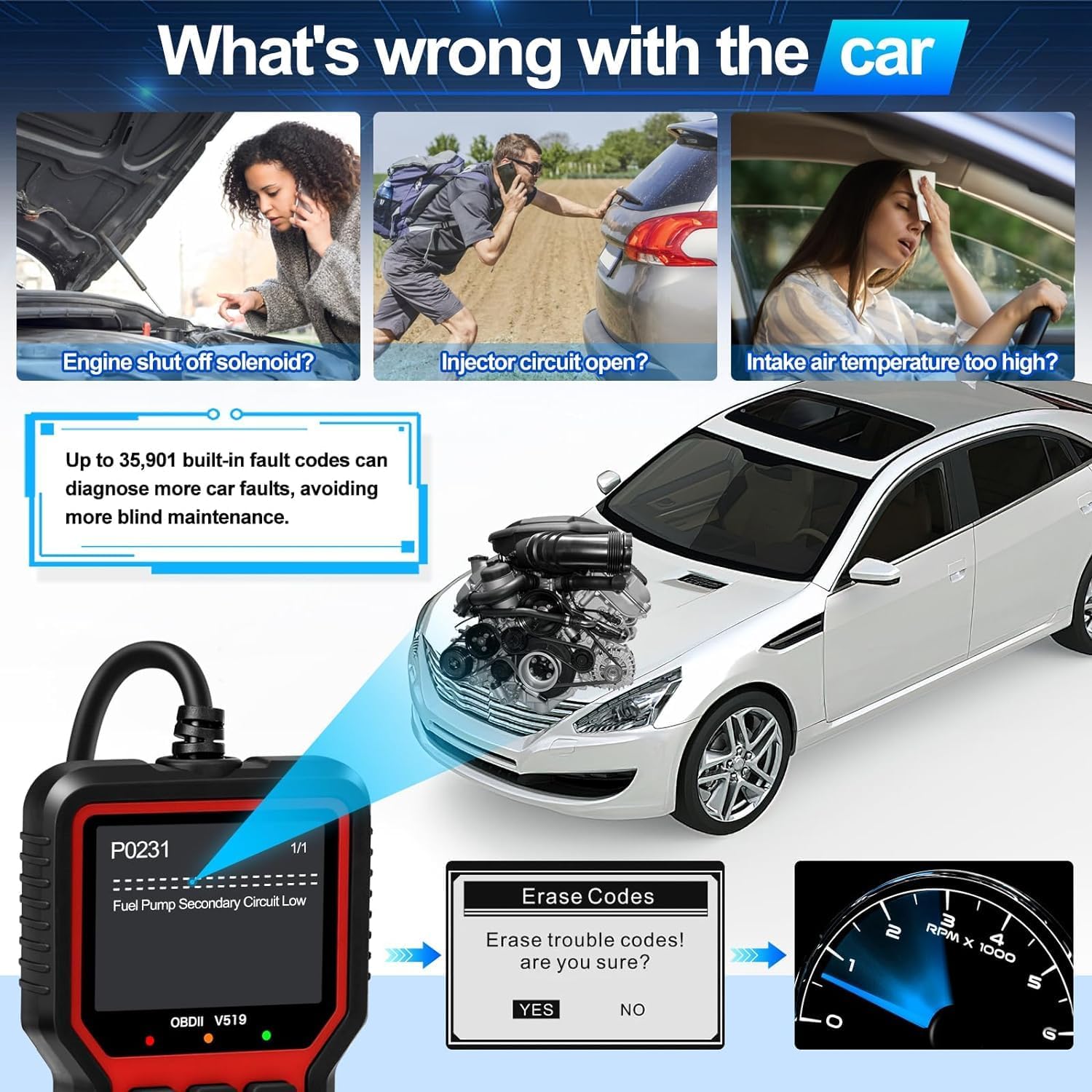
Figure 5: The V519 scanner identifying a fault code (P0231, Fuel Pump Secondary Circuit Low) and presenting the user with a prompt to confirm erasing the trouble codes.
- Live Data Stream: View real-time operational parameters of the vehicle, such as engine RPM, vehicle speed, oxygen sensor readings, and coolant temperature. This data can be displayed numerically or graphically.
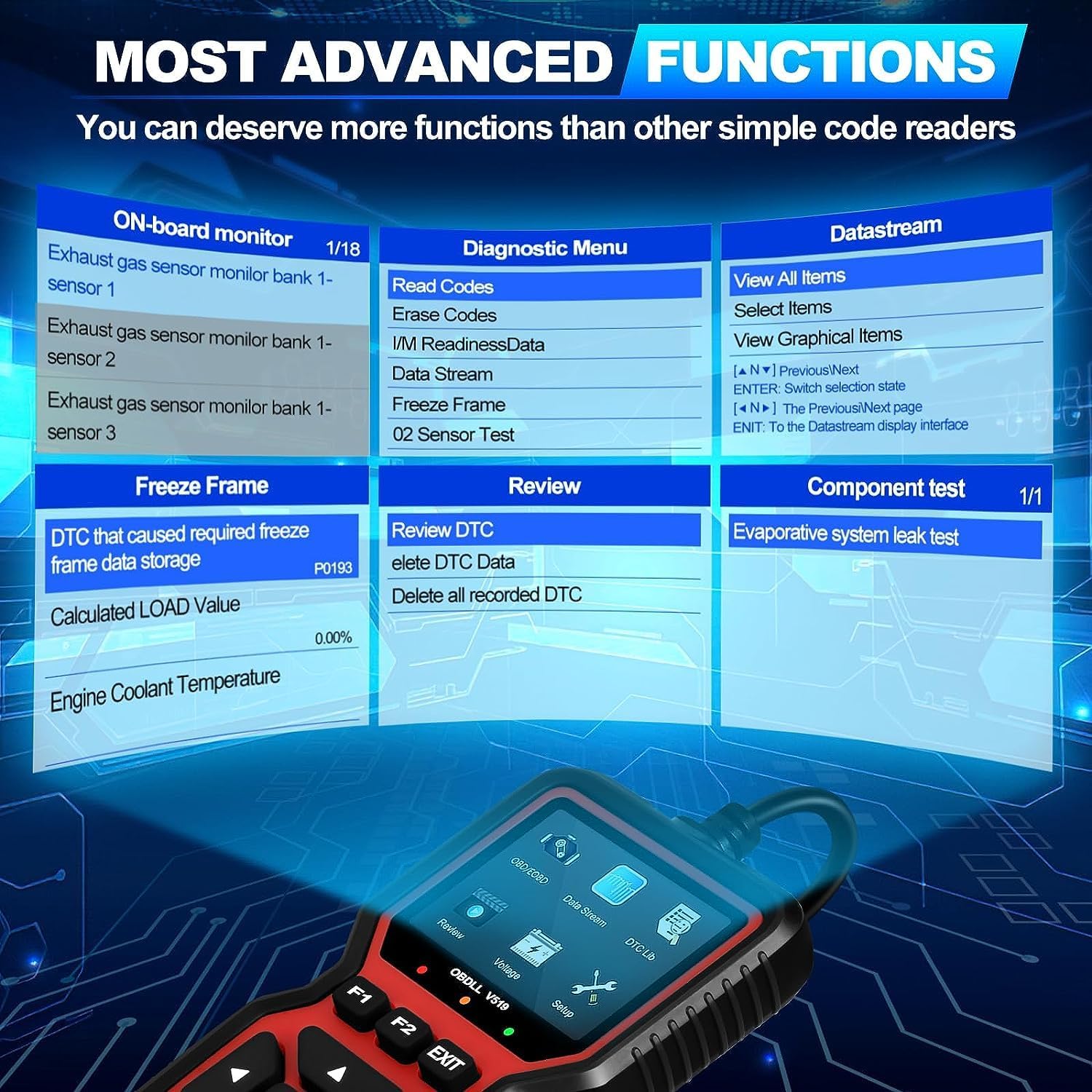
Figure 6: The V519's on-screen interface, showing examples of the Diagnostic Menu (Read Codes, Erase Codes, I/M Readiness, Data Stream, Freeze Frame, O2 Sensor Test) and a Datastream view with graphical items.
- I/M Readiness: This function checks the status of the vehicle's emission-related monitoring systems to determine if they are ready for an emissions test.

Figure 7: The V519 performing quick diagnostic retrieval, displaying trouble codes (e.g., P2029) and I/M readiness status for various vehicle systems.
- O2 Sensor Test: Allows retrieval and viewing of O2 sensor monitor test results for the most recently completed tests from the vehicle's on-board computer.
- Mode 6 (On-Board Monitor Test): Retrieves test results for emission-related powertrain components and systems that are not continuously monitored.
- Mode 8 (Component Test): Enables the initiation of a leak test for the evaporative system.

Figure 8: The V519's advanced diagnostic screens, showing data for on-board monitor tests (Mode 6), oxygen sensor values, and component tests (Mode 8).
4.3. Software Upgrade and Printing
The V519 scanner supports software upgrades to ensure compatibility with new vehicles and features. Connect the scanner to a computer using a USB cable (if applicable) and visit the manufacturer's website for update instructions and software. Diagnostic reports can also be printed via a connected computer.
5. Maintenance
5.1. Cleaning
Use a soft, dry cloth to clean the scanner's exterior. Avoid using abrasive cleaners, solvents, or harsh chemicals, as these can damage the screen or casing.
5.2. Storage
Store the V519 scanner in a cool, dry place away from direct sunlight and extreme temperatures. Keep it in its original packaging or a protective case when not in use to prevent damage.
5.3. Software Updates
Regularly check the official X MODAXE website for available software updates. Keeping your scanner's software up-to-date ensures optimal performance and compatibility with the latest vehicle models and diagnostic protocols.
6. Troubleshooting
If you encounter issues with your V519 scanner, refer to the following troubleshooting tips:
- No Power:
- Ensure the scanner is securely connected to the vehicle's OBD-II port.
- Verify that the vehicle's ignition is in the "ON" position (engine off).
- Check the vehicle's fuse for the OBD-II port (refer to your vehicle's manual).
- Link Error / Vehicle Not Supported:
- Confirm that your vehicle is OBD-II compliant (generally 1996 and newer for US vehicles, 2001 for petrol and 2004 for diesel vehicles in Europe).
- Ensure the connection to the OBD-II port is firm and not loose.
- Try the scanner on another known OBD-II compliant vehicle to determine if the issue is with the scanner or the vehicle.
- Scanner Freezes:
- Disconnect the scanner from the vehicle and reconnect it.
- If the issue persists, check for available software updates on the manufacturer's website.
- Codes Cannot Be Cleared:
- Ensure the vehicle's ignition is ON and the engine is OFF.
- Some critical fault codes may not clear until the underlying vehicle issue has been repaired.
7. Specifications
| Feature | Detail |
|---|---|
| Manufacturer | MODAXE |
| Brand | X MODAXE MODIFY YOUR DRIVE |
| Model | V519 |
| Package Dimensions | 20.3 x 13.4 x 4.4 cm |
| Item Weight | 330 g |
| Assembly Required | No |
| Guaranteed Software Updates Until | Unknown |
| ASIN | B0CRL6FRDY |
| First Available Date | January 5, 2024 |
8. Warranty and Support
The X MODAXE V519 scanner comes with a standard manufacturer's warranty. For specific warranty details, technical support, or to access the latest software updates, please refer to the official X MODAXE website or contact their customer service department directly. Contact information can typically be found on the product packaging or the manufacturer's website.