
Introduction
This manual provides comprehensive instructions for the setup, operation, and maintenance of your AULCMEET KT-9018E Universal Air Conditioner Remote Control. This remote is designed to be compatible with a wide range of AC units from various brands, offering a convenient replacement or backup solution.
Product Overview
The AULCMEET KT-9018E is a universal remote control for air conditioning units, featuring a clear LCD display and intuitive button layout for easy operation. It requires 2 AAA batteries for power.
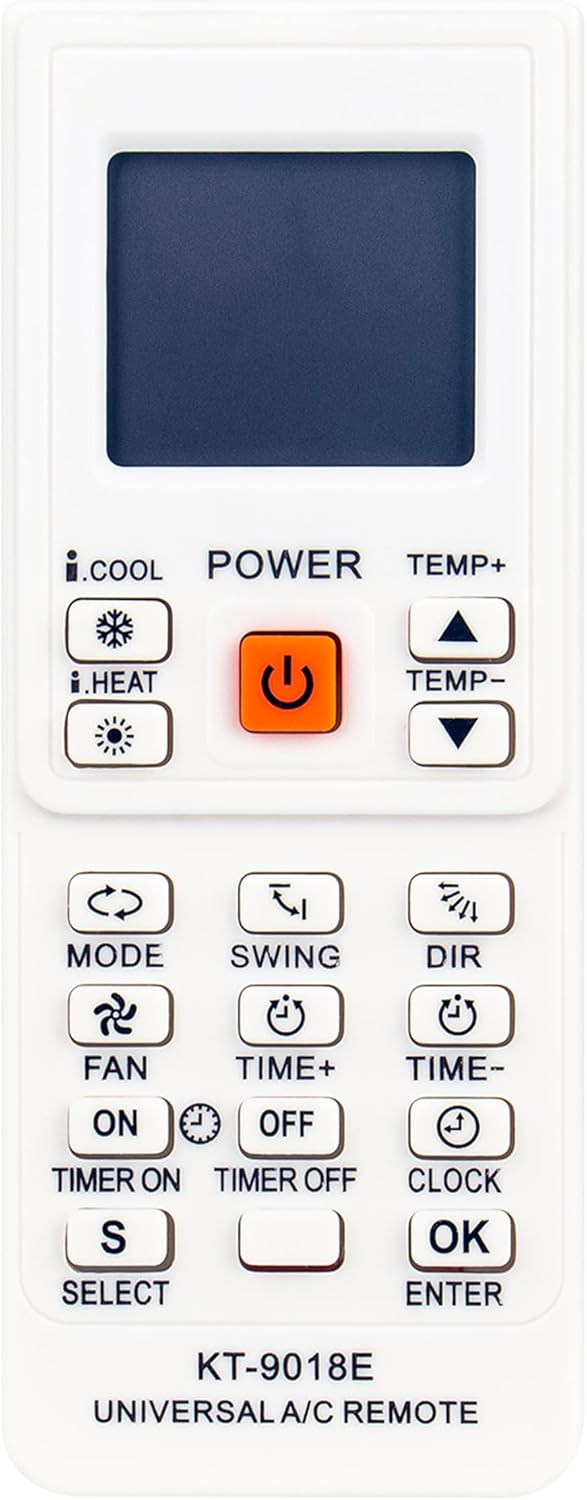
Figure 1: Front view of the AULCMEET KT-9018E remote control, showing the LCD screen, power button, temperature controls, mode, fan, swing, and timer buttons.

Figure 2: Angled view of the AULCMEET KT-9018E remote control, highlighting its ergonomic design and button layout from a side perspective.

Figure 3: Back view of the AULCMEET KT-9018E remote control, showing the battery compartment cover.
Setup
1. Battery Installation
- Locate the battery compartment on the back of the remote control (refer to Figure 3).
- Slide open the battery compartment cover.
- Insert two (2) AAA batteries, ensuring the correct polarity (+ and -) as indicated inside the compartment.
- Close the battery compartment cover securely.
Note: If the remote does not power on after battery installation, ensure batteries are correctly inserted and fully charged. Check for any loose connections if the issue persists.
2. Code Setup for Your AC Unit
The AULCMEET KT-9018E is a universal remote and requires a specific code to operate your air conditioning unit. The necessary codes and detailed setup instructions are included with your physical remote control package. Please refer to the separate code list and setup guide provided.
Generally, the setup process involves:
- Turning on your air conditioning unit manually.
- Entering the programming mode on the remote (usually by pressing and holding a specific button like "SET" or "CODE").
- Inputting the 3 or 4-digit code corresponding to your AC unit's brand from the provided code list.
- Testing the remote's functionality (e.g., power on/off, temperature adjustment).
- If the first code does not work, try other codes listed for your brand until full functionality is achieved.
Important: The specific code search function or direct code entry method varies by universal remote. Always consult the dedicated code list and instructions that came with your remote for the most accurate and efficient setup.
Operating Instructions
Once successfully programmed, your AULCMEET KT-9018E remote can control various functions of your air conditioning unit. Below are common button functions:
- POWER: Turns the AC unit on or off.
- TEMP+ / TEMP-: Adjusts the temperature setting up or down.
- MODE: Cycles through operating modes such as Cool, Heat, Fan, Dry, Auto.
- FAN: Adjusts fan speed (e.g., Low, Medium, High, Auto).
- SWING: Controls the vertical swing of the air deflector.
- DIR: Adjusts the horizontal direction of the air deflector.
- TIMER ON / TIMER OFF: Sets a timer for the AC unit to turn on or off automatically.
- CLOCK: Sets the current time on the remote's display.
- SELECT / OK / ENTER: Used for confirming selections during setup or timer settings.
Note: Not all functions may be supported by every AC unit model. Refer to your AC unit's original manual for specific feature compatibility.
Maintenance
Battery Replacement
When the remote's display dims or its response becomes sluggish, it's time to replace the batteries. Follow the battery installation steps outlined in the "Setup" section. Always replace both batteries simultaneously with new AAA batteries.
Cleaning
To clean the remote control, gently wipe its surface with a soft, dry cloth. Do not use liquid cleaners, abrasive materials, or chemical solvents, as these can damage the remote's finish or internal components.
Troubleshooting
| Problem | Possible Cause | Solution |
|---|---|---|
| Remote does not power on / LCD is blank. |
|
|
| Remote does not control the AC unit. |
|
|
| Some functions do not work. |
|
|
Specifications
- Model: KT-9018E
- Brand: AULCMEET
- Product Dimensions: 6.5 x 2 x 0.7 inches
- Item Weight: 2.3 ounces
- Power Source: 2 x AAA Batteries (not included)
- Compatible Devices: Air Conditioner Units (4000+ codes)
- Color: White
- Special Feature: Ergonomic design
Warranty and Support
Specific warranty information for the AULCMEET KT-9018E Universal Air Conditioner Remote Control is not provided within this manual. For details regarding warranty coverage, returns, or technical support, please refer to the documentation included with your purchase or contact the seller/manufacturer directly.
For further assistance, you may visit the AULCMEET official website or contact their customer service department.


