
1. Important Safety Instructions
Always observe basic safety precautions when using electrical appliances to reduce the risk of fire, electric shock, or injury. Read all instructions before using this vacuum cleaner.
- Battery and Charger Compatibility: Use only Makita 40V Max XGT batteries and chargers with this tool. Use of other batteries or chargers may create a risk of injury and fire, and will invalidate the product warranty.
- Proper Use: This vacuum is designed for dry vacuuming only. Do not use it to pick up flammable or combustible liquids, hot ashes, or sharp objects.
- Maintenance: Perform regular maintenance as described in this manual to ensure safe and efficient operation.
- Personal Protective Equipment: Wear appropriate personal protective equipment, such as safety glasses, when operating the vacuum.
- Supervision: This appliance is not intended for use by persons with reduced physical, sensory or mental capabilities, or lack of experience and knowledge, unless they have been given supervision or instruction concerning use of the appliance by a person responsible for their safety.
2. Product Overview and Components
The Makita VC011GZ is a cordless backpack vacuum designed for efficient dry cleaning. It features a powerful 40V brushless motor and a HEPA filter for effective dust collection.
2.1 Package Contents
Verify that all items are present upon unpacking:
- 1 x Makita VC011GZ Backpack Vacuum (Batteries and Charger Not Included)
- 1 x Aluminium telescopic pipe with pipelock
- 1 x Bent pipe assembly with pipelock
- 1 x Corner nozzle
- 1 x Fabric reusable dust bag
- 1 x Fleece dust bag
- 1 x Hose band
- 1 x Nozzle assembly set
2.2 Key Features
- Dry type operation
- 6 litre maximum capacity paper dust bag / 5.5 litre maximum cloth dust bag capacity
- 4 mode suction power adjustment
- Automatic filter cleaning mechanism
- Anti-forgetting mechanism for dust bag installation
- Mode memory function
- HEPA filter for efficient particle capture
- Vertically adjustable chest belt position for user comfort
- LED job light

Image 1: The Makita VC011GZ backpack vacuum with its attached wand and floor nozzle, ready for use.

Image 2: Rear view of the Makita VC011GZ, highlighting the ergonomic backpack harness designed for user comfort and weight distribution.
3. Setup
3.1 Attaching the Hose and Nozzles
- Insert the flexible hose into the vacuum's inlet port until it clicks securely into place.
- Connect the bent pipe assembly to the end of the flexible hose.
- Attach the aluminium telescopic pipe to the bent pipe assembly. Adjust its length by pressing the pipelock button and extending or retracting.
- Finally, attach the desired nozzle (e.g., floor nozzle, corner nozzle) to the end of the telescopic pipe.

Image 3: A close-up view illustrating the secure connection point for the flexible hose on the Makita VC011GZ vacuum unit.
3.2 Installing/Removing Dust Bags
- Open the dust bag compartment cover on the vacuum unit.
- For paper dust bags: Slide the cardboard collar of the new paper dust bag into the bag holder until it is fully seated. Ensure the bag is unfolded inside the compartment.
- For cloth dust bags: Ensure the fabric reusable dust bag is properly positioned and secured within the compartment.
- Close the compartment cover firmly until it latches. The anti-forgetting mechanism prevents operation if the bag is not correctly installed.
- To remove: Open the cover, carefully pull the bag out by its collar, and dispose of contents responsibly.

Image 4: The dust bag compartment of the Makita VC011GZ is shown open, revealing an installed dust bag, ready for use or replacement.
3.3 Wearing the Backpack Vacuum
- Place the backpack vacuum on your back, ensuring the shoulder straps are comfortable.
- Fasten the waist belt and adjust it for a snug fit around your waist to distribute the weight.
- Adjust the chest belt vertically to suit your size and fasten it. Ensure both fastening belts are secure.
- Adjust the shoulder straps to ensure the unit sits comfortably and securely on your back.
3.4 Battery Installation
The VC011GZ requires a 40V Max XGT slide-type battery (not included).
- Ensure the vacuum is turned off.
- Locate the battery compartment on the side of the vacuum.
- Slide a fully charged 40V Max XGT battery into the compartment until it clicks into place.
- To remove the battery, press the release button on the battery and slide it out.
4. Operation
4.1 Powering On/Off
- Press the power button on the control panel to turn the vacuum on. The vacuum will start in the last used suction power mode (Mode Memory Function).
- Press the power button again to turn the vacuum off.
4.2 Adjusting Suction Power
The vacuum features 4 suction power modes:
- Mode 1: 25 watts
- Mode 2: 55 watts
- Mode 3: 100 watts
- Mode 4: 195 watts (maximum)
To adjust the suction power, press the 'MODE' button on the control panel. Each press cycles through the available modes. The current mode is indicated by LED lights on the control panel.
4.3 Using the LED Job Light
Press the light button on the control panel to activate the LED job light, illuminating the work area. Press it again to turn it off.
4.4 Mode Memory Function
The vacuum automatically remembers the last used suction power mode. When powered on, it will resume operation in that mode.
4.5 Vacuuming Guidelines
- Ensure the dust bag is properly installed and not full before starting.
- Select the appropriate suction power mode for the task. Lower modes conserve battery life for lighter debris.
- Move the nozzle slowly and steadily over the surface to allow for effective debris collection.
- Regularly check the dust bag and filter for optimal performance.

Image 5: The control panel for the Makita VC011GZ, featuring buttons for power, mode selection, and LED job light activation, along with suction power indicators.
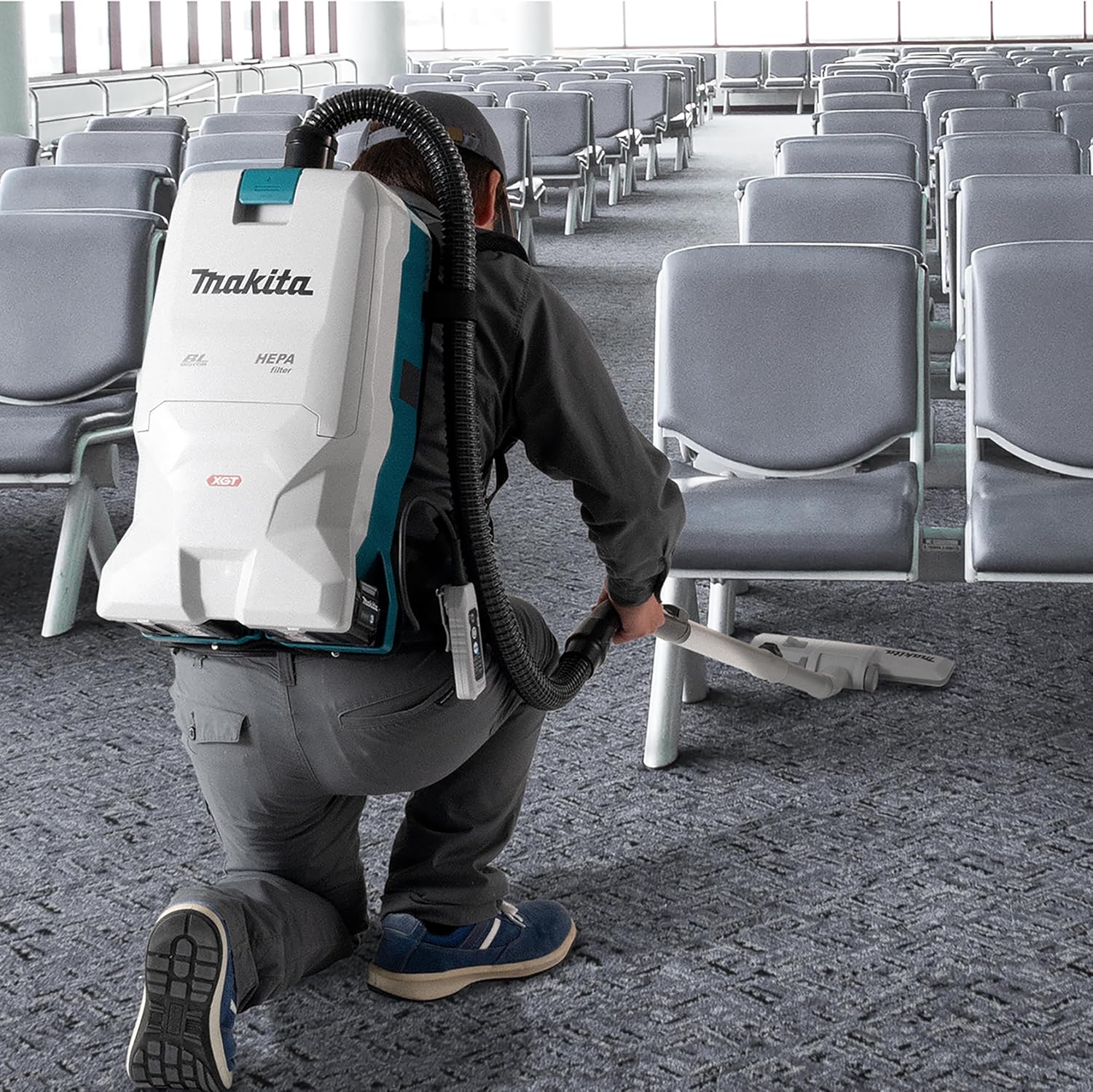
Image 6: A user demonstrating the Makita VC011GZ backpack vacuum in a commercial environment, highlighting its portability and ease of use.
5. Maintenance
Regular maintenance ensures the longevity and optimal performance of your Makita VC011GZ vacuum.
5.1 Emptying/Replacing Dust Bags
Empty the dust bag when it is full or when suction power noticeably decreases. The anti-forgetting mechanism will prevent operation if the bag is not installed correctly after replacement.
- Turn off the vacuum and remove the battery.
- Open the dust bag compartment cover.
- Carefully remove the full dust bag. For paper bags, seal the opening if possible before disposal. For cloth bags, empty contents into a waste receptacle.
- Install a new paper dust bag or re-install the emptied cloth dust bag, ensuring it is properly seated.
- Close the compartment cover securely.
5.2 Cleaning the HEPA Filter
The HEPA filter should be cleaned periodically to maintain suction efficiency. The vacuum features an automatic filter cleaning mechanism.
- Turn off the vacuum and remove the battery.
- Open the dust bag compartment cover and remove the dust bag.
- Carefully remove the HEPA filter.
- Gently tap the filter to dislodge dust. Do not wash the HEPA filter with water unless specifically instructed by Makita, as this can damage it.
- Re-install the clean HEPA filter, ensuring it is correctly positioned.
- Re-install the dust bag and close the compartment cover.
5.3 General Cleaning and Storage
- Wipe the exterior of the vacuum with a damp cloth. Do not use harsh chemicals or abrasive cleaners.
- Inspect the hose, pipes, and nozzles for blockages or damage. Clear any obstructions.
- Store the vacuum in a clean, dry place, away from direct sunlight and extreme temperatures.
- Remove the battery from the vacuum during extended storage.
6. Troubleshooting
Refer to the table below for common issues and their solutions.
| Problem | Possible Cause | Solution |
|---|---|---|
| Vacuum does not turn on | Battery not installed or discharged; Dust bag compartment not closed; Anti-restart function active. | Ensure battery is fully charged and correctly installed; Close dust bag compartment securely; If anti-restart is active, turn off and on again. |
| Low suction power | Dust bag full; HEPA filter clogged; Hose or nozzle blocked; Suction mode set too low. | Empty/replace dust bag; Clean HEPA filter; Clear any blockages in hose/nozzle; Increase suction power mode. |
| Unusual noise during operation | Foreign object in hose/nozzle; Motor issue. | Check and remove any foreign objects; If noise persists, contact Makita service. |
| Dust escaping from vacuum | Dust bag not installed correctly; Dust bag damaged; Filter not seated properly. | Re-install dust bag; Replace damaged dust bag; Re-seat HEPA filter. |
7. Specifications
| Feature | Specification |
|---|---|
| Model Name | VC011GZ |
| Power Source | 40V Max XGT Li-ion Battery (not included) |
| Motor Type | Brushless |
| Maximum Sealed Suction | 20 kPa |
| Maximum Air Volume | 2.4 m³/min |
| Suction Power (Mode 1) | 25 watts |
| Suction Power (Mode 2) | 55 watts |
| Suction Power (Mode 3) | 100 watts |
| Suction Power (Mode 4) | 195 watts |
| Dust Bag Capacity (Paper) | 6 Litres |
| Dust Bag Capacity (Cloth) | 5.5 Litres |
| Filter Type | HEPA Filter |
| Hose Length | 52 Centimeters (approx.) |
| Product Dimensions (L x W x H) | 20.47" x 15.55" x 11.81" |
| Item Weight (without battery) | 20.9 pounds |
| UPC | 197050001733 |
8. Warranty and Support
Makita offers a 1-year manufacturer warranty for the VC011GZ. This warranty can be extended by an additional 2 years (total 3 years) when the product is registered within 30 days of purchase.
Important: This guarantee does not apply where non-genuine or non-recommended parts or accessories are fitted to the tool. The use of non-genuine or compatible batteries and chargers with Makita tools will invalidate the Makita guarantee for our tools.
For warranty claims, technical support, or to register your product, please visit the official Makita website or contact your authorized Makita dealer.


