
Introduction
This manual provides detailed instructions for the safe and efficient operation of your ShoX Hammer 60W Portable Bluetooth Speaker. The ShoX Hammer is designed to deliver powerful audio with its 60W output, offering versatile connectivity options including Bluetooth, Aux, and USB. It features a durable, splashproof design and a long-lasting battery, making it suitable for various environments. Please read this manual thoroughly before using the product.
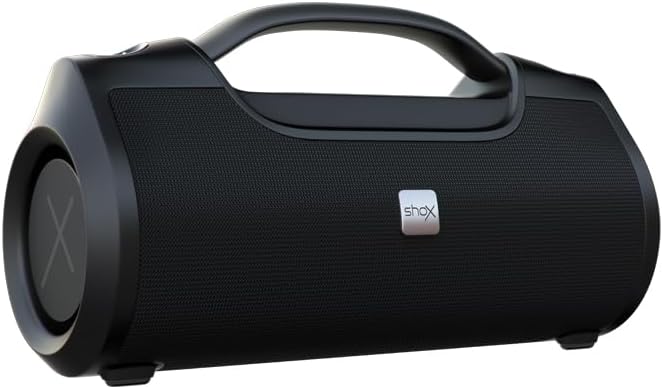
Image: The ShoX Hammer 60W Portable Bluetooth Speaker. This image displays the speaker's robust, black exterior with a prominent carrying handle and speaker grilles.
Package Contents
- 1 x ShoX Hammer 60W Portable Bluetooth Speaker
- 1 x Travel Strap
- 1 x Charging Cable (Type not specified, assume USB)
- 1 x Auxiliary Cable (if included, common for speakers with Aux input)
- 1 x User Manual (this document)
Note: Please check all items are present upon unboxing. Contact customer support if any items are missing or damaged.
Product Features
The ShoX Hammer speaker is equipped with several features designed to enhance your audio experience:
- 60W Massive Power Output: Delivers strong, clear audio.
- IPX6 Splashproof: Provides protection against water splashes, suitable for outdoor use.
- Dual-Sync Technology: Allows pairing two ShoX Hammer speakers for immersive stereo sound.
- Long-lasting Battery: Integrated 7200mAh battery offers extended playback time (up to 12 hours).
- Multiple Connectivity Options: Supports Bluetooth, Aux-in, and USB playback.
- 10m Wireless Connectivity: Stable Bluetooth connection range.
- Different EQ Modes: Customize your sound profile.
- Hands-free Call Control: Integrated microphone for answering calls.
- Intuitive Touch Controls: Easy access to playback and settings.
- Portable Design: Includes a convenient travel strap for easy transport.
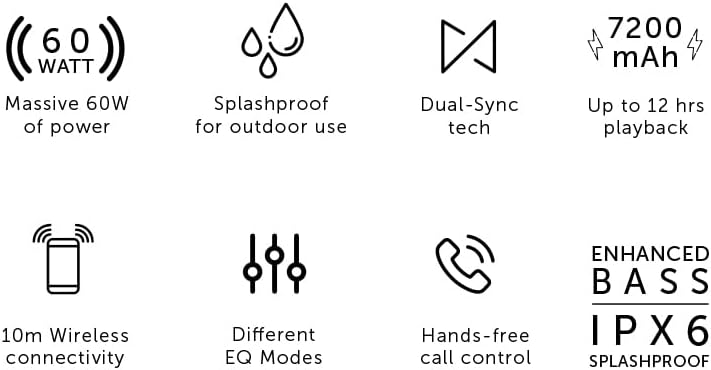
Image: Visual representation of key features including 60W power, IPX6 splashproof rating, Dual-Sync technology, 7200mAh battery, 10m wireless range, EQ modes, and hands-free calling.
Controls and Indicators
The ShoX Hammer features an intuitive control panel, typically located on the top surface of the speaker. While specific button layouts may vary, common controls include:
- Power Button: To turn the speaker on or off.
- Volume Up/Down Buttons: To adjust the playback volume.
- Play/Pause Button: To control audio playback.
- Mode Button: To switch between input sources (Bluetooth, Aux, USB).
- EQ Button: To cycle through different equalizer presets.
- Dual-Sync Button: To initiate pairing with another ShoX Hammer speaker.
- Call Button: To answer, end, or reject phone calls.
LED indicators are usually present to show power status, battery level, Bluetooth connection status, and charging status. Refer to the specific markings on your device for exact functions.
Setup
1. Charging the Speaker
- Before first use, fully charge the speaker.
- Connect the charging cable to the speaker's charging port and to a suitable USB power adapter (not included) or a computer's USB port.
- The charging indicator LED will illuminate, typically red, during charging and change color or turn off when fully charged.
- A full charge can take several hours.
2. Powering On/Off
- To Power On: Press and hold the Power button for a few seconds until you hear an audible prompt or see the power indicator LED light up.
- To Power Off: Press and hold the Power button again for a few seconds until the speaker powers down.
3. Bluetooth Pairing
- Ensure the speaker is powered on and in Bluetooth mode (indicated by a flashing Bluetooth LED). If not, press the Mode button to switch to Bluetooth.
- On your mobile device (smartphone, tablet, computer), enable Bluetooth and search for available devices.
- Select "ShoX Hammer" from the list of found devices.
- Once paired, the Bluetooth LED will stop flashing and remain solid, and you may hear a confirmation tone.
- The speaker will automatically attempt to reconnect to the last paired device when powered on.
4. Connecting via Aux-in
- Connect one end of a 3.5mm auxiliary cable (if included) to the speaker's Aux-in port.
- Connect the other end to the headphone jack of your audio source.
- Press the Mode button on the speaker until it switches to Aux-in mode.
- Audio will now play through the speaker from your connected device.
5. Connecting via USB
- Insert a USB flash drive containing audio files into the speaker's USB port.
- Press the Mode button on the speaker until it switches to USB playback mode.
- The speaker will automatically begin playing audio files from the USB drive.
6. Dual-Sync Pairing (Connecting Two ShoX Hammer Speakers)
- Ensure both ShoX Hammer speakers are powered on and in Bluetooth pairing mode (not connected to any device).
- On one of the speakers (this will be the primary speaker), press the Dual-Sync button. The speaker will emit a sound indicating it is searching for another speaker.
- The two speakers will automatically connect to each other. A confirmation tone will sound once connected.
- Now, connect your mobile device to the primary speaker via Bluetooth as described in step 3.
- Audio will now play in stereo across both speakers.
Operating Instructions
1. Playing Audio
- Once connected via Bluetooth, Aux, or USB, start playing audio from your source device or USB drive.
- Use the Play/Pause button on the speaker to control playback.
- Use the Volume Up/Down buttons to adjust the speaker's output volume.
2. Adjusting EQ Modes
- Press the EQ button to cycle through available equalizer presets (e.g., Bass Boost, Vocal, Standard).
- Select the mode that best suits your audio preference.
3. Hands-free Calling
- When a call comes in while connected via Bluetooth, the speaker will ring.
- Press the Call button once to answer the call.
- Press the Call button again to end the call.
- Press and hold the Call button to reject an incoming call.
4. IPX6 Splashproof Usage
- The speaker is rated IPX6, meaning it is protected against powerful water jets. It is suitable for use outdoors or near water sources like pools, but it is not designed to be submerged in water.
- Ensure all port covers are securely closed to maintain splashproof integrity.
- Do not expose the speaker to saltwater or other corrosive liquids.
Maintenance
- Cleaning: Wipe the speaker with a soft, damp cloth. Do not use abrasive cleaners, alcohol, or chemical solvents.
- Storage: Store the speaker in a cool, dry place away from direct sunlight and extreme temperatures.
- Battery Care: To prolong battery life, avoid fully discharging the speaker frequently. Charge it regularly, even if not in use for extended periods.
- Port Covers: Always ensure the rubber port covers are firmly sealed when not in use to maintain the IPX6 rating.
Troubleshooting
| Problem | Possible Cause | Solution |
|---|---|---|
| Speaker does not power on. | Low battery. | Charge the speaker fully. |
| No sound. | Volume too low; incorrect input mode; device not connected. | Increase volume on both speaker and source device. Ensure correct input mode is selected. Re-pair Bluetooth or check Aux/USB connection. |
| Bluetooth pairing fails. | Speaker not in pairing mode; device too far; interference; previously paired device. | Ensure speaker is in pairing mode. Move device closer. Turn off other Bluetooth devices. Forget "ShoX Hammer" from your device's Bluetooth list and try pairing again. |
| Dual-Sync pairing fails. | Speakers not in pairing mode; too far apart; already connected to a device. | Ensure both speakers are powered on and not connected to any device. Place them close to each other. Follow Dual-Sync pairing steps carefully. |
| Poor sound quality. | Low battery; source audio quality; Bluetooth range; EQ setting. | Charge the speaker. Try a different audio source. Move device closer to speaker. Adjust EQ mode. |
Specifications
| Brand | ShoX |
| Model Name | Hammer |
| Model Number | ESX761 |
| Speaker Maximum Output Power | 60 Watts |
| Connectivity Technology | Bluetooth |
| Audio Output Mode | Stereo |
| Speaker Type | Outdoor |
| IP Rating | IPX6 (Splashproof) |
| Battery Capacity | 7200mAh (1 Lithium Ion battery included) |
| Playback Time | Up to 12 hours (approximate, varies with volume and content) |
| Material | Plastic |
| Color | Black |
| Item Dimensions (D x W x H) | 15.9D x 21.3W x 34.4H centimetres |
| Manufacturer | Tevo |
| Country of Origin | China |
Warranty and Support
The ShoX Hammer 60W Portable Bluetooth Speaker comes with a 1-year warranty from the date of purchase. This warranty covers manufacturing defects and workmanship under normal use. It does not cover damage caused by misuse, accidents, unauthorized modifications, or normal wear and tear.
For warranty claims, technical support, or any inquiries regarding your product, please contact the retailer where you purchased the speaker or refer to the official ShoX website for customer service contact information. Please retain your proof of purchase for warranty validation.