
Introduction
This manual provides detailed instructions for the safe and effective use of your NeaLia CD28 Magnetic Wireless Trailer Lights. Please read this manual thoroughly before installation and operation to ensure proper functionality and safety.
What's in the Box
- 2 x Wireless Trailer Lights
- 1 x 7-Pin Transmitter
- 1 x USB Charging Cable
- 1 x Car Charger Adapter
- 2 x Safety Cables
- Mounting Hardware (screws)

Image: The complete NeaLia Wireless Trailer Light Kit, including two lights, a 7-pin transmitter, charging accessories, and safety cables, neatly arranged in its carrying case.
Setup
The NeaLia CD28 Wireless Trailer Lights are designed for quick and easy installation, typically within one minute, thanks to their strong magnetic base.
Charging the Lights
Before first use, ensure both trailer lights are fully charged. Connect the USB charging cable to the lights and use the provided car charger adapter or any standard USB power source. A full charge takes approximately 2.5 hours and provides up to 8 hours of continuous use.

Image: A detailed view of the light's rear, highlighting the USB-C charging port, power button, and battery indicator for easy access and monitoring.
Installation Steps
- Prepare Vehicle: Start your towing vehicle.
- Connect Transmitter: Plug the 7-pin transmitter into your vehicle's trailer wiring harness.
- Power On Lights: Short press the ON/OFF button on each trailer light to power them on.
- Pairing: Long press the ON/OFF button on each light for 15 seconds to initiate pairing with the transmitter. The lights will indicate successful connection.
- Attach Lights: Securely attach the lights to any metal surface on the rear of your trailer using their strong magnetic bases. Ensure they are positioned correctly for visibility (left and right).
- Install Safety Cables: For added security, especially during extended travel or on rough terrain, attach the provided safety cables from the lights to a secure point on the trailer.
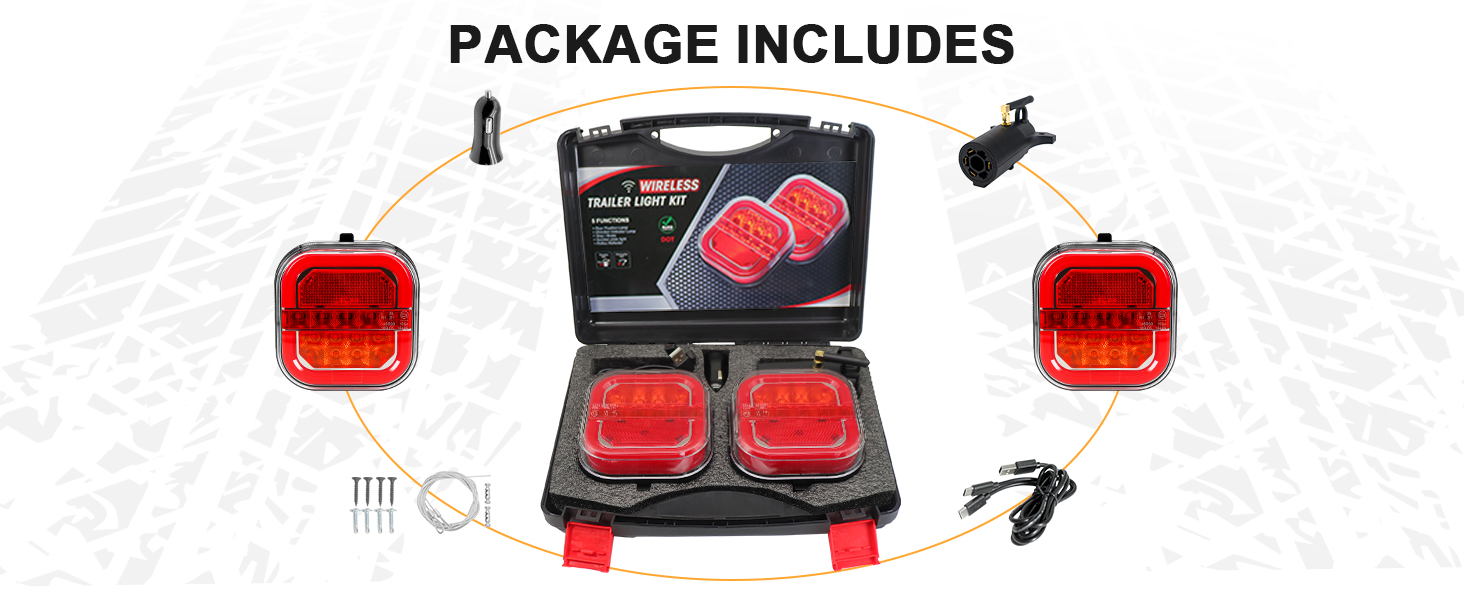
Image: A visual guide demonstrating the four-step installation process: starting the truck, plugging in the transmitter, powering on the lights, and connecting them.

Image: A close-up showing the safety cable securely attached to the trailer light, providing an additional layer of retention.

Image: A NeaLia wireless trailer light attached to the rear of an RV, illustrating the magnetic attachment and highlighting its 2.5-hour charging time for 8 hours of use.
Operating Instructions
The NeaLia CD28 lights offer multiple modes for comprehensive signaling, ensuring safety during towing.
Light Modes
The system supports four primary lighting modes, automatically activated by your vehicle's signals:
- Tail Light: Provides continuous rear illumination when headlights are on.
- Brake Light: Illuminates brightly when the brake pedal is pressed.
- Left Turn Signal: Flashes on the left light when the left turn signal is activated.
- Right Turn Signal: Flashes on the right light when the right turn signal is activated.

Image: A visual representation of the four distinct lighting modes: tail light, brake light, left turn signal, and right turn signal, demonstrating their appearance.
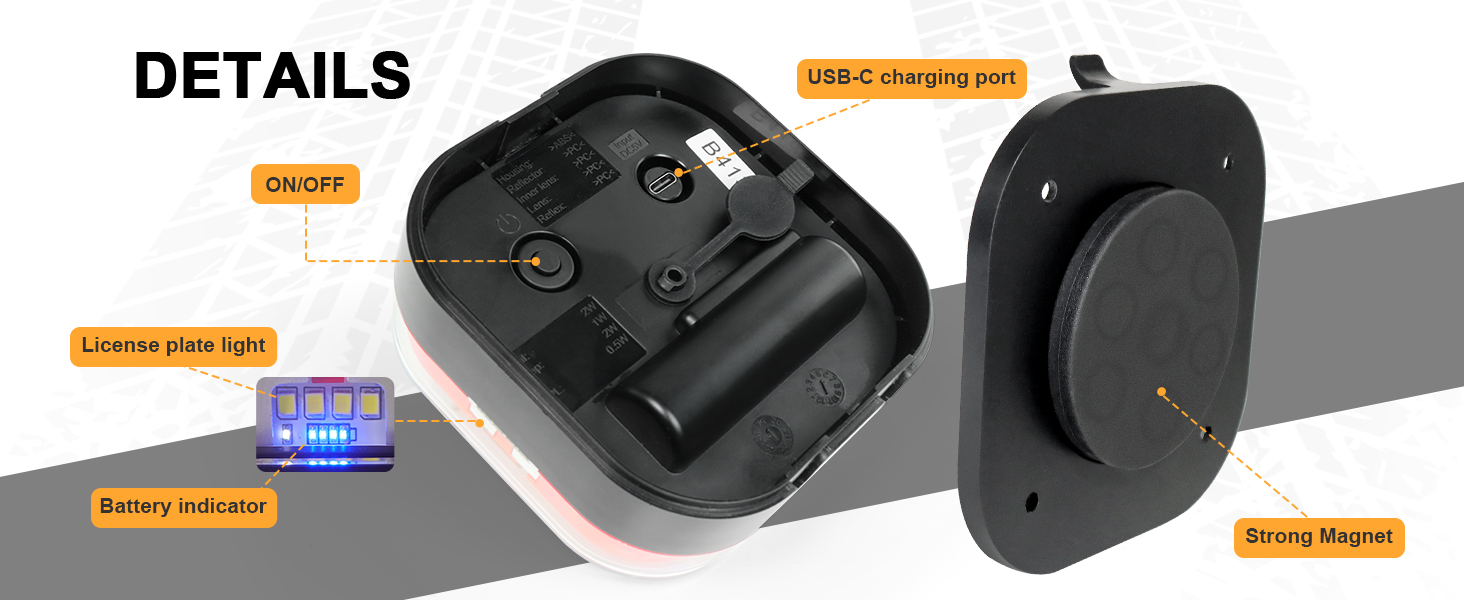
Image: An illustration showing the appearance of the running lights, brake lights, and turn signals on the NeaLia wireless trailer lights.
Signal Reliability
The system utilizes 2.4G wireless technology, providing stable signal transmission up to 100 feet without delays or interference.

Image: A graphic depicting a truck towing a fifth-wheel trailer, illustrating the 100-foot stable 2.4G wireless signal range between the transmitter and the trailer lights.
Integrated Features
- Reflectors: Built-in reflectors enhance visibility even when lights are off.
- License Plate Lights: Integrated license plate lights ensure your plate is illuminated.
- Battery Indicator: A battery indicator provides status on the remaining charge.

Image: A close-up view of the trailer light, highlighting the integrated license plate illumination feature.
Maintenance
Proper maintenance ensures the longevity and optimal performance of your NeaLia CD28 trailer lights.
Cleaning
Clean the lights periodically with a soft, damp cloth. Avoid abrasive cleaners or solvents that could damage the lens or housing.
Weather Resistance
The lights are constructed from premium HD PC + ABS material and boast an IP67 waterproof rating, making them resilient against dust, dirt, rain, snow, and fog. While designed for harsh conditions, regular inspection for any damage is recommended.

Image: A NeaLia trailer light shown in a rainy environment, emphasizing its IP65 waterproof rating and ability to withstand temperatures from -13°F to 149°F.
Battery Care
To maximize battery life, avoid fully discharging the lights frequently. Recharge them as needed. If storing for an extended period, charge them to about 50% and recharge every few months.
Troubleshooting
If you encounter issues with your NeaLia CD28 trailer lights, refer to the following common solutions.
Lights Not Pairing or Responding
- Ensure both lights are fully charged.
- Verify the 7-pin transmitter is securely plugged into the vehicle's harness.
- Confirm the vehicle's ignition is on and the trailer lights system is active.
- Repeat the pairing process: long press the ON/OFF button on each light for 15 seconds.
- Check for any obstructions or excessive distance between the transmitter and lights (maximum 100ft).
Lights Falling Off
- Ensure the mounting surface is clean, dry, and free of debris.
- Always use the provided safety cables for additional security, especially on rough roads or at high speeds.
Intermittent Signal
- Check for potential sources of 2.4Ghz interference near the vehicle or trailer.
- Ensure the transmitter's antenna (if applicable) is unobstructed.
If issues persist after following these steps, please contact customer support.
Specifications
| Feature | Specification |
|---|---|
| Brand | NeaLia |
| Model Number | NL-CD28 |
| Light Source Type | LED (Ceramic Base) |
| Voltage | 5 volts |
| Wattage | 5 watts |
| Waterproof Rating | IP67 |
| Signal Range | Up to 100ft (2.4G Wireless) |
| Charging Time | 2.5 hours |
| Battery Life | 8 hours |
| Material | HD PC + ABS (Housing), Polycarbonate (Lens) |
| Special Features | Corrosion Resistant, Dustproof, Lightweight, Shockproof, Waterproof |
| Certifications | DOT/FMVSS 108 compliant |
Warranty and Support
NeaLia provides a 12-month warranty for the CD28 Magnetic Wireless Trailer Lights. If you have any concerns or experience issues, please test the product upon arrival and reach out to our customer service team for assistance.
For customer service inquiries, please contact NeaLia directly through the retailer where the product was purchased.
Official Product Video
Video: An official overview of the NeaLia Wireless Trailer Lights, demonstrating their features and ease of use.