
1. Introduction
This manual provides detailed instructions for the safe and effective operation of your TAGVIT Digital Torque Wrench, Model TA-076. Please read this manual thoroughly before use and retain it for future reference. This digital torque wrench is designed for precise torque measurement and application in various automotive, motorcycle, and bicycle repair tasks.
2. Safety Information
- Always wear appropriate personal protective equipment, such as safety glasses, when using this tool.
- Ensure the workpiece is securely fastened before applying torque.
- Do not exceed the maximum torque capacity of the wrench (295 Ft-lb / 400 Nm).
- Avoid dropping the wrench or subjecting it to severe impacts, as this can affect its accuracy.
- Keep the wrench clean and dry. Do not immerse it in liquids.
- Store the wrench in a safe place, away from children and unauthorized users.
- Do not attempt to disassemble or modify the wrench. Refer all servicing to qualified personnel.
3. Product Features
- High Precision: Torque range of 14.75-295 ft-lb / 20-400 Nm with an accuracy of ±2% clockwise and ±3% counterclockwise, compliant with ISO 6789 and ASME B107.14M standards.
- Multiple Units: Quickly switch between Nm, Ft-lb, in.lb, and Kgf.cm.
- Measurement Modes: Features TRACK mode for real-time torque display and PEAK mode for displaying the maximum torque value achieved.
- Visual & Audible Notifications: LED lights and a buzzer provide feedback when approaching and reaching the set torque value, preventing over-tightening.
- Preset Modes: Store up to 10 commonly used torque values (M0-M9) for quick access.
- Quick Release Button: Facilitates fast and secure installation and removal of sockets.
- Dual-Direction Use: Adjustable direction for both clockwise and counter-clockwise applications.
- Large LCD Display: Clear, backlit screen for easy reading in various lighting conditions.
- Ergonomic Design: Extended handle for comfortable, non-slip grip, enhancing labor efficiency.

Figure 3.1: Overview of the TAGVIT Digital Torque Wrench TA-076.
4. Setup
4.1 Battery Installation
The TAGVIT Digital Torque Wrench requires 2 AA batteries (included). Follow these steps to install the batteries:
- Twist and open the battery cover located at the end of the handle.
- Insert two AA batteries, ensuring correct polarity (+/-).
- Close the battery cover securely.
- Press the power button to turn on the wrench.

Figure 4.1: Step-by-step guide for battery installation.
5. Operating Instructions
5.1 Power On/Off
- To power on, press the Power button. The LCD screen will illuminate.
- The wrench features an auto-sleep mode. If inactive for 5 minutes, it will automatically power off to conserve battery.
5.2 Unit Selection
Press the U button to cycle through the available torque units: Nm, Ft-lb, in.lb, and Kgf.cm. The selected unit will be displayed on the LCD.
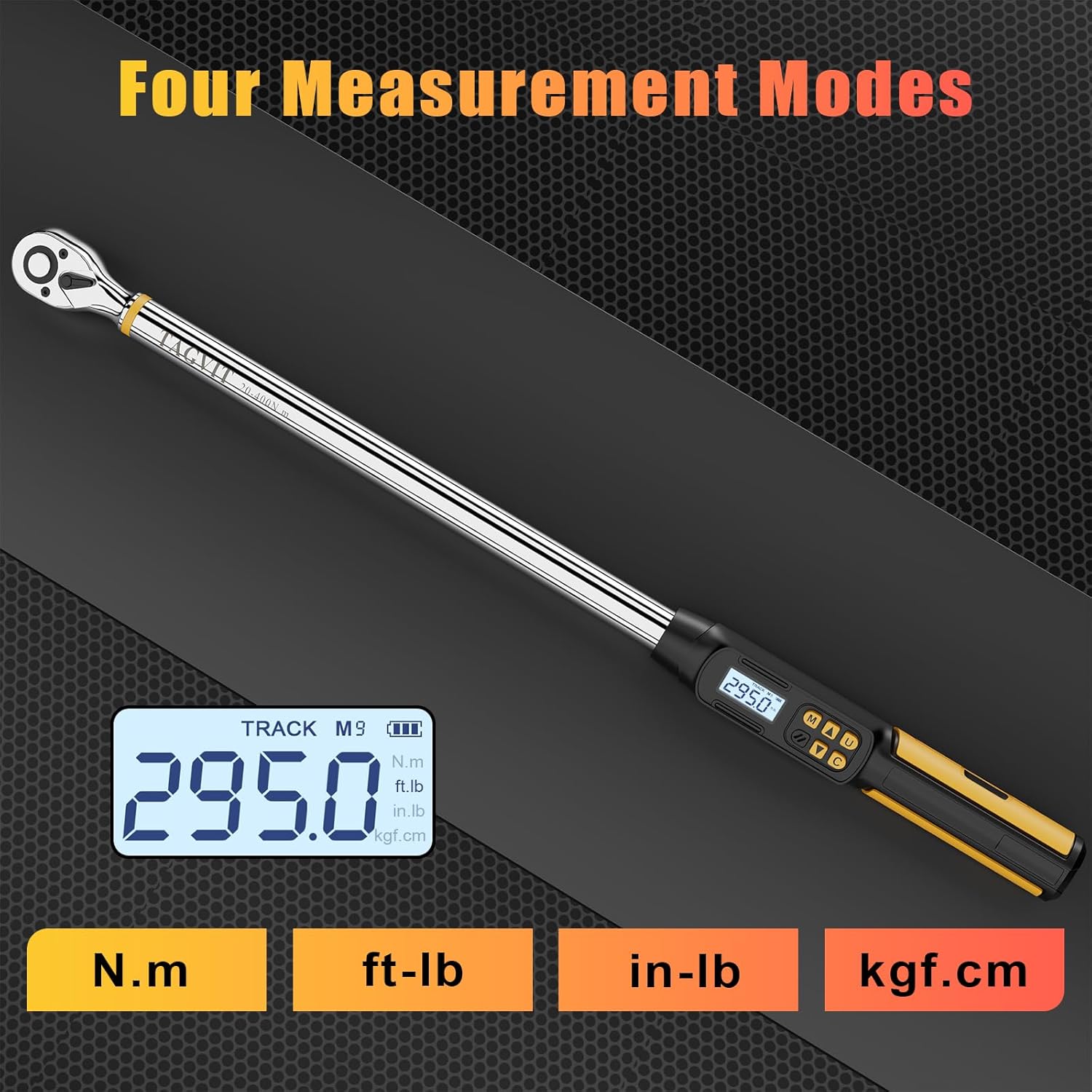
Figure 5.1: Display showing four selectable torque measurement units.
5.3 Mode Selection (TRACK/PEAK)
Press the M button to switch between TRACK and PEAK modes.
- TRACK Mode: Displays the real-time torque value as force is applied.
- PEAK Mode: Captures and displays the maximum torque value reached during an application.

Figure 5.2: Illustration of TRACK mode (real-time) and PEAK mode (maximum value).
5.4 Setting Target Torque and Preset Modes
To set a target torque value or utilize preset modes:
- Press the M button to enter the preset mode selection (M0-M9).
- Use the Up and Down arrow buttons to select a preset slot (e.g., M1, M2).
- Press the C button to confirm selection or to adjust the value within a preset.
- Use the Up and Down arrow buttons to adjust the desired torque value.
- Once the desired value is set, the wrench is ready for use.

Figure 5.3: The display showing the selection of preset torque values (M0-M9).
5.5 Buzzer and LED Indicators
When applying torque, the wrench provides feedback:
- As you approach the set torque value (e.g., 85-90%), the LED lights will illuminate, and the buzzer will emit a warning sound.
- When 100% of the set torque value is reached, the LED lights will change (e.g., to red), and the buzzer will sound continuously, indicating to stop applying force.

Figure 5.4: Visual representation of the buzzer and LED indicators during torque application.
5.6 Quick Release Button and Direction Adjustment
- The quick release button on the ratchet head allows for easy and secure attachment and detachment of sockets. Press the button to release the socket.
- A direction button on the wrench head enables switching between clockwise and counter-clockwise operation as needed for different fastening tasks.
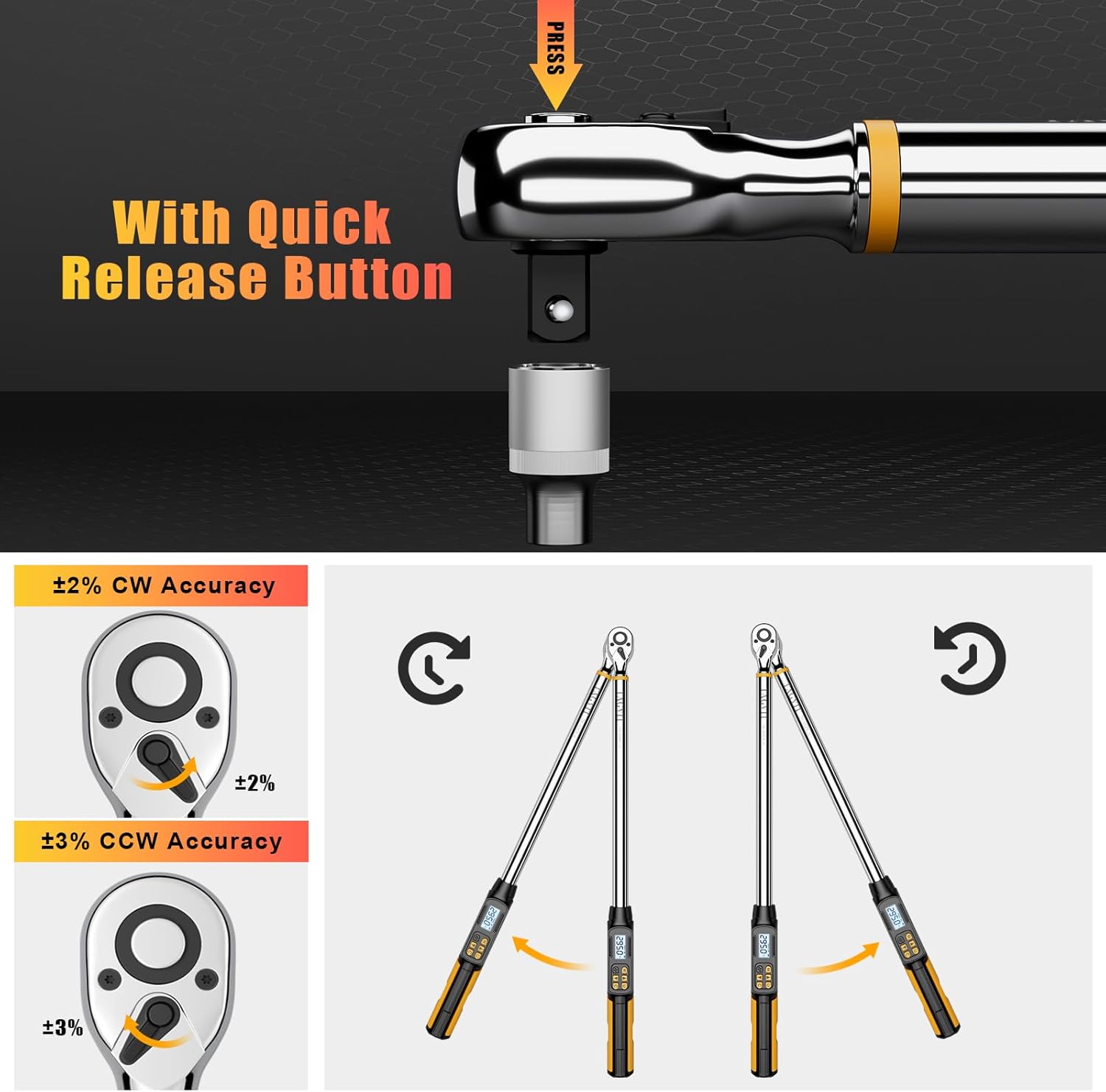
Figure 5.5: Details of the quick release button and illustrations of clockwise and counter-clockwise torque application.
6. Maintenance
- Cleaning: Wipe the wrench with a clean, dry cloth after each use. Do not use abrasive cleaners or solvents.
- Storage: Store the wrench in its protective case in a dry, cool place, away from direct sunlight and extreme temperatures.
- Battery Replacement: Replace batteries when the low battery indicator appears on the display. Remove batteries if the wrench will not be used for an extended period to prevent leakage.
- Calibration: For optimal accuracy, periodic calibration by a certified service center is recommended, especially after heavy use or impacts.
7. Troubleshooting
- Wrench does not power on: Check battery installation and ensure batteries are not depleted. Replace if necessary.
- Inaccurate readings: Ensure the wrench is properly calibrated. Avoid applying side loads or jerking motions during use.
- Display issues: If the display is dim or flickering, replace the batteries. If the issue persists, contact customer support.
- Buzzer/LED not working: Check battery level. If sufficient, contact customer support.
8. Specifications
| Feature | Specification |
|---|---|
| Brand | TAGVIT |
| Model Number | TA-076 |
| Drive Size | 1/2-Inch |
| Torque Range | 14.75-295 Ft-lb / 20-400 Nm |
| Accuracy (CW) | ±2% |
| Accuracy (CCW) | ±3% |
| Units | Nm, Ft-lb, in.lb, Kgf.cm |
| Head Style | Fixed Square, 72-tooth ratchet |
| Operation Mode | Electric |
| Power Source | 2 x AA Batteries (Zinc Carbon) |
| Material | Metal (Polished Finish) |
| Item Weight | 4.79 pounds (2.18 Kilograms) |
9. Warranty and Support
For warranty information or technical support, please refer to the product packaging or contact TAGVIT customer service directly. Keep your purchase receipt as proof of purchase.