
1. Introduction
The OKESAM GT1000 Metal Detector is designed for efficient and accurate metal detection, suitable for both beginners and experienced users. Its advanced features, including multiple detection modes and a waterproof search coil, make it ideal for various outdoor environments. This manual provides detailed instructions for assembly, operation, maintenance, and troubleshooting to ensure optimal performance and longevity of your device.
2. Product Overview and Features
The OKESAM GT1000 is equipped with an upgraded DSP chip for high accuracy and a 10-inch IP68 waterproof search coil. It features a backlit LCD display for clear visibility and an ergonomic design for comfortable use.
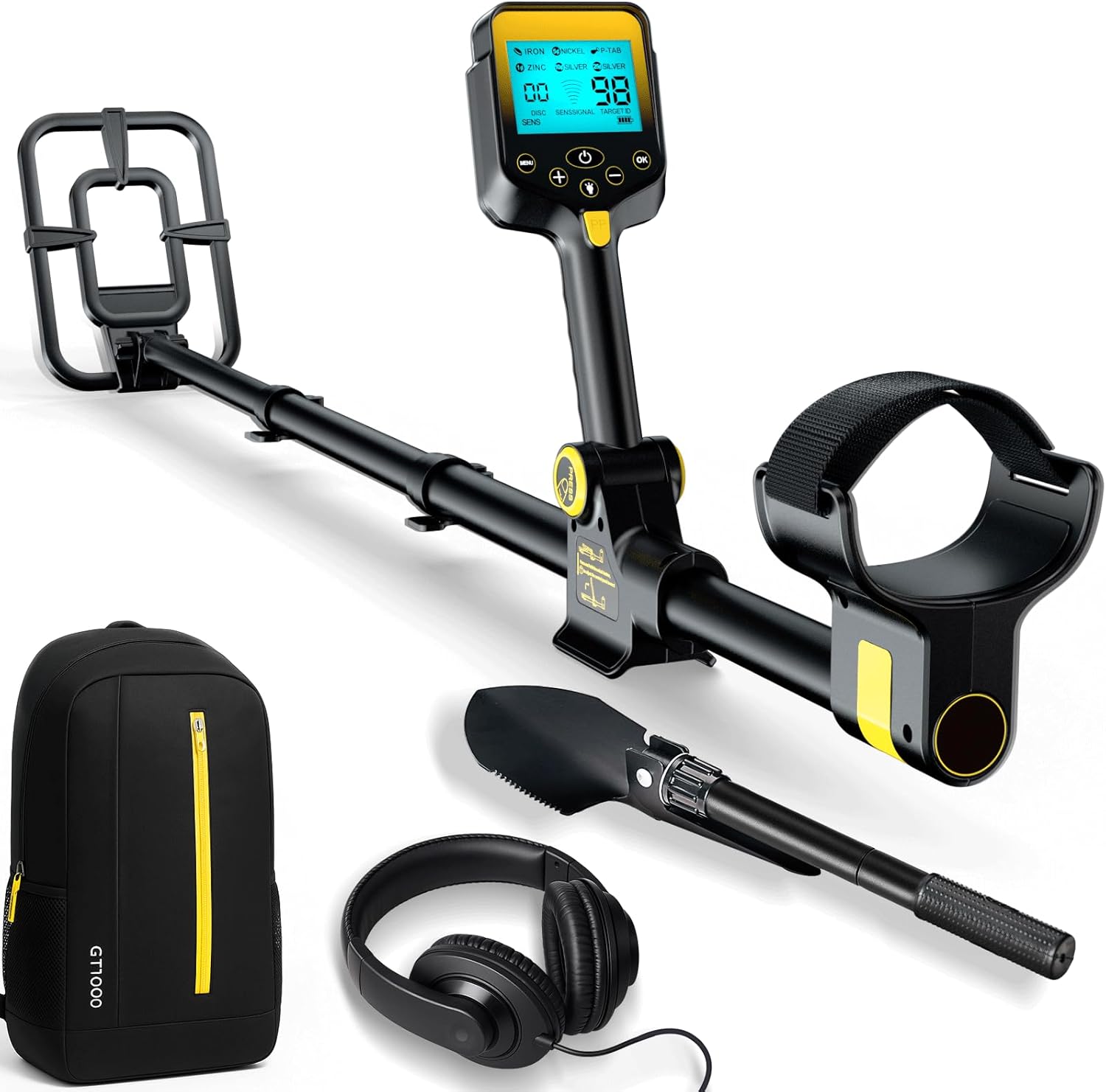
Image 2.1: The OKESAM GT1000 Metal Detector and included accessories.
Key Features:
- Upgraded DSP Chip: Provides enhanced detection accuracy and anti-interference capabilities.
- 10-inch IP68 Waterproof Search Coil: Allows for detection in shallow water and various terrains. (Note: The control unit is not waterproof.)
- 2000mAh Rechargeable Battery: Offers up to 20 hours of continuous operation on a single charge.
- LCD Display with Backlight: Clear display of target ID, depth, sensitivity, and mode settings.
- Adjustable Length: Retractable rod adjusts from 26.8 inches to 50 inches, suitable for various user heights.
- Ergonomic Design: Features a soft elbow support and comfortable grip for extended use.

Image 2.2: Overview of the OKESAM GT1000's intelligent design and features.
3. Package Contents
Verify that all items are present in the package:
- 1x OKESAM GT1000 Metal Detector
- 1x Backpack
- 1x Headphones
- 1x Folding Shovel
- 1x USB Charging Cable

Image 3.1: All components included in the OKESAM GT1000 package.
4. Assembly and Setup
Follow these steps to assemble your metal detector and prepare it for use:
- Attach the Search Coil: Securely connect the 10-inch search coil to the lower stem. Ensure the cable is wrapped snugly around the stem to prevent tangling.
- Connect the Stems: Connect the lower, middle, and upper stems. The retractable rod allows for length adjustment.
- Mount the Control Unit: Attach the control unit to the upper stem. Ensure it is firmly in place and the cable from the search coil is connected to the control unit's port.
- Adjust Length and Armrest: Adjust the length of the detector to a comfortable height where the search coil is parallel to the ground when you are standing upright. Position the armrest for comfortable support.
- Charge the Battery: Before first use, fully charge the internal 2000mAh lithium polymer battery using the provided USB charging cable. The charging port is located on the control unit. A full charge provides up to 20 hours of operation.

Image 4.1: Visual guide for quick start assembly and key components.
5. Operating Instructions
5.1 Control Panel Overview
The control unit features an LCD display and several buttons for mode selection, sensitivity adjustment, and target identification.

Image 5.1: Detailed view of the control panel and its functions.
| Button/Indicator | Function |
|---|---|
| Power Button | Press and hold to turn the detector ON/OFF. |
| MENU Button | Accesses detection modes and other settings. |
| OK Button | Confirms selections or settings. |
| '+' / '-' Buttons | Adjust sensitivity, discrimination values, or navigate menus. |
| Backlight Button | Toggles the display backlight. |
| PP (Pinpointer) Button | Activates the pinpointing mode for precise target location. |
| Detected Target ID | Numerical display indicating the probable type of metal detected. |
| Sensitivity / Depth | Indicates current sensitivity level and estimated target depth. |
| Power Indicator | Shows current battery level. |
5.2 Detection Modes
The OKESAM GT1000 offers four distinct detection modes to suit various searching conditions and target preferences.
5.2.1 All Metal Mode
This is the default mode upon powering on the device. It detects all types of metals without discrimination. Use this mode when you want to find any metallic object, regardless of its composition.

Image 5.2: The display in All Metal Detection Mode.
5.2.2 DISC (Discrimination) Mode
In DISC mode, you can eliminate unwanted metals by setting a specific discrimination value. Press the '+' key to increase the value (range 1-80). Metals with a target ID below the set value will be ignored. To return to All Metal mode, press the '-' key to clear the value.

Image 5.3: The display in DISC Adjustment Mode.
5.2.3 NOTCH Mode
NOTCH mode allows you to selectively block specific metal types. Use the '+' and '-' buttons to navigate through the metal type indicators on the display. Press 'OK' to select or deselect the metal types you wish to exclude from detection.

Image 5.4: The display in NOTCH Adjustment Mode.
5.2.4 SENS (Sensitivity) Mode
In SENS mode, you can adjust the detection signal strength using the '+' and '-' keys. Higher sensitivity settings increase detection depth but may also increase false signals in highly mineralized ground or areas with electromagnetic interference. Adjust sensitivity based on your environment for optimal performance.

Image 5.5: The display in SENS Mode.
5.2.5 PP (Pinpointer) Mode
Press the PP button to activate pinpointing mode. This mode helps you locate the exact position of a detected target. As you move the search coil closer to the target, the signal strength indicator on the display will increase, and the audio tone will become stronger, indicating the metal's precise location.

Image 5.6: The display in PP Mode.
5.3 Metal Type Distinctions
The detector provides a Target ID range to help identify the probable type of metal detected. This is a guide and actual identification may vary based on size, depth, and mineralization.

Image 5.7: Guide to metal type distinctions based on Target ID.
| Metal Type | Target ID Range | Description |
|---|---|---|
| IRON | 00-09 | Ferrous metals, typically unwanted. |
| NICKEL | 10-24 | Small foil, nickel-like metals, some small gold. |
| P-TAB | 25-39 | Aluminum pull tabs, some small gold rings. |
| ZINC | 40-59 | Zinc coins, medium gold items. |
| SILVER (10¢) | 60-79 | Dimes, larger gold items, rings, bronze items. |
| SILVER (25¢) | 80+ | Quarters, high purity silver items, large aluminum coins. |
6. Waterproof Features
The OKESAM GT1000 features an IP68 rated 10-inch search coil, allowing for detection in shallow water environments such as beaches, streams, and lakes. This enables exploration in diverse conditions.

Image 6.1: The IP68 waterproof search coil in use underwater.
Important Note: The control unit (display and buttons) is NOT waterproof. Ensure the control unit remains dry and protected from water exposure to prevent damage.
7. Maintenance
Proper maintenance ensures the longevity and optimal performance of your metal detector.
- Cleaning: After each use, especially in sandy or muddy conditions, wipe down the search coil and stem with a damp cloth. Ensure the control unit is kept clean and dry. Do not use abrasive cleaners or solvents.
- Storage: Store the detector in a cool, dry place when not in use. If storing for an extended period, ensure the battery is partially charged (around 50%) to prolong its life.
- Battery Care: Avoid fully discharging the battery frequently. Recharge as needed. If the detector will not be used for a long time, charge it every 3-6 months.
- Cable Inspection: Regularly check all cables for signs of wear or damage. Ensure connections are secure.
8. Troubleshooting
If you encounter issues with your OKESAM GT1000, refer to the following common problems and solutions:
| Problem | Possible Cause | Solution |
|---|---|---|
| No Power | Battery is discharged. | Charge the battery fully using the provided USB cable. |
| No Detection Signal | Sensitivity too low; DISC/NOTCH settings too high; coil not connected. | Increase sensitivity (SENS mode); adjust DISC/NOTCH settings; ensure search coil cable is securely connected. |
| False Signals / Chatter | High sensitivity; electromagnetic interference; highly mineralized ground. | Decrease sensitivity (SENS mode); move away from power lines or other electronics; perform ground balance if available (not explicitly mentioned as a user function, but implied by 'Ground Balance Design' feature). |
| Inaccurate Target ID | Target is deep or small; multiple targets close together; mineralization. | Sweep slower and closer to the ground; use PP mode for precise location; consider the environment. |
| Display Not Working | Low battery; connection issue. | Charge battery; ensure control unit is properly connected to the stem. |
9. Specifications
| Feature | Specification |
|---|---|
| Brand | OKESAM |
| Model Number | GT1000 |
| Power Source | Battery Powered (1 Lithium Polymer battery, included) |
| Battery Life | Up to 20 Hours |
| Search Coil Size | 10 Inches |
| Waterproof Rating | IP68 (Search Coil only) |
| Operating Frequency | 7 KHz |
| Detection Depth | Up to 10 inches (depending on target size and ground conditions) |
| Adjustable Length | Yes, from 26.8 inches to 50 inches |
| Item Weight | 5.7 Pounds |
| Materials | Metal, Plastic |
| Product Dimensions | 17"L x 9"W x 6"H (packaged) |
10. Warranty and Support
For warranty information or technical support, please refer to the documentation included with your purchase or contact OKESAM customer service through the retailer where the product was purchased. Keep your purchase receipt as proof of purchase for warranty claims.


