
VASAGLE URDT128B01
VASAGLE Vanity Desk with Mirror and Lights
Model: URDT128B01
Introduction
Thank you for choosing the VASAGLE Vanity Desk with Mirror and Lights. This manual provides essential information for the assembly, operation, and maintenance of your new vanity desk. Please read these instructions carefully before beginning assembly and retain them for future reference.
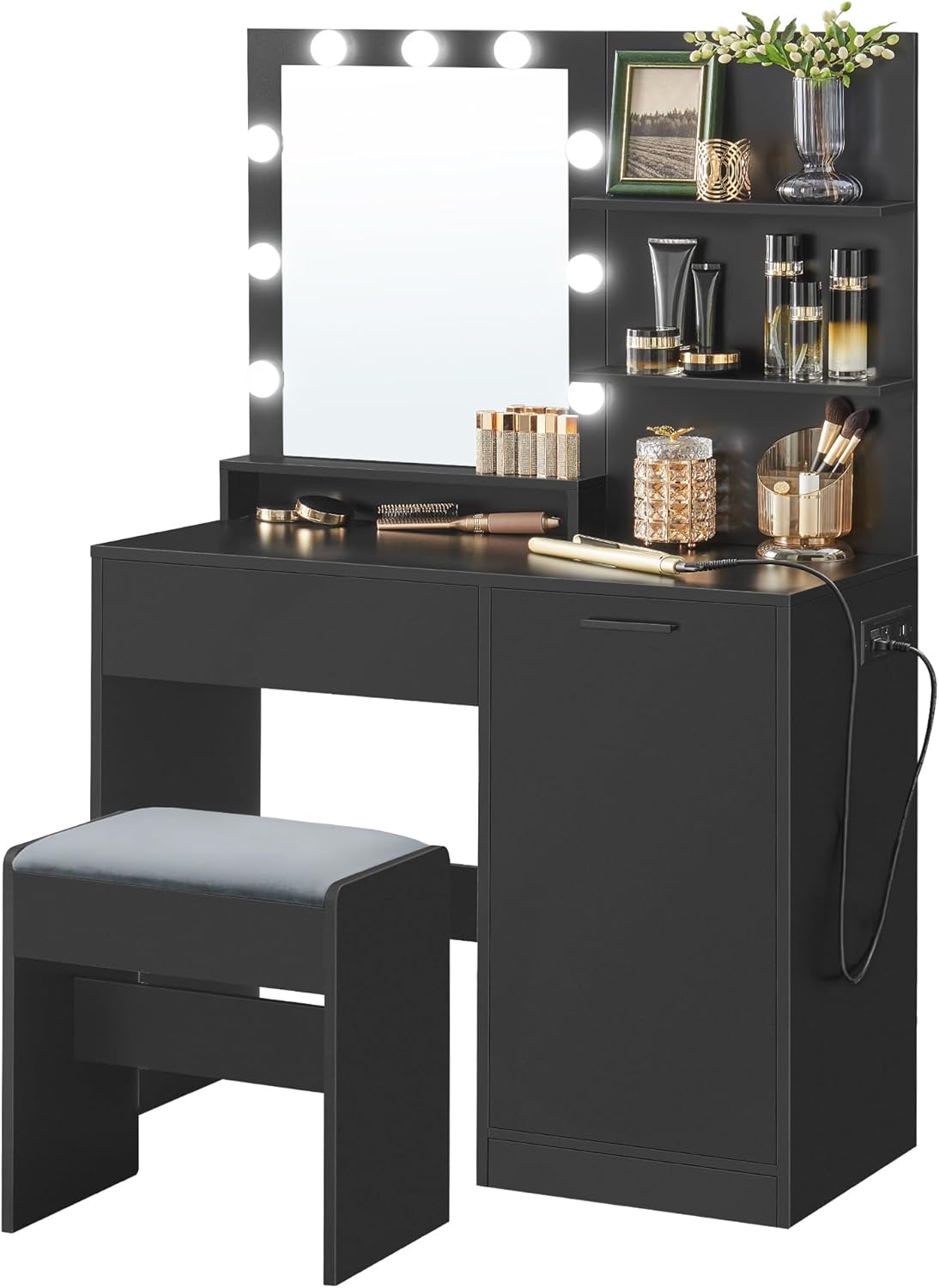
Figure 1: The VASAGLE Vanity Desk with Mirror and Lights, showcasing its sleek design and integrated lighting.
Safety Information
To ensure safe use and prolong the lifespan of your vanity desk, please observe the following safety precautions:
- Always follow the assembly instructions precisely. Do not skip steps or use unauthorized parts.
- Ensure all connections are secure before use. Regularly check and tighten screws if necessary.
- Do not overload shelves or drawers. Refer to the specifications for weight limits.
- Keep electrical components (power outlets, light wiring) away from water and moisture.
- Use the included anti-tip kit to secure the vanity to the wall, especially if children are present.
- Do not attempt to modify the electrical system or lighting. Contact qualified personnel for repairs.
- Place the vanity on a flat, stable surface to prevent tipping.
Package Contents
Verify that all components listed below are present and undamaged before beginning assembly. If any parts are missing or damaged, please contact customer support.
| Component | Quantity |
|---|---|
| Vanity Desk with Mirror | 1 |
| Vanity Stool | 1 |
| Accessory Kit (Hardware) | 1 |
| Anti-Tip Kit | 1 |
| Instructions Manual | 1 |
Assembly Instructions
Assembly of the VASAGLE Vanity Desk is required. Please follow the detailed step-by-step instructions provided in the separate "Instructions Manual" included in your package. It is recommended to have two people for assembly to ensure stability and ease of construction.
- Unpack all components and verify against the package contents list.
- Identify each part using the labels provided.
- Follow the numerical sequence of steps in the dedicated assembly manual.
- Use the appropriate hardware for each step as indicated. Do not overtighten screws.
- Once assembled, attach the anti-tip kit to secure the vanity to a wall, preventing accidental tipping.

Figure 2: Detailed dimensions of the vanity desk and stool, crucial for planning placement and assembly.
Features and Functions
Storage Solutions
The vanity desk is designed with ample storage to keep your beauty essentials organized and easily accessible.
- Spacious Tabletop: Provides a large surface for daily use.
- 3 Open Shelves: Ideal for displaying perfumes, lotions, or decorative items.
- Roomy Drawer: Perfect for neatly tucking away smaller items and accessories.
- Enclosed Cabinet: Features adjustable shelves to accommodate items of varying sizes, keeping them out of sight.

Figure 3: An illustration highlighting the various storage compartments, including open shelves, a spacious drawer, and an enclosed cabinet.
Integrated Power Hub
A built-in power strip offers convenient access to power for your electronic devices and styling tools.
- 2 AC Outlets: Standard 125V / 12A outlets for hair dryers, curling irons, etc.
- 1 USB-A Port: For charging compatible USB-A devices.
- 1 USB-C Port: For charging compatible USB-C devices.
- 6.5 ft (2 m) Power Cord: Provides flexibility in placement.
- The mirror's LED lights are wired into this strip, optimizing outlet usage.

Figure 4: A close-up view of the integrated power strip with AC outlets, USB-A, and USB-C ports, along with a diagram illustrating its efficient use.
Dimmable LED Lights
The mirror is equipped with 9 adjustable LED light bulbs to provide optimal illumination for your beauty routine.
- Adjustable Brightness: Customize the light intensity from intense (for details) to bright (for complete makeup) to dim (for daily routines).
- Convenient Switch: A dedicated switch allows for easy control of the lights and brightness adjustment.
- Sleek Cable Management: Mirror light cables are hidden behind the mirror for a clean aesthetic.

Figure 5: An illustration demonstrating the adjustable LED lights on the mirror, showing different brightness levels for various makeup needs.
Operating Instructions
Using the LED Lights
- Ensure the vanity desk is properly connected to a power source via its main power cord.
- Locate the light control switch, typically found on the mirror frame or connected cable.
- Press the power button on the switch to turn the lights ON/OFF.
- To adjust brightness, long-press the power button or use the designated brightness control buttons (if present) until the desired illumination is achieved.
Utilizing the Power Outlets
- Plug your hair tools or electronic chargers directly into the AC outlets (125V / 12A) on the integrated power strip.
- For charging mobile devices, connect your USB-A or USB-C cable to the corresponding ports.
- Ensure devices are compatible with the provided voltage and current.
Maintenance and Care
Proper care will help maintain the appearance and functionality of your vanity desk:
- Cleaning: Wipe the surfaces with a soft, dry cloth. For stubborn marks, a slightly damp cloth followed by a dry one can be used. Avoid harsh chemicals or abrasive cleaners.
- Mirror Care: Clean the mirror with a glass cleaner and a lint-free cloth.
- Dusting: Regularly dust all surfaces, including shelves and the mirror, to prevent buildup.
- Spills: Clean up spills immediately to prevent staining or damage to the particleboard.
- Stool Care: For the upholstered stool, spot clean with a mild fabric cleaner as needed.
Troubleshooting
If you encounter any issues with your vanity desk, refer to the following common problems and solutions:
| Problem | Possible Cause | Solution |
|---|---|---|
| LED Lights not turning on | Power cord not fully plugged in; Light switch off; Loose connection. | Ensure the main power cord is securely plugged into a working outlet. Check the light switch is ON. Verify all light connections are secure. |
| Power Outlets not working | Main power cord unplugged; Device not compatible; Overload. | Confirm the vanity's main power cord is plugged in. Test the device in another outlet. Avoid plugging in too many high-power devices simultaneously. |
| Drawer/Cabinet not closing smoothly | Obstruction; Misaligned rails; Loose hardware. | Check for items blocking the drawer/cabinet. Ensure rails are correctly aligned during assembly. Tighten any loose screws on the drawer slides or hinges. |
| Vanity feels wobbly | Uneven floor; Loose assembly hardware. | Adjust the vanity's position on an even floor. Re-tighten all assembly screws. Ensure the anti-tip kit is properly installed. |
Specifications
| Attribute | Detail |
|---|---|
| Brand | VASAGLE |
| Model Number | URDT128B01 |
| Product Dimensions | 15.7"D x 35.4"W x 55.5"H (40 x 90 x 141 cm) |
| Item Weight | 88.8 pounds (40.28 kg) |
| Frame Material | Particleboard, Glass, Foam, Velvet |
| Color | Ink Black |
| Assembly Required | Yes |
| Power Outlets | 2 AC Outlets (125V / 12A), 1 USB-A Port, 1 USB-C Port |
| LED Lights | 9 Dimmable Bulbs |
| UPC | 194343068770 |
Warranty and Support
VASAGLE products are designed for quality and durability. For warranty information, technical support, or to order replacement parts, please refer to the contact information provided on the product packaging or visit the official VASAGLE website. Please have your model number (URDT128B01) and purchase date ready when contacting support.
For additional resources and product information, you may visit the VASAGLE Store on Amazon.
Related documentsURDT128B01


Ask a question about this manual
Ask about setup, troubleshooting, compatibility, parts, safety, or missing instructions. Manuals+ will review the question and use this page’s manual context to help answer it.