
1. Introduction
This manual provides essential information for the safe and efficient operation of your Green Cell LCD Voltage Converter. This device converts 12V DC power from a battery into 230V AC pure sine wave power, suitable for a wide range of household appliances. It features an intelligent display, comprehensive protection mechanisms, and active cooling for reliable performance.
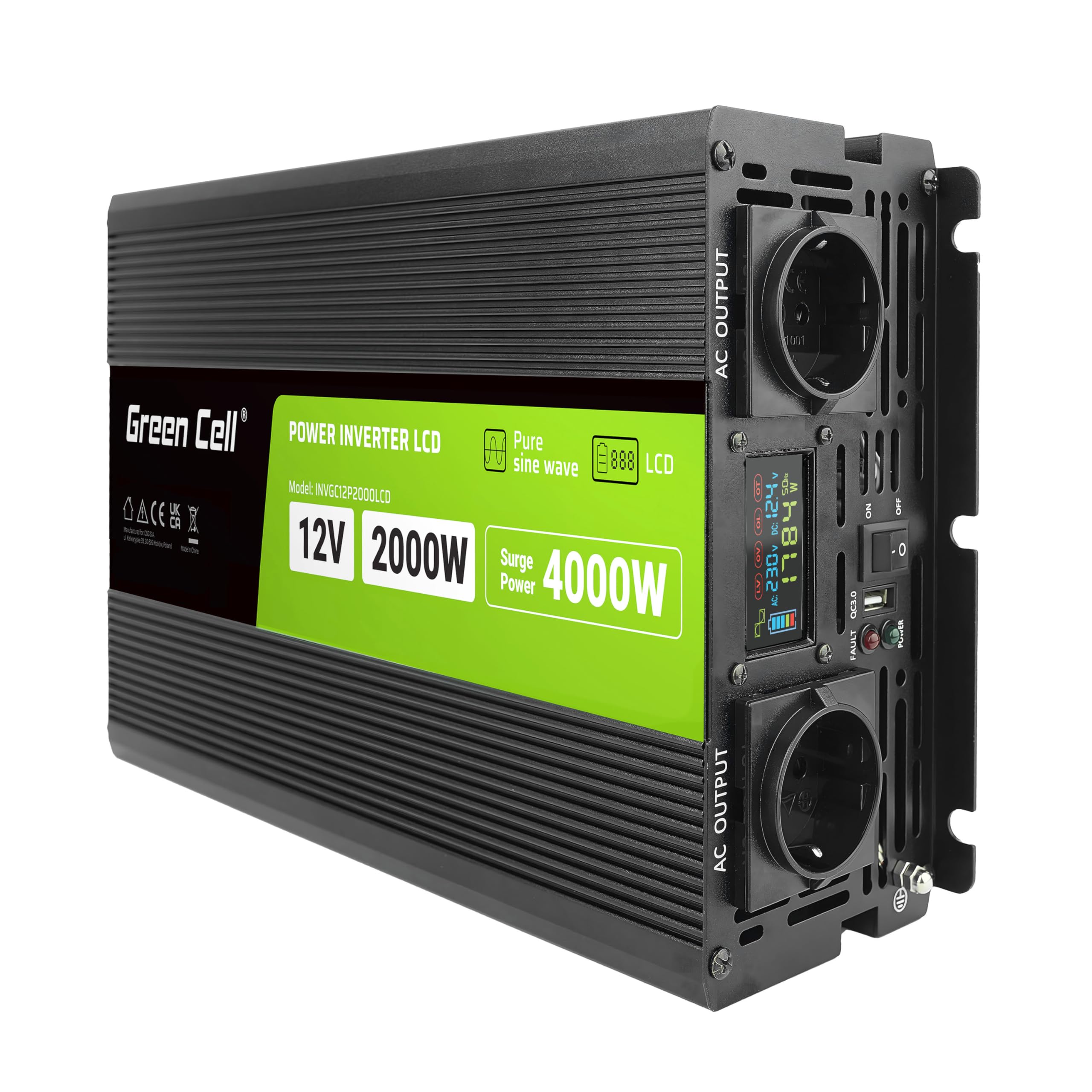
An overhead view of the Green Cell Power Inverter LCD, highlighting its key specifications: 12V input, 2000W continuous power, and 4000W surge power. The model number INVGC12P2000LCD is also visible.
2. Safety Instructions
Please read and understand all safety instructions before installing or operating the inverter. Failure to follow these instructions may result in electric shock, fire, or serious injury.
- Ventilation: Ensure adequate ventilation around the inverter. Do not block ventilation openings.
- Environment: Install the inverter in a dry, cool, and well-ventilated area, away from direct sunlight, heat sources, and flammable materials. Avoid exposure to moisture, dust, and corrosive substances.
- Connections: All electrical connections must be tight and secure to prevent loose connections that can cause overheating or sparks. Use appropriate gauge cables for battery connections.
- Grounding: The inverter must be properly grounded.
- Power Off: Always disconnect the battery power before performing any maintenance or making connections to the inverter.
- Load Capacity: Do not exceed the inverter's rated continuous power output (2000W) or surge power (4000W).
- Children: Keep the device out of reach of children.
- Qualified Personnel: Installation and servicing should only be performed by qualified personnel.
3. Package Contents
Upon unpacking, please verify that all items listed below are present and undamaged:
- Green Cell LCD Voltage Converter (INVGC12P2000LCD)
- User Manual
- Components for connecting the inverter to the battery (cables)
- Spare fuses

The inverter is shown alongside its accessories, including red and black battery connection cables and the user manual, indicating a complete package for installation.
4. Product Features
The Green Cell LCD Voltage Converter is designed with advanced features for optimal performance and user safety:
- Pure Sine Wave Output: Provides stable 230V AC power identical to grid electricity, suitable for sensitive electronics and inductive loads like CO pumps, refrigerators, and microwave ovens.
- LCD Display: A clear display shows critical operating parameters including current power, battery level, AC/DC voltage, and frequency.
- Intelligent Protection System: Continuously monitors operation and protects against short circuits, undervoltage, overvoltage, overload, overheating, and reverse polarity (DC).
- Active Cooling: Equipped with intelligent active cooling fans that adjust speed based on temperature, ensuring long-lasting and trouble-free operation.
- USB QC3.0 Port: For convenient charging of compatible devices.

This image displays the front panel of the inverter, featuring two 230V AC output sockets, a central LCD screen for monitoring, a USB QC3.0 port, a power ON/OFF switch, and LED indicators for power and fault status.

This diagram visually represents the inverter's comprehensive protection mechanisms: short-circuit protection, undervoltage protection, overvoltage protection, overload protection, overheating protection, and reverse polarity protection (DC).
5. Setup
Proper setup is crucial for the safe and efficient operation of your inverter.
5.1. Choosing a Location
- Mount the inverter on a flat, stable surface.
- Ensure the location is dry, cool, and well-ventilated.
- Keep away from direct sunlight, heat sources, and flammable materials.
- Allow at least 10 cm (4 inches) of clear space around the inverter for proper airflow.
5.2. Connecting to the Battery
- Ensure the inverter's power switch is in the OFF position.
- Connect the red (positive) battery cable to the positive (+) terminal of the inverter.
- Connect the black (negative) battery cable to the negative (-) terminal of the inverter.
- Connect the other end of the red (positive) battery cable to the positive (+) terminal of your 12V battery.
- Connect the other end of the black (negative) battery cable to the negative (-) terminal of your 12V battery.
- Ensure all connections are tight and secure. Loose connections can cause excessive heat and damage.
- It is recommended to install an appropriate fuse or circuit breaker between the battery and the inverter for additional protection.
5.3. Grounding the Inverter
Connect a grounding wire from the inverter's grounding terminal to a suitable earth ground point (e.g., vehicle chassis, ground rod).

This image provides a dual view of the inverter. The front shows AC outputs, status LEDs, USB port, and power switch. The rear illustrates the DC input terminals (positive and negative) and active cooling fans, emphasizing intuitive and user-friendly design.
6. Operating Instructions
6.1. Powering On the Inverter
- After all connections are secure, switch the inverter's power button to the ON position.
- The LCD display will illuminate, showing the current battery voltage, output voltage, and other parameters. The power LED indicator should light up.
6.2. Connecting AC Appliances
- Plug your 230V AC appliance into one of the AC output sockets on the front panel of the inverter.
- Ensure the total wattage of all connected appliances does not exceed the inverter's continuous output power (2000W).
- For appliances with high starting currents (e.g., motors, compressors), ensure their surge power requirement does not exceed 4000W.
6.3. Using the LCD Display
The LCD display provides real-time information about the inverter's status:
- Battery Level Indicator: Shows the approximate charge level of the connected 12V battery.
- AC Output Voltage: Displays the current 230V AC output voltage.
- DC Input Voltage: Shows the current 12V DC input voltage from the battery.
- Output Frequency: Indicates the 50Hz AC output frequency.
- Current Load (W): Displays the real-time power consumption of connected appliances in Watts.
- Protection Indicators (LV, OV, OL, OT): These indicators light up to signal specific protection events (Low Voltage, Over Voltage, Overload, Over Temperature).

A close-up of the LCD display, illustrating various parameters: battery charge level, sine wave form, low voltage protection (LV), overvoltage protection (OV), overload protection (OL), overheating protection (OT), DC input voltage, AC output voltage, AC output frequency, and current load in Watts.
6.4. Powering Off the Inverter
- Disconnect all AC appliances from the inverter.
- Switch the inverter's power button to the OFF position.
7. Maintenance
Regular maintenance ensures the longevity and optimal performance of your inverter.
- Cleaning: Periodically clean the exterior of the inverter with a dry, soft cloth. Do not use liquids or abrasive cleaners.
- Ventilation: Ensure the ventilation openings and cooling fans are free from dust and debris. Blocked vents can lead to overheating.
- Connections: Regularly check all electrical connections (battery terminals, AC outlets) to ensure they are tight and free from corrosion.
- Fuses: If the inverter stops working, check the internal fuses. Refer to the troubleshooting section for fuse replacement instructions. Always replace with fuses of the same type and rating.

A side view of the inverter, focusing on one of the active cooling fans. Text indicates effective passive cooling, intelligent active cooling, and robust electronics, ensuring stable operation.
8. Troubleshooting
This section addresses common issues you might encounter with your inverter.
| Problem | Possible Cause | Solution |
|---|---|---|
| Inverter does not turn on | No battery connection; Low battery voltage; Blown fuse; Faulty power switch | Check battery connections; Charge or replace battery; Check and replace fuses; Contact support |
| No AC output | Overload; Overheating; Low battery voltage; Faulty appliance | Reduce load; Allow inverter to cool; Charge battery; Test appliance on another power source |
| LCD display shows protection indicator (LV, OV, OL, OT) | Low Voltage; Over Voltage; Overload; Over Temperature | Address the specific condition: charge battery (LV), check input voltage (OV), reduce load (OL), ensure ventilation (OT) |
| Fan runs constantly or loudly | High internal temperature; Heavy load | Ensure proper ventilation; Reduce load; This is normal operation under heavy load or high ambient temperature |
If the problem persists after attempting these solutions, please contact Green Cell customer support.
9. Specifications
| Feature | Specification |
|---|---|
| Brand | Green Cell |
| Model Number | INVGC12P2000LCD |
| Input Voltage | 12 Volts DC |
| Output Voltage | 230 Volts AC |
| Continuous Output Power | 2000 Watts |
| Peak Output Power (Surge) | 4000 Watts |
| Output Waveform | Pure Sine Wave |
| Output Frequency | 50 Hz |
| Number of AC Outlets | 1 |
| Display Type | LCD |
| Item Weight | 4 Kilograms |
| Manufacturer | CSG S.A. |
| Certifications | CE |
| Recommended Uses | Power for various AC appliances including CO pumps, refrigerators and microwaves |
10. Warranty and Support
For detailed warranty information, technical support, or service inquiries, please refer to the warranty card included with your product or visit the official Green Cell website. Keep your purchase receipt as proof of purchase for warranty claims.