Product Overview
The Mammotion LUBA 2 AWD 3000 is a state-of-the-art robotic lawnmower designed for efficient and autonomous lawn care. It eliminates the need for perimeter wires, utilizing advanced navigation and mapping technologies to manage your lawn with precision. This manual will guide you through the features and functionalities of your LUBA 2 AWD 3000.
- Perimeter Wire-Free Setup: Utilizes RTK-GNSS and Multi-Sensor Navigation for virtual boundaries.
- Advanced Navigation: Features 3D Vision & RTK Fusion-Mapping System for precise positioning and obstacle avoidance.
- All-Wheel Drive: Capable of handling slopes up to 80% (38-degrees) and navigating rough terrain.
- Smart Control: APP and voice control (Amazon Alexa, Google Home) for customizing mowing settings, schedules, and monitoring progress.
- Multi-Zone Management: Define multiple mowing zones with different cutting heights and schedules.
- Theft Protection: Equipped with GPS and 4G tracking, plus a built-in alarm system.
- Efficient Cutting: Dual cutting discs provide a 15.7-inch cutting width for higher efficiency.

Setup and Installation
Setting up your LUBA 2 AWD 3000 is designed to be straightforward and wire-free, typically taking around 18 minutes. The system relies on advanced RTK-GNSS and a Multi-Sensor Navigation System for precise positioning and virtual boundary mapping.
What's in the Box

- Quick Start Guide
- LUBA 2 AWD Mower
- Power Supply
- Extra One Set of Blades
- Security Key Installation Kits
- Charging Station
- RTK Reference Station
- RTK Extension Cable (10m)
- RTK Power Supply
- RTK Ground Mount
Initial Setup Steps
- Install the Vision Module: Securely connect and attach the vision module to the LUBA using the provided screws and a 2.5mm hex screwdriver. Ensure black wires connect to black and white to white.

A diagram illustrating the two steps for installing the vision module: connecting the wires and then attaching the module with screws. - Place the RTK Reference Station: Position the RTK reference station in an open area with a clear view of the sky to ensure optimal satellite signal reception.
- Charge the LUBA: Place the LUBA on its charging station and allow it to fully charge before first use.
- Download the Mammotion App: Install the Mammotion app on your smartphone. This app is essential for mapping your lawn and controlling the mower.
- Map Your Lawn: Use the app to drive the LUBA like a remote control car to set virtual boundaries for your mowing areas. The 3D Vision & RTK Fusion-mapping System ensures precise positioning and boundary compliance without physical wiring.

An illustration showing the LUBA 2 AWD 3000 on a lawn, receiving signals from multiple satellites and an RTK reference station, highlighting its 3D Vision + RTK Fusion-mapping System for wire-free setup. 
A split image showing a person remotely controlling the LUBA mower to define virtual boundaries on the left, and a mapped lawn with planned mowing routes on the right, illustrating the wire-free setup and optimized cutting paths. - Define Multi-Zones and No-Go Zones: Within the app, you can set up multiple mowing zones with varying cutting heights (25-70mm) and schedules. You can also designate 'no-go zones' for areas the mower should avoid.

A split image demonstrating multi-zone management on the left, showing a property divided into different mowing zones (A, B, C, D) with varying cutting heights, and no-go zone management on the right, indicating an area around a pool that the mower will strictly avoid.
Operation Guide
The LUBA 2 AWD 3000 offers flexible operation through its dedicated app and voice control integration, allowing you to manage your lawn from anywhere.
Using the Mammotion App
The Mammotion app provides comprehensive control over your LUBA, enabling you to:
- Adjust Cutting Height: Customize the cutting height from 1.0 to 2.7 inches to suit your lawn's needs.

An image showing a smartphone screen displaying the cutting height adjustment interface, with a visual representation of grass height and a dial to set the desired cut, alongside a graphic indicating 'Long Endurance' for 3 hours of operation. - Set Mowing Schedule: Create custom mowing schedules for different zones and times.
- Choose Mowing Modes: Select from various mowing modes for optimal performance.
- Check Mower Status: Monitor the mowing progress and location of your LUBA in real-time.

Voice Control
Integrate your LUBA 2 AWD 3000 with Amazon Alexa or Google Home for convenient voice commands, allowing you to initiate mowing tasks with simple spoken instructions.

Obstacle Avoidance and Terrain Handling
The LUBA 2 AWD 3000 is equipped with a triple-redundant obstacle avoidance system, combining binocular vision, ultrasonic radar, and a bumper to detect and navigate around objects. Its all-wheel drive system allows it to traverse challenging terrain, including steep slopes, potholes, rough ground, and tall grass.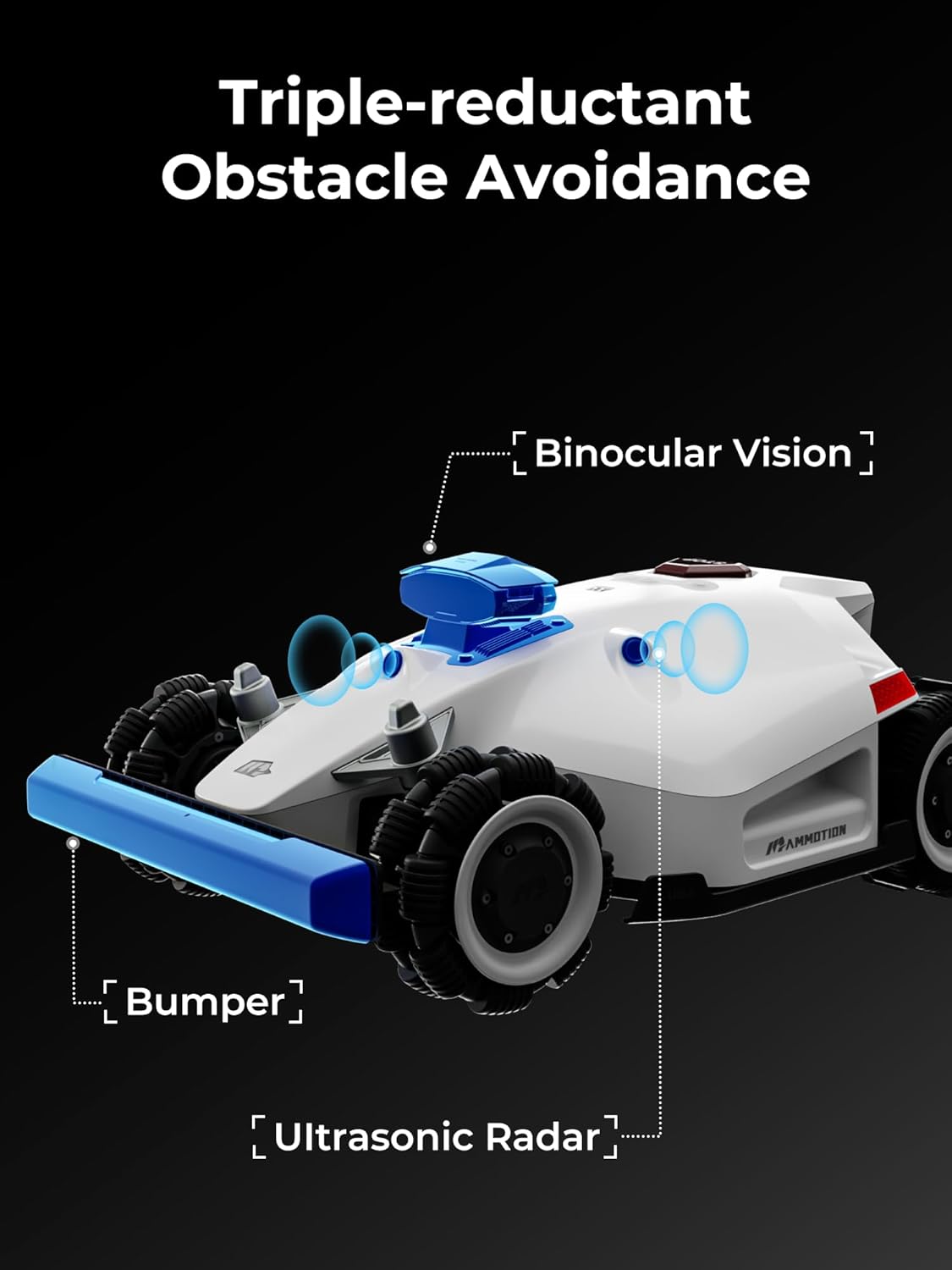

Smart Yard Security
The LUBA 2 AWD 3000 includes features for real-time monitoring and theft protection, providing peace of mind.

Maintenance
Regular maintenance ensures the longevity and optimal performance of your LUBA 2 AWD 3000. While specific maintenance schedules are detailed in the full user manual (PDF), general practices include:
- Blade Inspection and Replacement: Regularly check the cutting blades for sharpness and damage. Replace them as needed to maintain cutting efficiency. An extra set of blades is included with your purchase.
- Cleaning: Keep the mower's body, wheels, and cutting deck free from grass clippings, dirt, and debris. Use a soft brush or cloth.
- Sensor Cleaning: Ensure the vision module and ultrasonic radar sensors are clean and unobstructed for accurate navigation and obstacle detection.
- Charging Contacts: Periodically clean the charging contacts on both the mower and the charging station to ensure a reliable connection.
- Software Updates: Keep the Mammotion app and your LUBA's firmware updated to benefit from the latest features and improvements.
Troubleshooting
If you encounter issues with your LUBA 2 AWD 3000, consider the following common troubleshooting steps. For more detailed solutions, refer to the Mammotion app's support section or the comprehensive user manual.
- Mower Not Moving/Stuck: Check for physical obstructions around the mower or in its path. Ensure the battery is charged and the mower is within its defined mowing zone.
- Poor Navigation/Mapping Issues: Verify that the RTK reference station has a clear view of the sky and is properly connected. Ensure there are no new obstructions blocking satellite signals. Check for strong Wi-Fi or 4G signal in the mowing area.
- Uneven Cutting: Inspect the cutting blades for damage or dullness and replace if necessary. Ensure the cutting height setting is appropriate for your grass type and condition.
- App Connectivity Problems: Ensure your smartphone has a stable internet connection and Bluetooth is enabled. Restart the app and the mower if necessary.
- Error Messages: Consult the Mammotion app for specific error code explanations and recommended actions.
Technical Specifications
| Feature | Specification |
|---|---|
| Brand | Mammotion |
| Model Number | LUBA 2 AWD |
| Power Source | Battery Powered |
| Material | Plastic |
| Color | White |
| Item Weight | 38.9 Pounds |
| Cutting Width | 15.7 Inches |
| Cut Height Style | 1.0"-2.7" |
| Number of Positions | 5 |
| Operation Mode | Automatic |
| Product Dimensions | 27.17"D x 20.2"W x 10.75"H |
| Batteries | 24 Lithium Ion batteries required (included) |
| Max Slope Capability | 80% / 38-degrees |
| Max Mowing Area | 0.75 acre |
Warranty and Support
Mammotion is committed to providing excellent customer service and support for your LUBA 2 AWD 3000. For detailed warranty information, please refer to the official Mammotion website or the documentation included with your product.
Support Resources:
- User Manual (PDF): A comprehensive user manual is available for download. Download User Manual
- Mammotion App: The app offers live chat support and access to installation questions and troubleshooting tips.
- Email Support: Contact Mammotion customer service via email for assistance.
- Tutorial Videos: Access helpful tutorial videos on YouTube for visual guidance.


