
1. Introduction
The CHINT DDSU666 is a single-phase electronic energy meter designed for precise performance monitoring and measurement within power supply systems, communications, and the construction industry. This device accurately measures and displays various electrical parameters, including voltage, current, power, frequency, and power factor.
This manual provides essential information for the safe and effective installation, operation, and maintenance of your DDSU666 energy meter.

Figure 1: Front view of the DDSU666 Energy Meter, showing the LCD display and control button.
2. Key Features
- Accurate Measurement: Supports precise measurement of positive and negative active power for reliable energy detection.
- Clear Display: Equipped with a large LCD screen for clear and intuitive data reading.
- Internal Use: Designed for internal energy consumption monitoring and non-offset relevant applications (without MID certification).
- Easy Installation: Standardized DIN35mm top rail mount, compact design for easy installation in tight spaces.
- Robust Operation: Operates reliably in temperatures from -25°C to +60°C, suitable for long-term use in various environments.
3. Technical Specifications
The following table details the technical specifications of the DDSU666 energy meter:
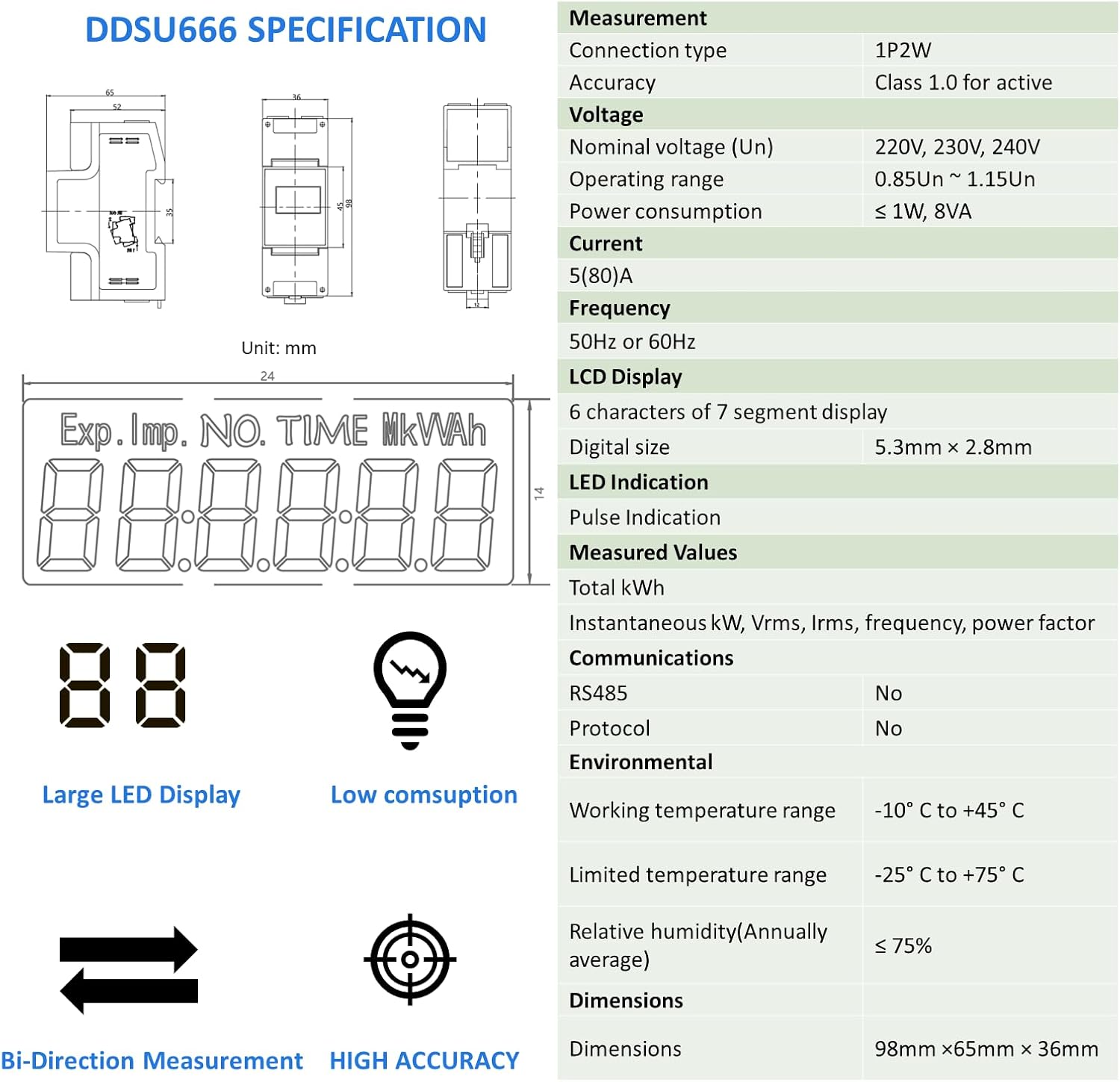
Figure 2: Detailed specifications and LCD display segment definitions.
| Parameter | Value |
|---|---|
| Manufacturer | CHINT |
| Model Number | 1P2W (DDSU666) |
| Product Dimensions | 6.5 x 3.6 x 9.8 cm |
| Weight | 210 g |
| Colour | White |
| Connection Type | 1P2W (Single Phase, 2 Wire) |
| Accuracy | Class 1.0 for active energy |
| Nominal Voltage (Un) | 220V, 230V, 240V AC |
| Operating Range | 0.85Un ~ 1.15Un |
| Current | 5(80)A |
| Frequency | 50Hz or 60Hz |
| Pulse Constant | 800imp/kWh |
| Power Consumption | ≤ 1W, 8VA |
| LCD Display | 6 characters of 7 segment display, 5.3mm × 2.8mm digital size |
| LED Indication | Pulse Indication |
| Measured Values | Total kWh, Instantaneous kW, Vrms, Irms, frequency, power factor |
| Communications | No RS485, No Protocol (for this model) |
| Working Temperature Range | -25°C to +60°C |
| Limited Temperature Range | -25°C to +75°C |
| Relative Humidity (Annually average) | ≤ 75% |
Note: This model (1P2W) does not include RS485/Modbus communication capabilities.
4. Installation and Setup
Warning: Installation should only be performed by qualified personnel. Ensure power is disconnected before installation to prevent electric shock.
4.1 Mounting
The DDSU666 meter is designed for DIN35mm rail mounting. Locate a suitable position within your electrical panel or enclosure.

Figure 3: The DDSU666 meter designed for easy mounting on a standard DIN rail.
- Ensure the DIN rail is securely fastened.
- Align the meter's clips with the DIN rail.
- Press the meter firmly onto the rail until it clicks into place.
4.2 Wiring Diagram (1P2W)
Follow the wiring diagram carefully for correct connection. This model is for single-phase, two-wire systems.
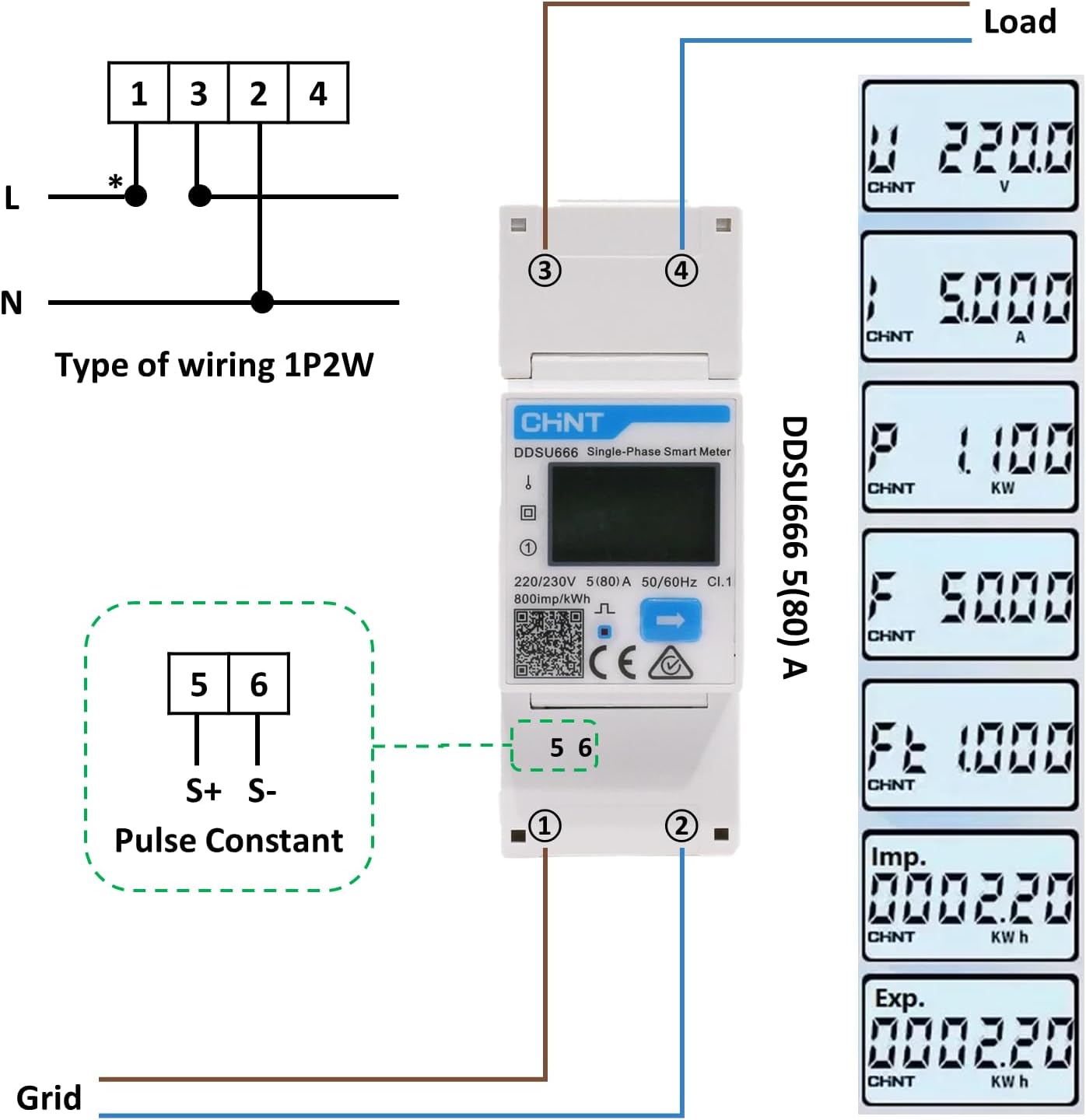
Figure 4: Wiring diagram for 1P2W configuration. Terminals 1 and 3 are for input (L and N), and terminals 2 and 4 are for output (L and N) to the load. Terminals 5 and 6 are for pulse output.
- Terminals 1 & 3: Connect the incoming Live (L) and Neutral (N) wires from the grid/supply.
- Terminals 2 & 4: Connect the outgoing Live (L) and Neutral (N) wires to the load.
- Terminals 5 & 6 (Pulse Output): These terminals provide a pulse output (800imp/kWh) for external monitoring systems. Connect S+ to terminal 5 and S- to terminal 6.
Ensure all connections are tight and secure to prevent loose contacts and potential hazards.
5. Operation
Once installed and powered on, the DDSU666 meter will automatically begin measuring electrical parameters. The LCD display will show various readings.

Figure 5: Examples of measurable parameters displayed on the LCD screen.
5.1 Display Readings
The meter cycles through different parameters on its LCD display. A single button on the front panel allows manual cycling through the readings.
- kWh (Exp.): Exported active energy (if applicable, typically for generation).
- kWh (Imp.): Imported active energy (total consumption).
- V (Voltage): Instantaneous voltage in Volts.
- A (Current): Instantaneous current in Amperes.
- kW (Power): Instantaneous active power in Kilowatts.
- Hz (Frequency): System frequency in Hertz.
- PF (Power Factor): Power factor of the circuit.
Press the button labeled with an arrow (usually on the right side of the display) to navigate through these parameters.
6. Maintenance
The DDSU666 energy meter is designed for long-term, maintenance-free operation under normal conditions. However, periodic checks are recommended to ensure optimal performance and safety.
- Cleaning: Use a soft, dry cloth to clean the meter's exterior. Do not use abrasive cleaners, solvents, or liquids directly on the device.
- Connection Check: Periodically inspect wiring connections to ensure they remain tight and free from corrosion. Loose connections can lead to inaccurate readings or safety hazards.
- Environmental Conditions: Ensure the operating environment remains within the specified temperature and humidity ranges to prevent damage to the internal components.
- Damage Inspection: Visually inspect the meter for any signs of physical damage, such as cracks, discoloration, or burnt marks. If damage is observed, disconnect power immediately and contact a qualified technician.
Do not attempt to open or repair the meter yourself. This will void the warranty and may lead to electric shock or damage to the device.
7. Troubleshooting
This section addresses common issues you might encounter with your DDSU666 energy meter.
| Problem | Possible Cause | Solution |
|---|---|---|
| Display is blank | No power supply; Incorrect wiring; Internal fault. | Check power supply to the meter. Verify wiring connections according to the diagram. If power is present and wiring is correct, the meter may be faulty; contact support. |
| Readings are incorrect or fluctuating | Loose wiring connections; Overload; External interference; Faulty meter. | Ensure all wiring connections are secure. Check if the load exceeds the meter's maximum current (80A). Isolate potential sources of electromagnetic interference. If issues persist, contact support. |
| Pulse LED not flashing | No load connected; Meter not powered; Pulse output not configured (if applicable). | Ensure there is an active load drawing power through the meter. Verify the meter is powered on. The pulse LED should flash proportionally to energy consumption. |
| Meter feels hot | Overload; Loose connections; Internal fault. | Immediately disconnect power. Check the load current to ensure it is within the meter's specifications. Inspect wiring for loose connections. Do not re-energize until the cause is identified and resolved. Contact a qualified electrician or support. |
8. Warranty and Support
8.1 Warranty Information
This CHINT DDSU666 energy meter is covered by a manufacturer's warranty against defects in materials and workmanship for a period typically specified by the seller or manufacturer. Please retain your purchase receipt as proof of purchase for warranty claims.
The warranty does not cover damage resulting from improper installation, misuse, unauthorized modification, natural disasters, or normal wear and tear. Opening the meter or attempting unauthorized repairs will void the warranty.
8.2 Customer Support
For technical assistance, troubleshooting beyond this manual, or warranty inquiries, please contact your retailer or the manufacturer's customer support. When contacting support, please have your product model number (DDSU666, 1P2W) and purchase details ready.
For more information about CHINT products, you may visit the official CHINT website: https://aiot.chint.com/product/detail/id/11.html


